这是我参与「第四届青训营 」笔记创作活动的第10天。
以下是在写仿掘金项目时学习到的一些操作以及接口
git操作
合并分支
创建一个新的分支
git checkout -b <branch>
切换到该分支
git switch <branch>
分支与远程连接
git pull <remote> <branch>
设置允许两个不相关的分支合并
git pull origin <branch> --allow-unrelate-histories
推送
git push
首页接口的bug修复
在昨天与前端进行对接时,首页的接口又出现的bug,真的难受。
找了半天,发现是逻辑的错误,if判断放到for循环外面了。
比较以下两段代码
router.post('/data/home', urlencodedParser, function (req, res, next) {
  	.....
        for (; index < sum; index++) {
          console.log(index);
          data1[index].category = category;
          if (index < 15) {
            part[index] = data1[index];
            //标明imgUrl
            if (part[index].isimage === true) {
              part[index].imgUrl = "http://127.0.0.1:3000/images/" + imgIndex + ".png";
              imgIndex++;
            }
          } else {
            part[index - 15] = data1[index];
            //标明imgUrl
            if (part[index - 15].isimage === true) {
              part[index - 15].imgUrl = "http://127.0.0.1:3000/images/" + imgIndex + ".png";
              imgIndex++;
            }
          }
        }
        res.send(JSON.stringify(part));
        //防止出现第三次数据读取
        if (count == 2) {
          count = 0;
        }
    	if (imgIndex == 25) {
            imgIndex = 10;
        }
      }
    })
  }
});
router.post('/data/home', urlencodedParser, function (req, res, next) {
  .......
        for (; index < sum; index++) {
          console.log(index);
          data1[index].category = category;
          if (index < 15) {
            part[index] = data1[index];
            //标明imgUrl
            if (part[index].isimage === true) {
              part[index].imgUrl = "http://127.0.0.1:3000/images/" + imgIndex + ".png";
              imgIndex++;
            }
          } else {
            part[index - 15] = data1[index];
            //标明imgUrl
            if (part[index - 15].isimage === true) {
              part[index - 15].imgUrl = "http://127.0.0.1:3000/images/" + imgIndex + ".png";
              imgIndex++;
            }
          }
          if (imgIndex == 25) {
            imgIndex = 10;
          }
        }
        res.send(JSON.stringify(part));
        //防止出现第三次数据读取
        if (count == 2) {
          count = 0;
        }
      }
    })
  }
});
一个将if(imgIndex==25)放在了for循环外,一个放在了for循环内,如果放在外面就导致即使imgIndex==25,也无法有效地将imgIndex重新赋值为10,进而导致读取图片数据时出现了错误。
author接口
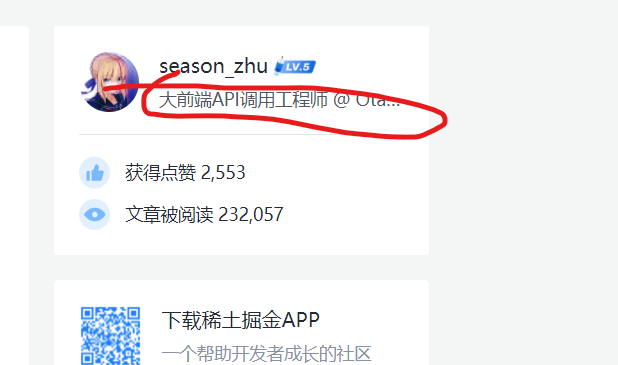
作者接口,支持get请求
返回值(JSON对象),包含:
-
name:作者名,默认掘金
-
icon:头像
-
signature:签名
-
like:点赞数
-
browse:浏览数
router.get('/data/author', function (req, res, next) {
  res.setHeader("Access-Control-Allow-Origin", "*");
  //创建一个随机数对象
  let randsum = new randtime();
  let author = {};
  author.name = "掘金";
  author.like = randsum.rand1(10, 50);
  author.browse = randsum.rand1(6000, 100000);
  author.icon = "http://127.0.0.1:3000/images/jue.png";
  author.signature = "欢迎来到掘金官网!";
  res.send(JSON.stringify(author));
})
随机数模块
这个模块可以随机生成一个数字,在指定的范围内,主要用来生成一个随机的事件,这样就解决了数据过少的问题,主要使用了Math.random()函数,rand1函数可以随机生成一个数字。
因为时间是有范围的,这样就可以通过改变范围来生成随机的时间。
注意:一定要带有返回值
function randtime() {
    let time = {
        years: 2022,
        mouths: 0,
        days: 0,
        hours: 0,
        minutes: 0,
        seconds: 0
    };
    this.rand1 = function (zuo, you) {
        let rand = Math.floor(Math.random() * (you - zuo) + zuo);
        if (rand === you) {
            rand = you - 1;
        }
        return rand;
    }

    this.sayHello = function () {
        console.log("hello");
    }

    this.randtime = function () {
        //月份
        time.mouths = this.rand1(7, 9);
        //天数
        time.days = this.rand1(1, 15);
        //时
        time.hours = this.rand1(0, 23);
        //分
        time.minutes = this.rand1(0, 60);
        //秒
        time.seconds = this.rand1(0, 60);
        return time;
    }
};
module.exports = randtime;