


QRCoder ASP.NET Core实现
QRCoder是一个用C#编写的非常流行的QR码实现库.在这里,我将实现QRCoder库,在我的ASP.NET Core应用程序中生成QR码。我也将使用C#。
我将以3种方式实现QRCoder,分别是:
1.为任何文本创建QR码位图图像。
2.为任何文本创建QR码文件(.qrr),然后在应用程序中保存这些文件。
3.读取并显示所有的QR码文件(.qrr)。
让我们从QRCoder的安装开始。 ASP.NET核心框架。
安装
通过NuGet软件包管理器安装QRCoder。如果你想使用NuGet,只需搜索 "QRCoder "或在NuGet Package Manager控制台运行以下命令。
PM> Install-Package QRCoder
QRCoder将在1分钟内安装完毕,并可以使用。
现在让我们开始以上述3种方式实现QRCoder。
为任何文本创建QR码位图图像
在Controllers文件夹中创建一个新的控制器,名为'QRCoderController'。该控制器将被创建,它将只有一个名为 "Index "的动作方法:
public IActionResult Index()
在控制器中导入以下命名空间:
using System;
接下来,在控制器中添加类型为[HttpPost]的Index动作:
[HttpPost]
这个索引动作接收一个名为'qrText'的字符串参数。它包含由视图中定义的输入控件提供的文本。这个文本将被转换为QR码位图图像。下面的代码行完成这项工作。
QRCodeGenerator qrGenerator = new QRCodeGenerator();

QRCodeData qrCodeData = qrGenerator.CreateQrCode(qrText, QRCodeGenerator.ECCLevel.Q);

QRCode qrCode = new QRCode(qrCodeData);
定义的QRCode对象('qrCode')调用一个名为'BitmapToBytes()'的静态函数。这个函数的作用是将Bitmap图像转换为'Byte[]'。
把这个函数添加到你的控制器中:
private static Byte[] BitmapToBytes(Bitmap img)
最后在'Views/QRCoder'文件夹下创建Index View,代码如下:
@model Byte[]


<!DOCTYPE html>
<head>
<style>
body {
background: #111 no-repeat;
background-image: -webkit-gradient(radial, 50% 0, 150, 50% 0, 300, from(#444), to(#111));
}
h1, h2, h3 {
text-align: center;
color: #FFF;
margin: 5px 0;
h1 {
font-size: 30px;
}
h2 a {
font-size: 25px;
color: #0184e3;
text-decoration: none;
}
h3 {
font-size: 23px;
border-bottom: solid 3px #CCC;
padding-bottom: 10px;
}
h3 a {
color: #00e8ff;
text-decoration: none
}
h3 a:hover, h2 a:hover {
text-decoration: underline;
}
.container {
width: 800px;
margin: auto
color: #FFF;
font-size: 25px;
}
.container #content {
border: dashed 2px #CCC;
padding: 10px;
}
#reset {
padding: 5px 10px;
background: #4CAF50;
border: none;
color: #FFF;
cursor: pointer;
}
#reset:hover {
color: #4CAF50;
background: #FFF;
#viewContent table {
width: 100%;
}


#viewContent table tr {


height: 80px;
background: darkcyan;
}
#viewContent table tr td {
width: 50%;

padding-left: 5px;

}
</style>
</head>
<body>

      <div id="viewContent">
索引视图有一个'input'控件。用户在这个控件中输入他们的文本来创建QR码。
一旦QR码由Index Action方法生成,它的 "字节 "数组将作为模型返回给View,然后通过以下代码显示位图图像。
@{
测试代码
运行你的应用程序并进入URL - 'http://localhost:50755/QRCoder'来调用Index Action方法。
在文本框中,添加你的文本并点击提交按钮来创建QR码位图图像。
请看这张图片,它说明了它的工作。
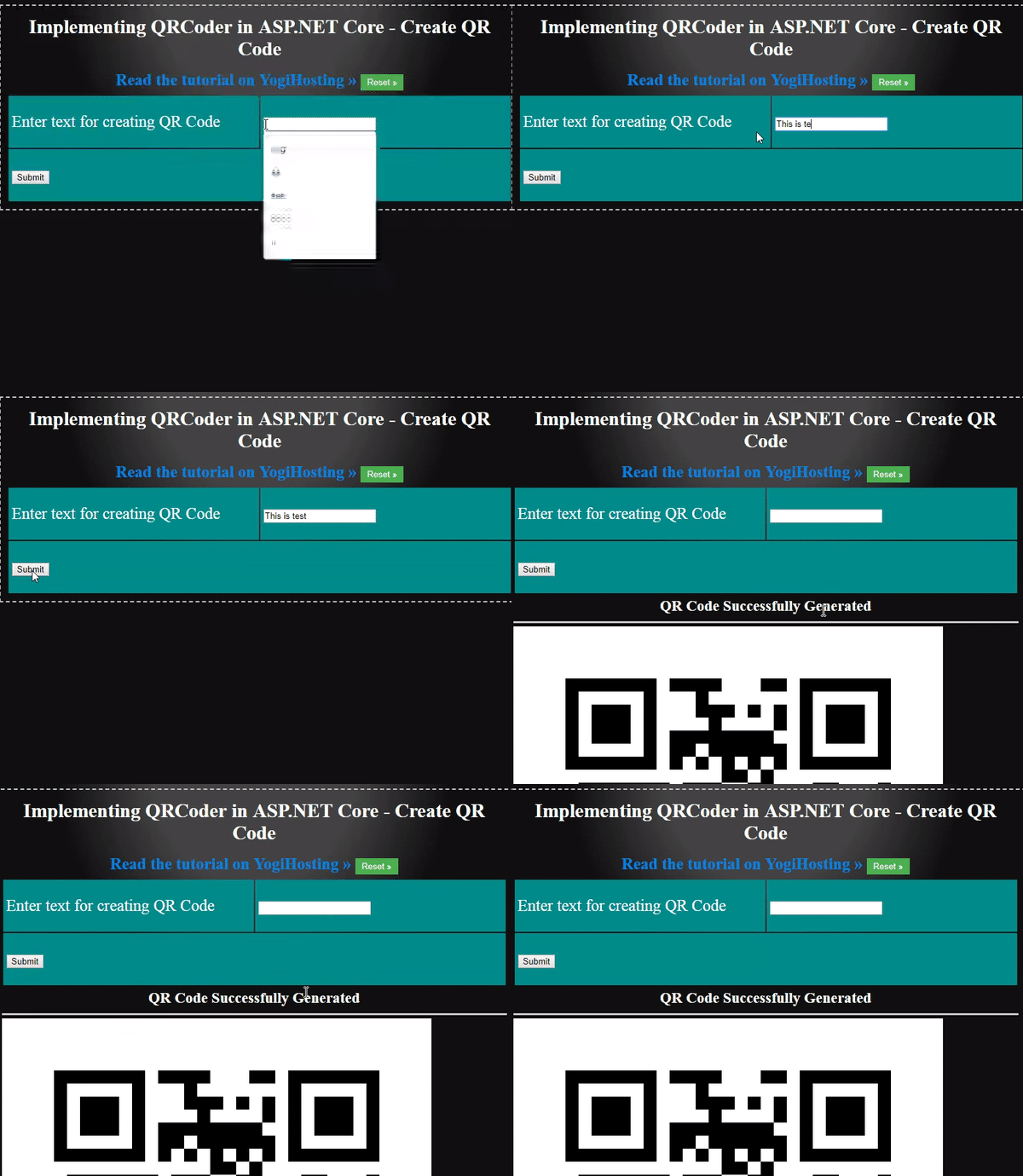
创建QRCode位图图像
为任何文本创建QR码文件(.qrr),然后在应用程序中保存这些文件
你也可以为一个文本生成QR码文件,并将其保存在你的网站上。这些文件的扩展名是.qrr 。
在你的控制器中添加以下名为 "GenerateFile "的动作方法。
public IActionResult GenerateFile()
[HttpPost]
string fileGuid = Guid.NewGuid().ToString().Substring(0, 4);
qrCodeData.SaveRawData("wwwroot/qrr/file-" + fileGuid + ".qrr", QRCodeData.Compression.Uncompressed);
QRCodeData qrCodeData1 = new QRCodeData("wwwroot/qrr/file-" + fileGuid + ".qrr", QRCodeData.Compression.Uncompressed);
QRCode qrCode = new QRCode(qrCodeData1);
这个动作方法的[HttpPost]版本在'wwwroot/qrr'文件夹内生成QR码文件。完成这项工作的代码如下。
QRCodeGenerator qrGenerator = new QRCodeGenerator();
QRCodeData qrCodeData = qrGenerator.CreateQrCode(qrText, QRCodeGenerator.ECCLevel.Q);
string fileGuid = Guid.NewGuid().ToString().Substring(0, 4);
qrCodeData.SaveRawData("wwwroot/qrr/file-" + fileGuid + ".qrr", QRCodeData.Compression.Uncompressed);
一旦创建了.qrr文件,我就简单地读取它在网站中的保存位置。然后我将其转换为位图类型,最后将图像的字节发送到视图中。相应的代码是。
QRCodeData qrCodeData1 = new QRCodeData("wwwroot/qrr/file-" + fileGuid + ".qrr", QRCodeData.Compression.Uncompressed);
QRCode qrCode = new QRCode(qrCodeData1);
return View(BitmapToBytes(qrCodeImage));
接下来,在'Views/QRCoder'文件夹中添加GenerateFile视图,并在其中添加以下代码。
@model Byte[]
@{
Layout = null;
}
<!DOCTYPE html>
<html>
<head>
<meta name="viewport" content="width=device-width" />
<title>Implementing QRCoder in ASP.NET Core - Create QR Code File</title>
<style>
body {
background: #111 no-repeat;
background-image: -webkit-gradient(radial, 50% 0, 150, 50% 0, 300, from(#444), to(#111));
}
h1, h2, h3 {
text-align: center;
color: #FFF;
margin: 5px 0;
}
h1 {
font-size: 30px;
}
h2 a {
font-size: 25px;
color: #0184e3;
text-decoration: none;
}
h3 {
font-size: 23px;
border-bottom: solid 3px #CCC;
padding-bottom: 10px;
}
h3 a {
color: #00e8ff;
text-decoration: none;
}
h3 a:hover, h2 a:hover {
text-decoration: underline;
}
.container {
width: 800px;
margin: auto;
color: #FFF;
font-size: 25px;
}
.container #content {
border: dashed 2px #CCC;
padding: 10px;
}
#reset {
padding: 5px 10px;
background: #4CAF50;
border: none;
color: #FFF;
cursor: pointer;
}
#reset:hover {
color: #4CAF50;
background: #FFF;
}
#viewContent table {
width: 100%;
}
#viewContent table tr {
height: 80px;
background: darkcyan;
}
#viewContent table tr td {
width: 50%;
padding-left: 5px;
}
</style>
</head>
<body>
<div class="container">
<div id="content">
<h1>Implementing QRCoder in ASP.NET Core - Create QR Code File</h1>
<h2>
<a href="http://www.yogihosting.com/category/aspnet-core/">Read the tutorial on YogiHosting » </a>
<button id="reset" onclick="location=''">Reset »</button>
</h2>
<div id="viewContent">
@using (Html.BeginForm(null, null, FormMethod.Post))
{
<table>
<tbody>
<tr>
<td>
<label>Enter text for creating QR File</label>
</td>
<td>
<input type="text" name="qrText" />
</td>
</tr>
<tr>
<td colspan="2">
<button>Submit</button>
</td>
</tr>
</tbody>
</table>
}
</div>
@{
if (Model != null)
{
<h3>QR Code file Successfully Generated</h3>
<img src="@String.Format("data:image/png;base64,{0}", Convert.ToBase64String(Model))" />
}
}
</div>
</div>
</body>
</html>
这个视图的代码与'Index'视图完全相似,工作方式也完全一样。
调用此视图的URL是'http://localhost:50755/QRCoder/GenerateFile'。
读取和显示所有的QR码文件(.qrr)
你也可以读取所有保存在网站上的.qrr文件。进入你的控制器,添加一个新的动作,名为'ViewFile'。
public IActionResult ViewFile()
KeyValuePair<string, Byte[]> data;
QRCode qrCode = new QRCode(qrCodeData);
Byte[] byteData = BitmapToBytes(qrCodeImage);
在这个动作方法中,我使用代码读取位于'qrr'文件夹中的文件。
Directory.GetFiles("wwwroot/qrr")
然后我在List<KeyValuePair<string, Byte[]>对象中添加每个qrr文件的字节和名称。
这个对象会在最后返回给View。
return View(fileData);
最后在'Views/QRCoder'文件夹下创建'ViewFile'视图,代码如下。
@model List<KeyValuePair<string, Byte[]>>
@{
Layout = null;
}
<!DOCTYPE html>
<html>
<head>
<meta name="viewport" content="width=device-width" />
<title>Implementing QRCoder in ASP.NET Core - View QR Code Files</title>
<style>
body {
background: #111 no-repeat;
background-image: -webkit-gradient(radial, 50% 0, 150, 50% 0, 300, from(#444), to(#111));
}
h1, h2, h3 {
text-align: center;
color: #FFF;
margin: 5px 0;
}
h1 {
font-size: 30px;
}
h2 a {
font-size: 25px;
color: #0184e3;
text-decoration: none;
}
h3 {
font-size: 23px;
border-bottom: solid 3px #CCC;
padding-bottom: 10px;
}
h3 a {
color: #00e8ff;
text-decoration: none;
}
h3 a:hover, h2 a:hover {
text-decoration: underline;
}
.container {
width: 800px;
margin: auto;
color: #FFF;
font-size: 25px;
}
.container #content {
border: dashed 2px #CCC;
padding: 10px;
}
#reset {
padding: 5px 10px;
background: #4CAF50;
border: none;
color: #FFF;
cursor: pointer;
}
#reset:hover {
color: #4CAF50;
background: #FFF;
}
#viewContent table {
width: 100%;
}
#viewContent table tr {
height: 80px;
background: darkcyan;
}
#viewContent table tr td {
width: 50%;
padding-left: 5px;
}
#viewContent table tr td img {
width: 150px;
}
#viewContent table tr td span {
display: block;
}
</style>
</head>
<body>
<div class="container">
<div id="content">
<h1>Implementing QRCoder in ASP.NET Core - View QR Code Files</h1>
<h2>
<a href="http://www.yogihosting.com/category/aspnet-core/">Read the tutorial on YogiHosting » </a>
<button id="reset" onclick="location=''">Reset »</button>
</h2>
<div id="viewContent">
<table>
<tbody>
@foreach (KeyValuePair<string, Byte[]> k in Model)
{
<tr>
<td>
<img src="@String.Format("data:image/png;base64,{0}", Convert.ToBase64String(k.Value))" />
<span>@k.Key</span>
</td>
</tr>
}
</tbody>
</table>
</div>
</div>
</div>
</body>
</html>
这个视图将所有的qrr文件作为位图图像显示在一个 "HTML "表格中。下面的代码创建了HTML表格。
<table>
<tbody>
</table>
测试代码
运行你的应用程序,进入URL - 'http://localhost:50755/QRCoder/ViewFile',调用ViewFile动作方法。你会看到所有的.qrr文件保存在你的网站上。
请看下面的图片,它说明了工作情况。
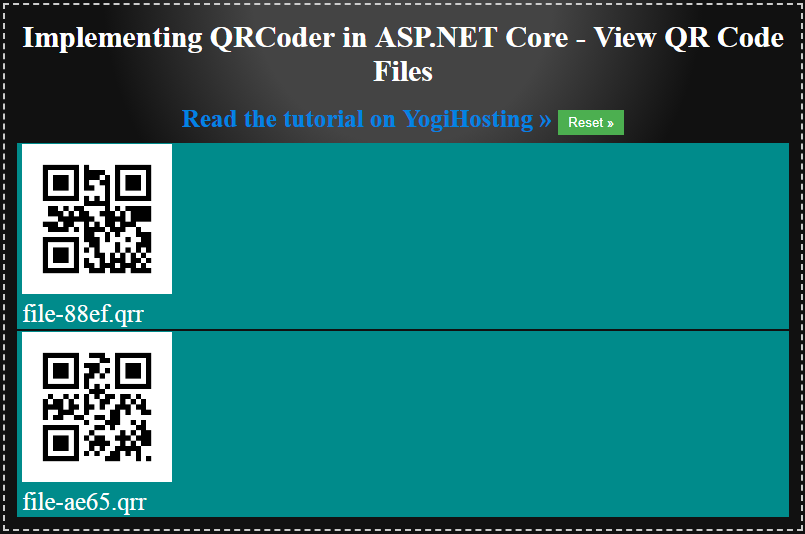
查看所有QRR文件
总结
我希望你喜欢这个资源库,它将帮助你在你的ASP.NET Core项目中使用QRCoder。请确保你喜欢这个资源库,以表示你对它的喜爱。
如果你在ASP.NET Core中需要任何帮助,请在下面的评论区告诉我。

我每周发布2篇网络开发文章。可以考虑关注我,每当我在Medium上发布新的教程时,就会收到电子邮件通知。如果这篇文章对你有帮助,请点击拍手按钮几次,以示支持!这将给我带来微笑。这将给我带来微笑,激励我为像你这样的读者写更多的文章。
我还在freeCodeCamp上发表了另一篇教程,如果你也想看的话--如何用Bootstrap Modal和jQuery AJAX创建一个登录功能。
谢谢你,祝你编码愉快!
如何在ASP.NET Core中使用C#轻松实现QRCoder最初发表于我们已经搬到了Medium上的freeCodeCamp.org/news,在那里人们通过强调和回应这个故事继续对话。

