

如果你曾经从事过任何机器学习项目,你就有机会见证为你的问题找到一个正确的算法是多么困难。为了找到最合适的匹配,需要用不同的超参数优化技术进行无尽的实验。
这一切都增加了成本和计算资源,对环境来说更是糟糕。这就催生了旨在优化这一过程的特定软件解决方案--自动机器学习(AutoML)。
这些解决方案的目标是利用低计算成本来搜索算法和超参数的配置,从而将并产生最佳模型。简而言之,AutoML工具正在自动寻找和训练最佳算法。这些工具之一是Python库FLAML。
在这篇文章中,我们将介绍:
- 为什么为AutoML选择FLAML?
- FLAML的安装
- 数据和准备
- FLAML AutoML培训
- FLAML AutoML评估和测试
- 保存FLAML模型
1.为什么选择FLAML进行AutoML?
现在有很多AutoML库和工具,让我们考虑一下为什么要使用FLAML。来自微软的研究人员使用几个简单但有效的技术建立了这个库。最重要的一个可能是他们的超参数优化策略--混合搜索策略。这种策略结合了全局和局部搜索的优势,并在飞行中对它们进行优先排序。这样一来,寻找好的配置所花费的成本就降到了最低。你可以在论文中找到更多关于这个策略的信息 这里.

这个库的另一个很酷的地方是对成本相关的超参数使用了节俭的优化。实质上,算法可以有超参数,这些超参数会导致训练成本的巨大变化。
大多数超参数优化技术都没有考虑到这一点,也就是说,他们在寻找最佳结果时,没有把成本作为一个可行的基准。这种技术主要是基于随机的直接搜索方法,你可以在以下内容中了解更多信息 论文.
在大型开源AutoML基准测试中,FLAML库明显优于排名靠前的AutoML库。另外,这个库还为ML.NET Builder提供动力,这是ML.NET的一个AutoML扩展。如果你想更深入地了解FLAML,你可以通过阅读以下内容来做到这一点 论文.
2.FLAML的安装
为了学习本教程,你需要有Python 3.6或更高版本。此外,你还需要安装FLAML库。这可以通过以下命令来完成:
pip install flaml
如果你想像我一样在Jupyter Notebook中使用FLAML,你还需要运行这个命令:
pip install flaml[notebook]

在本教程中,我们利用了几个库,所以确保你在文件中导入它们:
import pandas as pd
import numpy as np
import matplotlib.pyplot as plt

from sklearn.model_selection import train_test_split
from sklearn.preprocessing import StandardScaler

from flaml import AutoML
from flaml.ml import sklearn_metric_loss_score
from flaml.data import get_output_from_log
3.数据和准备
我们在这篇文章中使用的数据来自PalmerPenguins数据集。这个数据集最近被介绍为著名的Iris数据集的替代品。它是由Kristen Gorman博士和南极洲LTER的Palmer站创建的。你可以获得这个数据集 这里,或通过Kaggle。
这个数据集基本上由两个数据集组成,每个数据集包含344只企鹅的数据。就像在Iris数据集中,有3个不同种类的企鹅来自帕尔默群岛的3个岛屿。此外,这些数据集还包含每个物种的culmen尺寸。喙是鸟类喙的上脊。在简化的企鹅数据中, culmen的长度和深度被重新命名为culmen_length_mm和culmen_depth_mm两个变量。

数据本身并不太复杂。从本质上讲,它只是表格式的数据。

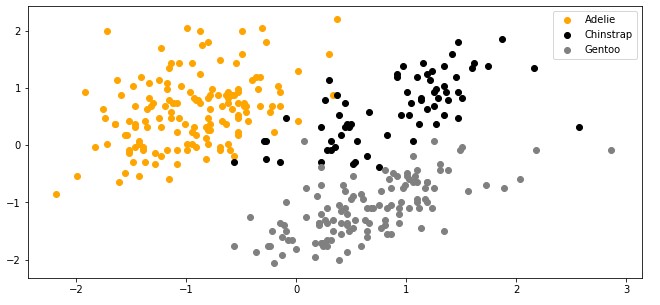
请注意,在本教程中,我们忽略了物种特征。这是因为我们进行的是无监督学习,即我们不需要样本的预期输出值。我们希望我们的算法能自己想出这个办法。下面是我们绘制数据时的样子。
4.FLAML AutoML训练
好了,让我们从有趣的事情开始。我们在开始时导入了几个库,现在是时候让它们发挥作用了。我们导入的最重要的类是来自FLAML库的AutoML。这个类几乎为我们完成了所有的工作。下面是我们如何使用它来寻找和训练最适合我们问题的算法。
automl = AutoML()

settings = {
    "time_budget": 15,  # seconds
    "metric": 'accuracy', # metric used for the evaluation
    "task": 'classification', # type of the task
    "log_file_name": "./penguins.log", # location of the log
}

automl.fit(X_train=X_train, y_train=y_train,
           **settings)
首先,我们实例化AutoML类的对象。然后,我们初始化设置字典。这个目录有几个有用的选项,我们可以使用。第一个选项是time_budget,它定义了训练将持续多长时间。
metric "选项用于定义在训练期间用于评估模型的指标。我们的想法是用多个超参数配置开始训练多个模型,对它们进行评估并挑选出最好的。

这个选项让我们能够定义哪一个指标用于提到的评估。这个值是一个字符串名称或一个函数,它可以有几个值。准确度"、"roc_auc"、"f1"、"micro_f1"、"macro_f1"、"log_loss"、"mae"、"mse"、"r2"。任务 "参数定义了任务的类型,例如,"分类 "或"回归"。
最后,你可以使用log_file_name来定义存储训练信息的路径。在我们的例子中,我们使用15秒的训练时间,性能指标的准确性,以及任务的分类。
之后,你需要做的就是在训练和测试数据上调用fit方法,并传递设置字典。这将找到最佳算法和超参数。
4.1 训练输出
你会注意到,在这个过程中,有很多信息被打印出来。你可以进一步研究这个输出,但我不会在本教程中详述。
除此之外,你可能会注意到,在笔记本所在的文件夹中出现了一个新文件 "penguins.log" 。我们以后会使用这个文件进行评估。下面是这个日志文件的例子。
{"record_id": 0, "iter_per_learner": 1, "logged_metric": false, "trial_time": 0.0974423885345459, "total_search_time": 0.18989896774291992, "validation_loss": 0.08053872053872055, "config": {"n_estimators": 4, "num_leaves": 4, "min_child_samples": 20, "learning_rate": 0.1, "subsample": 1.0, "log_max_bin": 8, "colsample_bytree": 1.0, "reg_alpha": 0.0009765625, "reg_lambda": 1.0}, "best_validation_loss": 0.08053872053872055, "best_config": {"n_estimators": 4, "num_leaves": 4, "min_child_samples": 20, "learning_rate": 0.1, "subsample": 1.0, "log_max_bin": 8, "colsample_bytree": 1.0, "reg_alpha": 0.0009765625, "reg_lambda": 1.0}, "learner": "lgbm", "sample_size": 273}
{"record_id": 1, "iter_per_learner": 3, "logged_metric": false, "trial_time": 0.040889739990234375, "total_search_time": 0.3075845241546631, "validation_loss": 0.07690235690235692, "config": {"n_estimators": 4, "num_leaves": 4, "min_child_samples": 12, "learning_rate": 0.2591253457286053, "subsample": 0.9266743941610592, "log_max_bin": 10, "colsample_bytree": 1.0, "reg_alpha": 0.0013933617380144255, "reg_lambda": 0.1809691794829294}, "best_validation_loss": 0.07690235690235692, "best_config": {"n_estimators": 4, "num_leaves": 4, "min_child_samples": 12, "learning_rate": 0.2591253457286053, "subsample": 0.9266743941610592, "log_max_bin": 10, "colsample_bytree": 1.0, "reg_alpha": 0.0013933617380144255, "reg_lambda": 0.1809691794829294}, "learner": "lgbm", "sample_size": 273}
{"record_id": 2, "iter_per_learner": 4, "logged_metric": false, "trial_time": 0.03989386558532715, "total_search_time": 0.36742496490478516, "validation_loss": 0.06956228956228958, "config": {"n_estimators": 4, "num_leaves": 4, "min_child_samples": 24, "learning_rate": 1.0, "subsample": 0.8513627344387319, "log_max_bin": 10, "colsample_bytree": 0.946138073111236, "reg_alpha": 0.0018311776973217071, "reg_lambda": 0.2790165919053837}, "best_validation_loss": 0.06956228956228958, "best_config": {"n_estimators": 4, "num_leaves": 4, "min_child_samples": 24, "learning_rate": 1.0, "subsample": 0.8513627344387319, "log_max_bin": 10, "colsample_bytree": 0.946138073111236, "reg_alpha": 0.0018311776973217071, "reg_lambda": 0.2790165919053837}, "learner": "lgbm", "sample_size": 273}
{"record_id": 3, "iter_per_learner": 6, "logged_metric": false, "trial_time": 0.04787254333496094, "total_search_time": 0.4881021976470947, "validation_loss": 0.062289562289562304, "config": {"n_estimators": 4, "num_leaves": 4, "min_child_samples": 16, "learning_rate": 0.5305016568114994, "subsample": 0.8132820472645405, "log_max_bin": 8, "colsample_bytree": 0.8110207792444197, "reg_alpha": 0.002464557255174736, "reg_lambda": 0.6369900700728733}, "best_validation_loss": 0.062289562289562304, "best_config": {"n_estimators": 4, "num_leaves": 4, "min_child_samples": 16, "learning_rate": 0.5305016568114994, "subsample": 0.8132820472645405, "log_max_bin": 8, "colsample_bytree": 0.8110207792444197, "reg_alpha": 0.002464557255174736, "reg_lambda": 0.6369900700728733}, "learner": "lgbm", "sample_size": 273}
{"record_id": 4, "iter_per_learner": 7, "logged_metric": false, "trial_time": 0.052857398986816406, "total_search_time": 0.5688858032226562, "validation_loss": 0.06222222222222222, "config": {"n_estimators": 7, "num_leaves": 4, "min_child_samples": 24, "learning_rate": 1.0, "subsample": 0.8513627344387319, "log_max_bin": 10, "colsample_bytree": 0.946138073111236, "reg_alpha": 0.0018311776973217073, "reg_lambda": 0.2790165919053837}, "best_validation_loss": 0.06222222222222222, "best_config": {"n_estimators": 7, "num_leaves": 4, "min_child_samples": 24, "learning_rate": 1.0, "subsample": 0.8513627344387319, "log_max_bin": 10, "colsample_bytree": 0.946138073111236, "reg_alpha": 0.0018311776973217073, "reg_lambda": 0.2790165919053837}, "learner": "lgbm", "sample_size": 273}
{"record_id": 5, "iter_per_learner": 9, "logged_metric": false, "trial_time": 0.10172533988952637, "total_search_time": 0.7853083610534668, "validation_loss": 0.058653198653198665, "config": {"n_estimators": 5, "num_leaves": 5, "min_child_samples": 19, "learning_rate": 0.38946718731417634, "subsample": 0.7593274397272737, "log_max_bin": 10, "colsample_bytree": 1.0, "reg_alpha": 0.0011281022212262847, "reg_lambda": 0.062447479285193244}, "best_validation_loss": 0.058653198653198665, "best_config": {"n_estimators": 5, "num_leaves": 5, "min_child_samples": 19, "learning_rate": 0.38946718731417634, "subsample": 0.7593274397272737, "log_max_bin": 10, "colsample_bytree": 1.0, "reg_alpha": 0.0011281022212262847, "reg_lambda": 0.062447479285193244}, "learner": "lgbm", "sample_size": 273}
{"record_id": 6, "iter_per_learner": 17, "logged_metric": false, "trial_time": 0.07380318641662598, "total_search_time": 2.150655746459961, "validation_loss": 0.05858585858585861, "config": {"n_estimators": 7, "num_leaves": 7, "min_child_samples": 10, "learning_rate": 0.6496763352968651, "subsample": 0.7765552597652422, "log_max_bin": 8, "colsample_bytree": 0.9158265282522311, "reg_alpha": 0.002034019632618961, "reg_lambda": 0.032548107388583214}, "best_validation_loss": 0.05858585858585861, "best_config": {"n_estimators": 7, "num_leaves": 7, "min_child_samples": 10, "learning_rate": 0.6496763352968651, "subsample": 0.7765552597652422, "log_max_bin": 8, "colsample_bytree": 0.9158265282522311, "reg_alpha": 0.002034019632618961, "reg_lambda": 0.032548107388583214}, "learner": "lgbm", "sample_size": 273}
4.2 训练结果
好的,让我们看看哪种算法效果最好,最佳的超参数配置是什么。
print('Best Machine Learning Algorithm:', automl.best_estimator)
print('Best hyperparmeter configuration:', automl.best_config)
print('Best accuracy on validation data: {0:.4g}'.format(1-automl.best_loss))
print('Training duration of best run: {0:.4g} s'.format(automl.best_config_train_time))
Best Machine Learning Algorithm: catboost
Best hyperparmeter configuration: {'early_stopping_rounds': 12, 'learning_rate': 0.1604199347807429}
Best accuracy on validation data: 0.956
Training duration of best run: 1.04 s
输出结果有点隐晦,但我们可以理解它。我们可以看到,RandomForest是最好的学习者,它使用了13棵决策树,有40片叶子,有吉尼杂质。这个算法在验证数据集中的准确率为95%。我们也可以通过检查属性model.estimator得到大部分的信息。
automl.model.estimator
RandomForestClassifier(max_features=0.8499597562649218, max_leaf_nodes=40, n_estimators=13, n_jobs=-1)
5.FLAML AutoML评估和测试
下一步将是对测试数据的评估。这里是我们如何使用FLAML获得预测的:
y_pred = automl.predict(X_test)
print('Actual Values:', y_test)
print('Predictions:', y_pred)
Actual Values: [0 1 0 0 2 0 1 0 1 0 0 0 1 0 0 1 2 1 1 1 0 0 0 1 1 1 1 1 0 1 1 1 0 2 1 2 2
 0 1 1 1 1 0 0 1 1 0 1 2 2 1 0 0 2 1 0 2 1 0 0 2 0 0 1 1 0 1 0 1]
Predictions: [2 1 0 0 2 0 1 0 1 0 0 0 2 0 0 1 2 1 1 1 0 0 0 1 1 1 1 1 0 1 1 1 0 2 1 2 2
 0 1 1 1 1 0 0 1 1 0 1 2 0 1 0 0 2 1 0 1 1 0 0 2 0 0 1 1 0 1 0 1]
如果我们不想手工计算准确性,我们可以使用sklearn_metric_loss_score方法。
test_accuracy = 1 - sklearn_metric_loss_score('accuracy', y_pred, y_test)
print(f'Accuracy on test data: {test_accuracy}')
Accuracy on test data: 0.9710144927536232
另一个有趣的事情是,我们可以探索训练过程中存储的日志数据。
5.1 使用FLAML日志数据进行评估
这里我们可以通过使用get_output_from_log方法来利用我们在训练时间内存储的信息。
plt.figure(figsize=(11, 5))
plt.title('Learning Curve')
plt.xlabel('Time (s)')
plt.ylabel('Validation Accuracy')
plt.scatter(time_history, 1 - np.array(valid_loss_history), c=RED)
plt.step(time_history, 1 - np.array(best_valid_loss_history), where='post', color=RED)
plt.show()

6.保存FLAML模型
为了保存FLAML模型,我们可以使用Pickle库。这个Python库在Python对象上执行pickling,也就是说,它实现了Python对象结构序列化和反序列化的二进制协议。下面是我们如何做的:
import pickle
with open('automl.pkl', 'wb') as f:
    pickle.dump(automl, f, pickle.HIGHEST_PROTOCOL)
全部完成!现在你可以在你的文件夹中找到automl.plk文件。
总结
在这篇文章中,我们探索了快速和轻量级的库FLAML。我们把它应用于Palmer Penguins数据集,并看到我们如何使用它的许多功能。这个库相当有用,而且非常快,它将是你的机器学习工具箱的一个很好的补充。
谢谢你的阅读!
