

第一章 ElasticSearch概述
01-ElasticSearch是什么
The Elastic Stack,包括ElasticSearch、Kibana、Beats和Logstash(也称为ELK Stack)。能够安全可靠的获取任何来源、任何格式的数据,然后实时地对数据进行搜索、分析和可视化。
ElasticSearch简称ES,ES是一个开源的高拓展的分布式全文搜索引擎,它能很方便的使大量数据具有搜索、分析和探索的能力。
02-ElasticSearch原理概述
ElasticSearch原理主要分为下面几个步骤,首先用户将数据提交到ElasticSearch数据库中,再通过分词控制器去将对应的语句分词,将其权重和分词结果一并存入数据,当用户搜索数据的时候,再根据权重将结果排名,打分,再将返回结果呈现给用户。
03- ELK简介
ElasticSearch是与名为Logstash的数据收集和日志解析引擎以及名为Kinaba的分析和可视化平台一起开发的。这三个产品被设计成一个集成解决方案,称为“ElaStic Stack”,简称ELK。
ElasticSearch可以用于搜索各种文档。它提供可拓展的搜索,并有接近实时的搜索,并支持多租户。ElasticSearch是分布式的,这意味着索引可以被分成切片,每个切片可以有0个或多个副本。每个节点托管一个或多个分片,并充当协调器将操作委托给正确的分片。再平衡和路由是自动完成的。相关数据通常存储在同一个索引中,该索引由一个或多个主分片和零个或多个复制分片组成。一旦创建了索引,就不能更改主分片的数量。
04- 有关概念
- cluster:代表一个集群,集群中有多个节点,其中有一个为主节点,这个主节点是可以通过选举产生的,主从节点是对于集群内部来说的。es的一个概念是去中心化,字面上理解就是无中心节点,这是对于集群外部来说的,因为从外部来看es集群,在逻辑上是个整体,你与任何一个节点的通信和与整个es集群的通信是等价的。
- shards:代表索引分片,es可以把一个完整的索引分成多个分片,这样的好处是可以把一个大索引拆分成多个,分布到不同的节点上,构成分布式搜索。分片的数量只能在索引创建前指定,并且索引创建后不能更改。
- replicas:代表索引副本,es可以设置多个索引的副本,副本的作用一是提高系统的容错性,当某个节点某个分片损坏或丢失时可以从副本中恢复,二是提高es的查询效率,es会自动对搜索请求进行负载均衡。
- recovery:代表数据恢复或叫数据重新分布,es在有节点加入或退出时会根据机器的负载对索引分片进行重新分配,挂掉的节点重新启动时也会进行数据恢复。
- river:代表es的一个数据源,也是其它存储方式(如数据库)同步数据到es的一个方法。它是以插件形式存在的一个es服务,通过读取river中的数据并把它索引到es中,官方的river的couchDB的,RabbitMQ等。
- gateway:代表es索引快照的存储方式,es默认是先把索引存放到内存中,当内存满了再持久化到本地硬盘。gateway对索引快照进行存储,当这个es集群关闭再重新启动时就会从gateway中读取索引备份数据。es支持多种类型的gateway,有本地文件系统(默认),分布式文件系统,Hadoop的HDFS和amaze的s3云存储服务。
- discovery.zen:代表es的自动发现节点机制,es是一个基于p2p的系统,它先通过广播寻找存在的节点,再通过多播协议来进行节点之间的通信,同时也支持点对点的交互。
05- 目录结构
- bin:可执行脚本目录
- config:配置目录
- jdk:内置JDK目录
- lib:类库
- logs:日志目录
- modules:模块目录
- plugins:插件目录
06- 和MYSQL对比
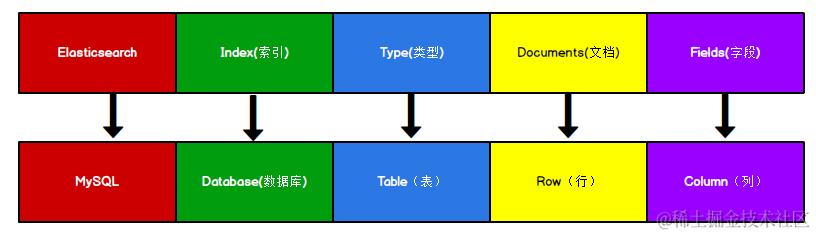
第二章 ElasticSearch入门
01-入门-索引
索引-创建
向ES服务器发送PUT请求:http://127.0.0.1:9200/shopping
请求后得到响应
{ "acknowledged": true,//响应结果
"shards_acknowledged": true,//分片结果
"index": "shopping"//索引名称 }
重复发送PUT请求,会抛出异常
索引-查看全部索引
向ES发送GET请求,http://127.0.0.1:9200/_cat/indices?v
health status index    uuid                   pri rep docs.count docs.deleted store.size
yellow open   shopping J0WlEhh4R7aDrfIc3AkwWQ   1   1          0            0       208b        pri.store.size
208b
| 表头 | 含义 |
|---|---|
| healthy | 当前服务器健康状态: green(集群完整) yellow(单点正常、集群不完整) red(单点不正常) |
| status | 索引打开,关闭状态 |
| index | 索引名 |
| uuid | 索引唯一编号 |
| pre | 主分片数量 |
| rep | 副本数量 |
| docs.count | 可用文档数量 |
| docs.deleted | 文档删除状态(逻辑删除) |
| store.size | 主分片和副分片整体占空间大小 |
| pri.store.size | 主分片占空间大小 |
索引-查看单个索引
向 ES 服务器发 GET 请求 : http://127.0.0.1:9200/shopping, 请求后,服务器响应结果如下:
{
"shopping"【索引名】: {
"aliases"【别名】: {},
"mappings"【映射】: {},
"settings"【设置】: {
"index"【设置 - 索引】: {
"creation_date"【设置 - 索引 - 创建时间】: "1614265373911",
"number_of_shards"【设置 - 索引 - 主分片数量】: "1",
"number_of_replicas"【设置 - 索引 - 副分片数量】: "1",
"uuid"【设置 - 索引 - 唯一标识】: "eI5wemRERTumxGCc1bAk2A",
"version"【设置 - 索引 - 版本】: {
"created": "7080099"
},
"provided_name"【设置 - 索引 - 名称】: "shopping"
}
}
}
}
索引-删除索引
向 ES 服务器发 DELETE 请求 : http://127.0.0.1:9200/shopping
02-入门-文档
文档-创建文档
文档可以类比为关系型数据库中的表数据,请求格式为JSON,向 ES 服务器发 POST 请求 : http://127.0.0.1:9200/shopping/_doc
{
    "address":"陕西西安",
    "name":"隔壁老王",
    "hobby":"黑丝"
}
返回结果:
{
    "_index": "shopping",//索引
    "_type": "_doc",//类型-文档
    "_id": "ANQqsHgBaKNfVnMbhZYU",//唯一标识,可以类比为 MySQL 中的主键,随机生成
    "_version": 1,//版本
    "result": "created",//结果,这里的 create 表示创建成功
    "_shards": {//
        "total": 2,//分片 - 总数
        "successful": 1,//分片 - 总数
        "failed": 0//分片 - 总数
    },
    "_seq_no": 0,
    "_primary_term": 1
}
上述数据创建后,没有指定数据的唯一性标识(ID),默认情况下,ES服务器会随机生成一个。 如果想要自定义唯一性标识,需要在创建时指定: http://127.0.0.1:9200/shopping/_doc/唯一ID
03-查询
查询-查询单个文档
查看文档时,需要指定文档的唯一标识,类似Mysql中的主键查询,向 ES 服务器发 GET 请求 : http://127.0.0.1:9200/shopping/_doc/文档的唯一ID
{
    "_index": "shopping",
    "_type": "_doc",
    "_id": "1",
    "_version": 1,
    "_seq_no": 1,
    "_primary_term": 1,
    "found": true,
    "_source": {
        "title": "小米手机",
        "category": "小米",
        "images": "http://www.gulixueyuan.com/xm.jpg",
        "price": 3999
    }
}
如果查找的内容不存在,则返回
{
    "_index": "shopping",
    "_type": "_doc",
    "_id": "1001",
    "found": false
}
查询-查询全部文档
查看索引下全部文档,向ES发送GET请求http://127.0.0.1:9200/shopping/_search
服务器响应如下:
{
    "took【查询花费时间,单位毫秒】" : 1116,
    "timed_out【是否超时】" : false,
    "_shards【分片信息】" : {
    "total【总数】" : 1,
    "successful【成功】" : 1,
    "skipped【忽略】" : 0,
    "failed【失败】" : 0
},
    "hits【搜索命中结果】" : {
    "total"【搜索条件匹配的文档总数】: {
    "value"【总命中计数的值】: 3,
    "relation"【计数规则】: "eq" # eq 表示计数准确, gte 表示计数不准确
},
    "max_score【匹配度分值】" : 1.0,
    "hits【命中结果集合】" : [
。。。
}
]
}
}
es的Java api查询的结果集和总条数对不上
03-入门-修改文档
修改-全量修改
向 ES 服务器发 POST 请求 : http://127.0.0.1:9200/shopping/_doc/文档ID 例如
{
    "title":"华为手机",
    "category":"华为",
    "images":"http://www.gulixueyuan.com/hw.jpg",
    "price":1999.00
}
修改成功,服务器返回
{
    "_index": "shopping",
    "_type": "_doc",
    "_id": "1",
    "_version": 2,
    "result": "updated",//<-----------updated 表示数据被更新
    "_shards": {
        "total": 2,
        "successful": 1,
        "failed": 0
    },
    "_seq_no": 2,
    "_primary_term": 1
}
修改-局部修改
修改数据时,也可以修改一条文档的局部信息,向 ES 服务器发 POST 请求 : http://127.0.0.1:9200/shopping/_update/文档ID
{
	"doc": {
		"title":"小米手机",
		"category":"小米"
	}
}
04-入门-删除文档
删除一个文档不会立即从服务器移除,只是被标记为已删除(逻辑删除)
向 ES 服务器发 DELETE 请求 : http://127.0.0.1:9200/shopping/_doc/文档ID
返回结果:
{
    "_index": "shopping",
    "_type": "_doc",
    "_id": "1",
    "_version": 4,
    "result": "deleted",//<---删除成功
    "_shards": {
        "total": 2,
        "successful": 1,
        "failed": 0
    },
    "_seq_no": 4,
    "_primary_term": 1
}
05-入门-## 条件查询 & 分页查询 & 查询排序
条件查询
查询文档的某个字段为某个值的文档,如查询category为小米的文档
向 ES 服务器发 GET请求 : http://127.0.0.1:9200/shopping/_search
附带JSON体如下:
{
	"query":{
		"match":{
			"category":"小米"
		}
	}
}
返回结果如下:
{
    "took": 3,
    "timed_out": false,
    "_shards": {
        "total": 1,
        "successful": 1,
        "skipped": 0,
        "failed": 0
    },
    "hits": {
        "total": {
            "value": 3,
            "relation": "eq"
        },
        "max_score": 1.3862942,
        "hits": [
            {
                "_index": "shopping",
                "_type": "_doc",
                "_id": "ANQqsHgBaKNfVnMbhZYU",
                "_score": 1.3862942,
                "_source": {
                    "title": "小米手机",
                    "category": "小米",
                    "images": "http://www.gulixueyuan.com/xm.jpg",
                    "price": 3999
                }
            },
            {
                "_index": "shopping",
                "_type": "_doc",
                "_id": "A9R5sHgBaKNfVnMb25Ya",
                "_score": 1.3862942,
                "_source": {
                    "title": "小米手机",
                    "category": "小米",
                    "images": "http://www.gulixueyuan.com/xm.jpg",
                    "price": 1999
                }
            },
            {
                "_index": "shopping",
                "_type": "_doc",
                "_id": "BNR5sHgBaKNfVnMb7pal",
                "_score": 1.3862942,
                "_source": {
                    "title": "小米手机",
                    "category": "小米",
                    "images": "http://www.gulixueyuan.com/xm.jpg",
                    "price": 1999
                }
            }
        ]
    }
}
但注意,使用match搜索时,会先进行分词拆分,拆完后再来匹配,上面的title词条为:小 米,且两者属于或的关系,只要有任何一个词条在里面就能匹配到。如我们再向shopping索引添加category为大米
{
    "title": "小米手机",
    "category": "东北大米",
    "images": "http://www.gulixueyuan.com/xm.jpg",
    "price": 1999
}
此时再此进行上面的查询操作,可得
{
    "took": 250,
    "timed_out": false,
    "_shards": {
        "total": 1,
        "successful": 1,
        "skipped": 0,
        "failed": 0
    },
    "hits": {
        "total": {
            "value": 4,
            "relation": "eq"
        },
        "max_score": 1.477602,
        "hits": [
            {
                "_index": "shopping",
                "_type": "_doc",
                "_id": "J47Zi4IB3z8y6PJ10XPa",
                "_score": 1.477602,
                "_source": {
                    "title": "小米手机",
                    "category": "小米",
                    "images": "http://www.gulixueyuan.com/xm.jpg",
                    "price": 3999
                }
            },
            {
                "_index": "shopping",
                "_type": "_doc",
                "_id": "KI7ai4IB3z8y6PJ1EnOU",
                "_score": 1.477602,
                "_source": {
                    "title": "小米手机",
                    "category": "小米",
                    "images": "http://www.gulixueyuan.com/xm.jpg",
                    "price": 1999
                }
            },
            {
                "_index": "shopping",
                "_type": "_doc",
                "_id": "KY7ai4IB3z8y6PJ1P3ON",
                "_score": 1.477602,
                "_source": {
                    "title": "小米手机",
                    "category": "小米",
                    "images": "http://www.gulixueyuan.com/xm.jpg",
                    "price": 1999
                }
            },
            {
                "_index": "shopping",
                "_type": "_doc",
                "_id": "LY4CjIIB3z8y6PJ1WXP4",
                "_score": 0.44027865,
                "_source": {
                    "title": "小米手机",
                    "category": "东北大米",
                    "images": "http://www.gulixueyuan.com/xm.jpg",
                    "price": 1999
                }
            }
        ]
    }
}
可以看到东北大米也被查到,那如果只想精确查询category为东北大米的文档,需要使用match_phrase,即
{
	"query":{
		"match_phrase":{
			"category":"东北大米"
		}
	}
}
可得结果
{
    "took": 17,
    "timed_out": false,
    "_shards": {
        "total": 1,
        "successful": 1,
        "skipped": 0,
        "failed": 0
    },
    "hits": {
        "total": {
            "value": 1,
            "relation": "eq"
        },
        "max_score": 4.283146,
        "hits": [
            {
                "_index": "shopping",
                "_type": "_doc",
                "_id": "LY4CjIIB3z8y6PJ1WXP4",
                "_score": 4.283146,
                "_source": {
                    "title": "小米手机",
                    "category": "东北大米",
                    "images": "http://www.gulixueyuan.com/xm.jpg",
                    "price": 1999
                }
            }
        ]
    }
}
带请求体方式查询索引下全部文档
向 ES 服务器发 GET请求 : http://127.0.0.1:9200/shopping/_search 请求体:
{
	"query":{
		"match_all":{}
	}
}
则返回该索引下全部文档。
查询指定字段
ES 服务器发 GET请求 : http://127.0.0.1:9200/shopping/_search
附带JSON体如下
{
    "query": {
        "match_all": {}
    },
    "_source": [
        "title"
    ]
}
返回结果如下:
{
    "took": 4,
    "timed_out": false,
    "_shards": {
        "total": 1,
        "successful": 1,
        "skipped": 0,
        "failed": 0
    },
    "hits": {
        "total": {
            "value": 11,
            "relation": "eq"
        },
        "max_score": 1,
        "hits": [
            {
                "_index": "shopping",
                "_type": "_doc",
                "_id": "reVjFYIBZj8TYsCCk8f9",
                "_score": 1,
                "_source": {}
            },
            {
                "_index": "shopping",
                "_type": "_doc",
                "_id": "jw6xhYIB3PPwIdje3_u6",
                "_score": 1,
                "_source": {}
            },
            {
                "_index": "shopping",
                "_type": "_doc",
                "_id": "kA6yhYIB3PPwIdjeAfue",
                "_score": 1,
                "_source": {}
            },
            {
                "_index": "shopping",
                "_type": "_doc",
                "_id": "kQ6yhYIB3PPwIdjeJ_tR",
                "_score": 1,
                "_source": {}
            },
            {
                "_index": "shopping",
                "_type": "_doc",
                "_id": "J47Zi4IB3z8y6PJ10XPa",
                "_score": 1,
                "_source": {
                    "title": "小米手机"
                }
            },
            {
                "_index": "shopping",
                "_type": "_doc",
                "_id": "KI7ai4IB3z8y6PJ1EnOU",
                "_score": 1,
                "_source": {
                    "title": "小米手机"
                }
            },
            {
                "_index": "shopping",
                "_type": "_doc",
                "_id": "KY7ai4IB3z8y6PJ1P3ON",
                "_score": 1,
                "_source": {
                    "title": "小米手机"
                }
            },
            {
                "_index": "shopping",
                "_type": "_doc",
                "_id": "Ko7ai4IB3z8y6PJ1aXNd",
                "_score": 1,
                "_source": {
                    "title": "华为手机"
                }
            },
            {
                "_index": "shopping",
                "_type": "_doc",
                "_id": "K47ai4IB3z8y6PJ1jHOr",
                "_score": 1,
                "_source": {
                    "title": "华为手机"
                }
            },
            {
                "_index": "shopping",
                "_type": "_doc",
                "_id": "LI7ai4IB3z8y6PJ1sXMR",
                "_score": 1,
                "_source": {
                    "title": "华为手机"
                }
            }
        ]
    }
}
则返回的文档中只含有title字段
分页查询
向ES服务器发送GET请求http://127.0.0.1:9200/shopping/_search 附带JSON体如下:
{
	"query":{
		"match_all":{}
	},
	"from":0,
	"size":2
}
查询结果如下:
{
    "took": 1,
    "timed_out": false,
    "_shards": {
        "total": 1,
        "successful": 1,
        "skipped": 0,
        "failed": 0
    },
    "hits": {
        "total": {
            "value": 6,
            "relation": "eq"
        },
        "max_score": 1,
        "hits": [
            {
                "_index": "shopping",
                "_type": "_doc",
                "_id": "ANQqsHgBaKNfVnMbhZYU",
                "_score": 1,
                "_source": {
                    "title": "小米手机",
                    "category": "小米",
                    "images": "http://www.gulixueyuan.com/xm.jpg",
                    "price": 3999
                }
            },
            {
                "_index": "shopping",
                "_type": "_doc",
                "_id": "A9R5sHgBaKNfVnMb25Ya",
                "_score": 1,
                "_source": {
                    "title": "小米手机",
                    "category": "小米",
                    "images": "http://www.gulixueyuan.com/xm.jpg",
                    "price": 1999
                }
            }
        ]
    }
}
排序查询
按照价格倒叙查询,向ES服务器发送GET请求http://127.0.0.1:9200/shopping/_search
{
	"query":{
		"match_all":{}
	},
	"sort":{
		"price":{
			"order":"desc"
		}
	}
}
返回结果如下:
{
    "took": 96,
    "timed_out": false,
    "_shards": {
        "total": 1,
        "successful": 1,
        "skipped": 0,
        "failed": 0
    },
    "hits": {
        "total": {
            "value": 6,
            "relation": "eq"
        },
        "max_score": null,
        "hits": [
            {
                "_index": "shopping",
                "_type": "_doc",
                "_id": "ANQqsHgBaKNfVnMbhZYU",
                "_score": null,
                "_source": {
                    "title": "小米手机",
                    "category": "小米",
                    "images": "http://www.gulixueyuan.com/xm.jpg",
                    "price": 3999
                },
                "sort": [
                    3999
                ]
            },
            {
                "_index": "shopping",
                "_type": "_doc",
                "_id": "A9R5sHgBaKNfVnMb25Ya",
                "_score": null,
                "_source": {
                    "title": "小米手机",
                    "category": "小米",
                    "images": "http://www.gulixueyuan.com/xm.jpg",
                    "price": 1999
                },
                "sort": [
                    1999
                ]
            },
            {
                "_index": "shopping",
                "_type": "_doc",
                "_id": "BNR5sHgBaKNfVnMb7pal",
                "_score": null,
                "_source": {
                    "title": "小米手机",
                    "category": "小米",
                    "images": "http://www.gulixueyuan.com/xm.jpg",
                    "price": 1999
                },
                "sort": [
                    1999
                ]
            },
            {
                "_index": "shopping",
                "_type": "_doc",
                "_id": "BtR6sHgBaKNfVnMbX5Y5",
                "_score": null,
                "_source": {
                    "title": "华为手机",
                    "category": "华为",
                    "images": "http://www.gulixueyuan.com/xm.jpg",
                    "price": 1999
                },
                "sort": [
                    1999
                ]
            },
            {
                "_index": "shopping",
                "_type": "_doc",
                "_id": "B9R6sHgBaKNfVnMbZpZ6",
                "_score": null,
                "_source": {
                    "title": "华为手机",
                    "category": "华为",
                    "images": "http://www.gulixueyuan.com/xm.jpg",
                    "price": 1999
                },
                "sort": [
                    1999
                ]
            },
            {
                "_index": "shopping",
                "_type": "_doc",
                "_id": "CdR7sHgBaKNfVnMbsJb9",
                "_score": null,
                "_source": {
                    "title": "华为手机",
                    "category": "华为",
                    "images": "http://www.gulixueyuan.com/xm.jpg",
                    "price": 1999
                },
                "sort": [
                    1999
                ]
            }
        ]
    }
}
同理可推导出价格倒序 且分页,JSON格式为
{
    "query": {
        "match_all": {}
    },
    "from": 0,
    "size": 2,
    "sort": {
        "price": {
            "order": "desc"
        }
    }
}
多条件查询&&
假如要查询小米品牌,并且价格为3999的手机,则用must关键字,must相当于数据库中的&&,向 ES 服务器发 GET请求 : http://127.0.0.1:9200/shopping/_search
{
	"query":{
		"bool":{
			"must":[{
				"match":{
					"category":"小米"
				}
			},{
				"match":{
					"price":3999.00
				}
			}]
		}
	}
}
结果如下:
{
    "took": 134,
    "timed_out": false,
    "_shards": {
        "total": 1,
        "successful": 1,
        "skipped": 0,
        "failed": 0
    },
    "hits": {
        "total": {
            "value": 1,
            "relation": "eq"
        },
        "max_score": 2.3862944,
        "hits": [
            {
                "_index": "shopping",
                "_type": "_doc",
                "_id": "ANQqsHgBaKNfVnMbhZYU",
                "_score": 2.3862944,
                "_source": {
                    "title": "小米手机",
                    "category": "小米",
                    "images": "http://www.gulixueyuan.com/xm.jpg",
                    "price": 3999
                }
            }
        ]
    }
}
此时的match还是类似于模糊匹配
多条件查询||
假设需要找出华为或小米的牌子。(should相当于数据库的||),向 ES 服务器发 GET请求 : http://127.0.0.1:9200/shopping/_search
{
	"query":{
		"bool":{
			"should":[{
				"match":{
					"category":"小米"
				}
			},{
				"match":{
					"category":"华为"
				}
			}]
		}
	}
}
如果要手机价格大于2000,并且是小米或者华为手机,则需使用filter关键字,要进行范围查讯,则需要ranage语法: gt : 大于
lt : 小于
gte : 大于等于
lte :小于等于
请求路径不变,参数如下
{
	"query":{
		"bool":{
			"should":[{
				"match":{
					"category":"小米"
				}
			},{
				"match":{
					"category":"华为"
				}
			}],
			"filter":{
				"range":{
					"price":{"gt":2000}
				}
			}
		}
	}
}
请求结果:
    "took": 87,
    "timed_out": false,
    "_shards": {
        "total": 1,
        "successful": 1,
        "skipped": 0,
        "failed": 0
    },
    "hits": {
        "total": {
            "value": 1,
            "relation": "eq"
        },
        "max_score": 1.477602,
        "hits": [
            {
                "_index": "shopping",
                "_type": "_doc",
                "_id": "J47Zi4IB3z8y6PJ10XPa",
                "_score": 1.477602,
                "_source": {
                    "title": "小米手机",
                    "category": "小米",
                    "images": "http://www.gulixueyuan.com/xm.jpg",
                    "price": 3999
                }
            }
        ]
    }
}
06 全文检索 & 完全匹配 & 高亮查询
全文检索,全文检索就像搜索引擎一样,比如品牌输入“小华”,返回结果带品牌小米和华为。向 ES 服务器发 GET请求 : http://127.0.0.1:9200/shopping/_search
	"query":{
		"match":{
			"category" : "小华"
		}
	}
}
结果如下
    "took": 7,
    "timed_out": false,
    "_shards": {
        "total": 1,
        "successful": 1,
        "skipped": 0,
        "failed": 0
    },
    "hits": {
        "total": {
            "value": 6,
            "relation": "eq"
        },
        "max_score": 0.6931471,
        "hits": [
            {
                "_index": "shopping",
                "_type": "_doc",
                "_id": "ANQqsHgBaKNfVnMbhZYU",
                "_score": 0.6931471,
                "_source": {
                    "title": "小米手机",
                    "category": "小米",
                    "images": "http://www.gulixueyuan.com/xm.jpg",
                    "price": 3999
                }
            },
            {
                "_index": "shopping",
                "_type": "_doc",
                "_id": "A9R5sHgBaKNfVnMb25Ya",
                "_score": 0.6931471,
                "_source": {
                    "title": "小米手机",
                    "category": "小米",
                    "images": "http://www.gulixueyuan.com/xm.jpg",
                    "price": 1999
                }
            },
            {
                "_index": "shopping",
                "_type": "_doc",
                "_id": "BNR5sHgBaKNfVnMb7pal",
                "_score": 0.6931471,
                "_source": {
                    "title": "小米手机",
                    "category": "小米",
                    "images": "http://www.gulixueyuan.com/xm.jpg",
                    "price": 1999
                }
            },
            {
                "_index": "shopping",
                "_type": "_doc",
                "_id": "BtR6sHgBaKNfVnMbX5Y5",
                "_score": 0.6931471,
                "_source": {
                    "title": "华为手机",
                    "category": "华为",
                    "images": "http://www.gulixueyuan.com/xm.jpg",
                    "price": 1999
                }
            },
            {
                "_index": "shopping",
                "_type": "_doc",
                "_id": "B9R6sHgBaKNfVnMbZpZ6",
                "_score": 0.6931471,
                "_source": {
                    "title": "华为手机",
                    "category": "华为",
                    "images": "http://www.gulixueyuan.com/xm.jpg",
                    "price": 1999
                }
            },
            {
                "_index": "shopping",
                "_type": "_doc",
                "_id": "CdR7sHgBaKNfVnMbsJb9",
                "_score": 0.6931471,
                "_source": {
                    "title": "华为手机",
                    "category": "华为",
                    "images": "http://www.gulixueyuan.com/xm.jpg",
                    "price": 1999
                }
            }
        ]
    }
}
完全匹配
向 ES 服务器发 GET请求 : http://127.0.0.1:9200/shopping/_search
	"query":{
		"match_phrase":{
			"category" : "为"
		}
	}
}
返回结果如下:
{
    "took": 2,
    "timed_out": false,
    "_shards": {
        "total": 1,
        "successful": 1,
        "skipped": 0,
        "failed": 0
    },
    "hits": {
        "total": {
            "value": 3,
            "relation": "eq"
        },
        "max_score": 0.6931471,
        "hits": [
            {
                "_index": "shopping",
                "_type": "_doc",
                "_id": "BtR6sHgBaKNfVnMbX5Y5",
                "_score": 0.6931471,
                "_source": {
                    "title": "华为手机",
                    "category": "华为",
                    "images": "http://www.gulixueyuan.com/xm.jpg",
                    "price": 1999
                }
            },
            {
                "_index": "shopping",
                "_type": "_doc",
                "_id": "B9R6sHgBaKNfVnMbZpZ6",
                "_score": 0.6931471,
                "_source": {
                    "title": "华为手机",
                    "category": "华为",
                    "images": "http://www.gulixueyuan.com/xm.jpg",
                    "price": 1999
                }
            },
            {
                "_index": "shopping",
                "_type": "_doc",
                "_id": "CdR7sHgBaKNfVnMbsJb9",
                "_score": 0.6931471,
                "_source": {
                    "title": "华为手机",
                    "category": "华为",
                    "images": "http://www.gulixueyuan.com/xm.jpg",
                    "price": 1999
                }
            }
        ]
    }
}
高亮查询
向 ES 服务器发 GET请求 : http://127.0.0.1:9200/shopping/_search
	"query":{
		"match_phrase":{
			"category" : "为"
		}
	},
    "highlight":{
        "fields":{
            "category":{}//<----高亮这字段
        }
    }
}
返回结果如下
    "took": 100,
    "timed_out": false,
    "_shards": {
        "total": 1,
        "successful": 1,
        "skipped": 0,
        "failed": 0
    },
    "hits": {
        "total": {
            "value": 3,
            "relation": "eq"
        },
        "max_score": 0.6931471,
        "hits": [
            {
                "_index": "shopping",
                "_type": "_doc",
                "_id": "BtR6sHgBaKNfVnMbX5Y5",
                "_score": 0.6931471,
                "_source": {
                    "title": "华为手机",
                    "category": "华为",
                    "images": "http://www.gulixueyuan.com/xm.jpg",
                    "price": 1999
                },
                "highlight": {
                    "category": [
                        "华<em>为</em>"//<------高亮一个为字。
                    ]
                }
            },
            {
                "_index": "shopping",
                "_type": "_doc",
                "_id": "B9R6sHgBaKNfVnMbZpZ6",
                "_score": 0.6931471,
                "_source": {
                    "title": "华为手机",
                    "category": "华为",
                    "images": "http://www.gulixueyuan.com/xm.jpg",
                    "price": 1999
                },
                "highlight": {
                    "category": [
                        "华<em>为</em>"
                    ]
                }
            },
            {
                "_index": "shopping",
                "_type": "_doc",
                "_id": "CdR7sHgBaKNfVnMbsJb9",
                "_score": 0.6931471,
                "_source": {
                    "title": "华为手机",
                    "category": "华为",
                    "images": "http://www.gulixueyuan.com/xm.jpg",
                    "price": 1999
                },
                "highlight": {
                    "category": [
                        "华<em>为</em>"
                    ]
                }
            }
        ]
    }
}
07 聚合查询
分组聚合查询
聚合允许使用者对ES文档进行统计分析,类似与关系型数据库中的group by,当然还有很多其他的聚合,例如取最大值max,平均值avg等。
例如按照price字段分组向 ES 服务器发 GET请求 : http://127.0.0.1:9200/shopping/_search
	"aggs":{//聚合操作
		"price_group":{//名称,随意起名
			"terms":{//分组
				"field":"price"//分组字段
			}
		}
	}
}
返回结果如下:
    "took": 63,
    "timed_out": false,
    "_shards": {
        "total": 1,
        "successful": 1,
        "skipped": 0,
        "failed": 0
    },
    "hits": {
        "total": {
            "value": 6,
            "relation": "eq"
        },
        "max_score": 1,
        "hits": [
            {
                "_index": "shopping",
                "_type": "_doc",
                "_id": "ANQqsHgBaKNfVnMbhZYU",
                "_score": 1,
                "_source": {
                    "title": "小米手机",
                    "category": "小米",
                    "images": "http://www.gulixueyuan.com/xm.jpg",
                    "price": 3999
                }
            },
            {
                "_index": "shopping",
                "_type": "_doc",
                "_id": "A9R5sHgBaKNfVnMb25Ya",
                "_score": 1,
                "_source": {
                    "title": "小米手机",
                    "category": "小米",
                    "images": "http://www.gulixueyuan.com/xm.jpg",
                    "price": 1999
                }
            },
            {
                "_index": "shopping",
                "_type": "_doc",
                "_id": "BNR5sHgBaKNfVnMb7pal",
                "_score": 1,
                "_source": {
                    "title": "小米手机",
                    "category": "小米",
                    "images": "http://www.gulixueyuan.com/xm.jpg",
                    "price": 1999
                }
            },
            {
                "_index": "shopping",
                "_type": "_doc",
                "_id": "BtR6sHgBaKNfVnMbX5Y5",
                "_score": 1,
                "_source": {
                    "title": "华为手机",
                    "category": "华为",
                    "images": "http://www.gulixueyuan.com/xm.jpg",
                    "price": 1999
                }
            },
            {
                "_index": "shopping",
                "_type": "_doc",
                "_id": "B9R6sHgBaKNfVnMbZpZ6",
                "_score": 1,
                "_source": {
                    "title": "华为手机",
                    "category": "华为",
                    "images": "http://www.gulixueyuan.com/xm.jpg",
                    "price": 1999
                }
            },
            {
                "_index": "shopping",
                "_type": "_doc",
                "_id": "CdR7sHgBaKNfVnMbsJb9",
                "_score": 1,
                "_source": {
                    "title": "华为手机",
                    "category": "华为",
                    "images": "http://www.gulixueyuan.com/xm.jpg",
                    "price": 1999
                }
            }
        ]
    },
    "aggregations": {
        "price_group": {
            "doc_count_error_upper_bound": 0,
            "sum_other_doc_count": 0,
            "buckets": [
                {
                    "key": 1999,
                    "doc_count": 5
                },
                {
                    "key": 3999,
                    "doc_count": 1
                }
            ]
        }
    }
}
上面返回结果会附带原始数据的。若不想要不附带原始数据的结果,则发送请求
	"aggs":{
		"price_group":{
			"terms":{
				"field":"price"
			}
		}
	},
    "size":0
}
返回结果如下:
    "took": 60,
    "timed_out": false,
    "_shards": {
        "total": 1,
        "successful": 1,
        "skipped": 0,
        "failed": 0
    },
    "hits": {
        "total": {
            "value": 6,
            "relation": "eq"
        },
        "max_score": null,
        "hits": []
    },
    "aggregations": {
        "price_group": {
            "doc_count_error_upper_bound": 0,
            "sum_other_doc_count": 0,
            "buckets": [
                {
                    "key": 1999,
                    "doc_count": 5
                },
                {
                    "key": 3999,
                    "doc_count": 1
                }
            ]
        }
    }
}
若想对所有价格求平均值,则发送以下请求向 ES 服务器发 GET请求 : http://127.0.0.1:9200/shopping/_search
	"aggs":{
		"price_avg":{//名称,随意起名
			"avg":{//求平均
				"field":"price"
			}
		}
	},
    "size":0
}
返回结果如下:
    "took": 61,
    "timed_out": false,
    "_shards": {
        "total": 1,
        "successful": 1,
        "skipped": 0,
        "failed": 0
    },
    "hits": {
        "total": {
            "value": 11,
            "relation": "eq"
        },
        "max_score": null,
        "hits": []
    },
    "aggregations": {
        "price_avg": {
            "value": 2284.714285714286
        }
    }
}
08-映射关系mapping
Elasticsearch中的text和keyword类型的主要区别在于是否对字符串进行分词处理?
text类型:这种类型会将字符串使用默认分词器进行分词处理。这意味着,当我们将一个字符串定义为text类型时,Elasticsearch会在将该字符串存储到倒排索引之前对其进行文本分析,将其拆分成单词或词元。这种处理方式使得text类型适合用于全文搜索和文本分析场景,因为它允许用户搜索字符串中的特定词汇1。keyword类型:与text类型不同,keyword类型不会对字符串进行分词处理。它将整个字符串作为一个整体进行索引,这意味着查询时将匹配整个字符串,而不是字符串中的某个部分。这种类型更适合用于精确匹配和聚合操作,如过滤、排序和分组等,因为它保证了数据的原子性,确保了查询的准确性12。- 此外,在Elasticsearch中,一个字段可以同时包含
text和keyword类型。例如,一个字段可以定义为text类型以支持全文搜索,同时定义一个名为keyword的子字段以支持精确匹配和聚合操作。这种多字段类型的设计提供了灵活性,使得用户可以根据具体的应用场景选择合适的字段类型进行查询 有了索引相当于有了database。接下来就需要创建索引库(index)中的映射了,类似于数据库中的表结构table。
创建数据库表需要设置字段名称,类型,长度,约束等;索引库也一样,需要知道这个类型下有哪些字段,每个字段有哪些约束信息,这个就叫做映射mapping。 向ES发送PUT请求http://127.0.0.1:9200/user user为新增的索引名。
创建该索引的映射
{
    "properties": {
        "name":{
        	"type": "text",
        	"index": true
        },
        "sex":{
        	"type": "keyword",
        	"index": true
        },
        "tel":{
        	"type": "keyword",
        	"index": false
        }
    }
}
返回结果:
{
    "acknowledged": true
}
查询映射
#GET http://127.0.0.1:9200/user/_mapping
返回查询结果如下:
    "user": {
        "mappings": {
            "properties": {
                "name": {
                    "type": "text"
                },
                "sex": {
                    "type": "keyword"
                },
                "tel": {
                    "type": "keyword",
                    "index": false
                }
            }
        }
    }
}
映射数据说明:
字段名:任意填写,下面指定许多属性,例如:title、subtitle、images、price
type:类型,Elasticsearch 中支持的数据类型非常丰富,说几个关键的:
String 类型,又分两种:
text:可分词
keyword:不可分词,数据会作为完整字段进行匹配
Numerical:数值类型,分两类
基本数据类型:long、integer、short、byte、double、float、half_float
浮点数的高精度类型:scaled_float
Date:日期类型
Array:数组类型
Object:对象
index:是否索引,默认为 true,也就是说你不进行任何配置,所有字段都会被索引。
true:字段会被索引,则可以用来进行搜索
false:字段不会被索引,不能用来搜索
store:是否将数据进行独立存储,默认为 false
原始的文本会存储在_source 里面,默认情况下其他提取出来的字段都不是独立存储
的,是从_source 里面提取出来的。当然你也可以独立的存储某个字段,只要设置
"store": true 即可,获取独立存储的字段要比从_source 中解析快得多,但是也会占用
更多的空间,所以要根据实际业务需求来设置。
analyzer:分词器,这里的 ik_max_word 即使用 ik 分词器
向user索引中添加数据
{
	"name":"小米",
	"sex":"男的",
	"tel":"1111"
}
查找name中含有小的文档
{
	"query":{
		"match":{
			"name":"小"
		}
	}
}
返回结果如下
    "took": 495,
    "timed_out": false,
    "_shards": {
        "total": 1,
        "successful": 1,
        "skipped": 0,
        "failed": 0
    },
    "hits": {
        "total": {
            "value": 1,
            "relation": "eq"
        },
        "max_score": 0.2876821,
        "hits": [
            {
                "_index": "user",
                "_type": "_doc",
                "_id": "1001",
                "_score": 0.2876821,
                "_source": {
                    "name": "小米",
                    "sex": "男的",
                    "tel": "1111"
                }
            }
        ]
    }
}
查找sex含‘男’的数据
{
	"query":{
		"match":{
			"sex":"男"
		}
	}
}
返回结果如下:
    "took": 1,
    "timed_out": false,
    "_shards": {
        "total": 1,
        "successful": 1,
        "skipped": 0,
        "failed": 0
    },
    "hits": {
        "total": {
            "value": 0,
            "relation": "eq"
        },
        "max_score": null,
        "hits": []
    }
}
找不到想要的结果,因为创建映射时sex的类型为keyword,sex只能完全为男的,才能得到数据。
{
	"query":{
		"match":{
			"sex":"男的"
		}
	}
}
返回如下:
    "took": 2,
    "timed_out": false,
    "_shards": {
        "total": 1,
        "successful": 1,
        "skipped": 0,
        "failed": 0
    },
    "hits": {
        "total": {
            "value": 1,
            "relation": "eq"
        },
        "max_score": 0.2876821,
        "hits": [
            {
                "_index": "user",
                "_type": "_doc",
                "_id": "1001",
                "_score": 0.2876821,
                "_source": {
                    "name": "小米",
                    "sex": "男的",
                    "tel": "1111"
                }
            }
        ]
    }
}
当查询电话时
{
	"query":{
		"match":{
			"tel":"11"
		}
	}
}
返回结果如下:
    "error": {
        "root_cause": [
            {
                "type": "query_shard_exception",
                "reason": "failed to create query: Cannot search on field [tel] since it is not indexed.",
                "index_uuid": "ivLnMfQKROS7Skb2MTFOew",
                "index": "user"
            }
        ],
        "type": "search_phase_execution_exception",
        "reason": "all shards failed",
        "phase": "query",
        "grouped": true,
        "failed_shards": [
            {
                "shard": 0,
                "index": "user",
                "node": "4P7dIRfXSbezE5JTiuylew",
                "reason": {
                    "type": "query_shard_exception",
                    "reason": "failed to create query: Cannot search on field [tel] since it is not indexed.",
                    "index_uuid": "ivLnMfQKROS7Skb2MTFOew",
                    "index": "user",
                    "caused_by": {
                        "type": "illegal_argument_exception",
                        "reason": "Cannot search on field [tel] since it is not indexed."
                    }
                }
            }
        ]
    },
    "status": 400
}
报错只因创建映射时"tel"的"index"为false。 www.elastic.co/guide/cn/el…
09-高级查询
定义数据 :
# POST /student/_doc/1001
{
"name":"zhangsan",
"nickname":"zhangsan",
"sex":"男",
"age":30
}
# POST /student/_doc/1002
{
"name":"lisi",
"nickname":"lisi",
"sex":"男",
"age":20
}
# POST /student/_doc/1003
{
"name":"wangwu",
"nickname":"wangwu",
"sex":"女",
"age":40
}
# POST /student/_doc/1004
{
"name":"zhangsan1",
"nickname":"zhangsan1",
"sex":"女",
"age":50
}
# POST /student/_doc/1005
{
"name":"zhangsan2",
"nickname":"zhangsan2",
"sex":"女",
"age":30
}
查询所有文档
在 Postman 中,向 ES 服务器发 GET 请求 :http://127.0.0.1:9200/student/_search
{
"query": {
"match_all": {}
}
}
# "query":这里的 query 代表一个查询对象,里面可以有不同的查询属性
# "match_all":查询类型,例如:match_all(代表查询所有), match,term , range 等等
# {查询条件}:查询条件会根据类型的不同,写法也有差异
服务器响应结果如下:
{
"took【查询花费时间,单位毫秒】" : 1116,
"timed_out【是否超时】" : false,
"_shards【分片信息】" : {
"total【总数】" : 1,
"successful【成功】" : 1,
"skipped【忽略】" : 0,
"failed【失败】" : 0
},
"hits【搜索命中结果】" : {
"total"【搜索条件匹配的文档总数】: {
"value"【总命中计数的值】: 3,
"relation"【计数规则】: "eq" # eq 表示计数准确, gte 表示计数不准确
},
"max_score【匹配度分值】" : 1.0,
"hits【命中结果集合】" : [
。。。
}
]
}
}
匹配查询
match 匹配类型查询,会把查询条件进行分词,然后进行查询,多个词条之间是 or 的关系 在 Postman 中,向 ES 服务器发 GET 请求 :http://127.0.0.1:9200/student/_search
{
"query": {
"match": {
"name":"zhangsan"
}
}
}
服务器响应结果为:
字段匹配查询
multi_match 与 match 类似,不同的是它可以在多个字段中查询。 在 Postman 中,向 ES 服务器发 GET 请求 :http://127.0.0.1:9200/student/_search
{
"query": {
"multi_match": {
"query": "zhangsan",
"fields": ["name","nickname"]
}
}
}
服务器响应结果:
关键字精确查询
term 查询,精确的关键词匹配查询,不对查询条件进行分词。 在 Postman 中,向 ES 服务器发 GET 请求 :http://127.0.0.1:9200/student/_search
{
"query": {
"term": {
"name": {
"value": "zhangsan"
}
}
}
}
服务器响应结果:
多关键字精确查询
terms 查询和 term 查询一样,但它允许你指定多值进行匹配。 如果这个字段包含了指定值中的任何一个值,那么这个文档满足条件,类似于 mysql 的 in 在 Postman 中,向 ES 服务器发 GET 请求 :http://127.0.0.1:9200/student/_search
{
"query": {
"terms": {
"name": ["zhangsan","lisi"]
}
}
}
服务器响应结果:
指定查询字段
默认情况下,Elasticsearch 在搜索的结果中,会把文档中保存在_source 的所有字段都返回。 如果我们只想获取其中的部分字段,我们可以添加_source 的过滤 在 Postman 中,向 ES 服务器发 GET 请求 :http://127.0.0.1:9200/student/_search
{
"_source": ["name","nickname"],
"query": {
"terms": {
"nickname": ["zhangsan"]
}
}
}
服务器响应结果:
过滤字段
我们也可以通过:
- includes:来指定想要显示的字段
- excludes:来指定不想要显示的字段。
在 Postman 中,向 ES 服务器发 GET 请求 :http://127.0.0.1:9200/student/_search
{
"_source": {
"includes": ["name","nickname"]
},
"query": {
"terms": {
"nickname": ["zhangsan"]
}
}
}
服务器响应结果:
在 Postman 中,向 ES 服务器发 GET 请求 :http://127.0.0.1:9200/student/_search
{
"_source": {
"excludes": ["name","nickname"]
},
"query": {
"terms": {
"nickname": ["zhangsan"]
}
}
}
服务器响应结果:
组合查询
bool把各种其它查询通过must(必须 )、must_not(必须不)、should(应该)的方
式进行组合
在 Postman 中,向 ES 服务器发 GET 请求 :http://127.0.0.1:9200/student/_search
{
"query": {
"bool": {
"must": [
{
"match": {
"name": "zhangsan"
}
}
],
"must_not": [
{
"match": {
"age": "40"
}
}
],
"should": [
{
"match": {
"sex": "男"
}
}
]
}
}
}
服务器响应结果:
范围查询
range 查询找出那些落在指定区间内的数字或者时间。range 查询允许以下字符
| 操作符 | 说明 |
|---|---|
| gt | 大于> |
| gte | 大于等于>= |
| lt | 小于< |
| lte | 小于等于<= |
| 在 Postman 中,向 ES 服务器发 GET 请求 :http://127.0.0.1:9200/student/_search |
{
"query": {
"range": {
"age": {
"gte": 30,
"lte": 35
}
}
}
}
服务器响应结果:
模糊查询
返回包含与搜索字词相似的字词的文档。 编辑距离是将一个术语转换为另一个术语所需的一个字符更改的次数。这些更改可以包括:
- 更改字符(box → fox)
- 删除字符(black → lack)
- 插入字符(sic → sick)
- 转置两个相邻字符(act → cat)
为了找到相似的术语,fuzzy 查询会在指定的编辑距离内创建一组搜索词的所有可能的变体 或扩展。然后查询返回每个扩展的完全匹配。
通过 fuzziness 修改编辑距离。一般使用默认值 AUTO,根据术语的长度生成编辑距离。 在 Postman 中,向 ES 服务器发 GET 请求 :http://127.0.0.1:9200/student/_search
{
"query": {
"fuzzy": {
"title": {
"value": "zhangsan"
}
}
}
}
服务器响应结果:
在 Postman 中,向 ES 服务器发 GET 请求 :http://127.0.0.1:9200/student/_search
{
"query": {
"fuzzy": {
"title": {
"value": "zhangsan",
"fuzziness": 2
}
}
}
}
服务器响应结果:

单字段排序
sort 可以让我们按照不同的字段进行排序,并且通过 order 指定排序的方式。desc 降序,asc 升序。
在 Postman 中,向 ES 服务器发 GET 请求 :http://127.0.0.1:9200/student/_search
{
"query": {
"match": {
"name":"zhangsan"
}
},
"sort": [{
"age": {
"order":"desc"
}
}]
}
服务器响应结果:
多字段排序
假定我们想要结合使用 age 和 _score 进行查询,并且匹配的结果首先按照年龄排序,然后 按照相关性得分排序
在 Postman 中,向 ES 服务器发 GET 请求 :http://127.0.0.1:9200/student/_search
{
"query": {
"match_all": {}
},
"sort": [
{
"age": {
"order": "desc"
}
},
{
"_score":{
"order": "desc"
}
}
]
}
服务器响应结果:
分页查询
from:当前页的起始索引,默认从 0 开始。 from = (pageNum - 1) * size size:每页显示多少条
在 Postman 中,向 ES 服务器发 GET 请求 :http://127.0.0.1:9200/student/_search
    {
"query": {
"match_all": {}
},
"sort": [
{
"age": {
"order": "desc"
}
}
],
"from": 0,
"size": 2
}
服务器响应结果:
聚合查询
聚合允许使用者对 es 文档进行统计分析,类似与关系型数据库中的 group by,当然还有很 多其他的聚合,例如取最大值、平均值等等。
- 对某个字段取最大值 max
在 Postman 中,向 ES 服务器发 GET 请求 :http://127.0.0.1:9200/student/_search
{
"aggs":{
"max_age":{
"max":{"field":"age"}
}
},
"size":0
}
服务器响应结果:
- 对某个字段取最小值 min
在 Postman 中,向 ES 服务器发 GET 请求 :http://127.0.0.1:9200/student/_search
{
"aggs":{
"min_age":{
"min":{"field":"age"}
}
},
"size":0
}
服务器响应结果:
- 对某个字段求和 sum
在 Postman 中,向 ES 服务器发 GET 请求 :http://127.0.0.1:9200/student/_search
{
"aggs":{
"sum_age":{
"sum":{"field":"age"}
}
},
"size":0
}
服务器响应结果:
- 对某个字段取平均值 avg
在 Postman 中,向 ES 服务器发 GET 请求 :http://127.0.0.1:9200/student/_search
{
"aggs":{
"avg_age":{
"avg":{"field":"age"}
}
},
"size":0
}
服务器响应结果:
- 对某个字段的值进行去重之后再取总数
在 Postman 中,向 ES 服务器发 GET 请求 :http://127.0.0.1:9200/student/_search
{
"aggs":{
"distinct_age":{
"cardinality":{"field":"age"}
}
},
"size":0
}
服务器响应结果:
- State 聚合
stats 聚合,对某个字段一次性返回 count,max,min,avg 和 sum 五个指标
在 Postman 中,向 ES 服务器发 GET 请求 :http://127.0.0.1:9200/student/_search
{
"aggs":{
"stats_age":{
"stats":{"field":"age"}
}
},
"size":0
}
服务器响应结果:
桶聚合查询
桶聚和相当于 sql 中的 group by 语句
- terms 聚合,分组统计
在 Postman 中,向 ES 服务器发 GET 请求 :http://127.0.0.1:9200/student/_search
    {
"aggs":{
"age_groupby":{
"terms":{"field":"age"}
}
},
"size":0
}
服务器响应结果:
- 在 terms 分组下再进行聚合
在 Postman 中,向 ES 服务器发 GET 请求 :http://127.0.0.1:9200/student/_search
{
"aggs":{
"age_groupby":{
"terms":{"field":"age"}
}
},
"size":0
}
服务器响应结果:

