

对于一个联网的 Python 应用程序来说,一个典型的用例可能涉及到需要将一个远程文件复制到正在运行脚本的计算机上,或者创建一个新文件并将其传输到远程服务器上。通常情况下,这是通过使用 SFTP (安全文件传输协议) 来完成的。在关于Python中的网络编程的三部分系列的第二部分中,我们将看看如何使用Python、SFTP、SSH和套接字。
在进入编码之前,有必要强调一下SFTP究竟是如何确保文件传输安全的。SFTP过程所做的一件重要事情是验证远程SFTP服务器的SSH指纹。SSH指纹对于一个特定的SFTP服务器来说是唯一的。请注意,SFTP服务器的公钥和存储在远程服务器上的SSH公钥是不一样的,后者是用来进行无密码认证的。
验证SSH指纹对于确保SFTP服务器确实是远程用户认为的SFTP服务器是至关重要的。如果一个SFTP连接尝试报告说SSH指纹已经改变,这可能意味着以下几种情况之一:
- SFTP服务器的操作者对其进行了升级或对SFTP服务器进行了一些配置上的改变。
- 一个恶意的用户正试图冒充远程服务器,很可能是为了获取登录凭证。这是一个 "中间人 "攻击的例子。
在这两种情况下,任何自动执行SFTP程序的代码都必须验证SSH指纹是否有效,如果无效,要立即停止任何连接尝试,直到服务器的正确身份被验证。SFTP,像SSH套件中的所有其他协议一样,默认在TCP端口22上运行。本文中的所有例子都将遵循这一惯例。如果需要另一个端口,那么必须指定该端口以代替TCP端口22。
用SFTP获取初始SSH指纹
获取SFTP服务器的SSH指纹的最简单的方法是用免费的SFTP客户端连接到它,或者用Linux和Windows 10 Professional提供的OpenSSH工具:
Linux系统
从一个终端,简单地直接调用sftp命令。如果不知道SSH指纹,或者它已经被改变,该命令将提示用户。下面的命令将在尝试连接之前查询远程服务器以检索其SSH指纹。一旦连接被确认,用户将被提示输入指定账户的密码。
$ sftp sftp://user@host
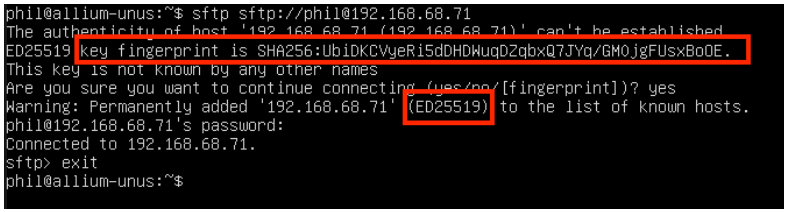
在Linux中获取SSH指纹,指纹和算法突出显示
确认添加的指纹将被保存到~/.ssh/known_hosts文件中,该文件是Linux系统中每个用户账户所特有的。在上图中,SSH指纹的哈希值,以及使用的哈希算法(sha-256)和使用的加密或签名方案(Ed25519)都用红色矩形标出。
如果对想要继续连接的问题没有回答"是",下面的Linux的Python代码将失败。将主机记录添加到~/.ssh/known_hosts文件中是非常关键的,确保任何利用 SFTP 的程序代码仅限于最终用户已经添加的主机,是一种良好的安全实践。
虽然这些信息在其他应用中可能很重要,但在这些演示中出现的Python模块对指纹本身的价值更感兴趣。这些信息可以通过转储~/.ssh/known_hosts文件的内容来列出。

一个 known_hosts 文件样本
在上图中,与哈希值相对应的加密或签名算法被突出显示。注意,在这个特定的Linux发行版和OpenSSH实现中,主机本身,也就是每一行最左边的值,是被哈希的。
窗口
Windows 10提供了一个OpenSSH的官方实现,可以用来检索远程SFTP服务器的SSH指纹。在继续之前,请遵循 "开始使用OpenSSH"的指示,并确认至少在Windows中安装了"OpenSSH客户端 "的Windows插件。一旦安装完毕,就可以用命令生成一个类似于~/.ssh/known_hosts文件的文件:
C…> ssh-keyscan my-sftp-host-or-ip > known_hosts.txt
known_hosts**.txt**文件看起来将类似于下面的内容。请注意,在这种情况下,IP地址(或主机名)没有被散列。

known_hosts文件的二重奏
正如Linux~/.ssh/known_hosts文件的情况一样,签名算法与SSH指纹一起列出,但在OpenSSH的Windows实现中,主机条目没有被散列。
现在已经知道了有关远程服务器的SSH指纹,是时候继续编写代码了。这里的服务器例子使用了ssh-ed25519签名算法和SHA-256散列算法。其他服务器可能使用不同的加密方案,代码也需要相应的调整。
Paramiko模块
Paramiko是一个实现SSHv2的Python模块。本Python教程中的演示将严格侧重于SFTP连接和基本的SFTP使用。下面的例子是在Ubuntu 22.04 LTS上运行的,Python版本为3.10.4。在这个系统中,必须明确使用python3命令来调用 Python 3。因此,与这个系统相关的pip命令是pip3。其他系统可能会用python命令的别名来调用 Python 3。在这些情况下,该命令为pip。
要安装Paramiko模块,使用该命令:
$ pip3 install paramiko
Linux
下面的代码从Linux连接,并从~/.ssh/known_hosts文件中获取主机密钥。该代码在允许连接之前验证SSH指纹是否匹配:
# demo-sftp.py

import paramiko
import sys

def main(argv):
  hostkeys = paramiko.hostkeys.HostKeys (filename="/home/phil/.ssh/known_hosts")
  # The host fingerprint is stored using the ed25519 algorithm. This was revealed
  # when the host was initially connected to from the sftp program invoked earlier.
  hostFingerprint = hostkeys.lookup ("my-sftp-host-or-ip")['ssh-ed25519']


  try:
    # Note that the parameters below represent a low-level Python Socket, and
    # they must be represented as such.
    tp = paramiko.Transport("my-sftp-host-or-ip", 22)

    # Note that while you *can* connect without checking the hostkey, you really
    # shouldn't. Without checking the hostkey, a malicious actor can steal
    # your credentials by impersonating the server.
    tp.connect (username = "my-username", password="my-password", hostkey=hostFingerprint)
    try:
      sftpClient = paramiko.SFTPClient.from_transport(tp)
      fileCount = 0
      # Proof of concept - List First 10 Files
      for file in sftpClient.listdir():
        print (str(file))
        fileCount = 1 + fileCount
        if 10 == fileCount:
          break
      sftpClient.close()
    except Exception as err:
      print ("SFTP failed due to [" + str(err) + "]")

    tp.close()
  except paramiko.ssh_exception.AuthenticationException as err:
    print ("Can't connect due to authentication error [" + str(err) + "]")
  except Exception as err:
    print ("Can't connect due to other error [" + str(err) + "]")

if __name__ == "__main__":
  main(sys.argv[1:])
下面是一个输出的例子:
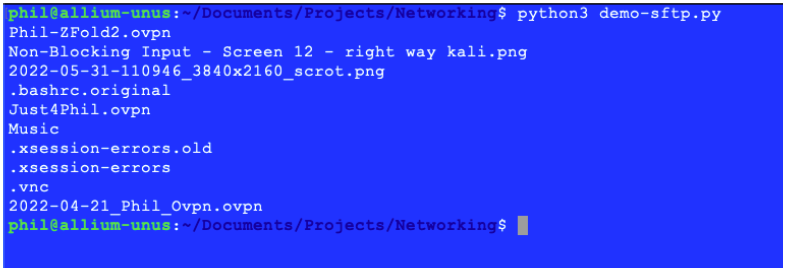
清单3的输出
窗口
同样的命令可以用来在Windows中安装Paramiko模块:
C…> pip3 install paramiko
一旦在Windows中安装了Paramiko,请记下上面创建的known_hosts.txt文件。下面的Windows实现假定 known_hosts.txt文件与Python代码在同一目录下。
之前的代码也可以适用于Windows:
# demo-sftp-windows.py

import paramiko
import sys

def main(argv):
  hostkeys = paramiko.hostkeys.HostKeys (filename="known_hosts.txt")
  # The host fingerprint is stored using the ed25519 algorithm. This was revealed
  # when the host was initially connected to from the sftp program invoked earlier.
  hostFingerprint = hostkeys.lookup ("my-sftp-host-or-ip")['ssh-ed25519']


  try:
    # Note that the parameters below represent a low-level Python Socket, and
    # they must be represented as such.
    tp = paramiko.Transport("my-sftp-host-or-ip", 22)

    # Note that while you *can* connect without checking the hostkey, you really
    # shouldn't. Without checking the hostkey, a malicious actor can steal
    # your credentials by impersonating the server.
    tp.connect (username = "my-username", password="my-password", hostkey=hostFingerprint)
    try:
      sftpClient = paramiko.SFTPClient.from_transport(tp)
      fileCount = 0
      # Proof of concept - List First 10 Files
      for file in sftpClient.listdir():
        print (str(file))
        fileCount = 1 + fileCount
        if 10 == fileCount:
          break
      sftpClient.close()
    except Exception as err:
      print ("SFTP failed due to [" + str(err) + "]")

    tp.close()
  except paramiko.ssh_exception.AuthenticationException as err:
    print ("Can't connect due to authentication error [" + str(err) + "]")
  except Exception as err:
    print ("Can't connect due to other error [" + str(err) + "]")

if __name__ == "__main__":
  main(sys.argv[1:])
闭包的重要性
注意在这两段代码列表中,sftpClient对象和tp对象都是在使用它们的区块结束时关闭的。这一点很关键,因为如果这些对象没有被关闭,某些底层操作可能会阻塞。
模拟安全问题
由于这个Python教程在确保SSH指纹与最初发现的指纹相匹配方面做了 "大文章","模拟 "一下主机冒充攻击的样子可能会很有趣。要做到这一点,只需打开~/.ssh/known_hosts文件,对清单1中正在连接的系统的主机密钥进行修改:

故意破坏Linux中的SSH指纹图谱
由于这个Linux发行版使用哈希值而不是主机条目,因此必须推断出,由于这是唯一一个使用Ed25519算法的条目,这就是需要修改的条目。开发者有责任确保,如果这种类型的测试是必要的,正确的主机记录被修改。虽然上面的例子集中在一个字母上,但"ssh-ed25519 "右边那一行的任何字符都可以被修改。
现在再次运行清单1中的代码,会出现这个错误:

由于不匹配的SSH指纹导致的正确失败
如果由于恶意用户试图冒充SSH服务器而导致SSH指纹在服务器端被改变,这将是一个非常受欢迎的失败,因为在SSH指纹不匹配的情况下,安全证书不会被传输。
要修复上面创建的问题,只需调用用于发现SSH指纹的原始命令,并按照它提供的说明进行操作。
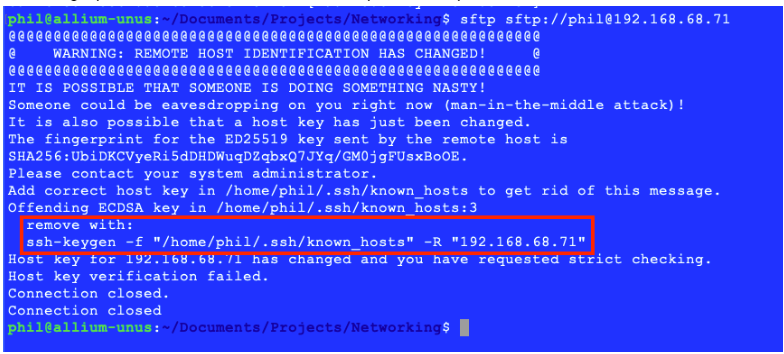
修复故意制造的SSH指纹不匹配问题
一旦删除了违规条目,只需按照上面的初始步骤重新尝试SFTP进入原始主机,将SSH Fingerprint重新添加到~/.ssh/known_hosts文件中。
同样的安全问题可以通过对上面创建的known_hosts.txt文件做类似的修改在 Windows 中模拟。
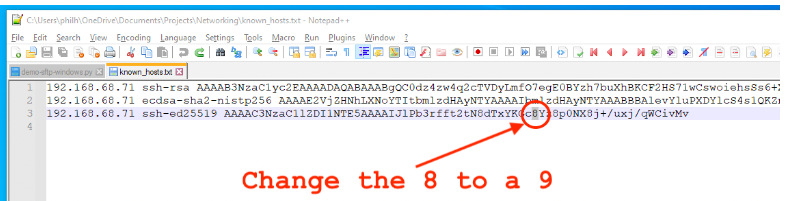
故意破坏Windows中的SSH指纹
并且在Windows版本的代码中出现同样的错误。要解决上述问题,只需按上述步骤重新创建known_hosts.txt文件。
使用Python的常见SFTP任务
Paramiko模块为简单和非常复杂的SFTP任务提供了一个非常丰富和强大的工具包。本节将强调一些更基本和更常见的SFTP任务。
用SFTP和Python上传文件
put方法在现有的开放的 SFTP 连接的背景下,向 SFTP 服务器上传一个文件:
# demo-sftp-upload.py

import paramiko
import sys

def main(argv):
	hostkeys = paramiko.hostkeys.HostKeys (filename="/home/phil/.ssh/known_hosts")
	# The host fingerprint is stored using the ed25519 algorithm. This was revealed
	# when the host was initially connected to from the sftp program invoked earlier.
	hostFingerprint = hostkeys.lookup ("my-sftp-host-or-ip")['ssh-ed25519']


	try:
		# Note that the parameters below represent a low-level Python Socket, and
		# they must be represented as such.
		tp = paramiko.Transport("my-sftp-host-or-ip", 22)

		# Note that while you *can* connect without checking the hostkey, you really
		# shouldn't. Without checking the hostkey, a malicious actor can steal
		# your credentials by impersonating the server.
		tp.connect (username = "my-username", password="my-password", hostkey=hostFingerprint)

		# Use a dictionary object to create a list of files to upload, along with their remote paths.
		# Note that the first entry attempts to upload to a directory without write permissions.
		filesToUpload = {"./Wiring Up Close - Annotated.jpeg":"./no-upload-allowed/Wiring Up Close - Annotated.jpeg",
			"./lipsum.txt":"./lipsum.txt",
			"./3 Separate LEDs - Full Diagram - Cropped.jpeg":"./3 Separate LEDs - Full Diagram - Cropped.jpeg"}


		sftpClient = paramiko.SFTPClient.from_transport(tp)
		for key, value in filesToUpload.items():
			try:
				sftpClient.put(key, value)
				print ("[" + key + "] successfully uploaded to [" + value + "]")
			except PermissionError as err:
				print ("SFTP Operation Failed on [" + key +
					"] due to a permissions error on the remote server [" + str(err) + "]")
			except Exception as err:
				print ("SFTP failed due to other error [" + str(err) + "]")

		# Make sure to close all created objects.
		sftpClient.close()

		tp.close()
	except paramiko.ssh_exception.AuthenticationException as err:
		print ("Can't connect due to authentication error [" + str(err) + "]")
	except Exception as err:
		print ("Can't connect due to other error [" + str(err) + "]")

if __name__ == "__main__":
	main(sys.argv[1:])


Listing 3 - Uploading Files
注意在本地和远程,每个要上传的文件都要指定完整的目录。这是因为如果只指定了远程目录,put方法可能会引发一个错误。
远程SFTP服务器上的**"no-upload-allowed "**目录被明确地配置为不可写,目的是为了说明当试图向这样的目录上传时会发生什么。
正如预期的那样,向不可写的目录上传的一次尝试导致了一个权限错误。其他的上传都成功了。
用Python下载SFTP中的文件
get方法从 SFTP 服务器下载文件,在现有的开放的 SFTP 连接范围内:
# demo-sftp-download.py

import os
import paramiko
import sys

def main(argv):
 hostkeys = paramiko.hostkeys.HostKeys (filename="known_hosts.txt")
 # The host fingerprint is stored using the ed25519 algorithm. This was revealed
 # when the host was initially connected to from the sftp program invoked earlier.
 hostFingerprint = hostkeys.lookup ("my-sftp-host-or-ip")['ssh-ed25519']


 try:
  # Note that the parameters below represent a low-level Python Socket, and
  # they must be represented as such.
  tp = paramiko.Transport("my-sftp-host-or-ip", 22)

  # Note that while you *can* connect without checking the hostkey, you really
  # shouldn't. Without checking the hostkey, a malicious actor can steal
  # your credentials by impersonating the server.
  tp.connect (username = "my-username", password="my-password", hostkey=hostFingerprint)

  # Use a dictionary object to create a list of files to download, along with their remote paths.
  # Note that the first entry attempts to download from a directory with no files.

  # Note that while this dictionary shows the local path as the key and the remote path
  # as the value, the get method expects the remote path as its first parameter, so the
  # call to that will look "backwards."
  filesToDownload = {"./Wiring Up Close - Annotated.jpeg":"./no-upload-allowed/Wiring Up Close - Annotated.jpeg",
   "./lipsum.txt":"./lipsum.txt",
   "./3 Separate LEDs - Full Diagram - Cropped.jpeg":"./3 Separate LEDs - Full Diagram - Cropped.jpeg"}
  sftpClient = paramiko.SFTPClient.from_transport(tp)
  for key, value in filesToDownload.items():
   # Note how the remote file to download is specified first. The path to which it will be saved
   # locally is the second parameter.
   try:
    sftpClient.get (value, key)
    print ("[" + value + "] successfully downloaded to [" + key + "]")
   except FileNotFoundError as err:
    print ("File download failed because [" + value + "] did not exist on the remote server.")
    # Note that the get method may leave a zero-length file in the local path.
    # This should be deleted.
    if os.path.exists(key):
     os.remove(key)
   except Exception as err:
    print ("File download failed for [" + value + "] due to other error [" + str(err) + "]")

  # Make sure to close all created objects.
  sftpClient.close()
  tp.close()
 except paramiko.ssh_exception.AuthenticationException as err:
  print ("Can't connect due to authentication error [" + str(err) + "]")
 except Exception as err:
  print ("Can't connect due to other error [" + str(err) + "]")

if __name__ == "__main__":
 main(sys.argv[1:])


Listing 4 - Downloading Files
从这个列表中得到的主要启示是,虽然这里使用的 dictionary 包含的值与前一个列表中的相同,但驱动下载操作的是值,而不是键。另一个小插曲是,在某些情况下,当无法下载时,会创建一个零长度的文件。删除这样的文件是一个好的做法。
上面的清单给出了以下输出,注意前后的目录列表:
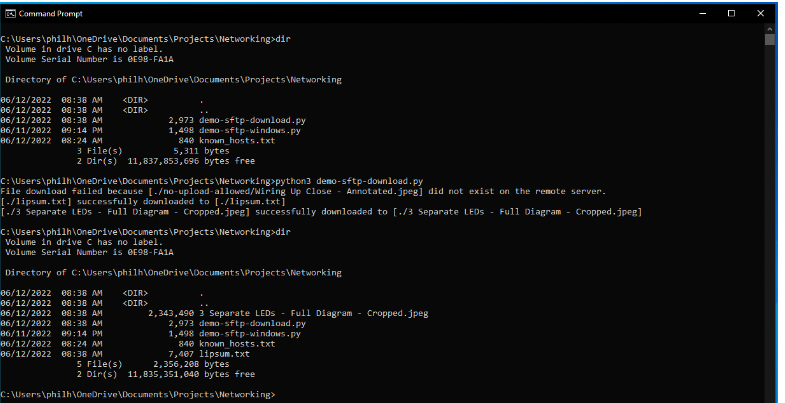
清单4的输出,显示下载的文件。
与上传文件的情况一样,当试图下载一个不存在的文件时,会显示一个错误信息。
用SFTP和Python删除文件
删除方法删除了远程服务器上的文件,假设用于登录服务器的账户有足够的权限来这样做:
# demo-sftp-delete.py

import paramiko
import sys

def main(argv):
	hostkeys = paramiko.hostkeys.HostKeys (filename="/home/phil/.ssh/known_hosts")
	# The host fingerprint is stored using the ed25519 algorithm. This was revealed
	# when the host was initially connected to from the sftp program invoked earlier.
	hostFingerprint = hostkeys.lookup ("my-sftp-host-or-ip")['ssh-ed25519']


	try:
		# Note that the parameters below represent a low-level Python Socket, and
		# they must be represented as such.
		tp = paramiko.Transport("my-sftp-host-or-ip", 22)

		# Note that while you *can* connect without checking the hostkey, you really
		# shouldn't. Without checking the hostkey, a malicious actor can steal
		# your credentials by impersonating the server.
		tp.connect (username = "my-username", password="my-password", hostkey=hostFingerprint)

		# Use a list to create a list of files to delete, including their remote paths.
		filesToDelete = [ "./no-upload-allowed/Wiring Up Close - Annotated.jpeg",
			"./lipsum.txt", "./3 Separate LEDs - Full Diagram - Cropped.jpeg",
			"./no-upload-allowed/Non-Blocking Input - Key Codes Kali.png"]

		sftpClient = paramiko.SFTPClient.from_transport(tp)

		for file in filesToDelete:
			try:
				sftpClient.remove(file)
				print ("[" + file + "] successfully deleted.")
			except PermissionError as err:
				print ("SFTP Delete Failed on [" + file +
					"] due to a permissions error on the remote server [" + str(err) + "]")
			except FileNotFoundError as err:
				print ("SFTP Delete Failed on [" + file + "] because it was not found.")
			except Exception as err:
				print ("SFTP failed due to other error [" + str(err) + "]")

		# Make sure to close all created objects.
		sftpClient.close()

		tp.close()
	except paramiko.ssh_exception.AuthenticationException as err:
		print ("Can't connect due to authentication error [" + str(err) + "]")
	except Exception as err:
		print ("Can't connect due to other error [" + str(err) + "]")

if __name__ == "__main__":
	main(sys.argv[1:])


Listing 5 - Deleting Files
注意,需要额外的例外来涵盖删除可能失败的两个常见原因。
其他 SFTP 和 Python 的考虑
如果一个支持 SFTP 的 Python 程序的目的是对要下载的文件子集进行某种操作,那么将每个文件单独下载到本地计算机的临时目录是一个好的做法。在执行其他操作之前,"复制 "远程站点的全部内容几乎不是一个好主意。
恶意软件通常使用SFTP来窃取本地计算机的文件,某些病毒扫描软件通常会注意到在传统SFTP客户端(如FileZilla或WinSCP)的权限之外发生的多个连续的SFTP操作。在这种情况下,这种病毒扫描软件已知会简单地阻止支持 SFTP 的 Python 程序的执行。可能有必要创建一个例外,以允许支持 SFTP 的 Python 应用程序运行。
在这个Python网络编程教程的下一期中,我们将研究在客户端使用Python和HTTPS的方法。
