

目录
- 什么是Apache Beam
- 什么是Beam管道
- 设计管道时需要考虑什么
- 一个基本的管道
- 分支的PCcollections
- 例子
阅读时间: 3 分钟
介绍管道的基本原理。
什么是Apache Beam
Apache Beam是一个开源的统一编程模型,用于定义和执行数据处理管道,包括ETL、批量和流处理。Apache Beam编程模型简化了大规模数据处理的机制。
什么是Beam管道
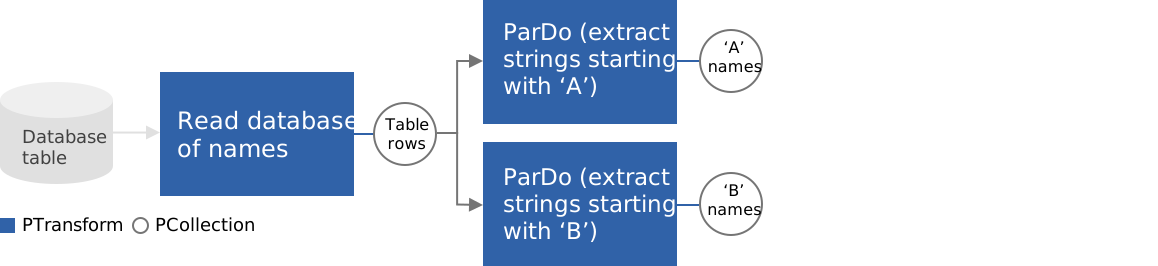
Beam管道是你的数据处理任务中所有数据和计算的图形。这包括读取输入数据,转换该数据,并写入输出数据。一个管道是由用户在他们选择的SDK中构建的。然后,流水线通过SDK直接或通过Runner API的RPC接口进入运行器。例如,这张图显示了一个分支管道。
设计管道时需要考虑的问题
当设计你的Beam管道时,考虑几个基本问题:
- 你的输入数据存储在哪里? 你有多少组输入数据?这将决定你在管道开始时需要应用什么样的
Read变换。 - 你的数据是什么样子的? 它可能是纯文本,格式化的日志文件,或数据库表中的行。一些Beam转换只在键/值对的
PCollection;你需要确定你的数据是否和如何被键入,以及如何在你的管道的PCollection(s)中最好地表示。 - 你想对你的数据做什么?Beam SDKs中的核心转换是通用的。了解你需要如何改变或操作你的数据将决定你如何建立像ParDo这样的核心转换,或者你何时使用Beam SDKs中的预写转换。
- 你的输出数据是什么样子的,它应该去哪里?这将决定你需要在你的管道末端应用什么样的
Write变换。
一个基本的管道

然而,你的流水线可以明显地更复杂。一个流水线代表了一个有向无环图的步骤。它可以有多个输入源,多个输出汇,其操作(PTransforms)可以同时读取和输出多个PCollections。
分支的PC集合
重要的是要理解,转换并不消耗PCollections;相反,它们考虑PCollection 的每个单独元素,并创建一个新的PCollection 作为输出。这样,你可以对同一个PCollection 中的不同元素做不同的事情。
有两种方法来分支管道。你可以使用同一个PCollection ,作为多个转换的输入,而不消耗输入或改变它。另一种分支管道的方法是通过使用标签输出,让一个转换输出到多个PCollection。
例子
下面的示例代码对一个输入集合应用了两个转换:
PCollection<String> dbRowCollection = ...;

PCollection<String> aCollection = dbRowCollection.apply("aTrans", ParDo.of(new DoFn<String, String>(){
  @ProcessElement
  public void processElement(ProcessContext c) {
    if(c.element().startsWith("A")){
      c.output(c.element());
    }
  }
}));

PCollection<String> bCollection = dbRowCollection.apply("bTrans", ParDo.of(new DoFn<String, String>(){
  @ProcessElement
  public void processElement(ProcessContext c) {
    if(c.element().startsWith("B")){
      c.output(c.element());
    }
  }
}));
下面的示例代码应用一个转换,对每个元素处理一次,并输出两个集合:
final TupleTag<String> startsWithATag = new TupleTag<String>(){};
final TupleTag<String> startsWithBTag = new TupleTag<String>(){};

PCollectionTuple mixedCollection =
    dbRowCollection.apply(ParDo
        .of(new DoFn<String, String>() {
          @ProcessElement
          public void processElement(ProcessContext c) {
            if (c.element().startsWith("A")) {
              // Emit to main output, which is the output with tag startsWithATag.
              c.output(c.element());
            } else if(c.element().startsWith("B")) {
              // Emit to output with tag startsWithBTag.
              c.output(startsWithBTag, c.element());
            }
          }
        })
        // Specify main output. In this example, it is the output
        // with tag startsWithATag.
        .withOutputTags(startsWithATag,
        // Specify the output with tag startsWithBTag, as a TupleTagList.
                        TupleTagList.of(startsWithBTag)));

// Get subset of the output with tag startsWithATag.
mixedCollection.get(startsWithATag).apply(...);

// Get subset of the output with tag startsWithBTag.
mixedCollection.get(startsWithBTag).apply(...);
