携手创作,共同成长!这是我参与「掘金日新计划 · 8 月更文挑战」的第4天,点击查看活动详情
一天一个css小技巧
基本属性
1. 字体属性
1.1 字体系列 font-family
div {
    font-family:'Microsoft YaHei',tahoma,arial,'Hiragino Sans GB';
}
1.2 字体大小 font-size
font-size:16px;
px(像素)大小是常用单位- 谷歌默认大小16
px
1.3 字体粗细 font-weight
font-weight: 400;
- normal 默认值,不加粗
- bold 加粗
- 100-900
400等同于normal,700等同于bold,数字后面不跟单位
1.4 文字样式 font-style
font-style:normal;
- normal 默认值,不倾斜
- italic 显示斜体字样
1.5 字体符合属性
font : font-style font-weight font-size/line-height font-family;
- 使用font属性时,不能更换顺序,以空格隔开
- 不需要设置的属性可以省略,但必须保留font-size和font-family,否则font属性不起作用
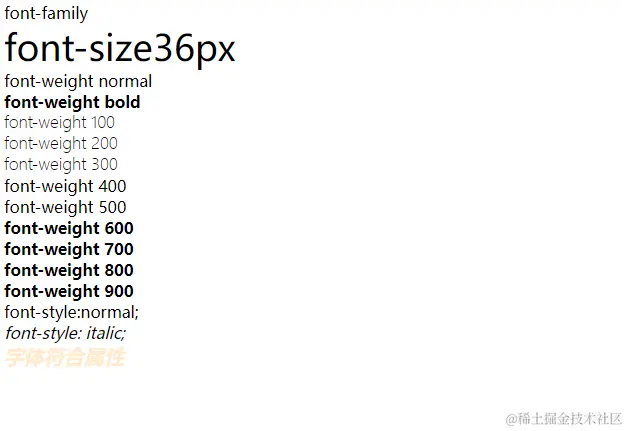
<!DOCTYPE html>
<html lang="en">
<head>
    <meta charset="UTF-8">
    <meta name="viewport" content="width=device-width, initial-scale=1.0">
    <meta http-equiv="X-UA-Compatible" content="ie=edge">
    <title>Document</title>
    <style>
        .fontFamily {
            font-family:'Microsoft YaHei',tahoma,arial,'Hiragino Sans GB';
        }
        .fontSize {
            font-size: 36px;
        }
        .fontWeight {
            font-weight: 600;
        }
        .allStyle {
            font : italic 600 20px 'Microsoft YaHei';
            color: blanchedalmond;
        }
    </style>
</head>
<body>
    <div>
        <div class="fontFamily">font-family</div>
        <div class="fontSize">font-size36px</div>
        <div>
            <div style="font-weight:normal">font-weight normal</div>
            <div style="font-weight:bold">font-weight bold</div>
            <div style="font-weight:100">font-weight 100</div>
            <div style="font-weight:200">font-weight 200</div>
            <div style="font-weight:300">font-weight 300</div>
            <div style="font-weight:400">font-weight 400</div>
            <div style="font-weight:500">font-weight 500</div>
            <div style="font-weight:600">font-weight 600</div>
            <div style="font-weight:700">font-weight 700</div>
            <div style="font-weight:800">font-weight 800</div>
            <div style="font-weight:900">font-weight 900</div>
            <div style="font-style:normal;">font-style:normal;</div>
            <div style="font-style: italic;">font-style: italic;</div>
            <div class="allStyle">字体符合属性</div>
        </div>
    </div>
</body>
</html>
2. 文本属性
2.1 文本颜色
color: red ;
2.2 文本对齐
text-align:center;
| 属性 | 对齐方式 |
|---|
| right | 文本右对齐 |
| center | 文本居中 |
| left | 文本左对齐 |
2.3 装饰文本
text-decoration:underline
| 属性 | 效果 |
|---|
| underline | 下划线 |
| overline | 上划线 |
| line-through | 删除线 |
| none | 默认没有下划线 |
2.4 文本缩进 (首行缩进)
text-indent:2em;
| 属性 | |
|---|
| em | 相对单位,相当于当前元素的1个文字大小 |
| px | 长度可以时负值 |
2.5 行间距
line-height:20px;
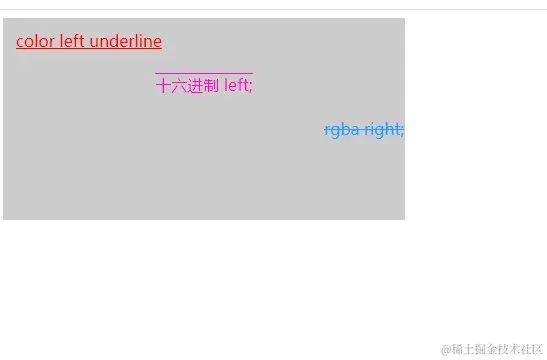
<!DOCTYPE html>
<html lang="en">
<head>
    <meta charset="UTF-8">
    <meta name="viewport" content="width=device-width, initial-scale=1.0">
    <meta http-equiv="X-UA-Compatible" content="ie=edge">
    <title>Document</title>
    <style>
        .box {
            background: #ccc;
            border: 1px solid #ccc;
            width: 400px;
            height: 200px;
        }
        .colorStyle {
           color: red;
           text-align: left;
           text-decoration: underline;
           text-indent: 12px;
           line-height: 44px;
        }
        .colorStyleOne {
            color: #ff0cc0;
            text-align: center;
            text-decoration: overline;
            line-height: 44px;
        }
        .colorStyleTwo {
           color:  rgba(32, 160, 255, 1);
           text-align: right;
           text-decoration: line-through;
           line-height: 44px;
        }
    </style>
</head>
<body>
    <div class="box">
        <div class="colorStyle">color  left underline</div>
        <div class="colorStyleOne">十六进制   left;</div>
        <div class="colorStyleTwo">rgba  right;</div>
    </div>
</body>
</html>
3. 背景
给页面元素添加背景样式
3.1 背景颜色
background-color:red;
默认背景颜色 transparent(透明)
3.2 背景图片
background-image:url(链接);
none 无背景图(默认)url 使用相对或绝对地址指定背景图像
3.3 背景平铺
background-repeat:no-repeat;
- repeat 背景图片平铺(默认)
- no-repeat 不平铺
- repeat-x 横向上平铺
- repeat-y 纵向上平铺
3.4 背景图片位置
background-position:top center;
| 属性 | |
|---|
| 精确单位 | 参数值有精确的坐标,顺序一定是x在前 只指定一个数值,该数值为x坐标,另一个默认垂直居中 |
| 混合单位 | 参数值是精确单位和方位名词混合使用 第一个值是x坐标,第二个值是y坐标 |
| 方位名词 | 两个值的顺序无关指定一个方位名词,另一个值省略,则第二个值默认居中对齐 |
3.5 背景图片固定(背景附着)
background-attachment设置背景图像是否固定或者随着页面的其余部分滚动。
- scroll 背景图片随着页面的滚动而滚动,这是默认的。
- fixed 背景图片不会随着页面的滚动而滚动。
- local 背景图片会随着元素内容的滚动而滚动。
- inherit 指定 background-attachment 的设置应该从父元素继承。 阅读关于 inherit 内容
3.6 背景复合写法
background:背景颜色 背景图片 背景平铺 背景图像固定 背景图片位置
div {
    background: url(链接) no-repeat center top fixed;
}
3.7 背景色半透明
background:rgba(0,0,0,0.3)
- rgba(red,green,blue,alpha)
- 最后参数为alpha(透明度),取值范围:0~1
- 可以把0.3写成.3
- 盒子背景半透明,盒子内容不受影响

 .image_box {
     height: 500px;
     width: 300px;
     background-color: #ccc;
     background-image:url('./login_pic.png');
     background-repeat:no-repeat;
     background-position:center center;
     background-attachment:scroll;
     background-size:100% 100%;
     overflow-y: auto;
}