

如何在Go中处理文件上传
处理用户上传的文件是网络开发中的一项常见任务,你很可能需要不时地开发一个处理这项任务的服务。本文将指导你完成在Go网络服务器上处理文件上传的过程。
在本教程中,我们将看看Go中的文件上传,并涵盖常见的要求,如设置大小限制、文件类型限制和进度报告。
开始学习
克隆这个版本库到你的电脑上,然后cd 到创建的目录中。你会看到一个main.go 文件,其中包含以下代码。
main.go
package main

import (
	"log"
	"net/http"
)

func indexHandler(w http.ResponseWriter, r *http.Request) {
	w.Header().Add("Content-Type", "text/html")
	http.ServeFile(w, r, "index.html")
}

func uploadHandler(w http.ResponseWriter, r *http.Request) {
	if r.Method != "POST" {
		http.Error(w, "Method not allowed", http.StatusMethodNotAllowed)
		return
	}
}

func main() {
	mux := http.NewServeMux()
	mux.HandleFunc("/", indexHandler)
	mux.HandleFunc("/upload", uploadHandler)

	if err := http.ListenAndServe(":4500", mux); err != nil {
		log.Fatal(err)
	}
}
这里的代码用于在4500端口启动一个服务器,并在根路径上渲染index.html 文件。在index.html 文件中,我们有一个包含文件输入的表单,它发布到服务器上的一个/upload 路由。
index.html
<!DOCTYPE html>
<html lang="en">
  <head>
    <meta charset="UTF-8" />
    <meta name="viewport" content="width=device-width, initial-scale=1.0" />
    <meta http-equiv="X-UA-Compatible" content="ie=edge" />
    <title>File upload demo</title>
  </head>
  <body>
    <form
      id="form"
      enctype="multipart/form-data"
      action="/upload"
      method="POST"
    >
      <input class="input file-input" type="file" name="file" multiple />
      <button class="button" type="submit">Submit</button>
    </form>
  </body>
</html>
让我们继续写我们需要的代码,以处理从浏览器上传的文件。
设置最大的文件大小
有必要限制文件上传的最大尺寸,以避免客户意外或恶意上传巨大的文件,最终浪费服务器资源的情况。在本节中,我们将设置最大上传限制为一兆字节,如果上传的文件大于该限制,则显示错误。
一个常见的方法是检查Content-Length 请求头,并与允许的最大文件大小进行比较,看是否超过了。
if r.ContentLength > MAX_UPLOAD_SIZE {
	http.Error(w, "The uploaded image is too big. Please use an image less than 1MB in size", http.StatusBadRequest)
	return
}
我不建议使用这种方法,因为Content-Length 标头可以在客户端被修改为任何数值,而不考虑实际文件大小。最好是依靠下面演示的[http.MaxBytesReader]方法。用以下片段的高亮部分更新你的main.go 文件。
main.go
const MAX_UPLOAD_SIZE = 1024 * 1024 // 1MB

func uploadHandler(w http.ResponseWriter, r *http.Request) {
	if r.Method != "POST" {
		http.Error(w, "Method not allowed", http.StatusMethodNotAllowed)
		return
	}

	r.Body = http.MaxBytesReader(w, r.Body, MAX_UPLOAD_SIZE)
	if err := r.ParseMultipartForm(MAX_UPLOAD_SIZE); err != nil {
		http.Error(w, "The uploaded file is too big. Please choose an file that's less than 1MB in size", http.StatusBadRequest)
		return
	}
}
http.MaxBytesReader() 方法是用来限制传入请求体的大小。对于单个文件的上传,限制请求体的大小可以很好地近似于限制文件的大小。ParseMultipartForm() 方法随后将请求体解析为multipart/form-data ,直至最大内存参数。如果上传的文件大于ParseMultipartForm() 的参数,将发生错误。
保存上传的文件
接下来,让我们检索并保存上传的文件到文件系统中。将下面的代码片段的高亮部分添加到uploadHandler() 函数的结尾。
main.go
func uploadHandler(w http.ResponseWriter, r *http.Request) {
	// truncated for brevity

	// The argument to FormFile must match the name attribute
	// of the file input on the frontend
	file, fileHeader, err := r.FormFile("file")
	if err != nil {
		http.Error(w, err.Error(), http.StatusBadRequest)
		return
	}

	defer file.Close()

	// Create the uploads folder if it doesn't
	// already exist
	err = os.MkdirAll("./uploads", os.ModePerm)
	if err != nil {
		http.Error(w, err.Error(), http.StatusInternalServerError)
		return
	}

	// Create a new file in the uploads directory
	dst, err := os.Create(fmt.Sprintf("./uploads/%d%s", time.Now().UnixNano(), filepath.Ext(fileHeader.Filename)))
	if err != nil {
		http.Error(w, err.Error(), http.StatusInternalServerError)
		return
	}

	defer dst.Close()

	// Copy the uploaded file to the filesystem
	// at the specified destination
	_, err = io.Copy(dst, file)
	if err != nil {
		http.Error(w, err.Error(), http.StatusInternalServerError)
		return
	}

	fmt.Fprintf(w, "Upload successful")
}
限制上传文件的类型
假设我们想把上传文件的类型限制在只有图像,特别是只有JPEG和PNG图像。我们需要检测上传文件的MIME类型,然后将其与允许的MIME类型进行比较,以确定服务器是否应该继续处理该上传。
你可以在文件输入中使用accept 属性来定义应该接受的文件类型,但你仍然需要在服务器上仔细检查以确保输入没有被篡改。将下面的片段的高亮部分添加到FileHandlerUpload 函数中。
main.go
func uploadHandler(w http.ResponseWriter, r *http.Request) {
	// truncated for brevity

	file, fileHeader, err := r.FormFile("file")
	if err != nil {
		http.Error(w, err.Error(), http.StatusBadRequest)
		return
	}

	defer file.Close()

	buff := make([]byte, 512)
	_, err = file.Read(buff)
	if err != nil {
		http.Error(w, err.Error(), http.StatusInternalServerError)
		return
	}

	filetype := http.DetectContentType(buff)
	if filetype != "image/jpeg" && filetype != "image/png" { {
		http.Error(w, "The provided file format is not allowed. Please upload a JPEG or PNG image", http.StatusBadRequest)
		return
	}

	_, err := file.Seek(0, io.SeekStart)
	if err != nil {
		http.Error(w, err.Error(), http.StatusInternalServerError)
		return
	}

	// truncated for brevity
}
DetectContentType() 方法是由http 包提供的,目的是检测给定数据的内容类型。它考虑(最多)前512字节的数据来确定MIME类型。这就是为什么我们在将文件传递给DetectContentType() 方法之前,先将文件的前512字节读到一个空缓冲区。如果产生的filetype 既不是JPEG也不是PNG,就会返回一个错误。
当我们为了确定内容类型而读取上传文件的前512字节时,底层文件流指针向前移动了512字节。当后来调用io.Copy() ,它继续从该位置读取,导致图像文件被破坏。file.Seek() 方法被用来将指针返回到文件的起始位置,这样io.Copy() 就可以从头开始。
处理多个文件
如果你想处理一次从客户端发送多个文件的情况,你可以手动解析并迭代每个文件,而不是使用FormFile() 。打开文件后,其余的代码与单文件上传的代码相同。
main.go
func uploadHandler(w http.ResponseWriter, r *http.Request) {
	if r.Method != "POST" {
		http.Error(w, "Method not allowed", http.StatusMethodNotAllowed)
		return
	}

	// 32 MB is the default used by FormFile()
	if err := r.ParseMultipartForm(32 << 20); err != nil {
		http.Error(w, err.Error(), http.InternalServerError)
		return
	}

	// Get a reference to the fileHeaders.
	// They are accessible only after ParseMultipartForm is called
	files := r.MultipartForm.File["file"]

	for _, fileHeader := range files {
		// Restrict the size of each uploaded file to 1MB.
		// To prevent the aggregate size from exceeding
		// a specified value, use the http.MaxBytesReader() method
		// before calling ParseMultipartForm()
		if fileHeader.Size > MAX_UPLOAD_SIZE {
			http.Error(w, fmt.Sprintf("The uploaded image is too big: %s. Please use an image less than 1MB in size", fileHeader.Filename), http.StatusBadRequest)
			return
		}

		// Open the file
		file, err := fileHeader.Open()
		if err != nil {
			http.Error(w, err.Error(), http.StatusInternalServerError)
			return
		}

		defer file.Close()

		buff := make([]byte, 512)
		_, err = file.Read(buff)
		if err != nil {
			http.Error(w, err.Error(), http.StatusInternalServerError)
			return
		}

		filetype := http.DetectContentType(buff)
		if filetype != "image/jpeg" && filetype != "image/png" {
			http.Error(w, "The provided file format is not allowed. Please upload a JPEG or PNG image", http.StatusBadRequest)
			return
		}

		_, err = file.Seek(0, io.SeekStart)
		if err != nil {
			http.Error(w, err.Error(), http.StatusInternalServerError)
			return
		}

		err = os.MkdirAll("./uploads", os.ModePerm)
		if err != nil {
			http.Error(w, err.Error(), http.StatusInternalServerError)
			return
		}

		f, err := os.Create(fmt.Sprintf("./uploads/%d%s", time.Now().UnixNano(), filepath.Ext(fileHeader.Filename)))
		if err != nil {
			http.Error(w, err.Error(), http.StatusBadRequest)
			return
		}

		defer f.Close()

		_, err = io.Copy(f, file)
		if err != nil {
			http.Error(w, err.Error(), http.StatusBadRequest)
			return
		}
	}

	fmt.Fprintf(w, "Upload successful")
}
报告上传进度
接下来,让我们添加文件上传的进度报告。我们可以利用io.TeeReader() 方法来计算从一个io.Reader (在这里是指每个文件)中读取的字节数。下面是方法。
main.go
// Progress is used to track the progress of a file upload.
// It implements the io.Writer interface so it can be passed
// to an io.TeeReader()
type Progress struct {
	TotalSize  int64
	BytesRead int64
}

// Write is used to satisfy the io.Writer interface.
// Instead of writing somewhere, it simply aggregates
// the total bytes on each read
func (pr *Progress) Write(p []byte) (n int, err error) {
	n, err = len(p), nil
	pr.BytesRead += int64(n)
	pr.Print()
	return
}

// Print displays the current progress of the file upload
// each time Write is called
func (pr *Progress) Print() {
	if pr.BytesRead == pr.TotalSize {
		fmt.Println("DONE!")
		return
	}

	fmt.Printf("File upload in progress: %d\n", pr.BytesRead)
}

func uploadHandler(w http.ResponseWriter, r *http.Request) {
	// truncated for brevity

	for _, fileHeader := range files {
		// [..]

		pr := &Progress{
			TotalSize: fileHeader.Size,
		}

		_, err = io.Copy(f, io.TeeReader(file, pr))
		if err != nil {
			http.Error(w, err.Error(), http.StatusBadRequest)
			return
		}
	}

	fmt.Fprintf(w, "Upload successful")
}
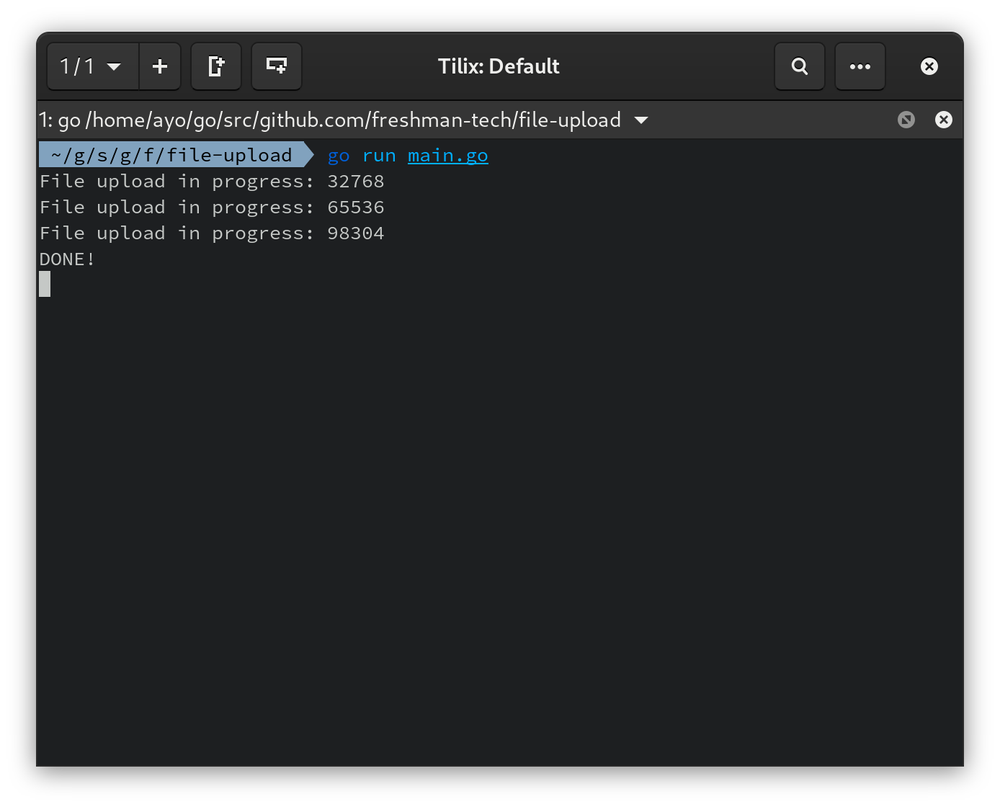
总结
至此,我们在Go中处理文件上传的工作结束了。如果你有任何问题或建议,欢迎在下面留言。
谢谢你的阅读,并祝你编码愉快
