用Flask表单上传文件到Amazon S3 - Part1 - 上传小文件
本文主要针对那些对使用Flask表单上传小文件到Amazon S3感兴趣的开发者。在下面的教程中,我将从亚马逊S3的概述开始,然后用python Boto3代码来管理S3桶上的文件操作,最后将代码与Flask Form整合。
1) 应用概述
作为一个网络开发者,拥有将文件上传到数据库或服务器上进一步处理的功能是一个普遍的要求。云计算带来的概念是把基础设施当作软件而不是硬件,这使得对基础设施/硬件了解有限的网络开发者能够充分利用这些服务。
亚马逊是云计算中最受欢迎的选择,而Python则成为任何云计算的首选编程语言。
本教程的目标
在本教程结束时,你将能够:
- 用Python SDK创建一个S3桶。
- 启用桶的版本管理,以保持文件版本的跟踪。
- 用Python SDK上传小文件到S3。
- 创建一个Flask表单,允许特定类型的文件上传到S3。
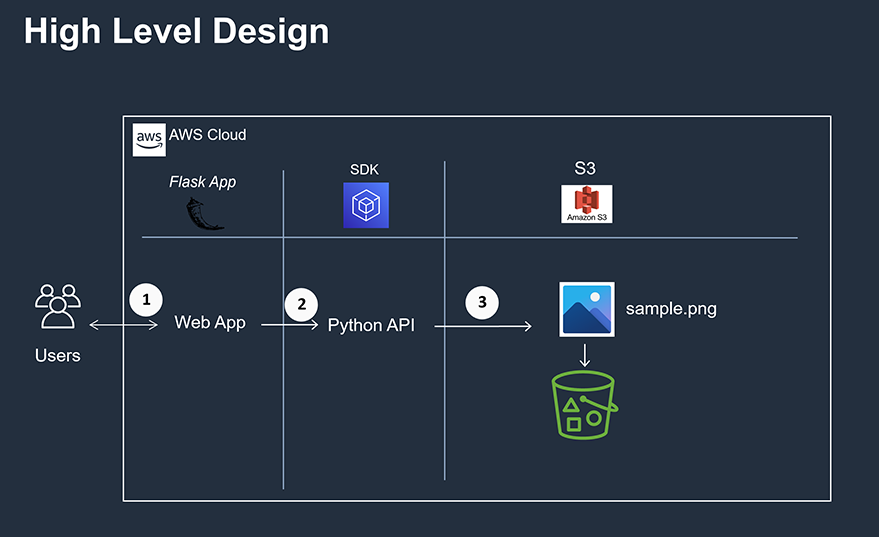
使用Flask表单设计将文件上传到Amazon S3
好了,让我们从亚马逊S3的介绍开始。
2) 亚马逊S3简介
亚马逊简单存储服务(简称S3)提供安全和高度可扩展的对象存储,它非常容易使用,因为它有一个非常简单的网络服务接口来存储和检索任何数量的数据。使用S3来存储对象(在我们的例子中是小文件)的主要优点是可以随时随地从网络上访问它们,而不是登录数据库或应用服务器来访问文件。
通过AWS SDK,我们也可以将S3与其他AWS服务和外部Flask应用程序集成。
在处理AWS S3时,术语 "文件 "和 "对象 "几乎是一样的,因为它把所有文件都称为对象。在进一步讨论之前,让我们先了解一下S3的基本组件。
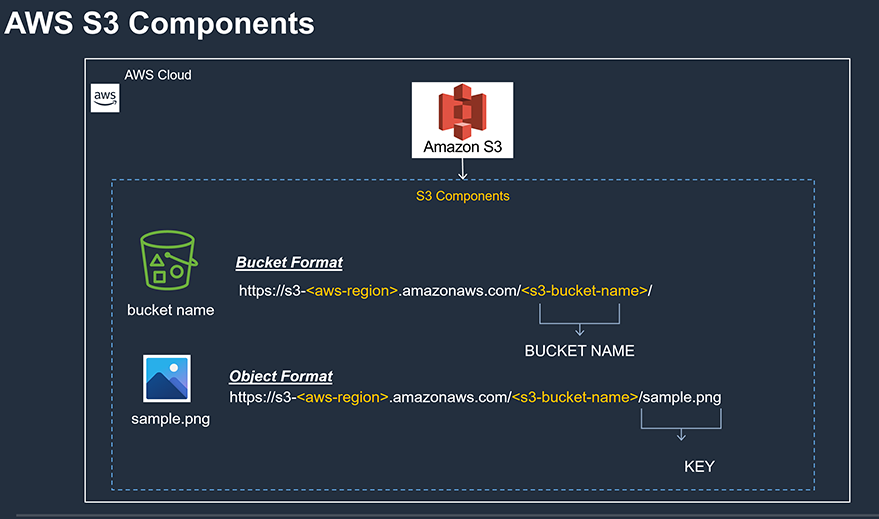
AWS S3组件
一个S3桶的基本组成部分是
- 桶的名称
- 桶中的对象/文件
- 关键。
上图应该可以帮助你理解S3桶中的组件是如何分类的。 密钥是映射到S3中每个对象的唯一标识符。关于S3的更多细节可以在其官方网站上找到。
3) 使用Python SDK的存储解决方案
接下来,我们要准备好我们的后端代码,通过flask表单从用户那里获取输入对象并将其加载到S3中。首先,我们要创建S3桶。
用python包管理器(即pip)安装python botot3。
pip install boto3
1) 定义S3客户端
我们需要将boto3导入我们的代码中,同时定义一个函数来定义S3客户端。由于S3是一个全球性的服务,不针对特定地区,我们在定义客户端的时候不需要指定地区:
import boto3
import json
import datetime
import sys
import botocore

from botocore.exceptions import ClientError
from pyboto3 import *


# ------------------------------------------------------------------------------------------------------------------------
def s3_client():
    """
        Function: get s3 client
         Purpose: get s3 client
        :returns: s3
    """
    session = boto3.session.Session()
    client = session.client('s3')
    """ :type : pyboto3.s3 """
    return client
2) 创建S3数据桶
下面的函数将接受桶的名称作为参数,并使用上述函数中的s3客户端来创建你当前区域的桶。如果没有指定区域,则会在默认的 "美国东部 "区域创建水桶。桶的名称必须遵守以下标准
- 桶的名称必须是3-63个字符的长度。
- 允许使用小写字母、数字和连字符。
- 不要在桶的名称中使用点(.)和连字符(-)。
# ------------------------------------------------------------------------------------------------------------------------
def s3_create_bucket(bucket_name):
    """
        function: s3_create_bucket - create s3 bucket
           :args: s3 bucket name
        :returns: bucket
    """

    # fetch the region
    session = boto3.session.Session()
    current_region = session.region_name

    # get the client
    client = s3_client()

    print(f" *** You are in {current_region} AWS region..\n Bucket name passed is - {bucket_name}")

    s3_bucket_create_response = client.create_bucket(Bucket=bucket_name,
                                                          CreateBucketConfiguration={
                                                              'LocationConstraint': current_region})

    print(f" *** Response when creating bucket - {s3_bucket_create_response} ")
    return s3_bucket_create_response
3) 创建水桶策略
现在我们已经创建了一个桶,我们将创建一个桶策略,以限制谁和从哪里可以访问桶内的对象。简而言之,桶策略是配置你的桶的访问策略的方法,如IP范围、主机、谁,以及可以对你的桶做什么。
我将使用JSON格式(字典格式)来指定策略配置:
# ------------------------------------------------------------------------------------------------------------------------
def s3_create_bucket_policy(s3_bucket_name):
    """
        function: s3_create_bucket_policy - Apply bucket policy
           :args: none
        :returns: none
           Notes: For test purpose let us allow all the actions, Need to change later.
    """
    resource = f"arn:aws:s3:::{s3_bucket_name}/*"
    s3_bucket_policy = {"Version": "2012-10-17",
                        "Statement": [
                            {
                                "Sid": "AddPerm",
                                "Effect": "Allow",
                                "Principal": "*",
                                "Action": "s3:*",
                                "Resource": resource,
                                "Condition": {
                                    "IpAddress": {"aws:SourceIp": ""}
                                }

                            }
                        ]}

    # prepare policy to be applied to AWS as Json
    policy = json.dumps(s3_bucket_policy)

    # apply policy
    s3_bucket_policy_response = s3_client().put_bucket_policy(Bucket=s3_bucket_name,
                                                              Policy=policy)

    # print response
    print(f" ** Response when applying policy to {s3_bucket_name} is {s3_bucket_policy_response} ")
    return s3_bucket_policy_response
4) 在S3中对对象进行版本管理
AWS S3提供了S3中对象的版本管理,默认情况下,它是不启用的。每个对象在启用版本的桶中都有一个唯一的版本ID。
对于没有启用版本的S3桶,对象的版本ID将被设置为空:
# ------------------------------------------------------------------------------------------------------------------------
def s3_version_bucket_files(s3_bucket_name):
    client = s3_client()
    version_bucket_response = client.put_bucket_versioning(Bucket=s3_bucket_name,
                                                           VersioningConfiguration={'Status': 'Enabled'})
    # check apply bucket response..
    if version_bucket_response['ResponseMetadata']['HTTPStatusCode'] == 204:
        print(f" *** Successfully applied Versioning to {s3_bucket_name}")
    else:
        print(f" *** Failed while applying Versioning to bucket")
5) 验证水桶和水桶策略
现在我们有了创建桶和策略的代码,我们将执行代码并使用以下代码验证桶和它的策略:
import boto3
import argparse
import json
import datetime
import sys
import botocore
import time
import click


from botocore.exceptions import ClientError
from pyboto3 import *


# ------------------------------------------------------------------------------------------------------------------------
def s3_client():
    """
        Function: get s3 client
         Purpose: get s3 client
        :returns: s3
    """
    session = boto3.session.Session()
    client = session.client('s3')
    """ :type : pyboto3.s3 """
    return client


# ------------------------------------------------------------------------------------------------------------------------
def list_s3_buckets():
    """
        Function: list_s3_buckets
         Purpose: Get the list of s3 buckets
        :returns: s3 buckets in your aws account
    """
    client = s3_client()
    buckets_response = client.list_buckets()

    # check buckets list returned successfully
    if buckets_response['ResponseMetadata']['HTTPStatusCode'] == 200:
        for s3_buckets in buckets_response['Buckets']:
            print(f" *** Bucket Name: {s3_buckets['Name']} - Created on {s3_buckets['CreationDate']} \n")
    else:
        print(f" *** Failed while trying to get buckets list from your account")


# ------------------------------------------------------------------------------------------------------------------------
def s3_create_bucket(bucket_name):
    """
        function: s3_create_bucket - create s3 bucket
           :args: s3 bucket name
        :returns: bucket
    """

    # fetch the region
    session = boto3.session.Session()
    current_region = session.region_name

    # get the client
    client = s3_client()

    print(f" *** You are in {current_region} AWS region..\n Bucket name passed is - {bucket_name}")

    s3_bucket_create_response = client.create_bucket(Bucket=bucket_name,
                                                          CreateBucketConfiguration={
                                                              'LocationConstraint': current_region})

    print(f" *** Response when creating bucket - {s3_bucket_create_response} ")
    return s3_bucket_create_response


# ------------------------------------------------------------------------------------------------------------------------
def s3_create_bucket_policy(s3_bucket_name):
    """
        function: s3_create_bucket_policy - Apply bucket policy
           :args: none
        :returns: none
           Notes: For test purpose let us allow all the actions, Need to change later.
    """
    resource = f"arn:aws:s3:::{s3_bucket_name}/*"
    s3_bucket_policy = {"Version": "2012-10-17",
                        "Statement": [
                            {
                                "Sid": "AddPerm",
                                "Effect": "Allow",
                                "Principal": "*",
                                "Action": "s3:*",
                                "Resource": resource,
                                "Condition": {
                                    "IpAddress": {"aws:SourceIp": ""}
                                }

                            }
                        ]}

    # prepare policy to be applied to AWS as Json
    policy = json.dumps(s3_bucket_policy)

    # apply policy
    s3_bucket_policy_response = s3_client().put_bucket_policy(Bucket=s3_bucket_name,
                                                              Policy=policy)

    # print response
    print(f" ** Response when applying policy to {s3_bucket_name} is {s3_bucket_policy_response} ")
    return s3_bucket_policy_response


# ------------------------------------------------------------------------------------------------------------------------
def s3_list_bucket_policy(s3_bucket_name):
    """
        function: s3_list_bucket_policy - list the bucket policy
           :args: none
        :returns: none
    """
    s3_list_bucket_policy_response = s3_client().get_bucket_policy(Bucket=s3_bucket_name)
    print(s3_list_bucket_policy_response)

# ------------------------------------------------------------------------------------------------------------------------
def s3_version_bucket_files(s3_bucket_name):
    client = s3_client()
    version_bucket_response = client.put_bucket_versioning(Bucket=s3_bucket_name,
                                                           VersioningConfiguration={'Status': 'Enabled'})
    # check apply bucket response..
    if version_bucket_response['ResponseMetadata']['HTTPStatusCode'] == 204:
        print(f" *** Successfully applied Versioning to {s3_bucket_name}")
    else:
        print(f" *** Failed while applying Versioning to bucket")


if __name__ == '__main__':
    list_s3_buckets()
    bucket_name = f"flask-small-file-uploads"
    s3_bucket = s3_create_bucket(bucket_name)
    s3_apply_bucket_policy = s3_create_bucket_policy(bucket_name)
    s3_show_bucket_policy = s3_list_bucket_policy(bucket_name)
    s3_show_bucket_response = s3_version_bucket_files(bucket_name)
    list_s3_buckets()
4) 使用Python SDK将小文件上传到S3
Amazon S3提供了几种上传文件的方法,根据文件的大小,用户可以选择使用 "put_object "方法上传小文件,或者使用多部分上传方法。我将另外上传一个关于如何用Flask上传巨大文件到S3的教程。 在本教程中,我们将专注于上传小文件。
根据S3的API规范,要上传一个文件,我们需要传递完整的文件路径、桶名和KEY。正如你在介绍部分所记得的,KEY标识了你的文件在S3桶中的位置路径。 由于S3的工作方式是键值对,所以必须将KEY传递给upload_file方法。
下面的两个方法将告诉你如何上传一个小文件到S3,然后列出一个桶中的所有文件:
# ------------------------------------------------------------------------------------------------------------------------
def s3_upload_small_files(inp_file_name, s3_bucket_name, inp_file_key, content_type):
    client = s3_client()
    upload_file_response = client.put_object(Body=inp_file_name,
                                             Bucket=s3_bucket_name,
                                             Key=inp_file_key,
                                             ContentType=content_type)
    print(f" ** Response - {upload_file_response}")
5.与Flask网络应用集成
让我们像下面这样设置应用程序,然后我们将进入细节:
~/Flask-Upload-Small-Files-S3
        |-- app.py
        |__ /views
            |-- s3.py
        |__ /templates
            |__ /includes
                |-- _flashmsg.html
                |-- _formhelpers.html
            |__ main.html
在我们执行代码之前,是时候详细讨论组件了 我们首先讨论正在实施的设计步骤。这个设计相当简单,我将尽力以这种方式来解释它。
5a) 组件模板/main,html
我将使用一个单一的模板(main.html),对于这个演示目的来说足够简单。
这是为用户上传文件到S3的主页。该HTML模板非常简单,只有上传文件选项和提交按钮。
模板中嵌入了flask消息,而应用程序代码将根据验证结果来传递。如果用户在没有选择文件的情况下提交按钮,或者上传的文件不在允许的扩展名中,错误信息就会出现在主页面,否则就会出现成功信息。
<html lang="en">
<head>
    <!-- Required meta tags -->
    <meta charset="utf-8">
    <meta name="viewport" content="width=device-width, initial-scale=1, shrink-to-fit=no">

    <!-- Bootstrap CSS -->
    <link rel="stylesheet" href="https://maxcdn.bootstrapcdn.com/bootstrap/4.0.0/css/bootstrap.min.css"
          integrity="sha384-Gn5384xqQ1aoWXA+058RXPxPg6fy4IWvTNh0E263XmFcJlSAwiGgFAW/dAiS6JXm" crossorigin="anonymous">
    <title>Flask Example</title>
</head>


<br>
<body class="bg-gradient-white">
<div id="page-wrapper">
    <div class="container">
        {% include 'includes/_flashmsg.html' %}
        {% from "includes/_formhelpers.html" import render_field %}
        <div class="row justify-content-center">
            <div class="col-xl-10 col-xl-12 col-xl-9">
                <div class="card o-hidden border-0 shadow-lg my-5">
                    <div class="card-body p-0">
                        <div class="row">
                            <div class="col-lg-6">
                                <div class="p-4">
                                    <div class="text-center">
                                        <h1 class="h4 text-gray-900 mb-4">
                                            <button type="button" class="btn btn-danger btn-circle-sm"><i
                                                    class="fa fa-mask"></i></button>
                                            Flask Upload Small Files To S3
                                        </h1>
                                    </div>

                                    <a href="#" class="btn btn-info  btn-icon-split text-left"
                                       style="height:40px; width:600px ;margin: auto  ;display:block">
                                        <span class="icon text-white-50">
                                          <i class="fas fa-upload text-white"></i>
                                        </span>
                                        <span class="mb-0 font-weight-bold text-800 text-white">Upload Database Model Report</span>
                                    </a>
                                    <br>

                                    <p class="mb-4"> Upload small files by clicking on Choose Files button.
                                        Click on submit button once the file had been uploaded.</p>
                                    <div class="container">
                                        <form method="POST" action="/upload_files_to_s3"
                                              enctype="multipart/form-data">

                                            <dl>
                                                <p>
                                                    <input type="file" name="file" multiple="true" autocomplete="off"
                                                           required>
                                                </p>
                                            </dl>

                                            <div id="content">
                                                <div class="form-group row">
                                                    <div class="col-sm-4 col-form-label">
                                                        <input type="submit" class="btn btn-danger">

                                                    </div>
                                                </div>
                                            </div>

                                        </form>
                                        <p>
                                            {% with messages = get_flashed_messages(with_categories=true) %}
                                            {% if messages %}
                                            {% for category, message in messages %}
                                        <div class="alert alert-{{ category }}  col-lg-8" role="alert"> {{ message }}
                                        </div>
                                        {% endfor %}
                                        {% endif %}
                                        {% endwith %}
                                    </div>


                                    <hr>
                                </div>
                            </div>
                        </div>
                    </div>
                </div>
            </div>
        </div>
    </div>
</div>

<script src="https://code.jquery.com/jquery-3.2.1.slim.min.js"
        integrity="sha384-KJ3o2DKtIkvYIK3UENzmM7KCkRr/rE9/Qpg6aAZGJwFDMVNA/GpGFF93hXpG5KkN"
        crossorigin="anonymous"></script>
<script src="https://cdnjs.cloudflare.com/ajax/libs/popper.js/1.12.9/umd/popper.min.js"
        integrity="sha384-ApNbgh9B+Y1QKtv3Rn7W3mgPxhU9K/ScQsAP7hUibX39j7fakFPskvXusvfa0b4Q"
        crossorigin="anonymous"></script>
<script src="https://maxcdn.bootstrapcdn.com/bootstrap/4.0.0/js/bootstrap.min.js"
        integrity="sha384-JZR6Spejh4U02d8jOt6vLEHfe/JQGiRRSQQxSfFWpi1MquVdAyjUar5+76PVCmYl"
        crossorigin="anonymous"></script>
</body>
</html>
5b) 组件:templates/includes/_flashmsg.html
{% with messages = get_flashed_messages(with_categories=true) %}
    <!-- Categories: success (green), info (blue), warning (yellow), danger (red) -->
    {% if messages %}
        {% for category, message in messages %}
            <div class="alert alert-{{ category }} alert-dismissible my-4" role="alert">
                {{ message }}
            </div>
        {% endfor %}
    {% endif %}
{% endwith %}
5c) 组件:templates/includes/_formhelpers.html
{% macro render_field(field) %}
    <dt>{{ field.label }}</dt>
    {{ field(**kwargs)|safe }}
    {% if field.errors %}
        {% for error in field.errors %}
            <span class="help-inline">{{ error }}</span>
        {% endfor %}
    {% endif %}
{% endmacro %}
5d) 组件:views/s3.py
s3.py里面的细节和我们在上一节讨论的差不多。我将在这里再次展示代码:
import boto3
import argparse
import json
import datetime
import sys
import botocore
import time
import click

# from RDS.Create_Client import RDSClient
from botocore.exceptions import ClientError
from pyboto3 import *


# ------------------------------------------------------------------------------------------------------------------------
def s3_client():
    """
        Function: get s3 client
         Purpose: get s3 client
        :returns: s3
    """
    session = boto3.session.Session()
    client = session.client('s3')
    """ :type : pyboto3.s3 """
    return client


# ------------------------------------------------------------------------------------------------------------------------
def list_s3_buckets():
    """
        Function: list_s3_buckets
         Purpose: Get the list of s3 buckets
        :returns: s3 buckets in your aws account
    """
    client = s3_client()
    buckets_response = client.list_buckets()

    # check buckets list returned successfully
    if buckets_response['ResponseMetadata']['HTTPStatusCode'] == 200:
        for s3_buckets in buckets_response['Buckets']:
            print(f" *** Bucket Name: {s3_buckets['Name']} - Created on {s3_buckets['CreationDate']} \n")
    else:
        print(f" *** Failed while trying to get buckets list from your account")


# ------------------------------------------------------------------------------------------------------------------------
def s3_create_bucket(bucket_name):
    """
        function: s3_create_bucket - create s3 bucket
           :args: s3 bucket name
        :returns: bucket
    """

    # fetch the region
    session = boto3.session.Session()
    current_region = session.region_name

    print(f" *** You are in {current_region} AWS region..\n Bucket name passed is - {bucket_name}")

    s3_bucket_create_response = s3_client().create_bucket(Bucket=bucket_name,
                                                          CreateBucketConfiguration={
                                                              'LocationConstraint': current_region})

    print(f" *** Response when creating bucket - {s3_bucket_create_response} ")
    return s3_bucket_create_response


# ------------------------------------------------------------------------------------------------------------------------
def s3_create_bucket_policy(s3_bucket_name):
    """
        function: s3_create_bucket_policy - Apply bucket policy
           :args: none
        :returns: none
           Notes: For test purpose let us allow all the actions, Need to change later.
    """
    resource = f"arn:aws:s3:::{s3_bucket_name}/*"
    s3_bucket_policy = {"Version": "2012-10-17",
                        "Statement": [
                            {
                                "Sid": "AddPerm",
                                "Effect": "Allow",
                                "Principal": "*",
                                "Action": "s3:*",
                                "Resource": resource,
                                "Condition": {
                                    "IpAddress": {"aws:SourceIp": ""}
                                }

                            }
                        ]}

    # prepare policy to be applied to AWS as Json
    policy = json.dumps(s3_bucket_policy)

    # apply policy
    s3_bucket_policy_response = s3_client().put_bucket_policy(Bucket=s3_bucket_name,
                                                              Policy=policy)

    # print response
    print(f" ** Response when applying policy to {s3_bucket_name} is {s3_bucket_policy_response} ")
    return s3_bucket_policy_response


# ------------------------------------------------------------------------------------------------------------------------
def s3_list_bucket_policy(s3_bucket_name):
    """
        function: s3_list_bucket_policy - list the bucket policy
           :args: none
        :returns: none
    """
    s3_list_bucket_policy_response = s3_client().get_bucket_policy(Bucket=s3_bucket_name)
    print(s3_list_bucket_policy_response)
    # for s3_bucket_policy in s3_list_bucket_policy_response['Policy']:
    #     print(f" *** Bucket Policy Version: {s3_bucket_policy['Version']} \n - Policy {s3_bucket_policy['Statement']} ")


# ------------------------------------------------------------------------------------------------------------------------
def s3_delete_bucket(s3_bucket_name):
    client = s3_client()
    delete_buckets_response = client.delete_bucket(Bucket=s3_bucket_name)

    # check delete bucket returned successfully
    if delete_buckets_response['ResponseMetadata']['HTTPStatusCode'] == 204:
        print(f" *** Successfully deleted bucket {s3_bucket_name}")
    else:
        print(f" *** Delete bucket failed")


# ------------------------------------------------------------------------------------------------------------------------
def s3_version_bucket_files(s3_bucket_name):
    client = s3_client()
    version_bucket_response = client.put_bucket_versioning(Bucket=s3_bucket_name,
                                                           VersioningConfiguration={'Status': 'Enabled'})
    # check apply bucket response..
    if version_bucket_response['ResponseMetadata']['HTTPStatusCode'] == 204:
        print(f" *** Successfully applied Versioning to {s3_bucket_name}")
    else:
        print(f" *** Failed while applying Versioning to bucket")


# ------------------------------------------------------------------------------------------------------------------------
def s3_upload_small_files(inp_file_name, s3_bucket_name, inp_file_key, content_type):
    client = s3_client()
    upload_file_response = client.put_object(Body=inp_file_name,
                                             Bucket=s3_bucket_name,
                                             Key=inp_file_key,
                                             ContentType=content_type)
    print(f" ** Response - {upload_file_response}")


# ------------------------------------------------------------------------------------------------------------------------
def s3_read_objects(s3_bucket_name, inp_file_key):
    client = s3_client()
    read_object_response = client.put_object(Bucket=s3_bucket_name,
                                             Key=inp_file_key)
    print(f" ** Response - {read_object_response}")
5e) 组件:app.py
app.py是我们程序的主要协调器。我们首先使用ALLOWED_EXTENSIONS变量将允许的文件扩展名设置为Excel电子表格。函数index或app路线'/'只是显示main.html页面。
当用户点击main.html页面上的提交按钮时,函数upload_files_to_s3将被触发,并验证以下情况的发生:
- 如果要上传的文件是空的(即缺失)或文件扩展名不在允许的扩展名变量中,函数会抛出错误信息。
- 如果要上传的文件在允许的扩展名中,那么该文件将使用views/s3.py中的s3_upload_small_files函数被上传到S3。
import os
from flask import Flask, render_template, session, redirect, url_for, request, flash
from flask_bootstrap import Bootstrap
from flask_wtf.csrf import CSRFProtect
from werkzeug.utils import secure_filename

from flask_mail import Mail
from views.s3 import *

app = Flask(__name__)
bootstrap = Bootstrap(app)

app.config.from_object('settings')
app.secret_key = os.urandom(24)
app.config['MAX_CONTENT_LENGTH'] = 16 * 1024 * 1024

"""
# -- ---------------------------------------------------------------------------------
# -- Set allowed extensions to allow only upload excel files
# -- ---------------------------------------------------------------------------------
"""
ALLOWED_EXTENSIONS = set(['xls', 'xlsx', 'xlsm'])


def allowed_file(filename):
    return '.' in filename and filename.rsplit('.', 1)[1].lower() in ALLOWED_EXTENSIONS


# -----------------------------------------------------------------------------------------
@app.route('/', methods=['GET', 'POST'])
def index():
    if request.method in ('POST'):
        print(f"*** Inside the template")
    return render_template('main.html')


# ------------------------------------------------------------------------------------------
@app.route('/upload_files_to_s3', methods=['GET', 'POST'])
def upload_files_to_s3():
    if request.method == 'POST':

        # No file selected
        if 'file' not in request.files:
            flash(f' *** No files Selected', 'danger')

        file_to_upload = request.files['file']
        content_type = request.mimetype

        # if empty files
        if file_to_upload.filename == '':
            flash(f' *** No files Selected', 'danger')

        # file uploaded and check
        if file_to_upload and allowed_file(file_to_upload.filename):


            file_name = secure_filename(file_to_upload.filename)

            print(f" *** The file name to upload is {file_name}")
            print(f" *** The file full path  is {file_to_upload}")

            bucket_name = "flask-small-file-uploads"

            s3_upload_small_files(file_to_upload, bucket_name, file_name,content_type )
            flash(f'Success - {file_to_upload} Is uploaded to {bucket_name}', 'success')

        else:
            flash(f'Allowed file type are - xls - xlsx - xlsm.Please upload proper formats...', 'danger')

    return redirect(url_for('index'))


if __name__ == '__main__':
    app.run(debug=True)
至此,编程部分基本结束。
6.最后一步 - 执行代码
主页
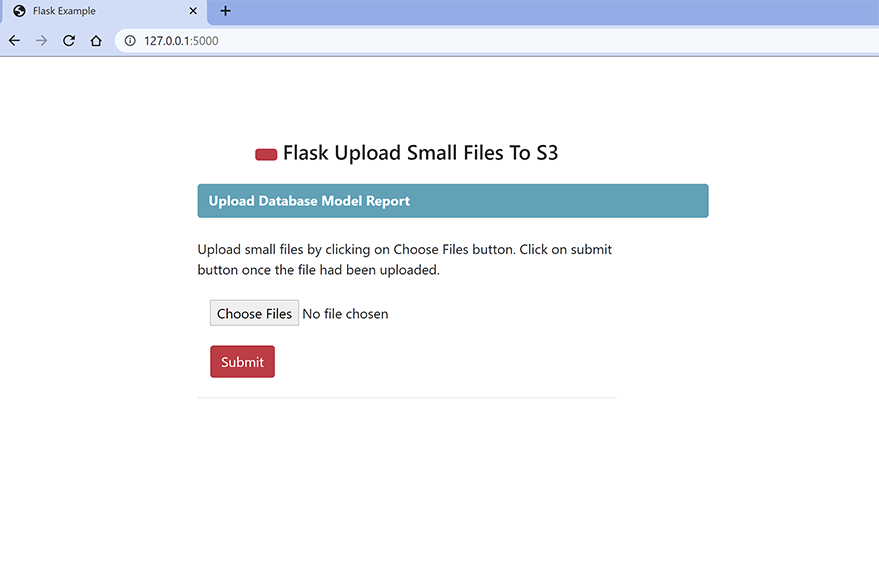
Flask应用程序主页
场景1:
没有选择文件。当用户点击提交按钮时,没有选择任何文件:
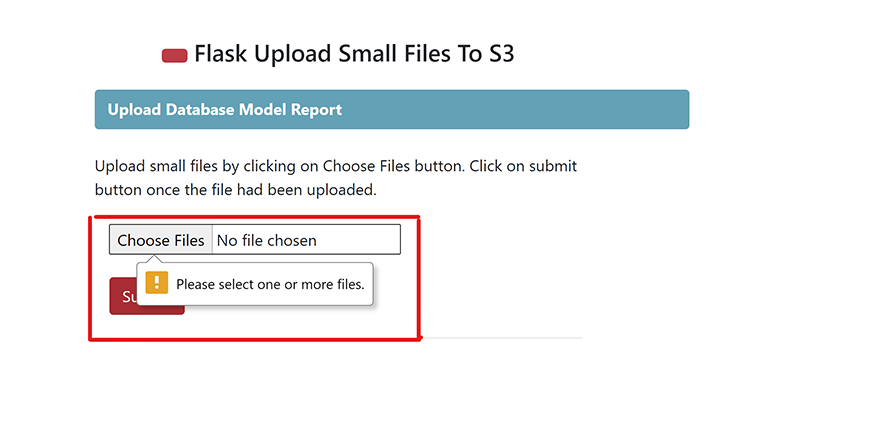
Flask应用程序没有选择要上传的文件
场景2:
错误的文件扩展。当用户试图上传一个没有设置扩展名的文件:
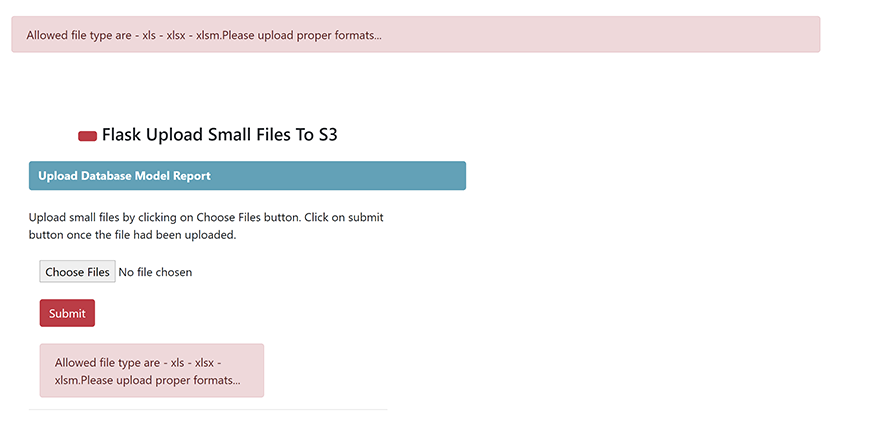
Flask应用程序错误的文件格式
场景3:
文件上传,当用户试图上传正确的文件扩展名时:
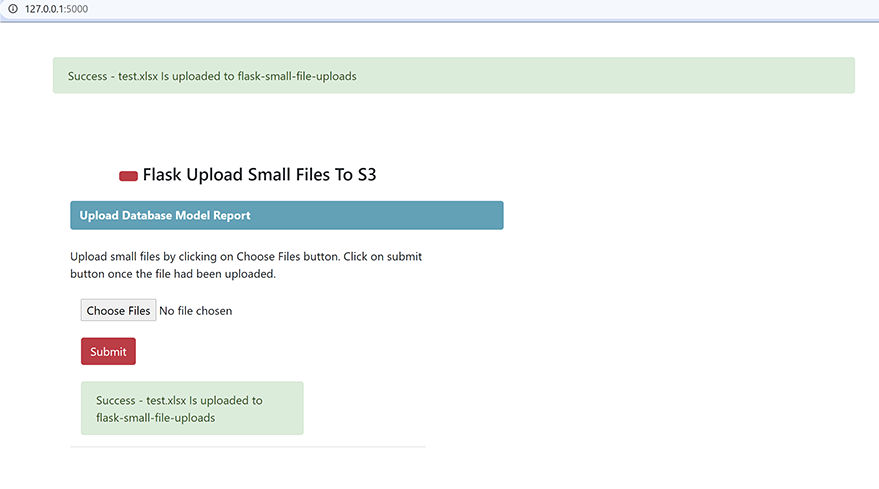
Flask应用程序成功的文件上传
你可以通过运行views/s3.py中的函数--s3_read_objects来验证文件的细节。