COVID仪表盘的升级
我最近升级了我之前建立的COVID Rails仪表盘。在这篇文章中,我描述了升级的动机和细节,同时分享了代码片段。
早在2020年,我就用Rails 6.0.2和Ruby 2.5.1编写了一个COVID仪表盘。给定一个日期范围,它显示确认、死亡和恢复案例数量的累积以及增量数据的线图。它的数据来源是:
-
约翰霍普金斯大学系统科学与工程中心(CSSE)的COVID-19数据存储库。这个GitHub资源库每天提供一个CSV文件,其中包含国家层面的累积数据。
-
这个网站曾经提供印度各州的统计数据,但不幸的是已经停止了运作。州一级的数据只提供到2021年10月30日,可以通过REST API获得JSON格式的数据。
CSSE每天提供累积数据,而covid19india.org每天提供增量数据。
我最近升级了这个应用程序。在这篇文章中,我描述了升级的动机和细节,并分享了代码片段。
目标
该系统有两个Python和Ruby脚本来生成CSV格式的数据集。这些数据被插入Rails仪表盘所访问的数据库中。
这四个生成器脚本是:
gdc.py:GDC代表全球每日累积。该脚本将CSV文件作为一个命令行参数,提取每个国家的数据,并打印出来。输出被重定向到datasets/global_daily_cumulative文件夹中的一个文件。在控制台中运行它的命令是。
Shell
python3 gdc.py ../COVID-19/csse_covid_19_data/csse_covid_19_daily_reports/04-25-2020.csv > datasets/global_daily_cumulative/04-25-2020.csv
gdd.py:GDD代表全球每日三角洲。该脚本通过用当天的数字减去前一天的累积数字来计算一天的Delta数字。输出被重定向到datasets/global_daily_delta文件夹中的一个文件。在控制台中运行它的命令是:
Shell
python3 gdd.py datasets/global_daily_cumulative/04-25-2020.csv > datasets/global_daily_delta/04-25-2020.csv
idd.rb:IDD代表印度每日指数。该脚本提取一天的数据,其日期作为命令行参数提供。输出被重定向到datasets/india_daily_delta文件夹中的一个文件。在控制台中运行它的命令是:
Shell
ruby idd.rb 25-Apr-20 > datasets/india_daily_delta/04-25-2020.csv
注意covid19india.org使用的日期格式是dd-month-yy:
idc.rb:IDC代表印度每日累积。该脚本通过将当天的增量(delta)数字与前一天的累积数字相加,计算出一天的累积数据。输出被重定向到datasets/india_daily_cumulative文件夹中的一个文件。在控制台中运行它的命令是。
Shell
ruby idc.rb 04-25-2020 > datasets/india_daily_cumulative/04-25-2020.csv
daily_all.rb程序读取每个数据集子目录下的所有CSV文件,并制作整理文件内容的聚合数据文件。例如,global_daily_cumulative文件夹中所有文件的内容被整理成global_daily_cumulative.csv。主文件中的每一行都会把数据的日期作为第一个字段。文件名是:
- global_daily_cumulative.csv
- global_daily_delta.csv
- india_daily_cumulative.csv(印度每日累计)。
- india_daily_delta.csv
生成的每日文件和四个汇总的数据文件都有相同的数据格式:日期、地点、确认、死亡、恢复。
问题是,我不得不为一天的数据运行这四个程序。当然,我可以在一个脚本文件中为一周的数据串联一套命令,然后运行该文件,但仍然需要人工来准备这些命令。
我曾经通过使用psql ,把CSV文件作为一个参数传递给PostgreSQL,把数据插入。一个典型的命令如下(在Windows上)。
PowerShell
"C:\Program Files\PostgreSQL\13\bin\psql.exe" -h localhost -U postgres -d covid19 -c "SET client_encoding TO 'UTF8';" -c "\copy global_daily_cumulative(date, place, confirmed, deaths, recovered) FROM 'E:\Code\Corona2020\covid19\global_daily_cumulative.csv' DELIMITER ',' CSV;"
在Linux上,该命令是:
Shell
psql -d covid19 -c "SET client_encoding TO 'UTF8';" -c "\copy india_daily_delta(date, place, confirmed, deaths, recovered) FROM '/var/www/datasets/covid19/india_daily_delta.csv' DELIMITER ',' CSV;"
完整的工作流程如下图所示:
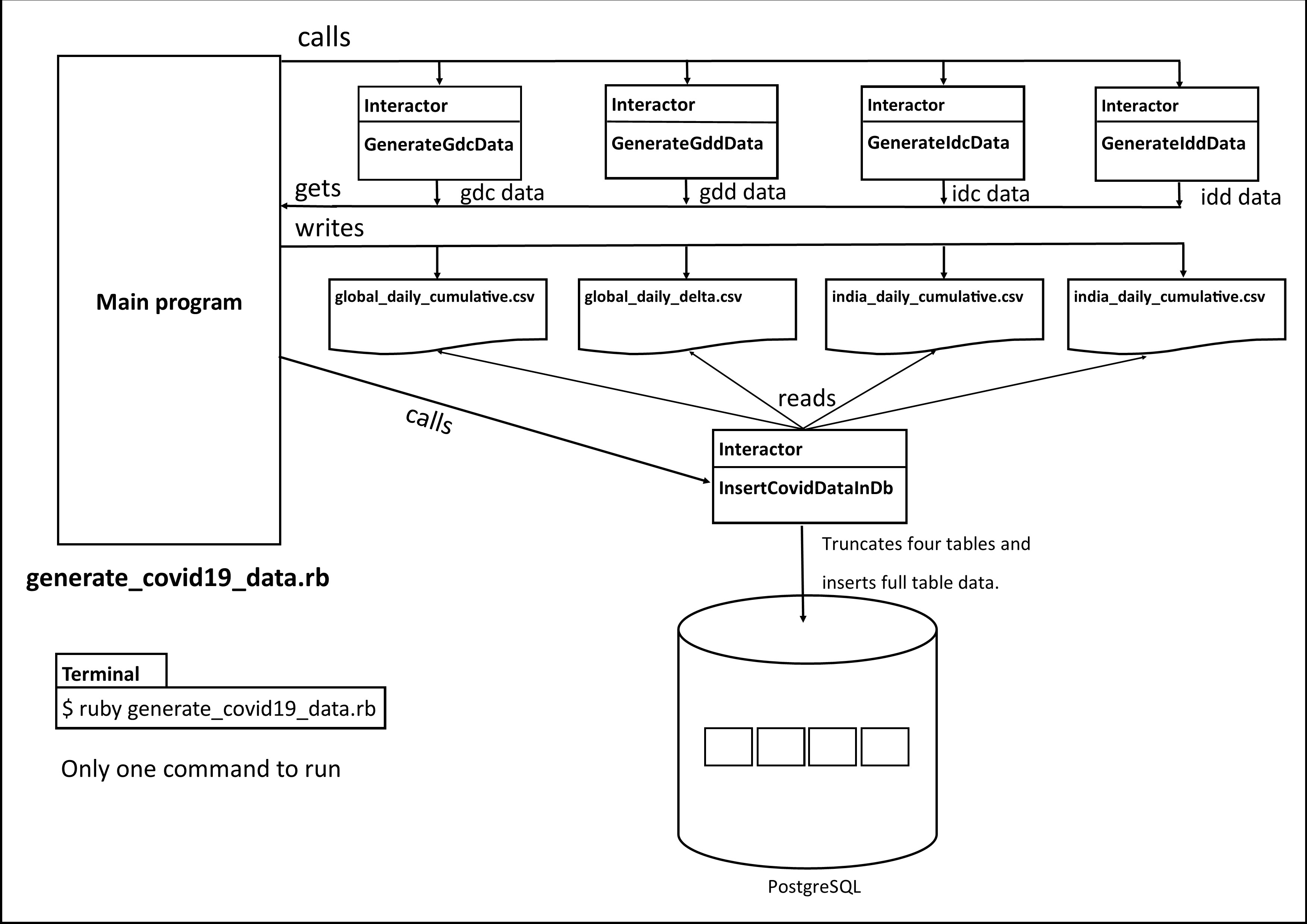
 有三个手动步骤。我的目标是做端到端的自动化。我的想法是,只做一个git克隆或拉到我的电脑上,然后运行一个Ruby文件。就这样了。同时,我还打算升级仪表盘的技术栈。
实施
我选择的语言肯定是Ruby,所以我把两个Python程序也移植到Ruby上。四个生成器脚本变成了Ruby Interactor类,其中的业务逻辑进入了调用方法。 同样地,我将psql命令封装在一个名为InsertCovidDataInDb 的交互器中。它将global_daily_cumulative.csv、global_daily_delta.csv、india_daily_cumulative.csv和india_daily_delta.csv文件中的数据分别插入到global_daily_cumulative、 global_daily_delta、india_daily_delta和india_daily_cumulative表中。
交互器是一个Ruby类,它将包括交互器宝石,并有一个调用方法,你在其中编写业务逻辑。在不创建该类对象的情况下,你调用 "调用 "方法来运行业务逻辑。这种用法类似于Java中的静态方法。文件gdc.rb中有一个交互器类GenerateGdcData ,gdd.rb中有GenerateGddData ,idd.rb中有GenerateIddData ,最后idc.rb中有GenerateIdcData 类。作为一个例子,下面给出的是GenerateGdcData 的代码。
Ruby
require 'interactor'
require 'date'
require 'csv'

$indexes_to_read = {}
$indexes_to_read['format1'] = [1,3,4,5]
$indexes_to_read['format2'] = [3,7,8,9]

class GenerateGdcData
    include Interactor

    def call
        country_data_hash = {}
        Dir[context.folder + '/*.csv'].each do |file_path|
            file_name = File.basename(file_path, ".*")

            # if file_name is before 03-22-2020, file_format = format1 else format2
            file_date     = Date.new(file_name[6..9].to_i, file_name[0..1].to_i, file_name[3..4].to_i)
            file_format   = file_date < Date.new(2020, 03, 22) ? "format1" : "format2"
            file_date_str = file_date.to_s

            country_index     = $indexes_to_read[file_format][0]
            confirmed_index   = $indexes_to_read[file_format][1]
            deaths_index      = $indexes_to_read[file_format][2]
            recovered_index   = $indexes_to_read[file_format][3]

            CSV.foreach(file_path, headers: true) do |row|
                country = row[country_index]
                if country == "Mainland China"
                    country = "China"
                elsif country == "Korea, North"
                    country = "South Korea"
                elsif country == "Korea, South"
                    country = "South Korea"
                elsif country == "Gambia, The"
                    country = "Gambia"
                elsif country == "Bahamas, The"
                    country = "Bahamas"
                elsif country == "The Bahamas"
                    country = "Bahamas"
                elsif country == "Gambia, The"
                    country = "Gambia"
                elsif country == "The Gambia"
                    country = "Gambia"
                end

                row[confirmed_index] = row[confirmed_index] ? row[confirmed_index] : 0
                row[deaths_index]    = row[deaths_index]    ? row[deaths_index]    : 0
                row[recovered_index] = row[recovered_index] ? row[recovered_index] : 0

                confirmed = row[confirmed_index].to_i
                deaths    = row[deaths_index].to_i
                recovered = row[recovered_index].to_i

                if file_format == "format2"
                    row[0] = row[0] ? row[0] : 0
                    row[5] = row[5] ? row[5] : 0.0
                    row[6] = row[6] ? row[6] : 0.0
                end

                if country_data_hash.has_key? [file_date,country]
                    country_data_hash[[file_date_str,country]][0] += confirmed if confirmed
                    country_data_hash[[file_date_str,country]][1] += deaths if deaths
                    country_data_hash[[file_date_str,country]][2] += recovered if recovered
                else
                    country_data_hash[[file_date_str,country]] = [confirmed, deaths, recovered]
                end
            end
        end
        context.gdc = country_data_hash
    end
end
主程序在一个新文件中,generate_covid19_data.rb。它的功能是直接的:调用五个交互器。
tailwind在自动化升级的同时,我还升级了堆栈:即Ruby从2.5.1升级到Ruby 3.1.1;Rails从6.0.2升级到7.0.2.3,加上importmap ;Chartkick从3.4.2升级到4.1.3;最后,PostgreSQL从12到14。
每当我把一个现有的应用程序升级到Rails 7时,我的方法是生成一个示例应用程序,并把不能用的文件复制到现有的应用程序上。具体来说,这些文件是bin、lib和app/javascript文件夹。在那里,我根据我所选择的打包方法做其他的修改。在本例中,我从webpacker 改为importmap ,所以我需要确保bin/importmap.rb文件的存在,以及application.html.erb中的javascript_importmap_tags。
如何运行
克隆CSSE GitHub repo:
Shell
$ git clone https://github.com/CSSEGISandData/COVID-19.git
克隆我的资源库:
Shell
$ git clone https://github.com/mh-github/covid19.git
在你的 PostgreSQL 数据库中创建一个名为 covid19 的数据库。在其中创建四个表。这些命令可以在GitHub上从第92行开始使用。
用你的数据库用户名、密码和端口号更新 covid19/rails/dashboard/config/database.yml。在insert_covid_data_in_db.rb文件中也输入同样的值。
转到项目根目录下:
Shell
$ cd covid19
你将需要ruby-3.1.1。如果你使用rvm,安装这个版本并使用:
Shell
$ rvm install 3.1.1
$ rvm use 3.1.1
安装httparty,pg, 和interactor 宝石,如果你的系统中没有这些宝石:
Shell
$ gem install httparty pg interactor
在数据库中插入数据:
Shell
$ ruby generate_covid19_data.rb path/to/COVID-19
转到仪表板文件夹:
Shell
$ cd rails/dashboard
切换到ruby 3.1.1:
Shell
$ rvm use 3.1.1
安装所需的宝石:
Shell
$ bundle install
运行服务器:
Shell
$ rails s
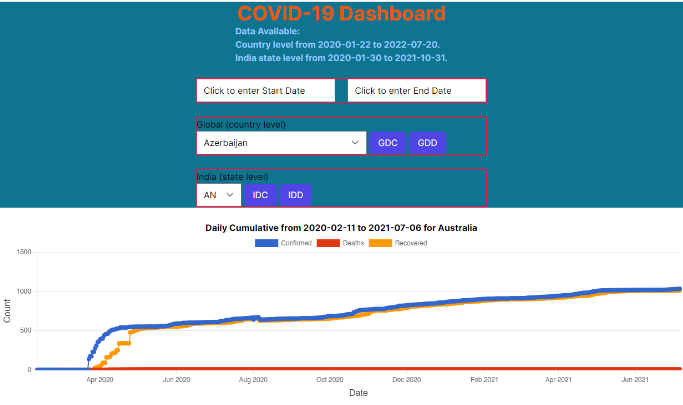
在你的浏览器中访问仪表板http://locahost:3000。这是一张截图,显示澳大利亚的图表。
我放了代码来捕捉数据插入的时间。psql看起来相当快。
考虑到我的基础设施是我的台式电脑,配备i5-4570 CPU @ 3.20GHz处理器,20GB内存,Windows 10 Pro v21H1和WSL2,这些都不坏。我在Windows上运行PostgreSQL,在WSL-Ubuntu上运行我的主要程序。
总结
无论项目大小,总是有机会进行重构和自动化。即使你的程序是一个基本的教程类型,将其技术栈升级到最新的版本也会给你带来实践和学习,你可以将其应用于你的工作应用中