用WebSocket和Node.JS构建HTTP隧道
介绍我如何在WebSocket的基础上建立一个HTTP隧道工具
当我们开发一些与第三方服务集成的应用程序时,我们需要使我们的本地开发服务器暴露在互联网上。要做到这一点,我们需要为我们的本地服务器建立一个HTTP隧道。HTTP隧道是如何工作的?在这篇文章中,我将向你展示我如何建立一个HTTP隧道工具:
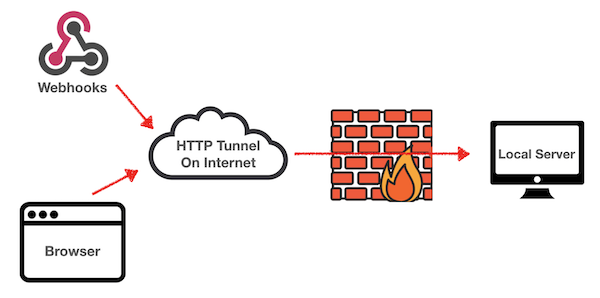 为什么我们需要部署我们自己的HTTP隧道服务?
有很多很棒的HTTP隧道的在线服务。例如,我们可以使用ngrok ,以获得支付固定的公共领域,连接您的本地服务器。它也有一个免费包。但对于免费包,你不能得到一个固定的域名。一旦你重新启动客户端,你将得到一个新的随机域名。当你需要在第三方服务中保存域名时,这是不方便的。
为了得到一个固定的域名,我们可以在我们自己的服务器上部署一个HTTP隧道。ngrok 也提供了一个开源版本,用于服务器端部署。但它是一个老的1.x版本,不建议在生产中部署,有一些严重的可靠性问题。
通过我们自己的服务器,它也可以保证数据的安全。
关于Lite HTTP Tunnel的介绍
Lite HTTP Tunnel是我最近建立的一个自我托管的HTTP隧道服务。你可以用Github仓库中的Heroku 按钮进行部署,以快速获得一个免费的固定Heroku域名。
它是在Express.js 和Socket.io 的基础上建立的,只用了一些代码。它使用WebSocket将HTTP/HTTPS请求从公共服务器流转到你的本地服务器。
我如何实现它
第1步:在服务器和客户端之间建立一个WebSocket连接
使用socket.io ,在服务器端支持WebSocket连接:
JavaScript
const http = require('http');
const express = require('express');
const { Server } = require('socket.io');

const app = express();
const httpServer = http.createServer(app);
const io = new Server(httpServer);

let connectedSocket = null;

io.on('connection', (socket) => {
  console.log('client connected');
  connectedSocket = socket;
  const onMessage = (message) => {
    if (message === 'ping') {
      socket.send('pong');
    }
  }
  const onDisconnect = (reason) => {
    console.log('client disconnected: ', reason);
    connectedSocket = null;
    socket.off('message', onMessage);
    socket.off('error', onError);
  };
  const onError = (e) => {
    connectedSocket = null;
    socket.off('message', onMessage);
    socket.off('disconnect', onDisconnect);
  };
  socket.on('message', onMessage);
  socket.once('disconnect', onDisconnect);
  socket.once('error', onError);
});

httpServer.listen(process.env.PORT);
在客户端连接WebSocket
JavaScript
const { io } = require('socket.io-client');

let socket = null;

function initClient(options) {
  socket = io(options.server, {
    transports: ["websocket"],
    auth: {
      token: options.jwtToken,
    },
  });

  socket.on('connect', () => {
    if (socket.connected) {
      console.log('client connect to server successfully');
    }
  });

  socket.on('connect_error', (e) => {
    console.log('connect error', e && e.message);
  });

  socket.on('disconnect', () => {
    console.log('client disconnected');
  });
}
第2步:使用Jwt令牌来保护Websocket连接
在服务器端,我们使用 socket.io 中间件来拒绝无效的连接:
JavaScript
const jwt = require('jsonwebtoken');

io.use((socket, next) => {
  if (connectedSocket) {
    return next(new Error('Connected error'));
  }
  if (!socket.handshake.auth || !socket.handshake.auth.token){
    next(new Error('Authentication error'));
  }
  jwt.verify(socket.handshake.auth.token, process.env.SECRET_KEY, function(err, decoded) {
    if (err) {
      return next(new Error('Authentication error'));
    }
    if (decoded.token !== process.env.VERIFY_TOKEN) {
      return next(new Error('Authentication error'));
    }
    next();
  });
});
第3步:从服务器到客户端的请求流
我们实现了一个可写流,将请求数据发送到隧道客户端。
JavaScript
const { Writable } = require('stream');

class SocketRequest extends Writable {
  constructor({ socket, requestId, request }) {
    super();
    this._socket = socket;
    this._requestId = requestId;
    this._socket.emit('request', requestId, request);
  }

  _write(chunk, encoding, callback) {
    this._socket.emit('request-pipe', this._requestId, chunk);
    this._socket.conn.once('drain', () => {
      callback();
    });
  }

  _writev(chunks, callback) {
    this._socket.emit('request-pipes', this._requestId, chunks);
    this._socket.conn.once('drain', () => {
      callback();
    });
  }

  _final(callback) {
    this._socket.emit('request-pipe-end', this._requestId);
    this._socket.conn.once('drain', () => {
      callback();
    });
  }

  _destroy(e, callback) {
    if (e) {
      this._socket.emit('request-pipe-error', this._requestId, e && e.message);
      this._socket.conn.once('drain', () => {
        callback();
      });
      return;
    }
    callback();
  }
}

app.use('/', (req, res) => {
  if (!connectedSocket) {
    res.status(404);
    res.send('Not Found');
    return;
  }
  const requestId = uuidV4();
  const socketRequest = new SocketRequest({
    socket: connectedSocket,
    requestId,
    request: {
      method: req.method,
      headers: { ...req.headers },
      path: req.url,
    },
  });
  const onReqError = (e) => {
    socketRequest.destroy(new Error(e || 'Aborted'));
  }
  req.once('aborted', onReqError);
  req.once('error', onReqError);
  req.pipe(socketRequest);
  req.once('finish', () => {
    req.off('aborted', onReqError);
    req.off('error', onReqError);
  });
  // ...
});
实现一个可读流来获取客户端的请求数据。
JavaScript
const stream = require('stream');

class SocketRequest extends stream.Readable {
  constructor({ socket, requestId }) {
    super();
    this._socket = socket;
    this._requestId = requestId;
    const onRequestPipe = (requestId, data) => {
      if (this._requestId === requestId) {
        this.push(data);
      }
    };
    const onRequestPipes = (requestId, data) => {
      if (this._requestId === requestId) {
        data.forEach((chunk) => {
          this.push(chunk);
        });
      }
    };
    const onRequestPipeError = (requestId, error) => {
      if (this._requestId === requestId) {
        this._socket.off('request-pipe', onRequestPipe);
        this._socket.off('request-pipes', onRequestPipes);
        this._socket.off('request-pipe-error', onRequestPipeError);
        this._socket.off('request-pipe-end', onRequestPipeEnd);
        this.destroy(new Error(error));
      }
    };
    const onRequestPipeEnd = (requestId, data) => {
      if (this._requestId === requestId) {
        this._socket.off('request-pipe', onRequestPipe);
        this._socket.off('request-pipes', onRequestPipes);
        this._socket.off('request-pipe-error', onRequestPipeError);
        this._socket.off('request-pipe-end', onRequestPipeEnd);
        if (data) {
          this.push(data);
        }
        this.push(null);
      }
    };
    this._socket.on('request-pipe', onRequestPipe);
    this._socket.on('request-pipes', onRequestPipes);
    this._socket.on('request-pipe-error', onRequestPipeError);
    this._socket.on('request-pipe-end', onRequestPipeEnd);
  }

  _read() {}
}

socket.on('request', (requestId, request) => {
  console.log(`${request.method}: `, request.path);
  request.port = options.port;
  request.hostname = options.host;
  const socketRequest = new SocketRequest({
    requestId,
    socket: socket,
  });
  const localReq = http.request(request);
  socketRequest.pipe(localReq);
  const onSocketRequestError = (e) => {
    socketRequest.off('end', onSocketRequestEnd);
    localReq.destroy(e);
  };
  const onSocketRequestEnd = () => {
    socketRequest.off('error', onSocketRequestError);
  };
  socketRequest.once('error', onSocketRequestError);
  socketRequest.once('end', onSocketRequestEnd);
  // ...
});
第4步:从客户端到服务器的响应流
实现一个可写的流来发送响应数据到隧道服务器。
JavaScript
const stream = require('stream');

class SocketResponse extends stream.Writable {
  constructor({ socket, responseId }) {
    super();
    this._socket = socket;
    this._responseId = responseId;
  }

  _write(chunk, encoding, callback) {
    this._socket.emit('response-pipe', this._responseId, chunk);
    this._socket.io.engine.once('drain', () => {
      callback();
    });
  }

  _writev(chunks, callback) {
    this._socket.emit('response-pipes', this._responseId, chunks);
    this._socket.io.engine.once('drain', () => {
      callback();
    });
  }

  _final(callback) {
    this._socket.emit('response-pipe-end', this._responseId);
    this._socket.io.engine.once('drain', () => {
      callback();
    });
  }

  _destroy(e, callback) {
    if (e) {
      this._socket.emit('response-pipe-error', this._responseId, e && e.message);
      this._socket.io.engine.once('drain', () => {
        callback();
      });
      return;
    }
    callback();
  }

  writeHead(statusCode, statusMessage, headers) {
    this._socket.emit('response', this._responseId, {
      statusCode,
      statusMessage,
      headers,
    });
  }
}

socket.on('request', (requestId, request) => {
    // ...stream request and send request to local server...
    const onLocalResponse = (localRes) => {
      localReq.off('error', onLocalError);
      const socketResponse = new SocketResponse({
        responseId: requestId,
        socket: socket,
      });
      socketResponse.writeHead(
        localRes.statusCode,
        localRes.statusMessage,
        localRes.headers
      );
      localRes.pipe(socketResponse);
    };
    const onLocalError = (error) => {
      console.log(error);
      localReq.off('response', onLocalResponse);
      socket.emit('request-error', requestId, error && error.message);
      socketRequest.destroy(error);
    };
    localReq.once('error', onLocalError);
    localReq.once('response', onLocalResponse);
  });
实现一个可读的流来获取隧道服务器中的响应数据:
JavaScript
class SocketResponse extends Readable {
  constructor({ socket, responseId }) {
    super();
    this._socket = socket;
    this._responseId = responseId;
    const onResponse = (responseId, data) => {
      if (this._responseId === responseId) {
        this._socket.off('response', onResponse);
        this._socket.off('request-error', onRequestError);
        this.emit('response', data.statusCode, data.statusMessage, data.headers);
      }
    }
    const onResponsePipe = (responseId, data) => {
      if (this._responseId === responseId) {
        this.push(data);
      }
    };
    const onResponsePipes = (responseId, data) => {
      if (this._responseId === responseId) {
        data.forEach((chunk) => {
          this.push(chunk);
        });
      }
    };
    const onResponsePipeError = (responseId, error) => {
      if (this._responseId !== responseId) {
        return;
      }
      this._socket.off('response-pipe', onResponsePipe);
      this._socket.off('response-pipes', onResponsePipes);
      this._socket.off('response-pipe-error', onResponsePipeError);
      this._socket.off('response-pipe-end', onResponsePipeEnd);
      this.destroy(new Error(error));
    };
    const onResponsePipeEnd = (responseId, data) => {
      if (this._responseId !== responseId) {
        return;
      }
      if (data) {
        this.push(data);
      }
      this._socket.off('response-pipe', onResponsePipe);
      this._socket.off('response-pipes', onResponsePipes);
      this._socket.off('response-pipe-error', onResponsePipeError);
      this._socket.off('response-pipe-end', onResponsePipeEnd);
      this.push(null);
    };
    const onRequestError = (requestId, error) => {
      if (requestId === this._responseId) {
        this._socket.off('request-error', onRequestError);
        this._socket.off('response', onResponse);
        this._socket.off('response-pipe', onResponsePipe);
        this._socket.off('response-pipes', onResponsePipes);
        this._socket.off('response-pipe-error', onResponsePipeError);
        this._socket.off('response-pipe-end', onResponsePipeEnd);
        this.emit('requestError', error);
      }
    };
    this._socket.on('response', onResponse);
    this._socket.on('response-pipe', onResponsePipe);
    this._socket.on('response-pipes', onResponsePipes);
    this._socket.on('response-pipe-error', onResponsePipeError);
    this._socket.on('response-pipe-end', onResponsePipeEnd);
    this._socket.on('request-error', onRequestError);
  }

  _read(size) {}
}

app.use('/', (req, res) => {
  // ... stream request to tunnel client
  const onResponse = (statusCode, statusMessage, headers) => {
    socketRequest.off('requestError', onRequestError)
    res.writeHead(statusCode, statusMessage, headers);
  };
  socketResponse.once('requestError', onRequestError)
  socketResponse.once('response', onResponse);
  socketResponse.pipe(res);
  const onSocketError = () => {
    res.end(500);
  };
  socketResponse.once('error', onSocketError);
  connectedSocket.once('close', onSocketError)
  res.once('close', () => {
    connectedSocket.off('close', onSocketError);
    socketResponse.off('error', onSocketError);
  });
});
在所有的步骤之后,我们已经支持将HTTP请求流到本地计算机,并从本地服务器发送响应到原始请求。这是一个简单的解决方案,但它是稳定的,易于部署在任何Node.js 环境。
更多
如果你只是想找一个有免费固定域名的HTTP隧道服务,你可以尝试用Github README中的Heroku deploy button ,把Lite HTTP Tunnel项目部署到Heroku 。希望你能从这篇文章中学到一些东西。