

了解关于内联CSS的一切

目录
内联CSS是在HTML文档中用插入样式表来定义单个元素的技术。我们可以用三种方法添加CSS:内联,内部,和外部。
它具有交互式和独特的风格,可以创建一个单一的HTML元素;我们可以在样式属性上定义内联CSS。
下面是带有输出的基本语法例子。
<!DOCTYPE html>

<html>

<body>

<h1 style="color:blue;text-align:center;">This is a placeholder of heading</h1>

<p style="color:red;">This is a placeholder for a paragraph.</p>

</body>

</html>
输出
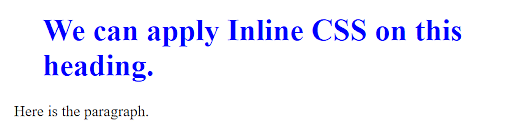
内联风格的HTML
内联式HTML的主要优点是它很方便,可以在一个 HTML标签中加入多个样式属性,并定义一个元素的CSS样式。
例如
<p style="color: orange; font-size: 25px;">Here is my first paragraph.</p>

<p>Here is my second paragraph.</p>
HTML中的内联CSS
通过内联CSS,我们可以按照下面的例子,用一个HTML元素定义样式属性。
我们也可以定义内联CSS并将其整合到样式表中。它可以帮助我们覆盖不同的CSS。
<element style="CSS property: value">
例1:
<!DOCTYPE html>

<html>

<head>

<style>

selector {

CSS property: value;

}

</style>

</head>
例2:CSS布局--显示:inline-block
span.a {

  display: inline; /* the default for span */

  width: 100px;

  height: 100px;

  padding: 5px;

  border: 1px solid blue;

  background-color: yellow;

}

span.b {

  display: inline-block;

  width: 100px;

  height: 100px;

  padding: 5px;

  border: 1px solid blue;

  background-color: yellow;

}

span.c {

  display: block;

  width: 100px;

  height: 100px;

  padding: 5px;

  border: 1px solid blue;

  background-color: yellow;

}
例3:使用inline-block来创建导航链接
.nav {

  background-color: yellow;

  list-style-type: none;

  text-align: center;

  padding: 0;

  margin: 0;

}

.nav li {

  display: inline-block;

  font-size: 20px;

  padding: 20px;

}
例4:CSS组合器
这里,四种类型的CSS选择器可以由一个简单的选择器组成。我们可以在简单选择器之间涉及一个组合器:
- 后裔选择器(space)
- 子选择器(>)。
- 相邻的兄弟姐妹选择器(+)
- 一般兄弟姐妹选择器(~)。
后裔选择器(空格)
<!DOCTYPE html>

<html>

<head>

<style>

div p {

  background-color: orange;

}

</style>

</head>

<body>

<h2>Here is the sample of Descendant Selector</h2>

<div>

  <p>Paragraph 1 in the div.</p>

  <p>Paragraph 2 in the div.</p>

  <section><p>Paragraph 3 in the div.</p></section>

</div>

<p>Paragraph 4. Not in a div.</p>

<p>Paragraph 5. Not in a div.</p>

</body>

</html>
输出
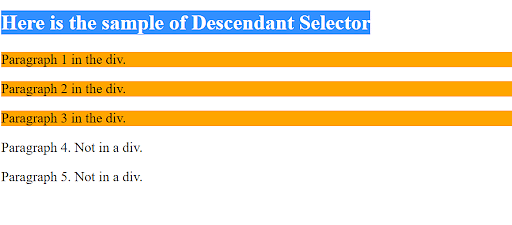
子选择器(>)
<!DOCTYPE html>

<html>

<head>

<style>

div > p {

  background-color: green;

}

</style>

</head>

<body>

<h2>Here is the sample of Child Selector</h2>

<p>The child selector (>) selects all elements that are the children of a defined element.</p>

<div>

  <p>Paragraph 1 in the div.</p>

  <p>Paragraph 2 in the div.</p>

  <section>

    <!-- not Child but Descendant -->

    <p>Paragraph 3 in the div (inside a section element).</p>

  </section>

  <p>Paragraph 4 in the div.</p>

</div>

<p>Paragraph 5. Not in a div.</p>

<p>Paragraph 6. Not in a div.</p>

</body>

</html>
输出
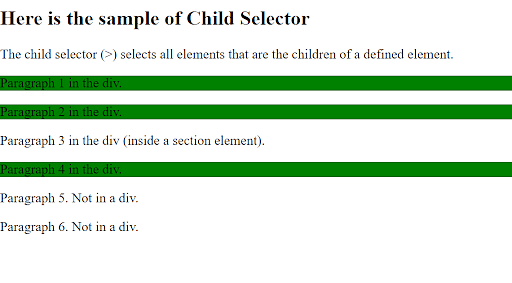
相邻的兄弟姐妹选择器(+)
<!DOCTYPE html>

<html>

<head>

<style>

div + p {

  background-color: Pink;

}

</style>

</head>

<body>

<h2>Here is the sample of Adjacent Sibling Selector</h2>

<p>The + selector is used to select or pick an element directly after another defined element.</p>

<div>

  <p>Paragraph 1 in the div.</p>

  <p>Paragraph 2 in the div.</p>

</div>

<p>Paragraph 3. After a div.</p>

<p>Paragraph 4. After a div.</p>

<div>

  <p>Paragraph 5 in the div.</p>

  <p>Paragraph 6 in the div.</p>

</div>

<p>Paragraph 7. After a div.</p>

<p>Paragraph 8. After a div.</p>

</body>

</html>
输出
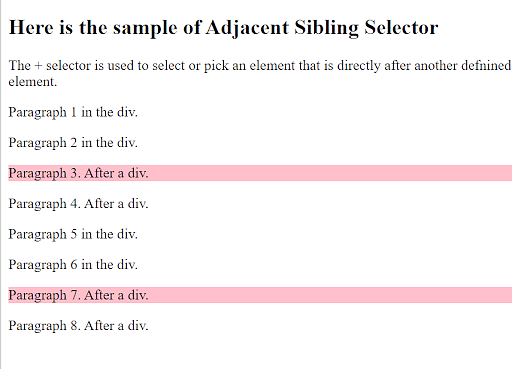
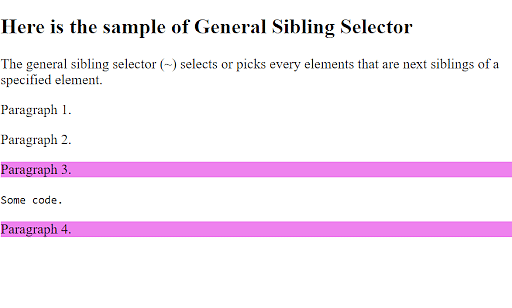
一般兄弟姐妹选择器(~)
<!DOCTYPE html>

<html>

<head>

<style>

div ~ p {

  background-color: violet;

}

</style>

</head>

<body>

<h2>Here is the sample of General Sibling Selector</h2>

<p>The general sibling selector (~) selects or picks every element of the next siblings of a specified element.</p>

<p>Paragraph 1.</p>

<div>

  <p>Paragraph 2.</p>

</div>

<p>Paragraph 3.</p>

<code>Some code.</code>

<p>Paragraph 4.</p>

</body>

</html>
输出
CSS内联样式
下面是CSS内联样式的例子
例子1:
body {

background-color: powderblue;

}

h1 {

color: blue;

}

p {

color: red;

}
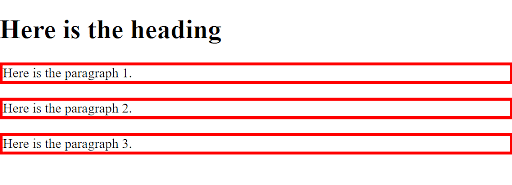
例2:用于CSS边框
<!DOCTYPE html>

<html>

<head>

<style>

p {

  border: 4px solid red;

}

</style>

</head>

<body>

<h1>Here is the heading</h1>

<p>Here is the paragraph 1.</p>

<p>Here is the paragraph 2.</p>

<p>Here is the paragraph 3.</p>

</body>

</html>
输出
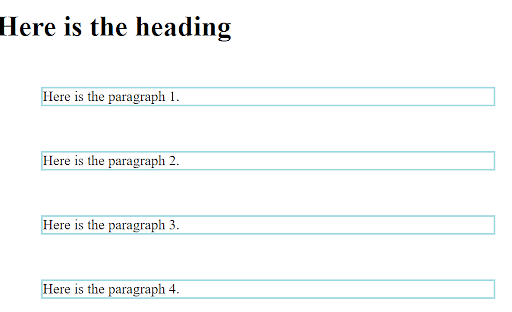
例3:CSS边距
这个示例代码指定了边框外的空白。
<!DOCTYPE html>

<html>

<head>

<style>

p {

  border: 2px solid powderblue;

  margin: 50px;

}

</style>

</head>

<body>

<h1>Here is the heading</h1>

<p>Here is the paragraph 1.</p>

<p>Here is the paragraph 2.</p>

<p>Here is the paragraph 3.</p>

<p>Here is the paragraph 4.</p>

</body>

</html>
输出
React中的内联风格
对于使用内联样式属性定义元素的样式,下面是一个Javascript对象的例子。
例子1:插入一个具有样式细节的对象
class MyHeader extends React.Component {

  render() {

    return (

      <div>

      <h1 style={{color: "red"}}>This is the example of inline CSS using React Style!</h1>

      <p>Please add a style!</p>

      </div>

    );

  }

}
例2:JavaScript对象
在这里,在这个例子中,我们可以使用style属性来定义对象的造型细节。
class TestHeader extends React.Component {

  render() {

    const Teststyle = {

      color: "white",

      backgroundColor: "DodgerBlue",

      padding: "10px",

      fontFamily: "Arial"

    };

    return (

      <div>

      <h1 style={Teststyle}>Hello Style!</h1>

      <p>Add a little style!</p>

      </div>

    );

  }

}
内联CSS的劣势
- 为每个HTML元素添加内联CSS规则很耗时,而且在HTML页面上会出现混乱的结果。
- 实现多个样式元素会影响HTML页面的大小和下载时间。
- 它提供了不同的版本,如CSS、CSS 1、CSS 2和CSS 3,这可能会让开发人员感到困惑,无法决定他们需要参考哪个版本,而且在网络浏览器中会给出错误的结果。
- 碎片化。它给浏览器带来了不兼容的问题,即它可能在一个浏览器上工作,而在另一种类型的浏览器上可能不工作。
- 缺少安全性。
总结
我们希望这篇文章能帮助你了解内联CSS。在这篇文章中,我们用几个例子讨论了CSS Inline的各种概念。这篇文章对来自Java和.net背景的专业开发者、应用架构、云计算专家、测试人员以及其他寻找HTML5和不同CSS的各种用途的学习者会有帮助。

