如果你在你的时代使用React,你可能不得不写一些*.bind(this)*的代码。是的,我知道:
- 它看起来很难看,另外。
- 它占用了代码库中的一些额外空间。
幸运的是,有一些提议的JavaScript的特性可以使*.bind(this)*成为我们的过去。
在我解释如何失去*.bind(this)*之前,我先给你看一个简短的例子,说明在什么地方可以使用这个功能。假设我们想渲染一个按钮,当你点击它时,它的文本会发生变化。为了做到这一点,我们会写一个类似于下面这个🔽的组件:
import React, { Component } from "react"

class ButtonWithBind extends Component {
  constructor() {
    super()

    this.state = { toggle: false }
  }

  toggleButton() {
    this.setState((prevState) => ({ toggle: !prevState.toggle }))
  }

  render() {
    const toggle = this.state.toggle

    return (
      <div>
        <button onClick={this.toggleButton}>{toggle ? "ON" : "OFF"}</button>
      </div>
    )
  }
}

export default ButtonWithBind
我们在构造函数中把状态中的切换开关设置为false。
同时,我们将toggleButton函数添加为onClick处理函数,所以当按钮被点击时它将被调用。
而且,我们创建了一个简单的toggleButton函数,当被调用时可以切换状态。
很好,看来我们可以开始了!
如果我们继续点击渲染过的按钮,我们会得到一个像这样的TypeError。
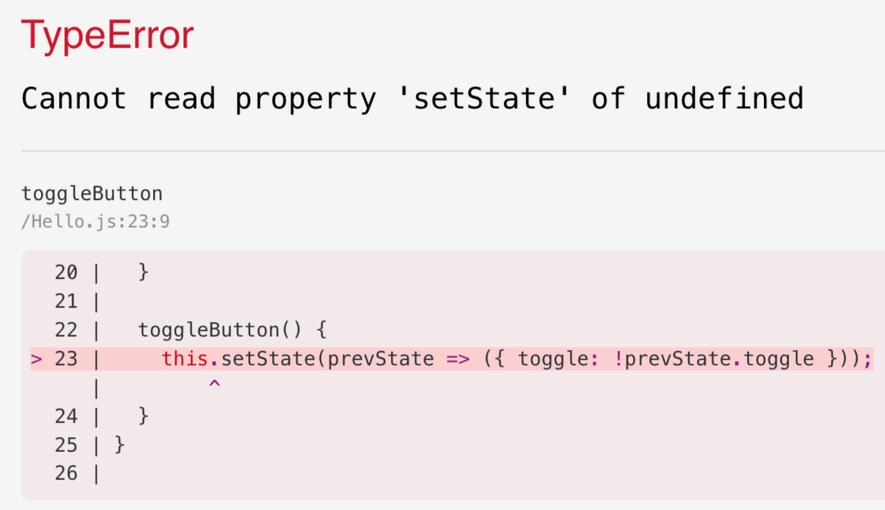
该死的!它应该工作🤔。
我们得到一个错误,因为当onClick调用我们的toggleButton函数时,这没有被定义。
通常情况下,你可以通过将其绑定到toggleButton函数上来解决这个问题,这样它就能一直保持不变了。让我们继续前进,在构造函数中把它与我们的函数绑定。
this.toggleButton = this.toggleButton.bind(this)
添加之后,我们的按钮组件应该看起来像这样:
import React, { Component } from "react"

class ButtonWithBind extends Component {
  constructor() {
    super()

    this.state = { toggle: false }

    this.toggleButton = this.toggleButton.bind(this)
  }

  toggleButton() {
    this.setState((prevState) => ({ toggle: !prevState.toggle }))
  }

  render() {
    const toggle = this.state.toggle

    return (
      <div>
        <button onClick={this.toggleButton}>{toggle ? "ON" : "OFF"}</button>
      </div>
    )
  }
}

export default ButtonWithBind
试试吧,它应该能完成工作:
 Yay, it's working!🍾
🔪 .bind(this)
现在,让我们去掉那个恼人的*.bind(this)。为了做到这一点,我们将使用JavaScript中实验性的*公共类字段功能。公共类字段功能允许你在你的类中使用箭头函数语法。
toggleButton = () => {
  this.setState((prevState) => ({ toggle: !prevState.toggle }))
}
箭头函数没有自己的this,但它有包围的执行上下文的this值。箭头函数在词法上绑定了它们的上下文,因此this ,实际上指的是原始的上下文。如果你喜欢命名的话,这就叫做词法范围。基本上,它使我们不用在代码中做.bind(this)。
请注意,这是JS中的一个实验性功能,这意味着它还没有被ECMAScript标准接受,但让我们继续祈祷它能🤞。在这之前,你可以配置babel来转译它,使用 babel-plugin-transform-class-properties.
另外,如果你在使用create-react-app,公有类的字段是开箱即支持的,所以不需要额外的设置🤘。
可能出现的陷阱
请记住,这可能会影响两件事。第一件事是内存和性能。当你使用类字段来定义一个函数时,你的方法驻留在类的每个实例上,而不是像使用绑定方法那样驻留在原型上。你可以在Donavon West的一篇很好的文章中深入了解这个问题--《使用ES6 React类的内存使用解密》。
使用公共类字段可能影响的第二件事是你如何编写单元测试。你将不能像这样使用组件原型来存根于函数调用:
const spy = jest.spyOn(ButtonWithoutBind.prototype, "toggleButton")
expect(spy).toHaveBeenCalled()
你将不得不找到另一种方法来存根,要么通过在道具中传递间谍,要么检查状态变化。
在组件中使用它
现在,让我们直接跳到如何在我们的组件中使用公共类字段,并改变我们的toggleButton函数,以便失去*.bind(this)*:
import React, { Component } from "react"

class ButtonWithoutBind extends Component {
  constructor() {
    super()

    this.state = { toggle: false }
  }

  toggleButton = () => {
    this.setState((prevState) => ({ toggle: !prevState.toggle }))
  }

  render() {
    const toggle = this.state.toggle

    return (
      <div>
        <button onClick={this.toggleButton}>{toggle ? "ON" : "OFF"}</button>
      </div>
    )
  }
}

export default ButtonWithoutBind
每个React开发者都会:看着第22-24行"哇,好漂亮💅。再也没有那个讨厌的小.bind(this)了"。
公有类字段的好处是,我们可以在构造函数中直接定义状态,并缩小我们的组件:
import React, { Component } from "react"

class ButtonWithoutBind extends Component {
  state = { toggle: false }

  toggleButton = () => {
    this.setState((prevState) => ({ toggle: !prevState.toggle }))
  }

  render() {
    const toggle = this.state.toggle

    return (
      <div>
        <button onClick={this.toggleButton}>{toggle ? "ON" : "OFF"}</button>
      </div>
    )
  }
}

export default ButtonWithoutBind
voilà,我们已经失去了*.bind(this)*,而且我们的组件也瘦了一些,我把这称为胜利🏁!我们应该得到某种奖励。你可以去冰箱里拿杯冷饮🍺,或者巧克力🍫,或者任何你喜欢的东西,因为你刚刚学会了在React中可以做的全新的事情🎉。
非常感谢Kent C. Dodds制作了一个关于这个的视频。没有他,这篇文章就不会存在。干杯,肯特🍻。