

使用Railshighlight 帮助器,将搜索结果匹配的内容包裹在<mark> 标签中。
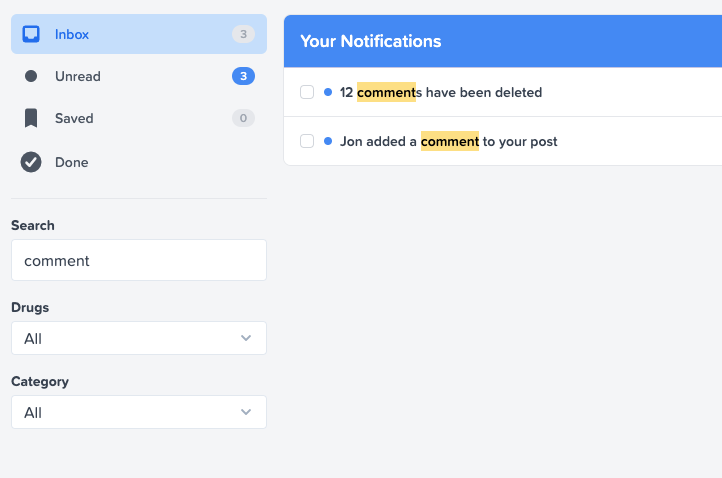
在通知列表中突出显示搜索词 "评论"。
使用方法
通过参数(如params[:search] )将搜索词传递给你的控制器,并使用它来过滤你的结果:
# app/controllers/inbox_controller.rb
class InboxController < ApplicationController
  def index
    @notifications = Current.user.notifications.for_search(params[:search])
  end
end

# app/models/notification.rb
class Notification < ApplicationRecord
  belongs_to :recipient, class_name: "User"

  validates :message, presence: true

  def self.for_search(term)
    if term.present?
      # Implement searching however you'd like
      where("message ILIKE ?", "%#{term}%")
    else
      all
    end
  end
end
渲染通知并在消息上使用TextHelper#highlight ,以强调匹配的查询:
<% @notifications.each do |notification| %>
  <%= link_to highlight(notification.message, params[:search]), notification %>
<% end %>
你可以随心所欲地设计<mark> 标签:
mark {
  background-color: yellow;
}
选项
你可以传递一个字符串、数组或一个重合词作为要匹配的短语,匹配是不分大小写的:
highlight('Boring Rails is the best', 'rails')
# => Boring <mark>Rails</mark> is the best

highlight('Boring Rails is the best', /rails|best/)
# => Boring <mark>Rails</mark> is the <mark>best</mark>

highlight('Boring Rails is the best', ['is', 'best'])
# => Boring Rails <mark>is</mark> the <mark>best</mark>
如果没有匹配,或者你把短语留空,一切仍然正常:
highlight('Boring Rails is the best', 'JavaScript')
# => Boring Rails is the best

highlight('Boring Rails is the best', '') # nil works too
# => Boring Rails is the best
你还可以使用highlighter 选项覆盖包裹在匹配词周围的HTML标记。使用\1 来引用匹配的内容。默认情况下,输出是经过消毒处理的:
highlight('Boring is best', 'best', highlight: '<b>\1</b>')
# => Boring is <b>best</b>

highlight('Boring is best', 'best', highlight: '<a href="tagged?q=\1">\1</a>')
# => Boring is <b>best</b>
如果你需要运行额外的代码,你可以传递一个块来代替渲染:
highlight('Blog: Boring Rails', 'rails') do |match|
  link_to(match, public_share_path(term: match))
end
# => Blog: Boring <a href="/public/share?term=Rails">Rails</a>

