Flutter用过的图表库:
- fl_chart ,缺点是自定义一些东西比较麻烦,而且数据填入的层级问题比较反人类
- graphic ,缺点是数据不能为空,没有空布局,可以先判断是否有数据然后在加载列表
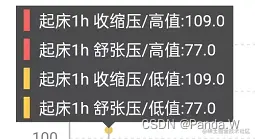
graphic自定义TooltipGuide的实现:
List<Figure> _renderer(Offset anchor, Map<int, Tuple> selectedTuples, Map<String, Color> groupColors) {
if (anchor.dy.isNaN) {
anchor = Offset(anchor.dx, 50)
}
final windowPath = Path()
const space = 5
const bgColor = Color(0xFF4C4C4C)
List<Figure> figures = []
var width = 0.0
var height = 0.0
List<TextPainter> textPainters = []
List<String> groupNames = []
selectedTuples.removeWhere((key, value) => value[yName].isNaN)
selectedTuples.forEach((key, value) {
final text = '${value[xName]} ${value[groupName] ?? ''}:${value[yName]}'
final textPaint = TextPainter(
text: TextSpan(text: text, style: TextStyle(color: Colors.white, fontSize: 11.fontSize)),
textDirection: TextDirection.ltr,
)
textPaint.layout()
if (width < textPaint.width) {
width = textPaint.width
}
height = height + textPaint.height + space
textPainters.add(textPaint)
groupNames.add(value[groupName] ?? '')
})
width = width + 4 * space
var start = Offset(anchor.dx - width / 2, anchor.dy - height)
var windowRect = Rect.fromLTWH(
start.dx,
start.dy - space * 3,
width,
height,
)
if (windowRect.left < 0) {
final left = -windowRect.left + space
windowRect = windowRect.translate(left, 0)
start = Offset(start.dx + left, start.dy)
}
if (windowRect.right > GetUtil.width) {
final right = -(windowRect.right - GetUtil.width) - space
windowRect = windowRect.translate(right, 0)
start = Offset(start.dx + right, start.dy)
}
windowPath.addRect(windowRect)
figures.add(PathFigure(
windowPath,
Paint()..color = bgColor,
))
var startX = start.dx + space
var startY = windowRect.top + space / 2
textPainters.asMap().forEach((key, value) {
final hint = Path()
..addRRect(
RRect.fromLTRBR(startX, startY, startX + 4, startY + value.height, const Radius.circular(0)),
)
figures.add(PathFigure(
hint,
Paint()..color = groupColors[groupNames[key]] ?? Colours.primaryColor,
))
figures.add(TextFigure(
value,
Offset(startX + 2 * space, startY),
))
startY = startY + value.height + space
})
//三角
final trianglePath = Path()
final x = anchor.dx
final y = windowRect.bottom - 1
trianglePath.moveTo(x, y)
trianglePath.lineTo(x - 5, y)
trianglePath.lineTo(x, y + 5)
trianglePath.lineTo(x + 5, y)
trianglePath.close()
figures.add(PathFigure(trianglePath, Paint()..color = bgColor))
return figures
}
变量
| 变量名 | 类型 | 备注 |
|---|
| xName | String | x轴的名称 |
| yName | String | y轴的名称 |
| groupName | String | 组的名称(也就是不同线) |
| groupColors | Map<String, Color> | 不同组对应的颜色 |
效果图: