ASP.NET Core 3最近已经发布了。React SPA可以利用的新功能有哪些?让我们来了解一下 ...
MVC服务注册
在Startup 类的ConfigureServices 方法中,有一些新的扩展方法用于添加MVC相关的服务。AddMvc 将继续照常工作,添加所有MVC相关的服务。然而,我们现在有AddControllers 、AddControllersWithViews 和AddRazorPages ,它们为更多的特定场景添加服务。
AddControllers.当应用程序是纯粹的网络API,不需要任何服务器端的视图或Razor页面时,可以使用这个方法:
public void ConfigureServices(IServiceCollection services)
{
  services.AddControllers();
}
AddControllersWithViews.当应用程序是一个网络API,有一些服务器端的视图时,可以使用这个服务。AddRazorPages.当应用程序使用Razor页面时可以使用这个。请注意,为了获得Web API的功能,还需要调用AddControllers或AddControllersWithViews。
端点路由
端点路由将匹配哪个端点将执行的过程与该端点的实际运行分开。 这使得路由信息可以在HTTP请求处理管道中更早地被使用。
app.UseMvc 为了在ASP.NET Core 3.0中为我们所有的API控制器创建端点,我们用app.UseEndpoints :
public void Configure(IApplicationBuilder app, IWebHostEnvironment env)
{
  ...

  app.UseEndpoints(endpoints =>
  {
    endpoints.MapControllers();
  });
}
关于端点路由的更多信息,请看Areg Sarkissian的这篇精彩文章。
内置JSON支持
ASP.NET Core不再依赖Json.NET来序列化和反序列化JSON。在System.Text.Json 名称空间中添加了一个JsonSerializer 类,其中包含Serialize 和Deserialize 方法。在内部,ASP.NET Core在模型绑定过程中使用这个类。如果我们的网络API需要调用其他网络API,我们可以使用它来反序列化响应:
var jsonContent = await response.Content.ReadAsStringAsync();
var user = JsonSerializer.Deserialize<User>(jsonContent, new JsonSerializerOptions
{
  PropertyNameCaseInsensitive = true
});
C# 8
C#有很多有用的功能,包括可归零的引用类型。我们需要在我们的项目文件中启用可归零引用类型,如下所示:
<PropertyGroup>
  ...
  <LangVersion>8.0</LangVersion>
  <Nullable>enable</Nullable>
</PropertyGroup>
参考类型在默认情况下是不能归零的。然后,当我们的代码中可能出现空引用异常时,Visual Studio会警告我们。
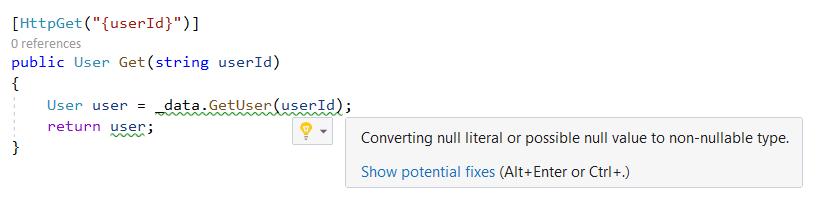
开关表达式也很好。这些是映射代码的理想选择,为我们节省了一些宝贵的击键次数:
public static string GetLevel(int level) =>
  level switch
  {
    1 => "low",
    2 => "medium",
    3 => "high",
    _ => throw new ArgumentException("invalid level"),
  };
查看文档以了解C# 8的其他功能。
SPA模板可以包括认证和授权
当使用SPA模板创建一个新项目时,现在可以选择包括认证:

这个例子的web API控制器使用Authorize 属性实现了一个受保护的端点:
[Authorize]
[ApiController]
[Route("[controller]")]
public class WeatherForecastController : ControllerBase
{
    ...
}
还请注意,这个例子的web API控制器现在继承了ControllerBase ,并使用ApiController 属性进行了装饰。使用ControllerBase ,意味着该类不包含处理服务器端视图的不必要的东西。ApiController 属性意味着无效的请求模型将返回HTTP状态代码400(坏请求),而我们不需要在动作方法中做任何工作。
React客户端使用一个AuthorizeService 类来封装与身份服务器的交互。这是对oidc-client npm包的一个很好的包装。
React客户端还包含AuthorizeRoute 组件,这样可以轻松实现授权路径:
<Layout>
  <Route exact path='/' component={Home} />
  <Route path='/counter' component={Counter} />
  <AuthorizeRoute path='/fetch-data' component={FetchData} />
  <Route path={ApplicationPaths.ApiAuthorizationPrefix} component={ApiAuthorizationRoutes} />
</Layout>
如果一个未经认证的用户访问一个受保护的路径,他们将被重定向到身份服务器进行认证。很好!
Create React App 3.x
SPA模板使用的Create React App的版本已经从v1提升到v3。但不要太兴奋,React的版本仍然很旧,而且是预先钩住的。TypeScript也被列为依赖项,但该项目似乎并没有使用它:
"dependencies": {
  "babel-eslint": "10.0.1",
  "bootstrap": "^4.1.3",
  "jquery": "^3.4.1",
  "merge": "^1.2.1",
  "oidc-client": "^1.9.0-beta.4",
  "react": "^16.0.0",
  "react-dom": "^16.0.0",
  "react-router-bootstrap": "^0.24.4",
  "react-router-dom": "^4.2.2",
  "react-scripts": "^3.0.1",
  "reactstrap": "^6.3.0",
  "rimraf": "^2.6.2"
},
"devDependencies": {
  "ajv": "^6.9.1",
  "cross-env": "^5.2.0",
  "eslint": "^5.12.0",
  "eslint-config-react-app": "^4.0.1",
  "eslint-plugin-flowtype": "^2.0.0",
  "eslint-plugin-import": "^2.14.0",
  "eslint-plugin-jsx-a11y": "^6.2.1",
  "eslint-plugin-react": "^7.11.1",
  "typescript": "^3.5.2"
}
SignalR端点和自动重新连接
像Web API端点一样,SignalR端点可以使用新的端点路由:
app.UseEndpoints(endpoints =>
{
  endpoints.MapControllers();
  endpoints.MapHub<QuestionsHub>("/questionshub");
});
在React客户端,当建立SignalR连接时,我们可以告诉它在连接丢失时自动重新连接:
const connection = new HubConnectionBuilder()
  .withUrl(`${server}/questionshub`)
  .withAutomaticReconnect()
  .build();