先看效果
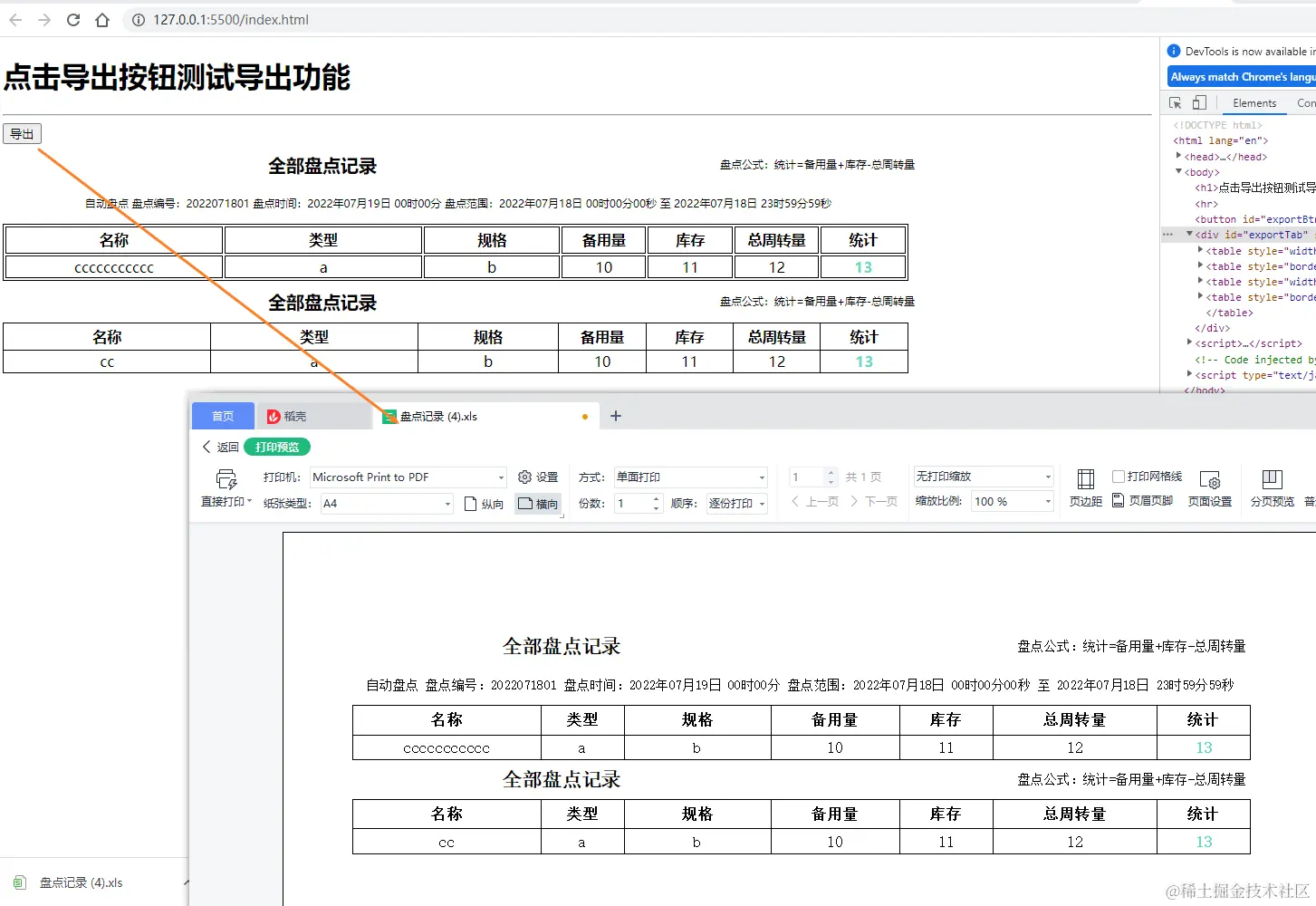
思路:
- 前端页面准备要导出的内容 table表格
- 用Blob转换成文件
- 将文件用
URL.createObjectURL生成链接,挂载a标签上
- 模拟点击a标签完成下载
代码
<!DOCTYPE html>
<html lang="en">
<head>
<meta charset="UTF-8">
<meta http-equiv="X-UA-Compatible" content="IE=edge">
<meta name="viewport" content="width=device-width, initial-scale=1.0">
<title>前端基于html生成excel并导出</title>
</head>
<body>
<h1>点击导出按钮测试导出功能</h1>
<hr>
<button id="exportBtn">导出</button>
<div id="exportTab" style="width: 1000px;font-size: 12px;">
<table style="width: 1000px;">
<tr style="height: 40px;width: 1000px;">
<th colspan="3">
<div
style=" width: 700px; height:40px; font-size: 20px;font-weight: bold;line-height: 40px;text-align: center;">
全部盘点记录</div>
</th>
<th colspan="4">
<div style=" width: 300px; height: 25px;font-weight: normal;line-height: 25px;text-align: right;">
盘点公式:统计=备用量+库存-总周转量</div>
</th>
</tr>
<tr style="height: 40px; width: 1000px;"><th colspan="7"><div style="width: 1000px; height: 25px; font-weight: normal; line-height: 25px;"> 自动盘点 盘点编号:2022071801 盘点时间:2022年07月19日 00时00分 盘点范围:2022年07月18日 00时00分00秒 至 2022年07月18日 23时59分59秒</div></th></tr>
</table>
<table style="border: 0.5px solid #000; font-size: 16px;">
<tr style="height: 30px;">
<th style="width:300px;border: 0.5px solid #000;"> 名称 </th>
<th style="width:300px;border: 0.5px solid #000;">类型</th>
<th style="width:200px;border: 0.5px solid #000;"> 规格 </th>
<th style="width:120px;border: 0.5px solid #000;">备用量</th>
<th style="width:120px;border: 0.5px solid #000;">库存</th>
<th style="width:120px;border: 0.5px solid #000;">总周转量</th>
<th style="width:120px;border: 0.5px solid #000;">统计</th>
</tr>
<tr :key="index" style="height: 25px;">
<td style="text-align:center;border: 0.5px solid #000;">ccccccccccc</td>
<td style="text-align:center;border: 0.5px solid #000;">a</td>
<td style="text-align:center;border: 0.5px solid #000;">b</td>
<td style="text-align:center;border: 0.5px solid #000;">10</td>
<td style="text-align:center;border: 0.5px solid #000;">11</td>
<td style="text-align:center;border: 0.5px solid #000;">12</td>
<td style="font-weight:bold;color: #64DBBF;text-align:center;border: 0.5px solid #000;">13</td>
</tr>
</table>
<table style="width: 1000px;">
<tr style="height: 40px;width: 1000px;">
<th colspan="3">
<div
style=" width: 700px; height:40px; font-size: 20px;font-weight: bold;line-height: 40px;text-align: center;">
全部盘点记录</div>
</th>
<th colspan="4">
<div style=" width: 300px; height: 25px;font-weight: normal;line-height: 25px;text-align: right;">
盘点公式:统计=备用量+库存-总周转量</div>
</th>
</tr>
</table>
<table style="border: 0.5px solid #000; border-collapse:collapse; font-size: 16px;">
<tr style="height: 30px;">
<th style="width:300px;border: 0.5px solid #000;"> 名称 </th>
<th style="width:300px;border: 0.5px solid #000;">类型</th>
<th style="width:200px;border: 0.5px solid #000;"> 规格 </th>
<th style="width:120px;border: 0.5px solid #000;">备用量</th>
<th style="width:120px;border: 0.5px solid #000;">库存</th>
<th style="width:120px;border: 0.5px solid #000;">总周转量</th>
<th style="width:120px;border: 0.5px solid #000;">统计</th>
</tr>
<tr :key="index" style="height: 25px;">
<td style="text-align:center;border: 0.5px solid #000;">cc</td>
<td style="text-align:center;border: 0.5px solid #000;">a</td>
<td style="text-align:center;border: 0.5px solid #000;">b</td>
<td style="text-align:center;border: 0.5px solid #000;">10</td>
<td style="text-align:center;border: 0.5px solid #000;">11</td>
<td style="text-align:center;border: 0.5px solid #000;">12</td>
<td style="font-weight:bold;color: #64DBBF;text-align:center;border: 0.5px solid #000;">13</td>
</tr>
</table>
</div>
<script>
document.querySelector("#exportBtn").addEventListener('click',function() {
let _header_wrapper = document.querySelector("#exportTab");
exportFileByInerHTML("盘点记录", _header_wrapper.innerHTML, "xls");
})
function exportFileByInerHTML(name, inerHTML, typeName) {
var _this = this;
let blob;
try {
blob = new Blob([inerHTML], {
type: "application/file"
});
} catch (e) {
if (typeof console !== "undefined") {
console.log("导出失败");
}
}
let objectUrl = URL.createObjectURL(blob);
let link = document.createElement("a");
let fname = `${name}.${typeName}`;
link.href = objectUrl;
link.setAttribute("download", fname);
document.body.appendChild(link);
link.click();
}
</script>
</body>
</html>