一、echarts(① ppchart.com/#/ ②madeapie.com)](③、www.isqqw.com/)
<template>
  <!-- 圆柱形柱状图 -->
  <div :id="id" style="width: 100%; height: 100%"></div>
</template>

<script>
export default {
  props: {
    options: {
      type: Object,
      default: function () {
        return {
          data: [],
          currentConfig: {},
        };
      },
    },
    id: {
      type: String,
      default: "radiusBar_" + Math.random().toFixed(2) * 100,
    },
  },
  watch: {
    options: {
      handler(val) {
        this.options = val;
        this.init();
      },
      deep: true,
    },
  },
  data() {
    return {
      myChart: null,
      colorList: ["#FF7D34", "#2BB8F7", "#FAFF1D", "#5BF299", "#ec6565"],
      finallyConfig: {},
    };
  },
  methods: {
    init() {
      let vm = this;
      let xAraay = [],
        seriesData = [],
        unitData = [];
      vm.options.data.forEach((item) => {
        xAraay.push(item.name);
        seriesData.push(item.value);
        unitData.push(item.unit);
      });
      let defaultConfig = {
        tooltip: {
          trigger: "axis",
          axisPointer: {
            type: "shadow",
          },
          textStyle: {
            fontSize: this.fontSize(14),
          },
          formatter: function (params) {
            let str = `${params[0].name}:${
              params[0].value + unitData[params[0].dataIndex]
            }`;
            return str;
          },
        },
        grid: {
          top: "10%",
          left: "3%",
          right: "3%",
          bottom: "3%",
          containLabel: true,
        },
        xAxis: {
          data: xAraay,
          axisTick: {
            show: true,
            interval: 0,
            lineStyle: {
              color: "#befbff",
            },
          },
          axisLine: {
            lineStyle: {
              color: "#befbff",
            },
          },
          interval: 0,
          axisLabel: {
            textStyle: {
              color: "#befbff",
              fontSize: this.fontSize(12),
            },
          },
          itemStyle: {
            color: "#befbff",
            fontSize: this.fontSize(12),
          },
        },
        yAxis: {
          show: false,
          nameTextStyle: {
            color: "#befbff",
            fontSize: this.fontSize(12),
          },
          splitLine: {
            show: false,
            lineStyle: {
              color: "#befbff",
            },
          },
          axisTick: {
            lineStyle: {
              color: "#befbff",
              opacity: 1,
            },
          },
          axisLine: {
            lineStyle: {
              color: "#befbff",
              opacity: 1,
            },
          },
          axisLabel: {
            show: false,
            textStyle: {
              fontSize: this.fontSize(12),
              color: "#befbff",
            },
          },
          splitNumber: 3,
        },
        series: [
          {
            name: "柱顶部",
            type: "pictorialBar",
            symbolSize: [this.fontSize(40), this.fontSize(10)],
            symbolOffset: [0, this.fontSize(-5)],
            z: 16,
            itemStyle: {
              normal: {
                color: function (params) {
                  return vm.colorList[params.dataIndex];
                },
              },
            },
            label: {
              show: true,
              position: "top",
              fontSize: this.fontSize(14),
              fontWeight: "bold",
              fontStyle: "normal",
              color: "#befbff",
              formatter: function (params) {
                return params.value + unitData[params.dataIndex];
              },
            },
            symbolPosition: "end",
            data: seriesData,
          },
          {
            name: "柱底部",
            type: "pictorialBar",
            symbolSize: [this.fontSize(40), this.fontSize(10)],
            symbolOffset: [0, 5],
            z: 11,
            itemStyle: {
              normal: {
                color: function (params) {
                  return vm.colorList[params.dataIndex];
                },
              },
            },
            data: [1, 1, 1, 1],
          },
          {
            type: "bar",
            itemStyle: {
              normal: {
                color: function (params) {
                  return vm.colorList[params.dataIndex];
                },
                opacity: 0.6,
              },
            },
            z: 11,
            silent: true,
            barWidth: this.fontSize(40),
            barGap: "-100%", // Make series be overlap
            data: seriesData,
          },
        ],
      };
      vm.finallyConfig = Object.assign(
        {},
        defaultConfig,
        vm.options.currentConfig
      );
      vm.myChart.setOption(vm.finallyConfig, true);
      setTimeout(() => {
        window.onresize = function () {
          vm.myChart.resize();
        };
      }, 200);
    },
  },
  mounted() {
    let vm = this;
    if (!vm.myChart) {
      console.log("radius");
      vm.myChart = vm.$echarts.init(document.getElementById(vm.id));
    }
    vm.init();
  },
};
</script>

<style></style>
二、highcharts图表(www.highcharts.com.cn/demo/highch…)
<template>
  <div :id="id" :option="option" style="width: 100%; height: 300px"></div>
</template>
<script>
import HighCharts from "highcharts";
import utils from "@/utils/utils";
export default {
  props: {
    id: {
      type: String,
      default: "charts",
    },
    option: {
      type: Array,
    },
    type: {
      type: String,
      default: "",
    },
  },
  data() {
    return {
      chartObj: {},
      highchart: HighCharts,
      highoption: {},
    };
  },
  watch: {
    option: {
      handler(val) {
        if (val) {
          this.option = val;
          // 因为Vue中的dom和数据改变都是异步进行的,而放在这里面则会等待数据和dom操作完毕之后才进行执行。
          this.$nextTick(() => {
            this.getchartdata();
          });
        }
      },
      immediate: true,
      deep: true,
    },
  },
  mounted() {
    console.log(this.type, "type");
  },
  methods: {
    getchartdata() {
      this.drawLineChart(this.option);
    },
    drawLineChart(data) {
      let vm = this;
      let targetName = "",
        unitName = "";
      let xArray = [],
        yArray = [];
      if (data && data.length > 0) {
        unitName = data[0].unit;
        data.forEach((item) => {
          let yvalue = vm.$setting.useRandData
            ? utils.randData(20, 100)
            : item.value - 0;
          let xvalue = item.xlable ? item.xlable : item.name;
          xArray.push(xvalue);
          yArray.push(yvalue);
          targetName = item.name;
        });
      }
      vm.highoption = {
        title: {
          text: null,
        },
        // X轴
        xAxis: {
          categories: xArray,
          labels: {
            rotation: -60, // 设置轴标签旋转角度
          },
        },
        // Y轴
        yAxis: {
          title: {
            text: `${targetName}:(${unitName})`,
          },
        },
        chart: {
          type: this.type,
          style: {
            fontFamily: "",
            fontSize: "12px",
            fontWeight: "bold",
            color: "#006cee",
            backgroundColor: "rgb(241, 236, 236)",
          },
        },
        //设置图标位置
        legend: {
          layout: "vertical",
          align: "right",
          // verticalAlign: 'top',
          verticalAlign: "middle",
        },
        credits: {
          enabled: false,
        },
        series: [
          {
            name: `${targetName}`,
            data: yArray,
          },
        ],
        responsive: {
          rules: [
            {
              condition: {
                maxWidth: 375,
              },
              chartOptions: {
                legend: {
                  layout: "horizontal",
                  align: "center",
                  verticalAlign: "top",
                },
              },
            },
          ],
        },
      };
      this.highchart.chart(this.id, vm.highoption);
    },
  },
};
</script>

<style lang="scss" scoped>
// div {
//   width: 90vw;
//   height: 300px;
// }
</style>>
三、属性笔记
<template>
  <div style="position: relative">
    <VueEcharts :echarts.sync="echarts" :options="options" height="6rem" @setEcharts="getEcharts" />
  </div>
</template>

<script>
import VueEcharts from '@/components/common/VueEcharts';
export default {
  props: {
    // options: {
    //   type: Array,
    //   default() {
    //     return [];
    //   },
    // },
  },
  watch: {},
  components: {
    VueEcharts,
  },
  data() {
    return {
      echarts: '',
      options: {},
      echartsFunction: null,
    };
  },
  computed: {},
  created() {},
  methods: {
    init() {
      const vm = this;
      const data = [
        {
          name: '中石油',
          value: 65,
        },
        {
          name: '中海油',
          value: 17,
        },
        {
          name: '中石化',
          value: 12,
        },
        {
          name: '其他',
          value: 6,
        },
      ];
      vm.options = {
        color: [
          '#0473FF',
          '#FF9200',
          '#28ADA7',
          '#FFBF00',
          '#585247',
          '#7F6AAD',
          '#009D85',
          'rgba(250,250,250,0.3)',
        ],
        backgroundColor: '#fff',
        title: {
          text: '100%',
          textStyle: {
            color: '#333333',
            fontSize: 16,
            align: 'center',
          },
          subtextStyle: {
            fontSize: 12,
            color: ['#ff9d19'],
          },
          // x: 'center',
          // y: 'center',
          // 饼图中心字体的位置不是随着饼图的位置自适应移动的
          x: '43%',
          y: '60%',
        },
        legend: {
          top: '5%',
          left: '1%',
          textStyle: {
            color: '#333333',
            fontSize: 12,
          },
          icon: 'circle',
          data: data,
        },
        series: [
          // 主要展示层的
          {
            // 饼图的大小更具此处进行变化
            radius: ['42%', '60%'],
            center: ['50%', '65%'],
            type: 'pie',
            label: {
              normal: {
                show: true,
                // 饼图的指针线的文字格式
                formatter: '{d}%',
                textStyle: {
                  fontSize: 12,
                },
                position: 'outside',
              },
              emphasis: {
                show: true,
              },
            },
            labelLine: {
              normal: {
                show: true,
                length: 12,
                length2: 6,
              },
              emphasis: {
                show: true,
              },
            },
            data: data,
          },
        ],
      };
    },
  },
  mounted() {
    this.init();
  },
};
</script>

<style lang="scss" scoped></style>
三、echarts使用地图时遇到的问题
<template>
  <div style="position: relative">
    <!-- <div class="changeNav">
      <tabs-group v-if="tabList.length > 1" v-model="tab" type="card" :list="list" />
    </div> -->
    <div class="timeInterval">{{ time }}</div>
    <VueEcharts :echarts.sync="echarts" :options="options" height="8rem" @setEcharts="getEcharts" />
    <div class="scaleMap">
      <div class="flexBox" style="color: red" @click="addSize">+</div>
      <div class="flexBox" style="color: block" @click="reduceSize">-</div>
    </div>
    <div class="listBox" v-if="showPup">
      <div class="dataBox">
        <div class="oneData" v-for="item in mapList" :key="item.id">
          <div>{{ item.name }}</div>
          <div>{{ item.price }}</div>
          <div style="color: red">{{ item.value > 0 ? `+${item.value}` : `${item.value}` }}</div>
        </div>
      </div>
      <div class="closeBox"><div @click="openPup">x</div></div>
    </div>
    <div class="describeBox">
      <div class="flexbox">
        <div class="Price"><span class="centerText">平均价</span></div>
        <div class="number">66.43 -3.79%</div>
      </div>
      <div class="flexbox">
        <div class="Price"><span>最高价:</span><span class="ellipsis">湖南省11111</span></div>
        <div class="number" style="color: #000">66.43 -4.79%</div>
      </div>
      <div class="flexbox">
        <div class="Price"><span>最低价:</span><span class="ellipsis">新疆省11111</span></div>
        <div class="number">66.43 -7.79%</div>
      </div>
    </div>
  </div>
</template>

<script>
// import TabsGroup from '@/components/common/TabsGroup';
import VueEcharts from '@/components/common/VueEcharts';
import china from '@/assets/js/china.json';
import * as echarts from 'echarts';
export default {
  props: {
    list: {
      type: Array,
      default() {
        return [];
      },
    },
  },
  watch: {
    list: {
      handler(list) {
        list.forEach(item => {
          this.unit = item.unit;
          this.time = `${item.startDate?.replace(/-/g, '/').substring(5, 10)} - ${item.endDate
            ?.replace(/-/g, '/')
            .substring(5, 10)}`;
          this.dataList.push({
            name: item.areaName,
            value: item.addPrice,
            price: item.price,
            time: `${item.startDate?.replace(/-/g, '/')} - ${item.endDate?.replace(/-/g, '/')}`,
          });
        });
        console.log(this.dataList, '222222222222222222222');
        this.init();
      },
      immediate: true,
      deep: true,
    },
  },
  components: {
    VueEcharts,
    // TabsGroup,
  },
  data() {
    return {
      showPup: false,
      size: 1.5,
      echarts: '',
      time: '',
      options: {},
      dataList: [],
      unit: '',
      mapList: [
        // { id: '1', name: '山西百汇', number: 6400, addNumber: 60 },
        // { id: '2', name: '山西百汇', number: 6400, addNumber: 60 },
        // { id: '3', name: '山西百汇', number: 6400, addNumber: 60 },
      ],
      // tab: this.$route.query?.tab?.toString() || '1',
      // list: [
      //   {
      //     label: '日',
      //     value: '1',
      //   },
      //   {
      //     label: '周',
      //     value: '2',
      //   },
      //   {
      //     label: '月',
      //     value: '3',
      //   },
      // ],
      echartsFunction: null,
    };
  },
  computed: {
    // tabList() {
    //   const permissions = [this.hasStation, this.hasPipeStorage, this.hasOutsideInventory];
    //   return this.list.filter((item, index) => permissions[index]);
    // },
    // hasStation() {
    //   return this.$checkPermissions(this.$permissions.chinaMap.day);
    // },
    // hasInnerPrice() {
    //   return this.$checkPermissions(this.$permissions.chinaMap.week);
    // },
    // hasOutsidePrice() {
    //   return this.$checkPermissions(this.$permissions.chinaMap.month);
    // },
  },
  created() {
    // this.tab = this.hasInnerPrice ? '1' : '2';
  },
  methods: {
    openPup() {
      this.showPup = false;
    },
    getEcharts(value) {
      this.echartsFunction = value;
      console.log(this.echartsFunction, '11111');
    },
    echartsClick() {
      const vm = this;
      vm.echartsFunction.on('click', function (params) {
        console.log(params, '点击地图');
        console.log(params.value, '点击地图所获取的值');
        vm.showPup = true;
        if (params.data) {
          vm.mapList.push(params.data);
        }
      });
    },

    addSize() {
      this.size = this.size + 0.25;
      this.init();
    },
    reduceSize() {
      let num = this.size;
      num = num - 0.25;
      this.size = num < 1 ? 1 : num;
      this.init();
    },
    init() {
      const vm = this;
      // 后端传递过来的数据更具value的大小来决定颜色
      // 由于china.json文件返回的地区以省结尾,所以该处的名字必须与china.json文件相同
      const heatmapData = this.dataList;
      const color = ['#0e6ece', '#0099ff', '#d7d7d7', '#f60', '#ff0000'];
      // const geoCoordMap = {};
      /*获取地图数据*/
      china.features.forEach(item => {
        item.properties.value = 12312;
      });
      //此处必须使用否则不会出现地图
      echarts.registerMap('china', { geoJSON: china });
      vm.options = {
        title: {
          show: true,
          textStyle: {
            fontWeight: 'bold',
            fontSize: 20,
            color: '#F1F1F3',
          },
          top: 20,
          left: 'center',
        },
        aspectScale: 0.85, // 地图的长宽比 默认0.75
        visualMap: {
          // 左下角定义 在选中范围中的视觉元素 渐变地区颜色
          splitNumber: 6,
          // seriesIndex: [0],
          itemWidth: 20, // 每个图元的宽度
          itemGap: 6, // 每两个图元之间的间隔距离,单位为px
          show: true,
          min: 0,
          top: '20%',
          max: 50000,
          seriesIndex: 0,
          realtime: false,
          // 展示柱状而不是多个小方块
          // calculable: true,
          // lte表示最小gte表示最大lte~gte,label表示描述
          pieces: [
            { gte: 10000, label: '大涨' },
            { gte: 1000, lte: 9999, label: '上涨' },
            { gte: 0, lte: 999, label: '平稳' },
            { gte: -999, lte: -1, label: '下跌' },
            { gte: -10000, lte: -1000, label: '大跌' },
          ],
          // calculable: false, // true 柱状展示 false 分级别展示
          inRange: {
            color: color,
          },
          textStyle: {
            color: '#000',
          },
        },
        geo: {
          map: 'china',
          label: {
            normal: {
              show: true,
              textStyle: {
                color: '#4a4a4a',
              },
            },
            emphasis: {
              show: true,
              textStyle: {
                color: '#fff',
              },
            },
          },
          center: [104.114129, 37.550339],
          zoom: vm.size,
          scaleLimit: 1,
          regions: heatmapData,
          // roam为true表示可以移动地图
          roam: true, // true scale move

          // 整体地图调整
          // itemStyle: {
          //   // borderColor: 'rgba(37, 142, 183, .3)',
          //   // borderWidth: 1,
          //   // areaColor: '#0099ff',
          //   // shadowColor: 'rgba(255, 255, 255, .8)',
          //   // shadowOffsetX: -2,
          //   // shadowOffsetY: -3,
          //   // shadowBlur: 10,
          //   emphasis: {
          //     areaColor: '#389BB7', // 区域悬停颜色 rgba(0, 0, 0, .3)
          //     borderWidth: 0,
          //   },
          // },
        },
        series: [
          {
            // 区域热力值
            name: '区域热力值',
            type: 'map',
            geoIndex: 0,
            label: {
              show: true,
            },
            data: heatmapData,
          },
        ],
      };
    },
  },
  mounted() {
    // this.init();
    this.echartsClick();
  },
};
</script>

<style lang="scss" scoped>
.scaleMap {
  width: 1rem;
  height: 2rem;
  background-color: #fff;
  position: absolute;
  color: blueviolet;
  border-radius: 0.1rem;
  right: 0.25rem;
  bottom: 0.5rem;
  box-shadow: 1px 1px 1px 1px rgba(0, 0, 0, 0.3);
  .flexBox {
    height: 50%;
    width: 100%;
    display: flex;
    justify-content: center;
    align-items: center;
    font-size: 0.5rem;
    border-bottom: 1px solid #ccc;
  }
}
.timeInterval {
  height: 0.8rem;
  z-index: 2;
  width: 2.4rem;
  color: #696969 !important;
  background-color: #f6f6f6;
  opacity: 0.8;
  position: absolute;
  color: blueviolet;
  border-radius: 0.1rem;
  text-align: center;
  line-height: 0.8rem;
  left: 0.1rem;
  top: 0.1rem;
  border-bottom: 1px solid #ccc;
}
.changeNav {
  height: 1rem;
  z-index: 2;
  width: 2.5rem;
  color: #696969 !important;
  background-color: #f6f6f6;
  position: absolute;
  color: blueviolet;
  border-radius: 0.2rem;
  text-align: center;
  line-height: 1rem;
  right: 0.1rem;
  top: 0.1rem;
  border-bottom: 1px solid #ccc;
}
.listBox {
  position: absolute;
  top: 0rem;
  left: 0rem;
  width: 100%;
  height: 8rem;
  z-index: 2;
  padding: 0.2rem;
  box-sizing: border-box;
  .dataBox {
    width: 100%;
    height: 6rem;
    z-index: 2;
    background-color: #eee;
    opacity: 0.9;
  }
  .oneData {
    width: 100%;
    height: 1.5rem;
    background-color: #fff;
    margin-bottom: 0.4rem;
    opacity: 1;
    display: flex;
    div {
      flex: 1;
      display: flex;
      justify-content: center;
      align-items: center;
      font-size: 0.45rem;
    }
  }
  .closeBox {
    width: 100%;
    display: flex;
    justify-content: center;
    align-items: center;
    div {
      width: 2rem;
      height: 2rem;
      line-height: 2rem;
      text-align: center;
      font-size: 0.8rem;
      border: 3px solid black;
      border-radius: 50%;
    }
  }
}
.describeBox {
  z-index: 1.5;
  position: absolute;
  bottom: 0.5rem;
  width: 7rem;
  display: flex;
  border-radius: 0.1rem;
  height: 1.2rem;
  box-shadow: rgb(114, 113, 113) 0px 0px 3px;
  .flexbox {
    flex: 1;
    font-size: 12px;
    border-left: 1px solid rgb(240, 236, 236);
    line-height: 0.6rem;
    .Price {
      text-align: center;
      height: 50%;
      width: 100%;
      display: flex;
      .centerText {
        width: 100%;
      }
      .ellipsis {
        width: 40%;
        overflow: hidden;
        text-overflow: ellipsis;
        white-space: normal;
        font-size: 16px;
        font-weight: 500;
        color: #000;
      }
    }
    .number {
      color: rgb(10, 246, 10);
      text-align: center;
      width: 100%;
      line-height: 0.6rem;
    }
  }
}
</style>
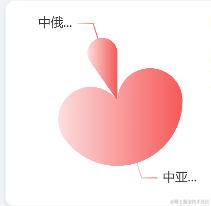
四 自定义爱心
效果展示
代码逻辑
export function card2Options() {
return {
// 图表配置
tooltip: {
trigger: 'item',
extraCssText: 'z-index:2;border:none;',
formatter: function (params) {
return `<div>
<p style="text-align:left;margin-bottom:3px;font-size: 14px;font-weight: 500;color: #333333;">
${params.name}
</p>
<p style="color: #666666;">变化量:${params.data.value}${params.data.unit}</p>
</div>`;
},
},
grid: {
left: 46,
bottom: 40,
top: 0,
},
legend: {
show: false,
data: ['中亚线', '中缅线', '中俄线'],
bottom: 0,
left: -5,
width: 6,
height: 4,
textStyle: {
color: '#000',
fontSize: 10,
},
},
xAxis: {
type: 'value',
nameTextStyle: { show: false, color: '#666', padding: [-30, -30, -30, 0] },
axisTick: { show: false },
axisLine: {
show: false,
lineStyle: {
color: '#fff',
},
},
axisLabel: { show: false, color: '#666' },
splitLine: {
show: false,
},
},
yAxis: [
{
axisLabel: { show: false, color: '#666' },
splitLine: {
show: false,
},
type: 'category',
axisTick: { show: false },
axisLine: { show: false, onZero: false, lineStyle: { color: '#d8d8d8' } },
data: ['中亚线', '中缅线', '中俄线'],
},
],
series: [
{
name: '有效房源量',
type: 'pie',
barWidth: 12,
barGap: '0%',
barCategoryGap: '50%',
data: [],
itemStyle: {
normal: {
borderRadius: [100, 100, 100, 100],
color: function (params) {
const color = new echarts.graphic.LinearGradient(0, 0, 1, 0, [
{
offset: 0,
color: 'rgba(245, 88, 88, 0.2000)',
},
{
offset: 1,
color: 'rgba(245, 88, 88, 1)',
},
]);
const color2 = new echarts.graphic.LinearGradient(0, 0, 1, 0, [
{
offset: 0,
color: 'rgba(22, 181, 125, 1 )',
},
{
offset: 1,
color: 'rgba(22, 181, 125, 0.2000)',
},
]);
const color3 = '#fff';
const value = Number(params?.data?.value);
if (value > 0) {
return color;
} else if (value == 0) {
return color3;
} else {
return color2;
}
},
},
},
},
],
};
}