

可观测性
可以将可观测性视为监控的超集
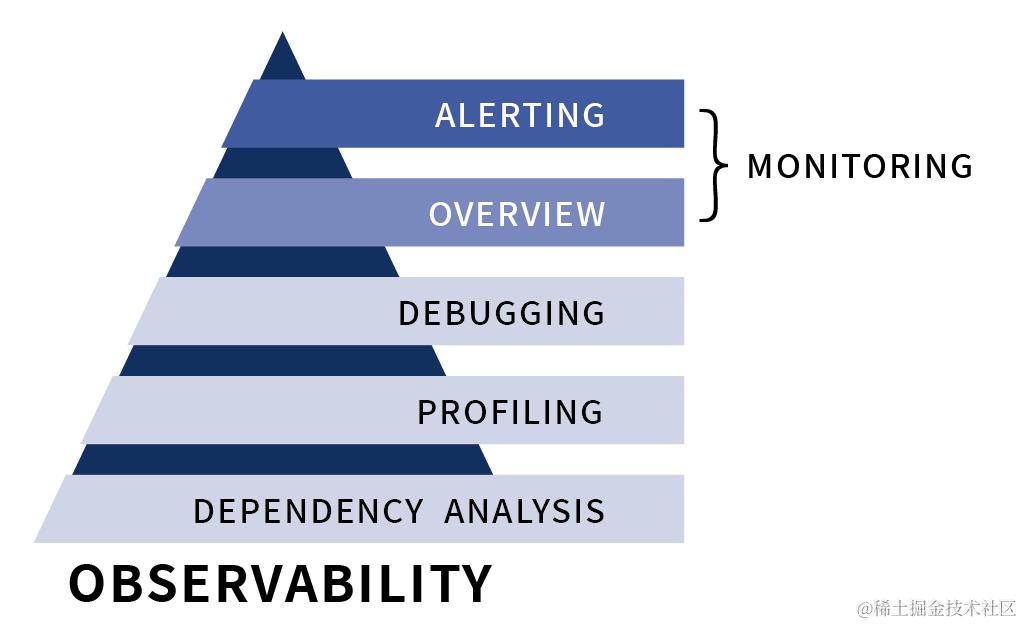
- 主动发现
- 排错(Degugging) ,即运用数据和信息去诊断故障出现的原因
- 剖析(Profiling) ,即运用数据和信息进行性能分析;
- 依赖分析(Dependency Analysis) ,即运用数据信息厘清系统之前的模块,并进行关联分析
个人理解强调的是提前预测及时防止故障的发生,而不是在故障产生后再去解决。 我们常常说一个企业数字化转型,传统监控的理念向可观测性的理念的转换也是数字换转型的必要一部分吧
三大重要的数据信息源
一. 日志记录(logging)
它展现的是应用运行而产生的信息或者程序在执行任务过程中产生信息,可以详细解释系统的运行状态。日志数据很丰富,但是不做进一步处理就变得难以理解
- ELK
二. 链路追踪(tracing)
处理请求范围内的信息,可以绑定到系统中单个事务对象的生命周期的任何数据。Trace在很大程度上可以帮助人们了解请求的生命周期中系统的哪些组件减慢了响应等。 请求通过分布式系统从端到端的过程
- skywalking / Zipkin
三. 指标(metrics)
本篇的主题就是可观测性中的 metrics
Metrics作为可聚合性数据,通常为一段时间内可度量的数据指标,透过其可以观察系统的状态与趋势。
Prometheus
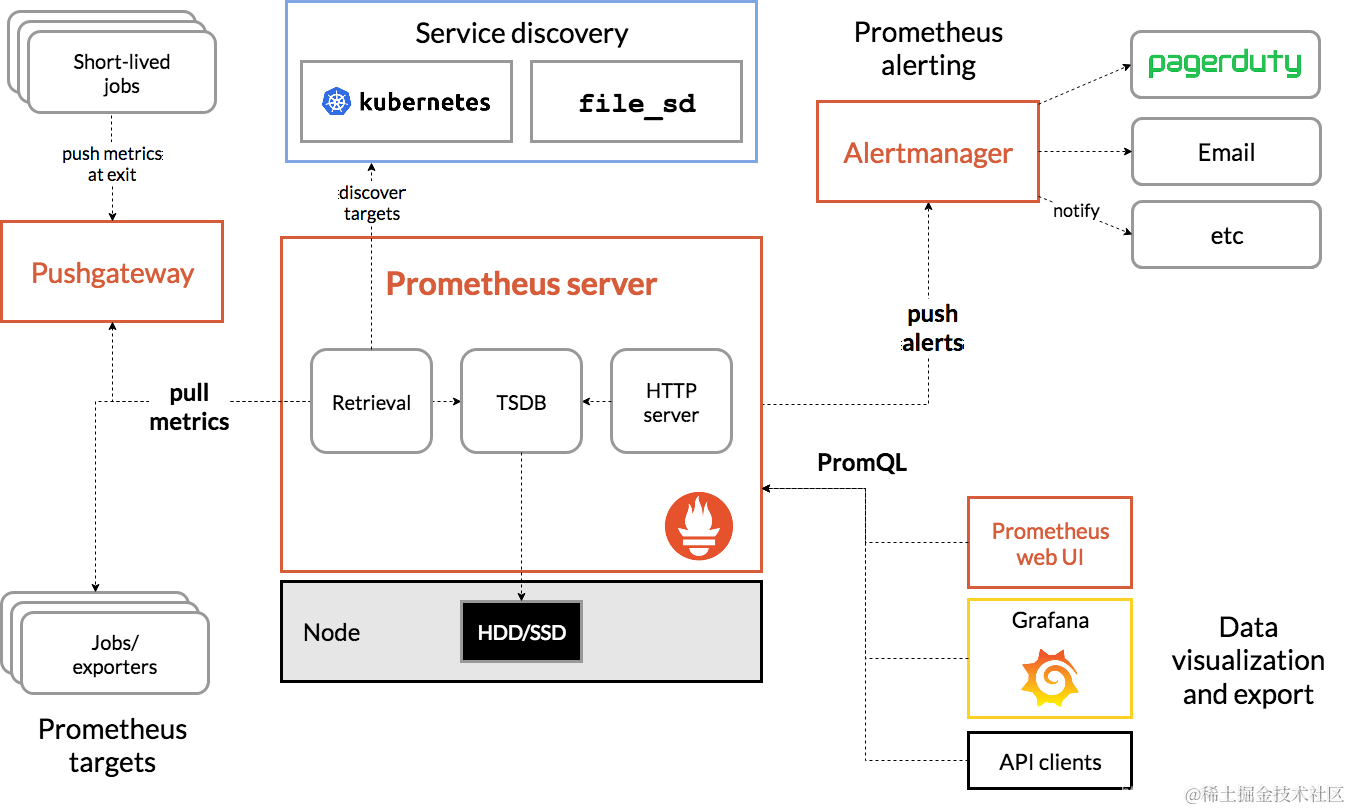
- 易于管理 (不存在任何的第三方依赖)
- 监控服务的内部运行状态 (基于丰富的Client库)
- 强大的数据模型 (时间序列、标签)
- 强大的查询语言PromQL
- 高效
可以监控什么?
- 系统层监控:例如 CPU、Memory、Disk 和 Network 等。
- 中间组件层监控:例如 Kafka、PG 和 NIFI 等。
- 应用层监控:应用服务监控,例如 JVM、HTTP 和 RPC 等。
- 业务监控:业务黄金指标,例如请求处理数、延迟等。
应用服务监控场景
- 接口服务质量
- 访问量/延时/成功率
- service、Dao等层级监控
- 异常监测
- 服务可用、异常状态
- JVM内部状态(Java)
- GC/内存/线程等
- 服务内部自定义监控
- 核心处理逻辑耗时情况
- 业务核心指标,例如数据集成任务数、集成任务接入量、数据源连接状态
- 业务核心数据波动
1. 指标数据模型 / 时间序列
- Prometheus将所有数据存储为时间序列
- 具有相同度量名称及标签属于同一个标签
- 每个时间序列都由度量标准名称和一组键值对(称为标签)唯一标识
-
指标格式
通过如下表达方式表示指定指标名称和指定标签集合的时间序列:
<metric name>{<label name>=<label value>, ...}以下两种方式均表示同一条time-series:
jvm_threads_states_threads{application="datahub-data-server",state="runnable",}
等同于:
{__name__="jvm_threads_states_threads",application="datahub-data-server",state="runnable",}
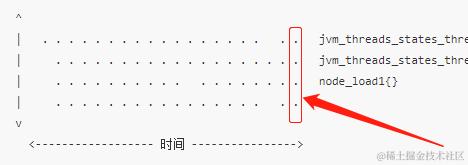
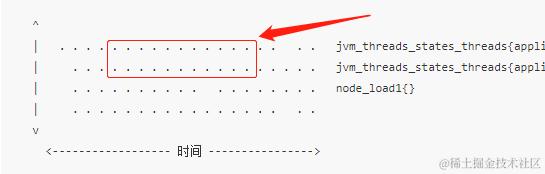
将所有采集到的样本数据以时间序列(time-series)的方式保存
^ │ . . . . . . . . . . . . . . . . . . . jvm_threads_states_threads{application="datahub-data-server",state="runnable"} │ . . . . . . . . . . . . . . . . . . . jvm_threads_states_threads{application="datahub-data-server",state="waiting"} │ . . . . . . . . . . . . . . . . . . node_load1{} │ . . . . . . . . . . . . . . . . . . v <------------------ 时间 ----------------> -
样本(Samples)
在时间序列中的每一个点称为一个样本(sample),样本形成实际的时间序列数据。每个采样值包括:
- 时间戳(timestamp):一个精确到毫秒的时间戳;
- 样本值(value): 一个folat64的浮点型数据表示当前样本的值。
怎么定义指标? 比如线程数量指标
- 方式1
- jvm_threads_states_threads{application="datahub-data-server",state="runnable"}
- jvm_threads_states_threads{application="datahub-data-server",state="waiting"}
- 方式2
- jvm_threads_states_threads_runnable{application="datahub-data-server"}
- jvm_threads_states_threads_waiting{application="datahub-data-server"}
2. 度量指标类型
Prometheus客户端库提供了四种核心的metrics类型:Counter、Gauge、Histogram、Summary
-
Counter
表示单个单调递增计数器的累积度量,其值只能在重启时增加或重置为零。
例如,您可以使用计数器来表示所服务的请求数,已完成的任务或错误,接入数据量等。
不要使用计数器来暴露可能减少的值。例如,不要使用计数器来处理当前正在运行的进程数,而是使用gauge。
// 数据资源服务
//通过rate()函数获取HTTP请求量的增长率
rate(http_server_requests_seconds_count[5m])
//查询 访问量前10的http请求量地址
topk(10,http_server_requests_seconds_count)

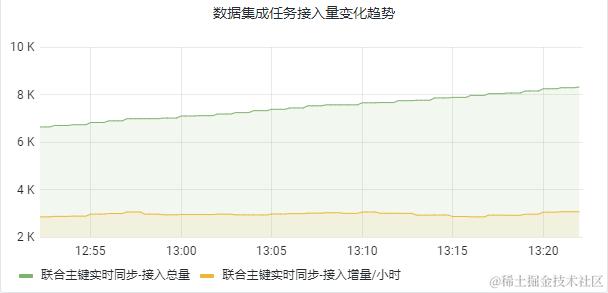
// 数据集成任务服务
//每天/每小时的已处理数据接入增量(也可以具体到某集成任务/或者某类型集成任务)
increase(data_integration_volume_total{release="data-integration-service",state='.*',mode=~'.*',taskId=~'.*'}[1d])
//接入增量前10的集成任务(增量模式)
topk(10,sum(data_integration_volume_total{mode='INCREMENTAL'}) by(taskId,name))
//每小时/每分钟的数据集成任务的错误日志数量
increase(data_integration_error_log_total{release="data-integration-service",,taskId=~'.*'}[2m])

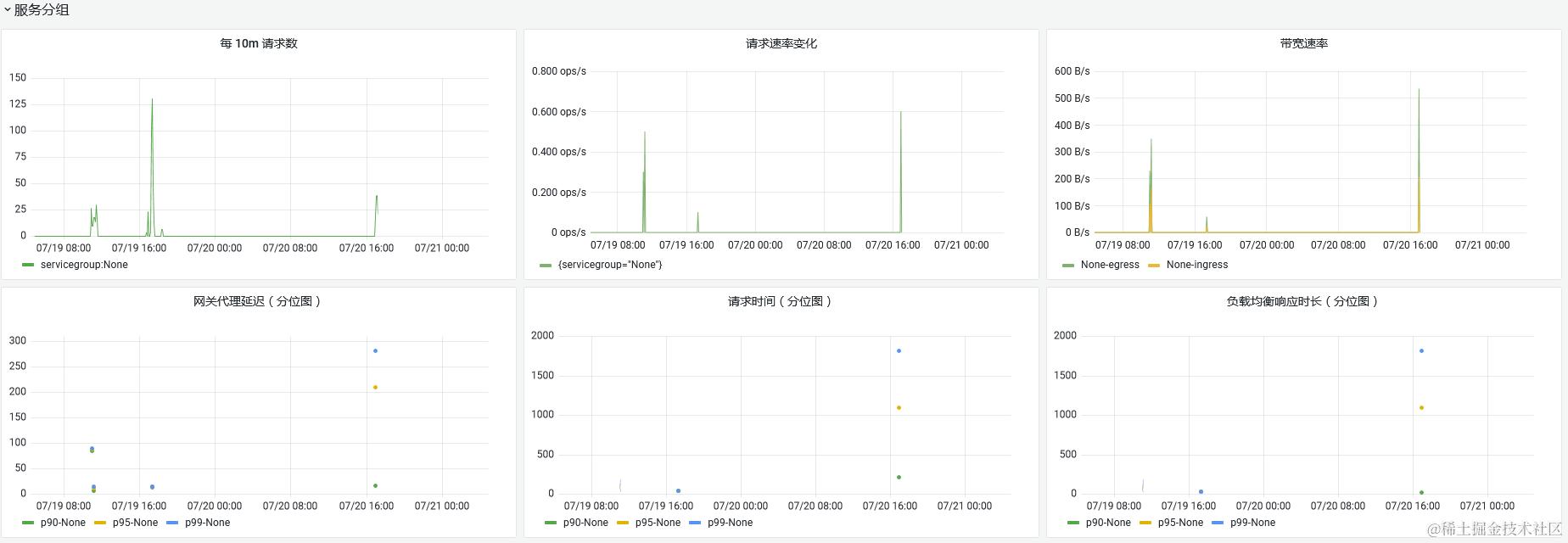
// 服务市场 指标示例
kong_http_status{code="200", instance="gdc-aecore-dev.glodon.com:80", job="kong", publisher="None", release="kong", route="da21a822-876d-4cb2-b719-56fec47989f6", service="monitor-service", servicegroup="None", uri="/monitor-service/alertrules/targets/kubernetes/targettypes", userkey="syhcihrbLHAFlAglzVhGqeQY0nz7O6Up"} 1000
//从服务分组、发布者等不同维度查询访问热度排名、访问体量排名
//从HTTP状态码400、500不同维度查询请求速率, 如果统一业务错误编码
sum(rate(kong_http_status{code='500'}[1m])) by (service,servicegroup) > 0
-
Gauge
gauge表示一个既可以递增, 又可以递减的度量指标值。 测量器主要测量类似于温度、当前内存使用量等,也可以统计当前服务运行随时增加或者减少的并发请求的数量
// 数据集成任务服务
// 已停止状态的集成任务的待处理数据量,用来做告警
data_integration_in_process_volume{release='data-integration-service',state='STOPPED'}
// 异常停止的集成任务数
data_integration_tasks{state='STOPPED',stateChangedReasonType='ERROR'}


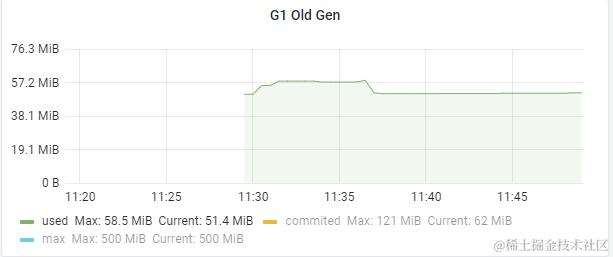
//预测内存使用在 4 个小时之后的情况
predict_linear(jvm_memory_used_bytes{area='heap',id='G1 Old Gen'}[2h], 4 * 3600)
// 预测主机可用磁盘空间的是否在4个小时候被占满
predict_linear(node_filesystem_free{job="node"}[2h], 4 * 3600) < 0
- Summary(客户端计算)
长尾问题: 在大多数情况下人们都倾向于使用某些量化指标的平均值,例如CPU的平均使用率、页面的平均响应时间。这种方式的问题很明显,以系统API调用的平均响应时间为例:如果大多数API请求都维持在100ms的响应时间范围内,而个别请求的响应时间需要5s,那么就会导致某些WEB页面的响应时间落到中位数的情况,而这种现象被称为长尾问题。为了区分是平均的慢还是长尾的慢,最简单的方式就是按照请求延迟的范围进行分组.
例如,统计延迟在0 ~ 10ms之间的请求数有多少而10~20ms之间的请求数又有多少。通过这种方式可以快速分析系统慢的原因。Histogram和Summary都是为了能够解决这样问题的存在
| 请求 | 延迟(s) |
|---|---|
| 0.05 | |
| 0.01 | |
| 0.06 | |
| 0.03 | |
| 5 | |
| 0.08 | |
| 0.08 | |
| 0.01 | |
| 0.1 | |
| 5 |
平均响应时长 = 1.042 s
| 请求 | 延迟(s) | 分位 |
|---|---|---|
| 0.01 | ||
| 0.01 | 20 | |
| 0.03 | ||
| 0.05 | ||
| 0.06 | 50 | |
| 0.08 | ||
| 0.08 | ||
| 0.1 | 80 | |
| 5 | ||
| 5 |
20分位 <=10ms 50分位 <=60ms 80分位 <=80ms
Summary用于表示一段时间内的数据采样的结果(通常是请求持续时间或响应大小等),但它直接存储了分位数(通过客户端计算,然后展示出来),而非通过区间来计算(Histogram的分位数需要通过histogram_quantile(φfloat,b instant-vector)函数计算得到)
因此,对于分位数的计算,Summary在通过PromQL进行查询时有更好的性能表现,而Histogram则会消耗更多的资源。反之,对于客户端而言,Histogram消耗的资源更少。在选择这两种方式时,用户应该根据自己的实际场景选择。
-
样本值的分位数分布情况,命名为
<basename>{quantile="<φ>"}。// 含义:这 12 次 http 请求中有 50% 的请求响应时间是 3.052404983s io_namespace_http_requests_latency_seconds_summary{path="/",method="GET",code="200",quantile="0.5",} 3.052404983 // 含义:这 12 次 http 请求中有 90% 的请求响应时间是 8.003261666s io_namespace_http_requests_latency_seconds_summary{path="/",method="GET",code="200",quantile="0.9",} 8.003261666 -
所有样本值的大小总和,命名为
<basename>_sum。// 含义:这12次 http 请求的总响应时间为 51.029495508s io_namespace_http_requests_latency_seconds_summary_sum{path="/",method="GET",code="200",} 51.029495508 -
样本总数,命名为
<basename>_count// 含义:当前一共发生了 12 次 http 请求 io_namespace_http_requests_latency_seconds_summary_count{path="/",method="GET",code="200",} 12.0
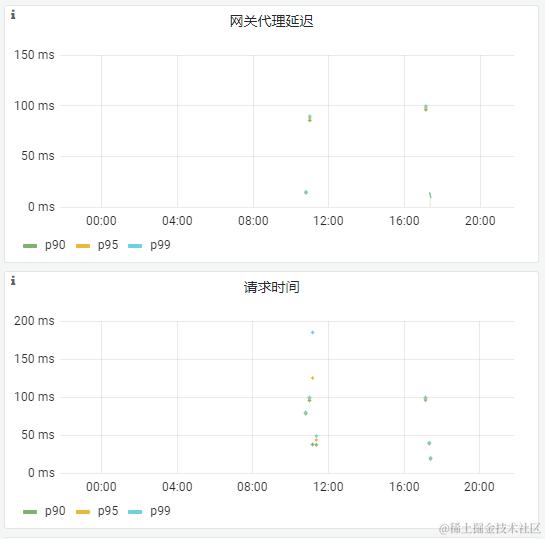
例:ingress响应延迟分布

- Histogram(服务端计算)
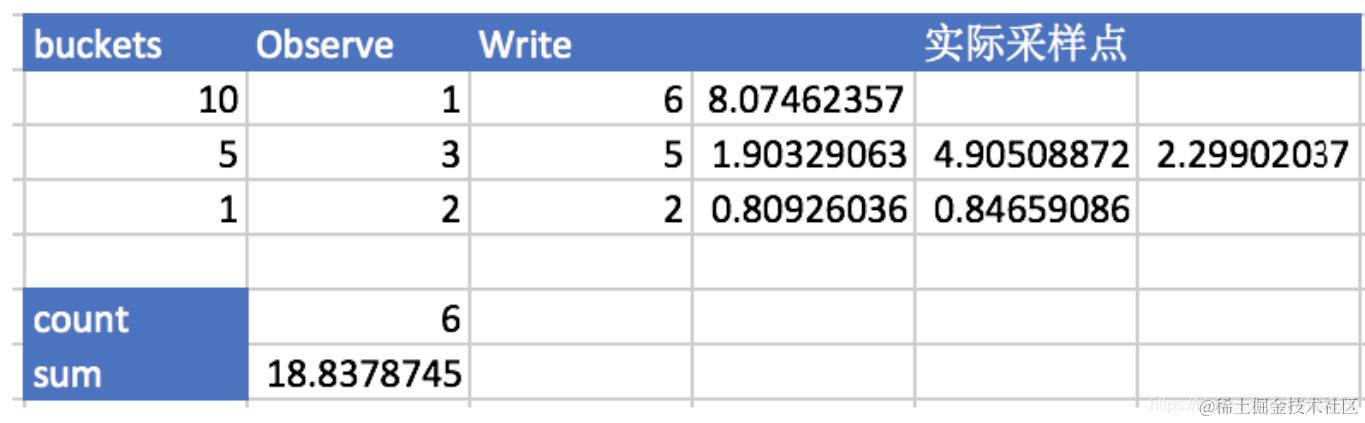 对观察结果进行采样(通常是请求持续时间或响应大小等),并将其计入可配置存储桶中。 Histogram 类型的样本会提供三种指标(假设指标名称为 < basename >):
-
样本的值分布在 bucket 中的数量,命名为
< basename >_bucket{le="<上边界>"}。解释的更通俗易懂一点,这个值表示指标值小于等于上边界的所有样本数量。# A histogram, which has a pretty complex representation in the text format: # HELP http_request_duration_seconds A histogram of the request duration. # TYPE http_request_duration_seconds histogram http_request_duration_seconds_bucket{le="0.05"} 24054 http_request_duration_seconds_bucket{le="0.1"} 33444 http_request_duration_seconds_bucket{le="0.2"} 100392 http_request_duration_seconds_bucket{le="+Inf"} 144320 -
所有样本值的大小总和,命名为
<basename>_sumhttp_request_duration_seconds_sum 53423 -
样本总数,命名为
<basename>_count。值和<basename>_bucket{le="+Inf"}相同。http_request_duration_seconds_count 144320可以通过 histogram_quantile() 函数来计算 Histogram 类型样本的分位数。
// 90分位响应时长
histogram_quantile(0.9, rate(kong_latency_bucket[10m]))

// 过去2分钟内 响应时长超过6秒的请求数量
sum(increase(kong_latency_bucket{le='+Inf',type='request'}[2m])) by(uri) - sum(increase(kong_latency_bucket{le='06000.0',type='request'}[2m])) by(uri)
Summary和Histogram的异同
- 它们都包含了< basename >_sum和< basename >_count指标。
- Histogram需要通过<basename_bucket来计算分位数,而Summary则直接存储了分位数的值。
- 如果需要汇总或者了解要观察的值的范围和分布,建议使用Histogram;如果并不在乎要观察的值的范围和分布,仅需要精确的quantile值,那么建议使用Summary。
3. PromQL数据类型
Prometheus 提供了一种功能表达式语言 PromQL,允许用户实时选择和汇聚时间序列数据。表达式的结果可以在浏览器中显示为图形,也可以显示为表格数据,或者由外部系统通过 HTTP API 调用。
1、瞬时向量(Instant vector) 一组时间序列,每个时间序列包含单个样本,它们共享相同的时间戳。也就是说,表达式的返回值中只会包含该时间序列中的最新的一个样本值。而相应的这样的表达式称之为瞬时向量表达式。
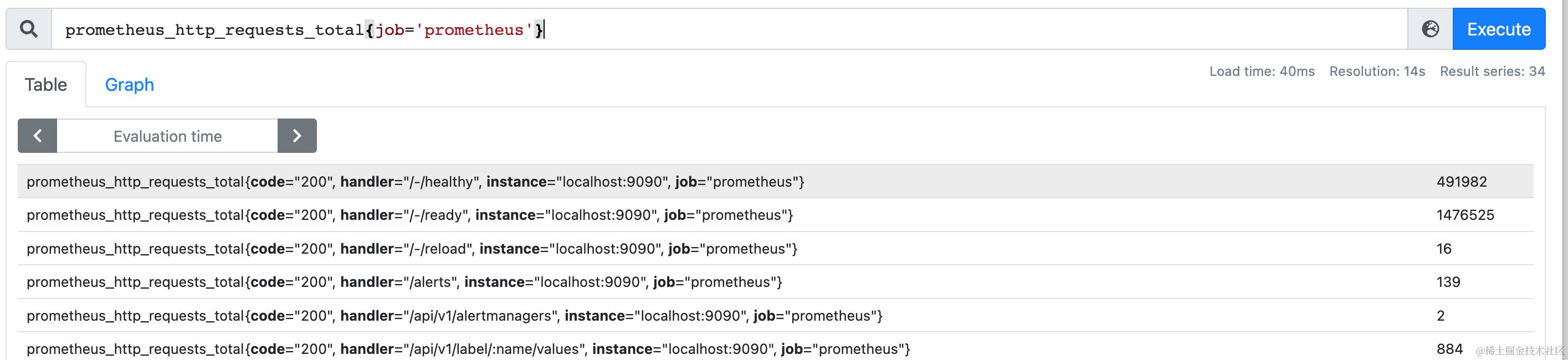
prometheus_http_requests_total{job='prometheus'} # 瞬时向量表达式,选择当前最新的数据

prometheus_http_requests_total{code="200", handler="/-/healthy", instance="localhost:9090", job="prometheus"}
5713
prometheus_http_requests_total{code="200", handler="/-/ready", instance="localhost:9090", job="prometheus"}
17140
prometheus_http_requests_total{code="200", handler="/api/v1/label/:name/values", instance="localhost:9090", job="prometheus"}
6
prometheus_http_requests_total{code="200", handler="/api/v1/labels", instance="localhost:9090", job="prometheus"}
4
2、区间向量(Range vector) - 一组时间序列,每个时间序列包含一段时间范围内的样本数据。
区间向量与瞬时向量的工作方式类似,唯一的差异在于在区间向量表达式中我们需要定义时间选择的范围,时间范围通过时间范围选择器 [] 进行定义,以指定应为每个返回的区间向量样本值中提取多长的时间范围。
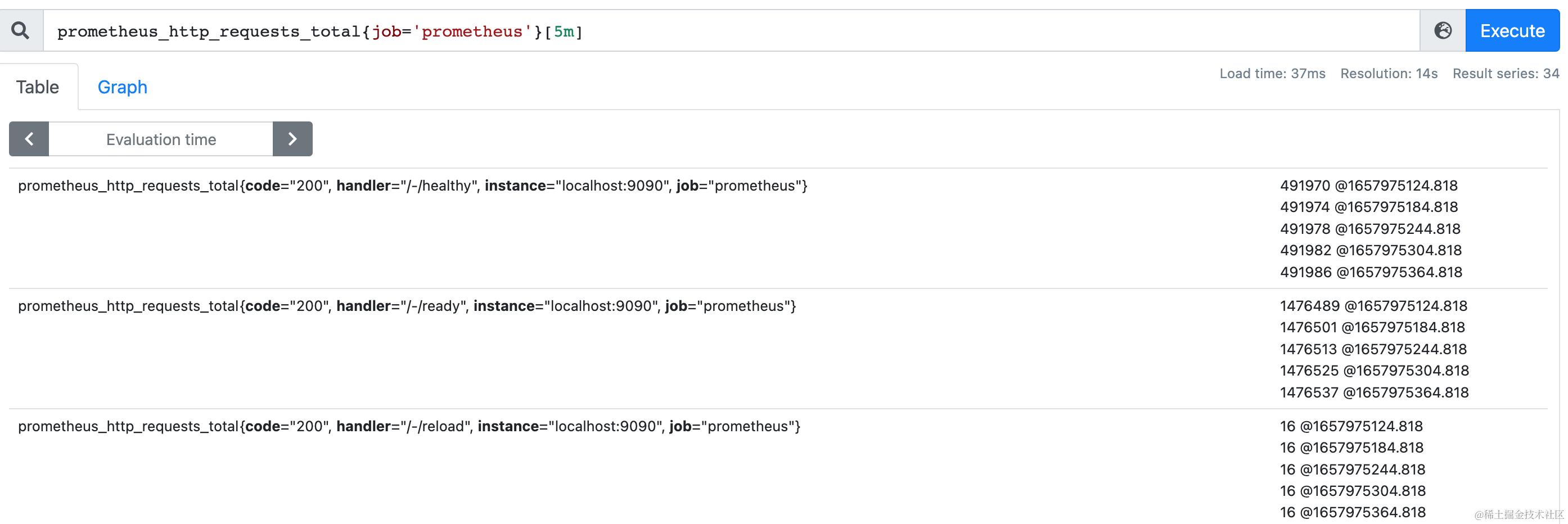
prometheus_http_requests_total{job='prometheus'}[5m] # 区间向量表达式,选择以当前时间为基准,5分钟内的数据

prometheus_http_requests_total{code="200", handler="/-/healthy", instance="localhost:9090", job="prometheus"}
5721 @1657450619.048
5725 @1657450679.048
5729 @1657450739.048
5733 @1657450799.048
5737 @1657450859.048
prometheus_http_requests_total{code="200", handler="/-/ready", instance="localhost:9090", job="prometheus"}
17164 @1657450619.048
17176 @1657450679.048
17188 @1657450739.048
17200 @1657450799.048
17212 @1657450859.048
3、标量(Scalar) - 一个浮点型的数据值。

scalar(prometheus_http_requests_total{job='prometheus',handler='/-/healthy'})
4、字符串(String) - 一个简单的字符串值。
可以用单引号、双引号或反引号指定为文字常量
4. 内置函数
// cpu使用率
sum (irate (container_cpu_usage_seconds_total{kubernetes_io_hostname=~"^$Node$"}[$interval]))
/
sum (machine_cpu_cores{kubernetes_io_hostname=~"^$Node$"}) * 100
5. 预聚合
Exporter(暴露Prometheus指标)
广义上讲所有可以向Prometheus提供监控样本数据的程序都可以被称为一个Exporter
- 来源
- 社区提供
- 用户自定义
- 运行方式
- 独立运行
- 集成到应用中
指标输出实现(Java)
1. simpleClient
        <!-- The client -->
        <dependency>
            <groupId>io.prometheus</groupId>
            <artifactId>simpleclient</artifactId>
            <version>0.15.0</version>
        </dependency>
        <!-- Hotspot JVM metrics-->
        <dependency>
            <groupId>io.prometheus</groupId>
            <artifactId>simpleclient_hotspot</artifactId>
            <version>0.15.0</version>
        </dependency>
        <!-- Exposition HTTPServer-->
        <dependency>
            <groupId>io.prometheus</groupId>
            <artifactId>simpleclient_httpserver</artifactId>
            <version>0.15.0</version>
        </dependency>
    HTTPServer server1 = new HTTPServer.Builder()
                        .withPort(9100)
                        .build();
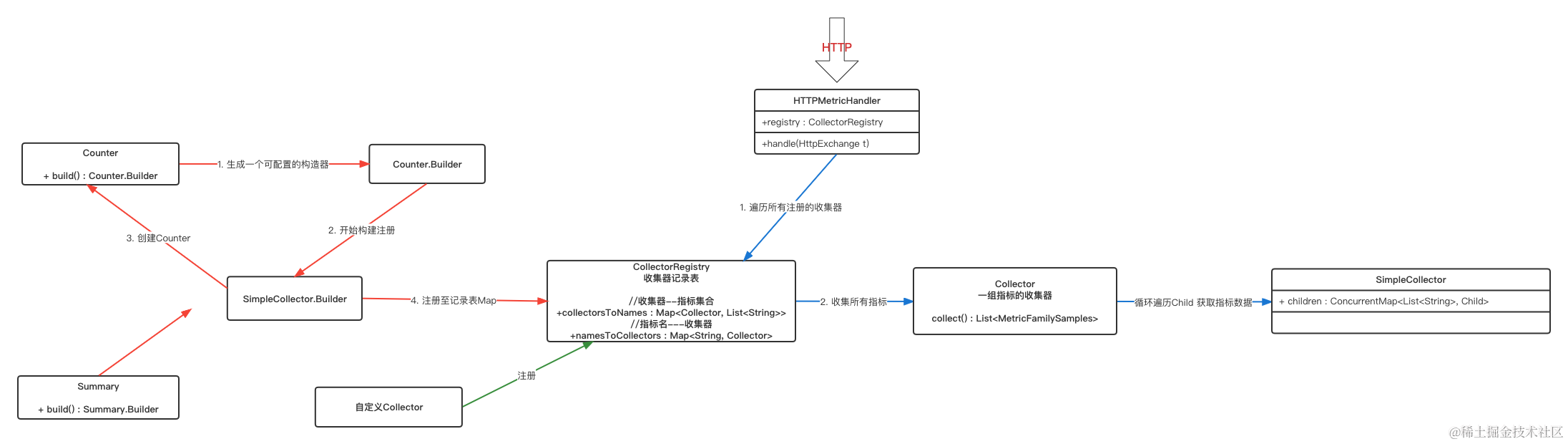
- 类图概要
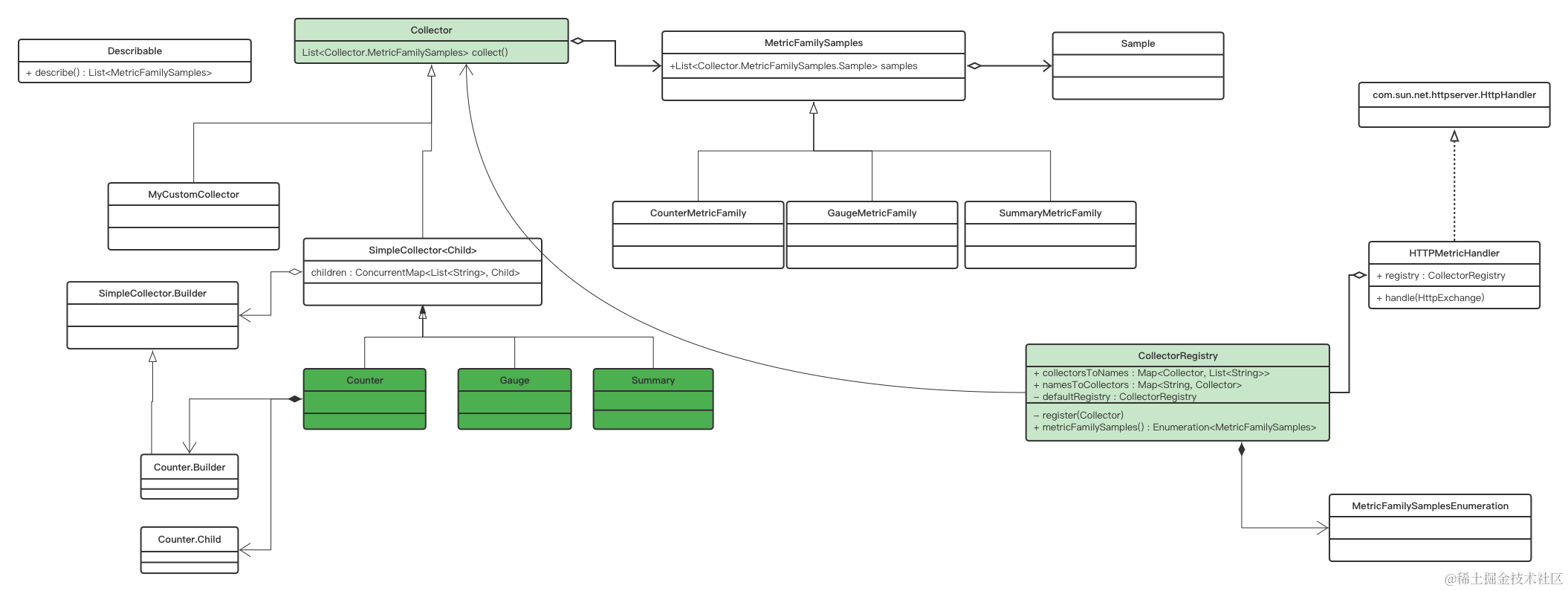
- 流程概要
1. 自定义Collector
2. 4种内置监控类型
    1. Counter
    2. Gauge
    3. Summary
    4. Histogram
3. PushGateway集成
2. micrometer
        <dependency>
            <groupId>io.micrometer</groupId>
            <artifactId>micrometer-registry-prometheus</artifactId>
        </dependency>
        try {
            HttpServer server = HttpServer.create(new InetSocketAddress(9091), 0);
            server.createContext("/prometheus", httpExchange -> {
                String response = prometheusRegistry.scrape();
                httpExchange.sendResponseHeaders(200, response.getBytes().length);
                try (OutputStream os = httpExchange.getResponseBody()) {
                    os.write(response.getBytes());
                }
            });

            new Thread(server::start).start();
        } catch (IOException e) {
            throw new RuntimeException(e);
        }
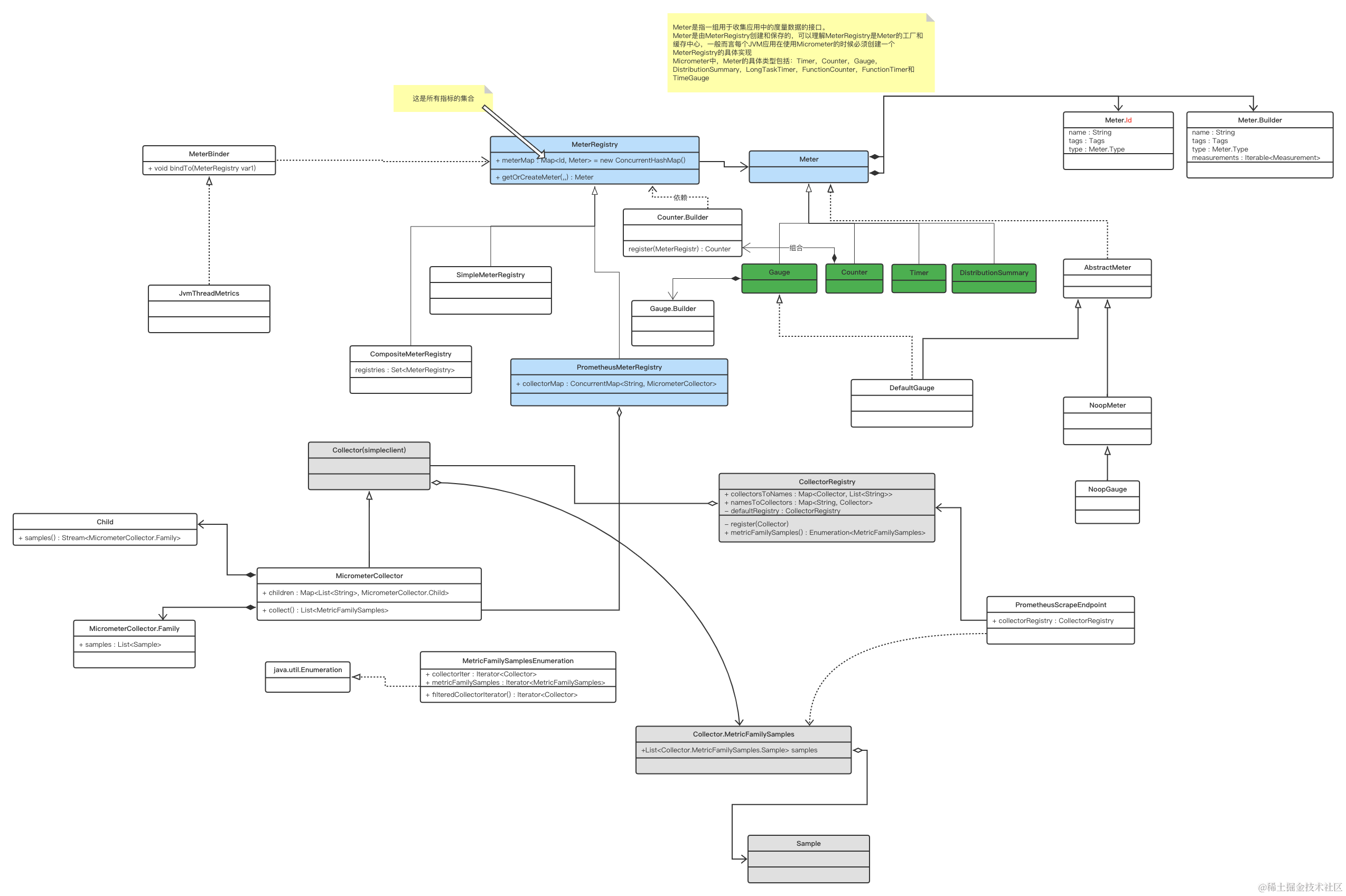
 Micrometer 提供了多种度量类库(Meter)
 Micrometer 支持对接各种监控系统,包括 Prometheus。
- 类图概要
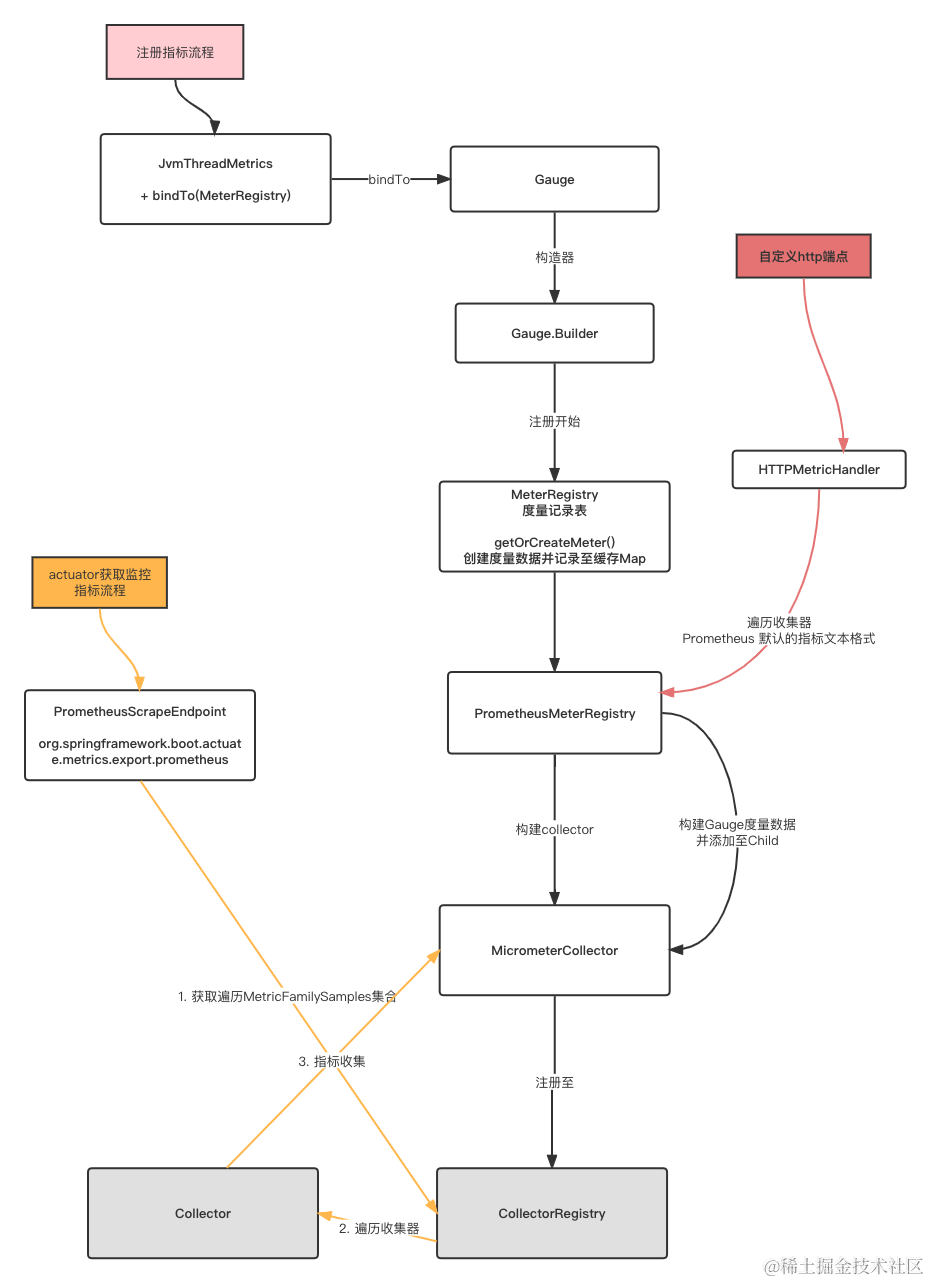
- 流程概要
3. Springboot监控之actuator
        <dependency>
            <groupId>org.springframework.boot</groupId>
            <artifactId>spring-boot-starter-actuator</artifactId>
        </dependency>
        <dependency>
            <groupId>io.micrometer</groupId>
            <artifactId>micrometer-registry-prometheus</artifactId>
        </dependency>
        <dependency>
            <groupId>org.springframework.boot</groupId>
            <artifactId>spring-boot-configuration-processor</artifactId>
        </dependency>
为了方便微服务应用接入
4. jmx_exporter(jmx)
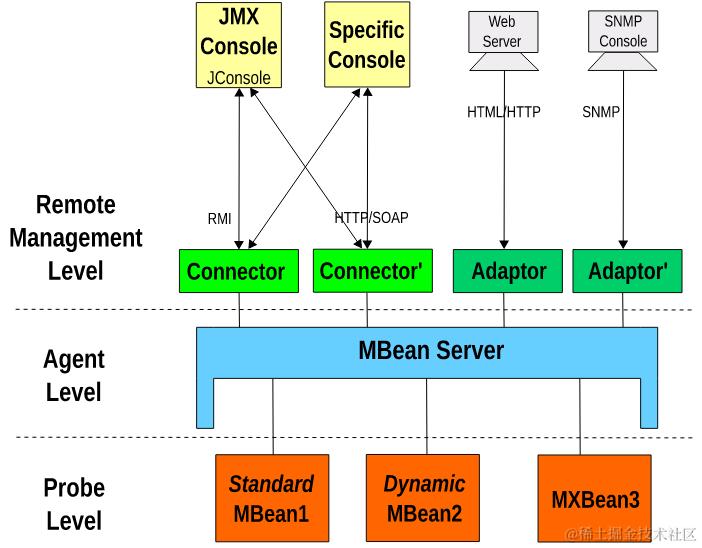
- JMX
-
资源管理模块(MBean/MXBean)
-
资源代理模块(MBean Server)
-
远程管理模块(Remote API)
-
- JMX Exporter
5. 自定义业务指标
gdc-metricclient
- IDataIntegrationResource
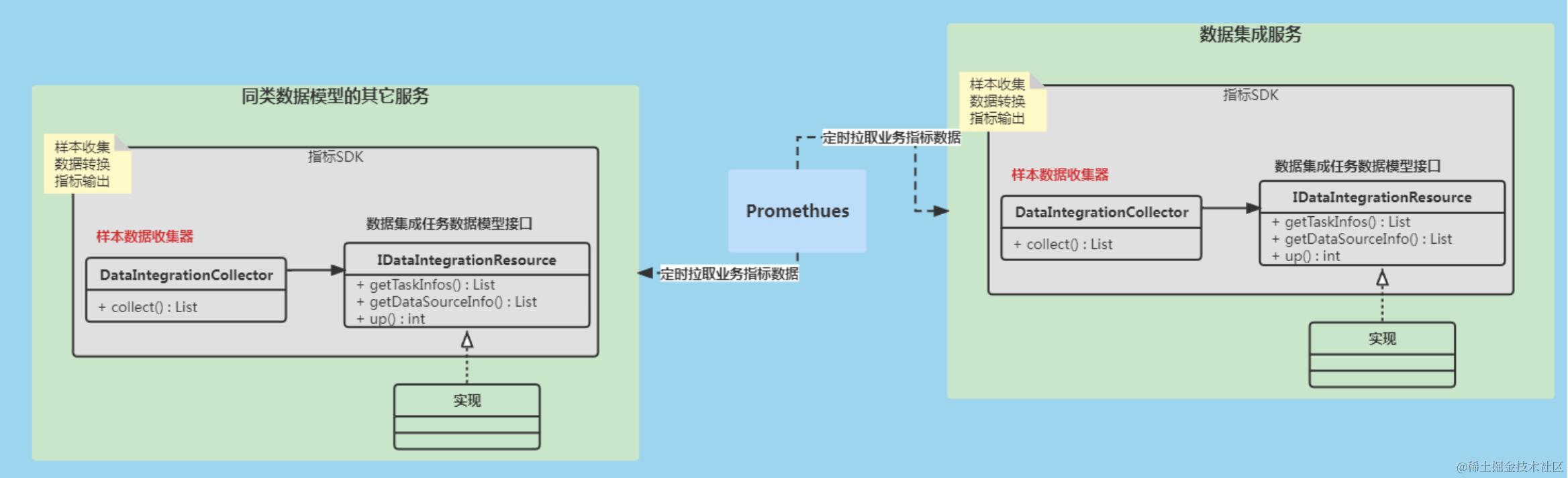
gdc-metricclient-web
详见内部代码实现
业务指标采集结构设计图
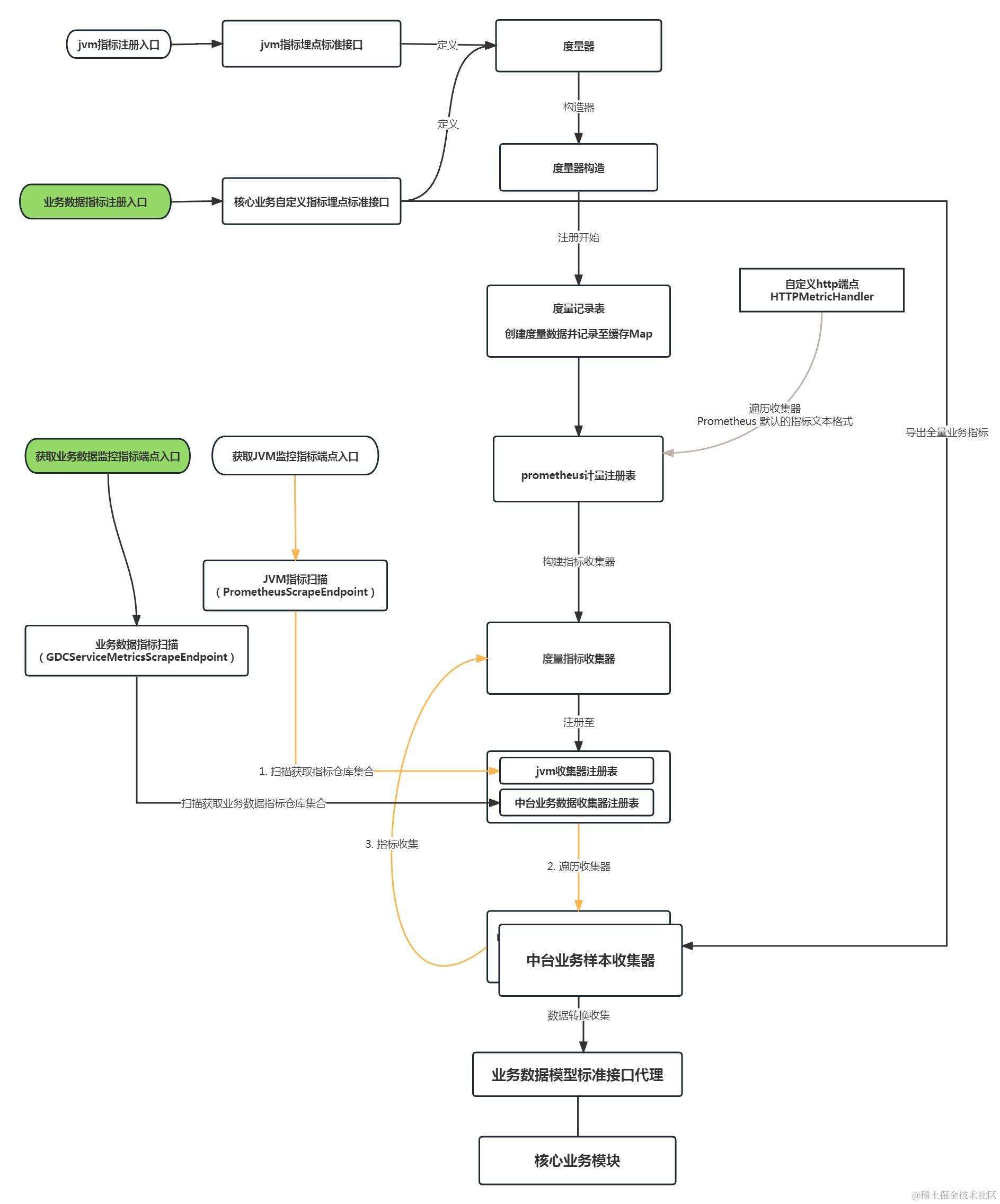
指标输出案例
系统层指标
- 服务器指标
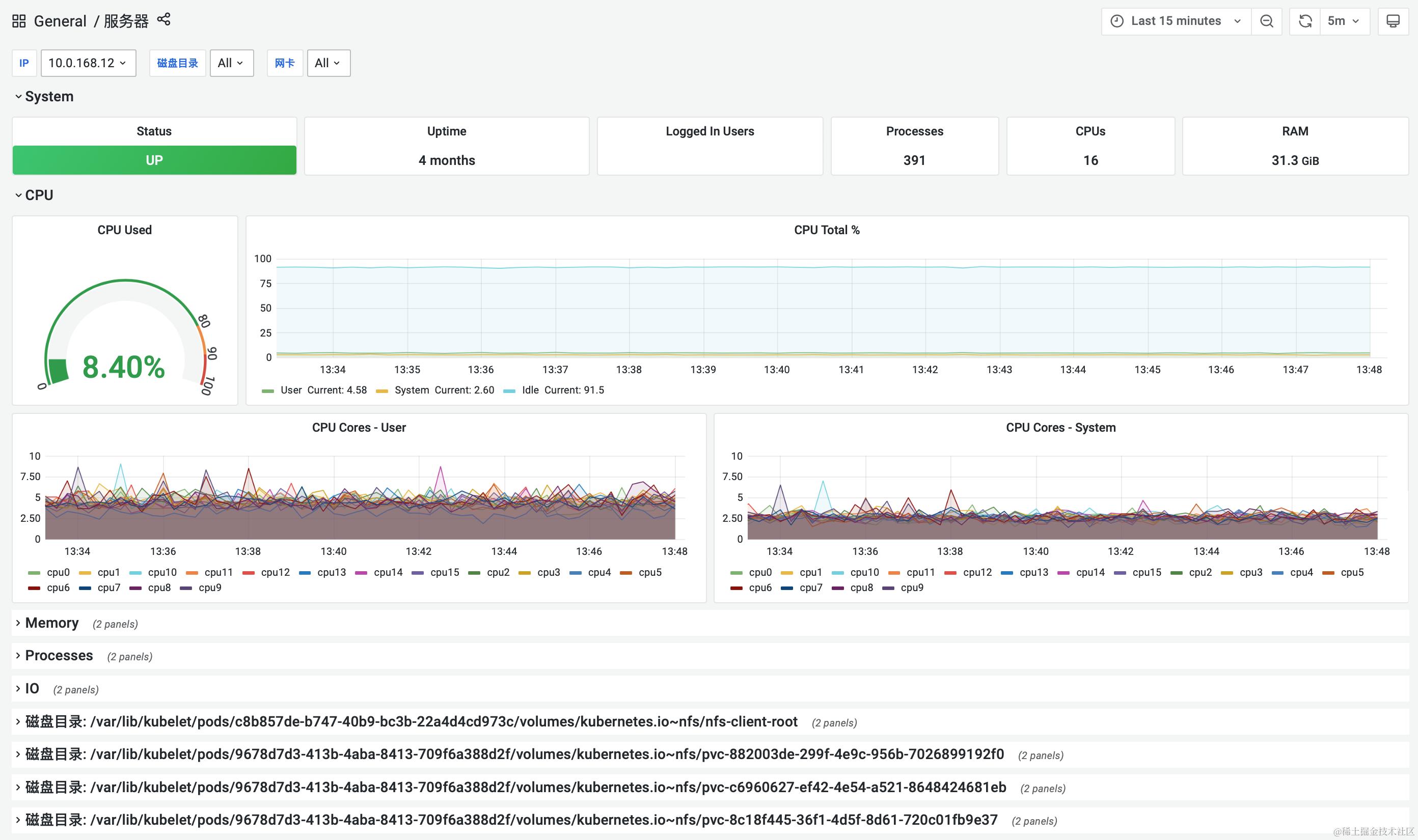
- k8s指标
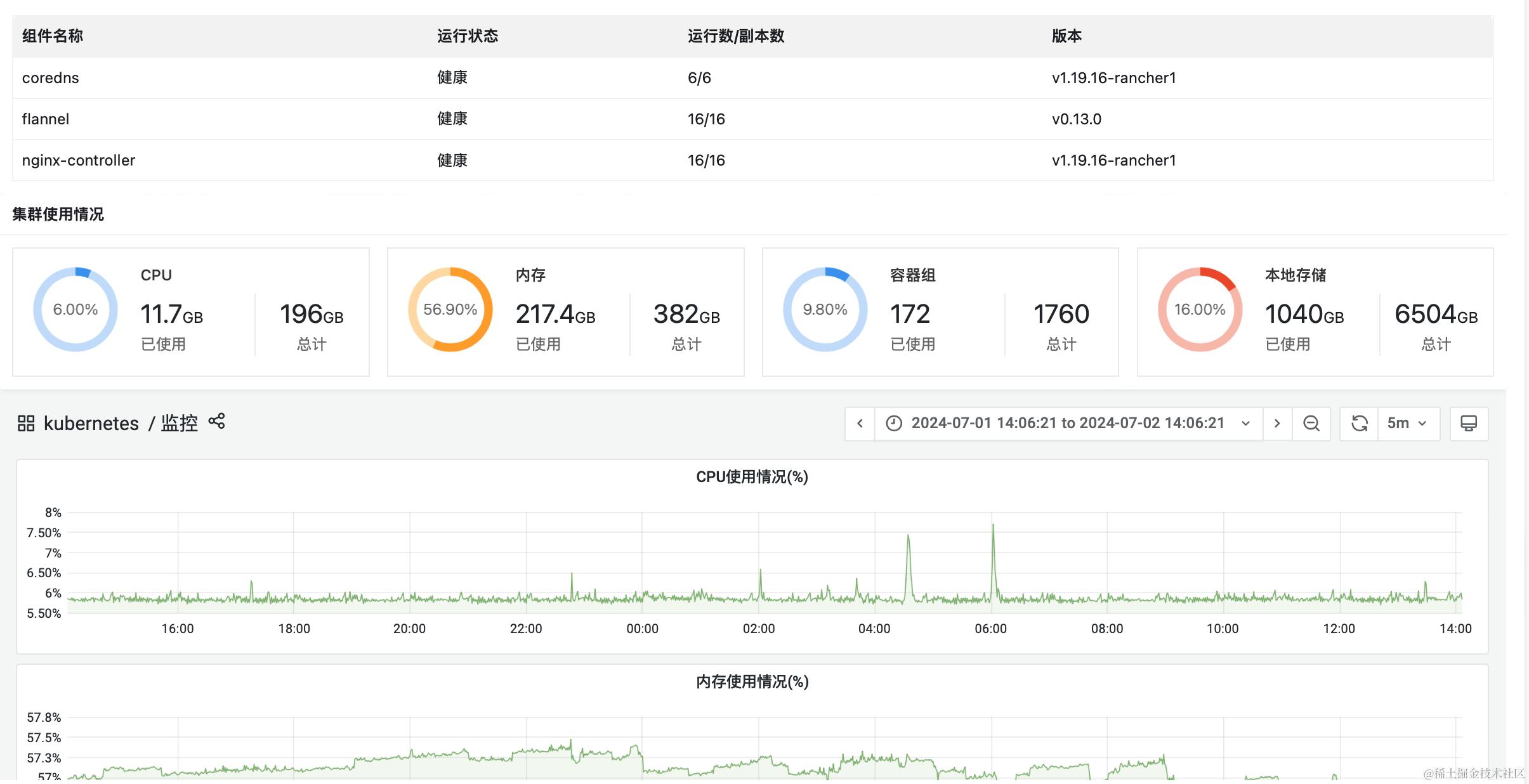
- 容器指标
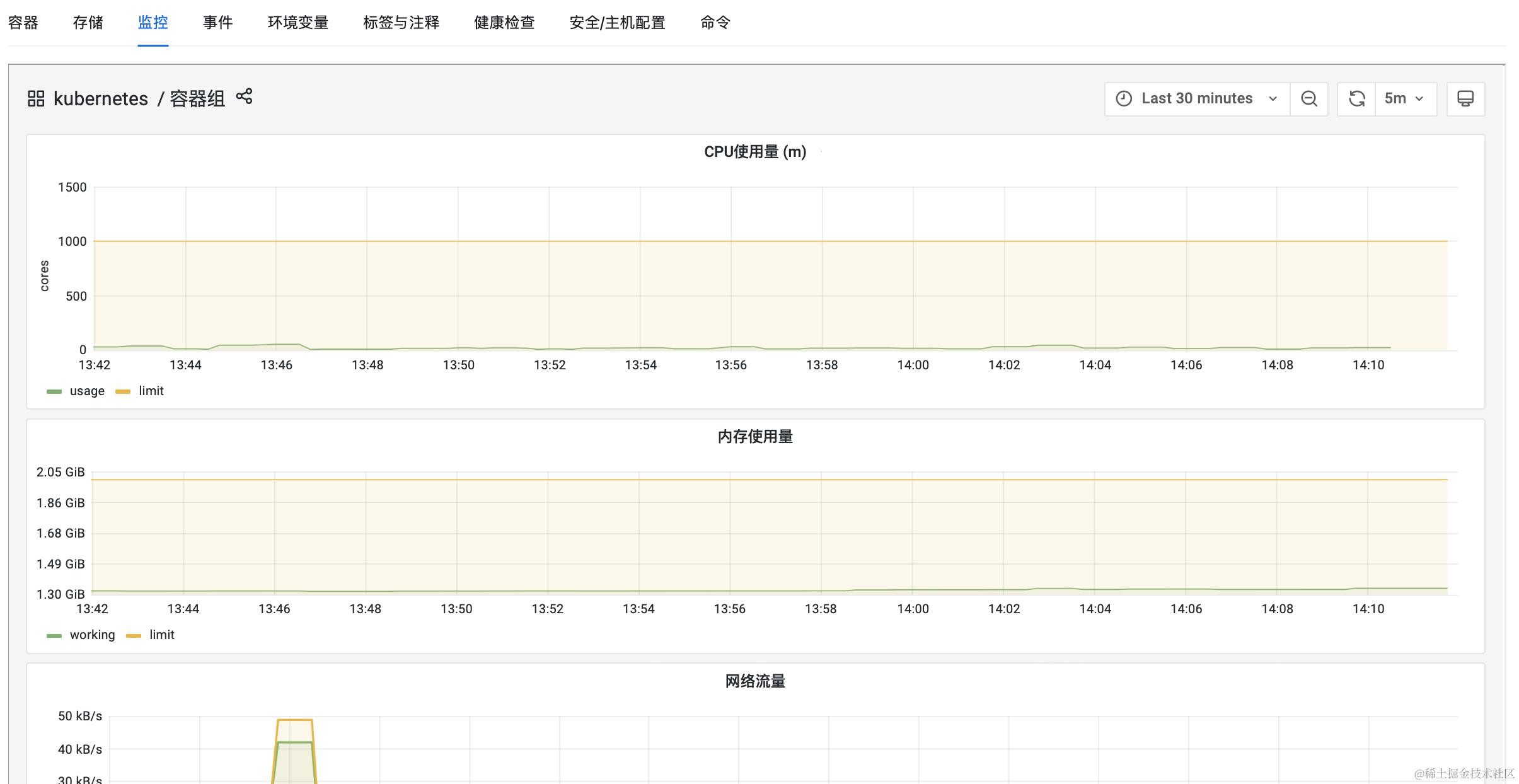
中间件层指标
- kong
- prometheus采集插件
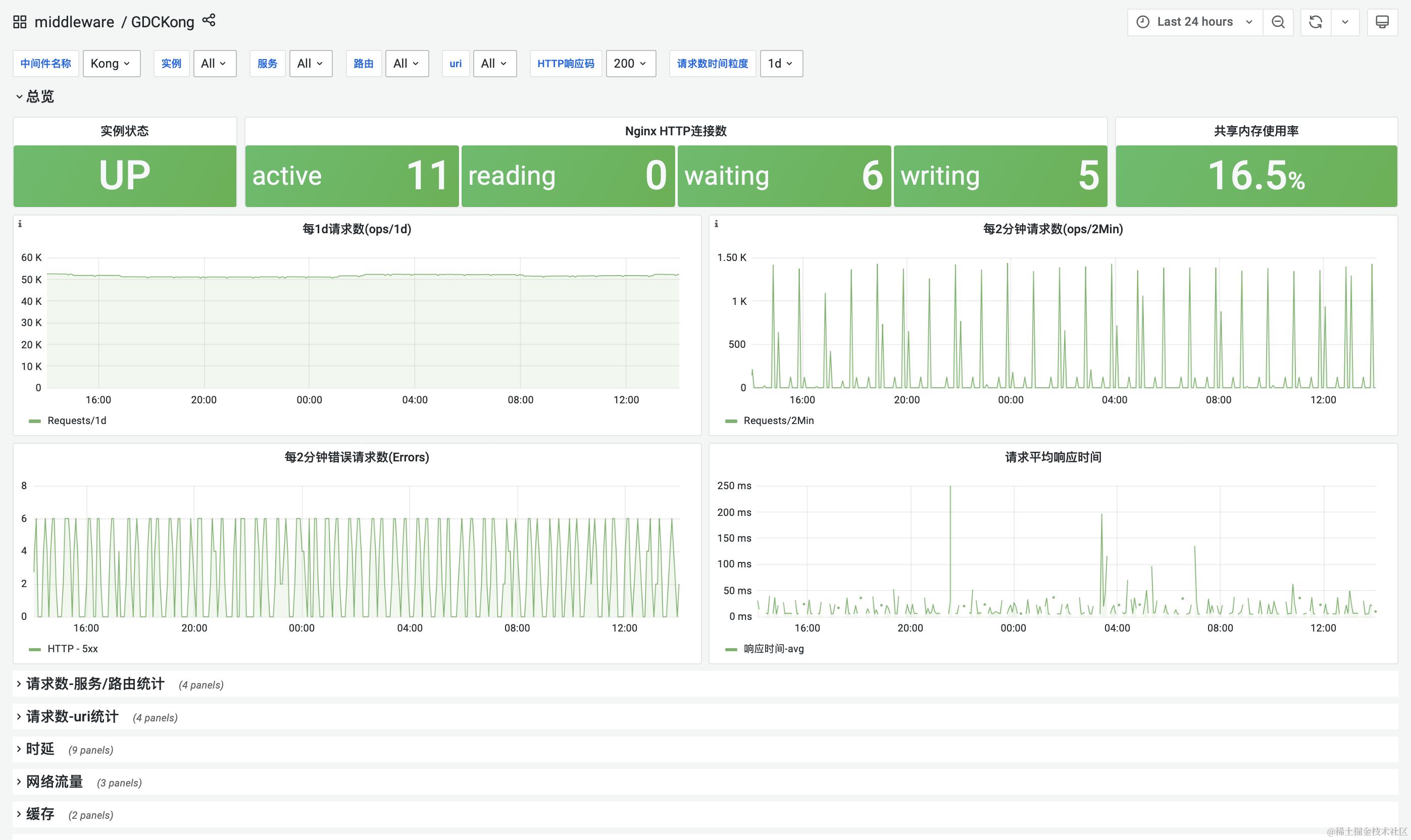
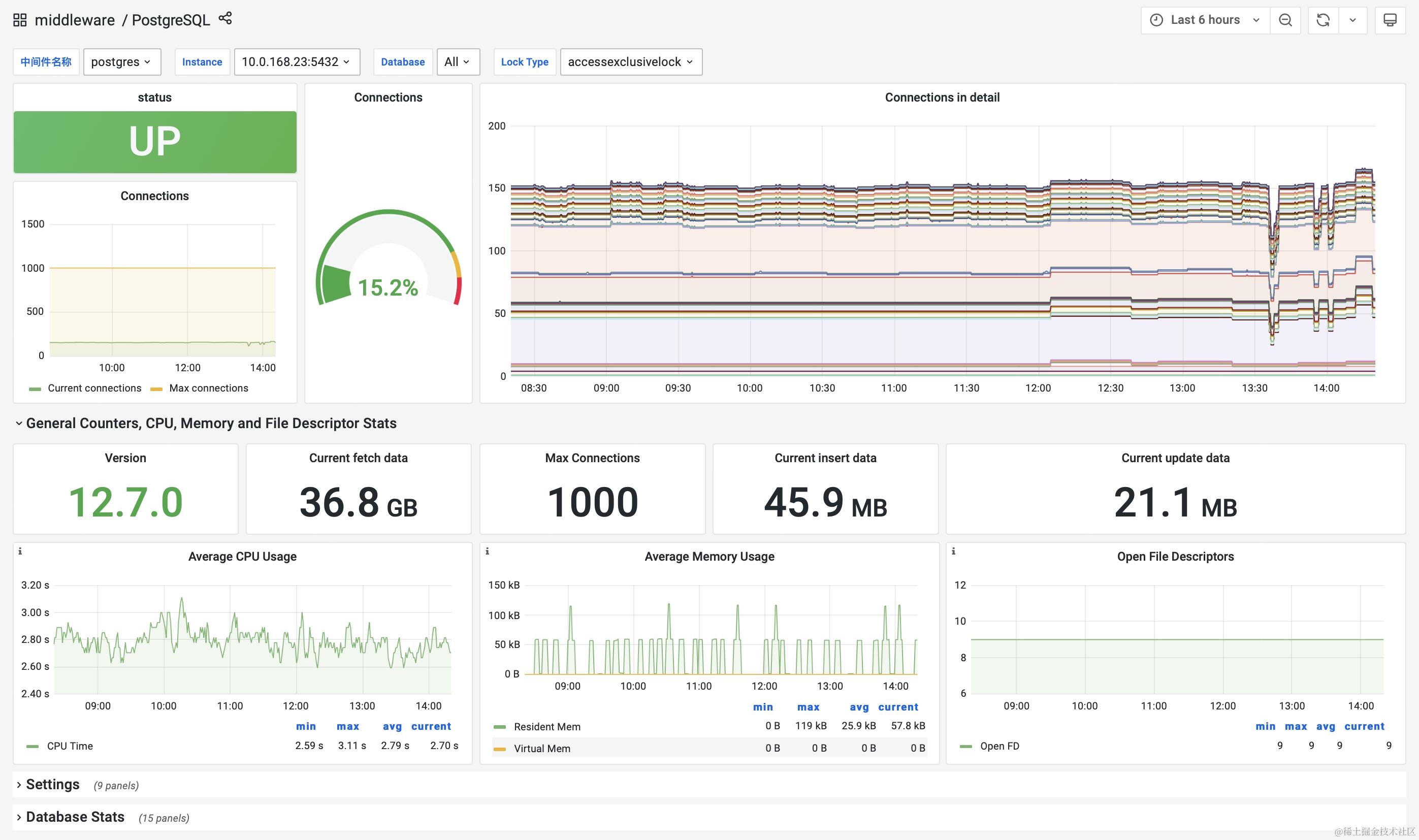
- PostgreSQL
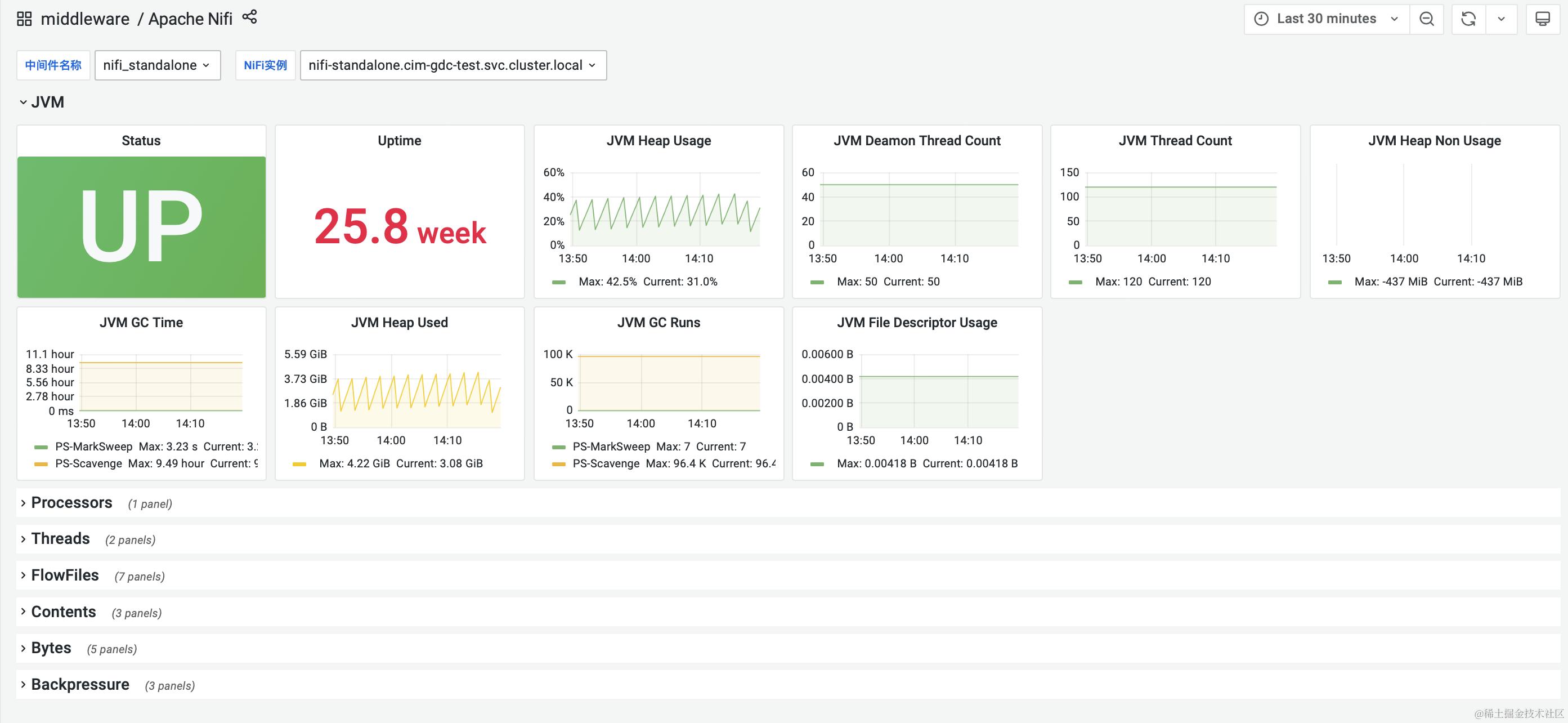
- nifi
- DolphinScheduler
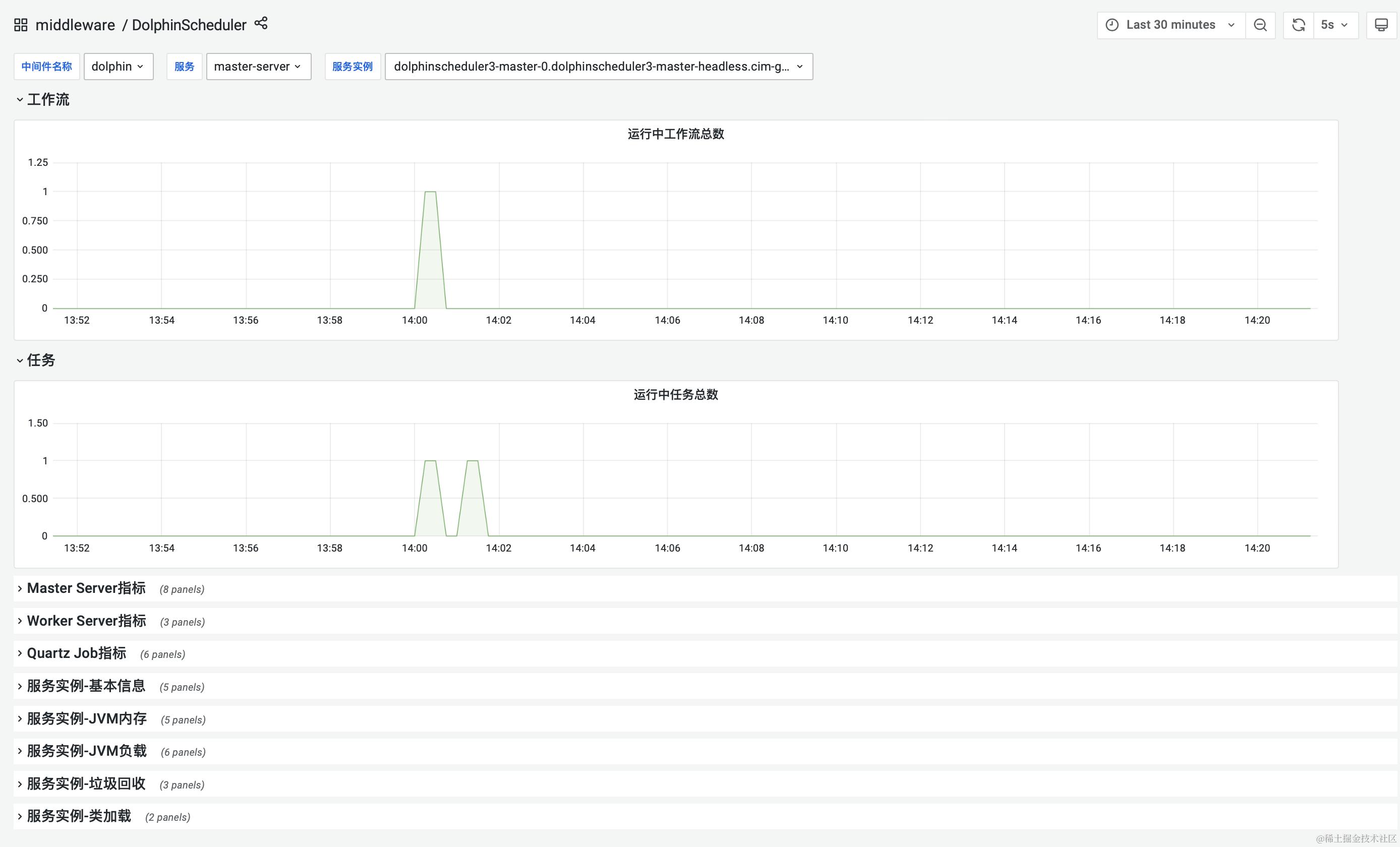
- kafka
- yammer.metrics
- jmx
- tomcat
- jmx
微服务指标(应用层监控)
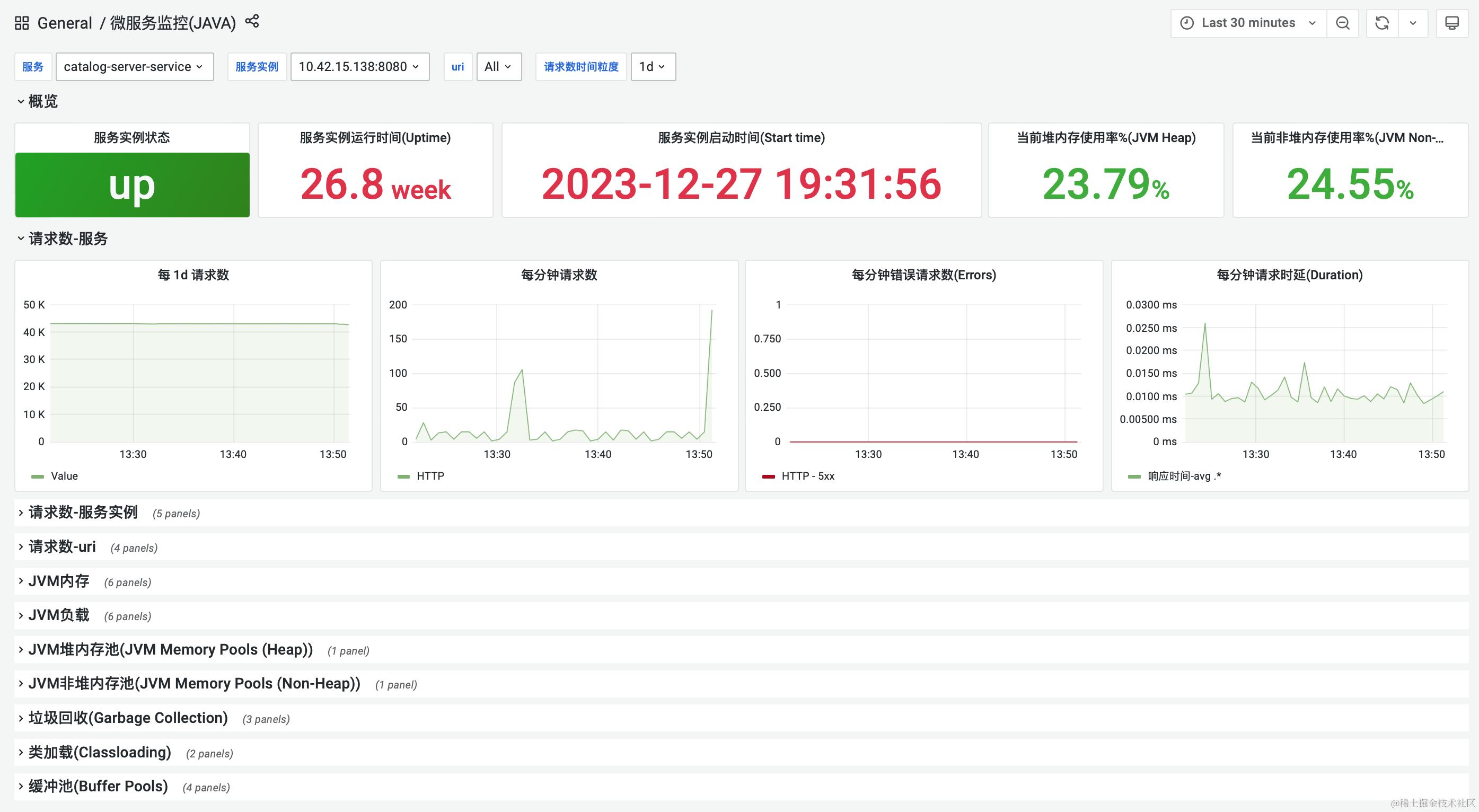
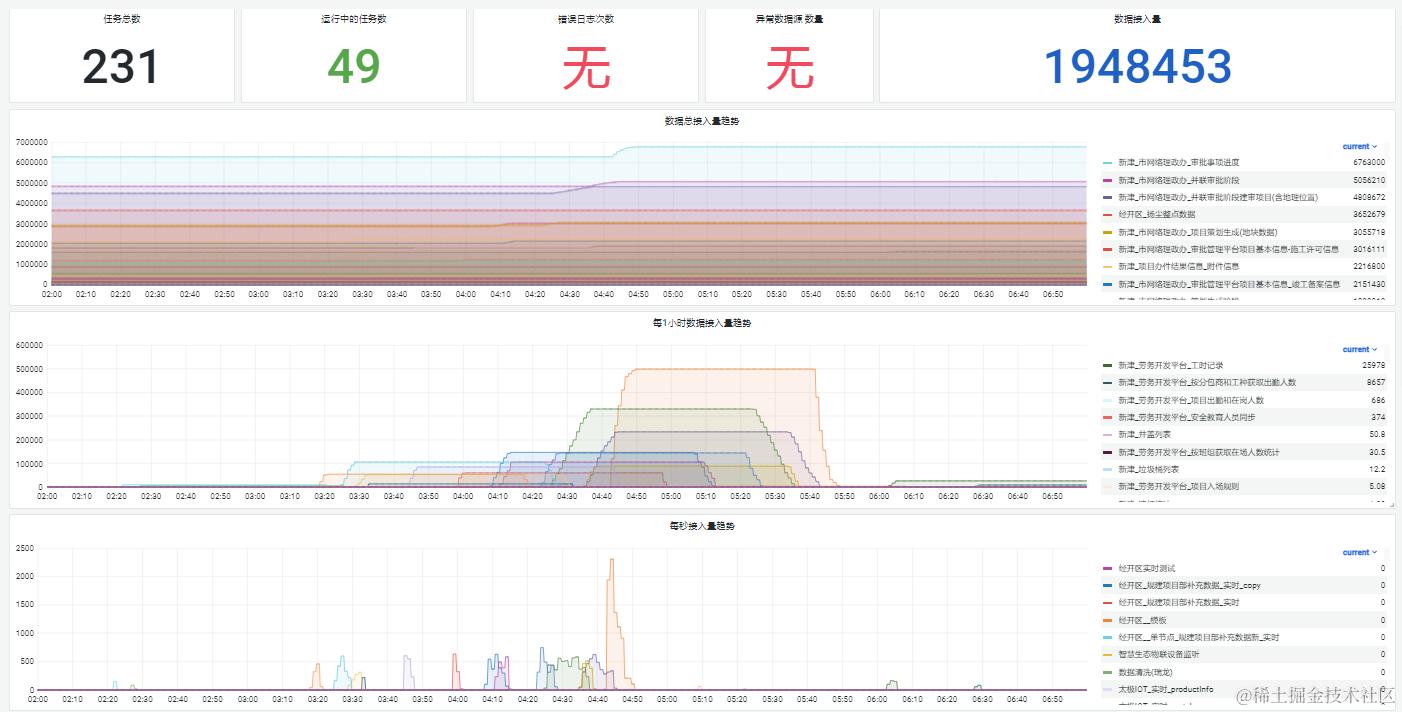
业务指标
- data-integration-service(数据集成)
- 定义集成任务通用对象
- 定义第三方链接源通用对象
- up 服务状态
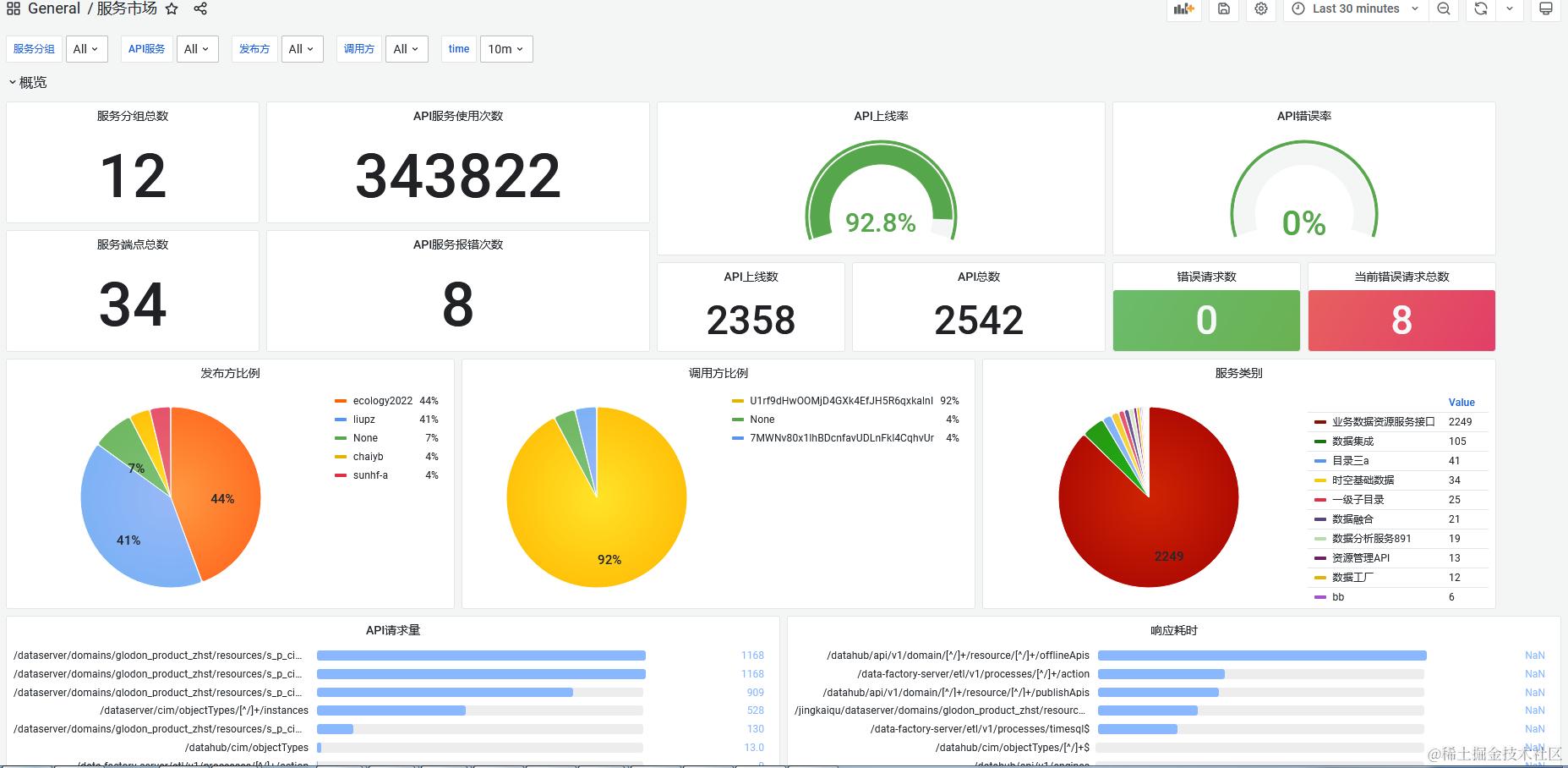
- datahub-data-server(服务市场)
- api请求指标细粒度
- up 服务状态
更多自定义指标实现
- @Timed
- @Counted
- ...
告警
Prometheus一条告警怎么触发的?
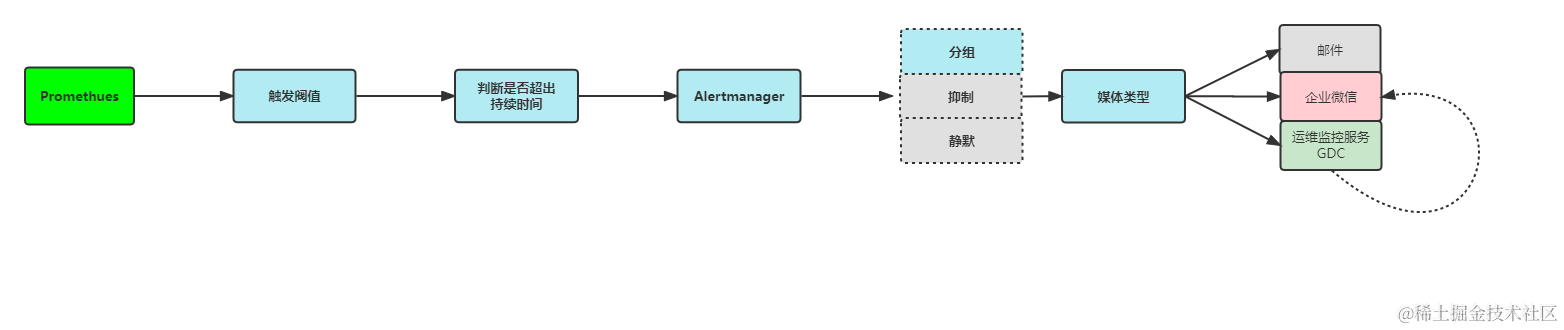
告警规则(Promethues)
groups:
- name: node-rule
  - alert: 主机cpu告警  # 告警规则名称
    annotations: # 指定附加信息
      summary: 主机:{{$labels.instance}},当前cpu使用率过高:{{ $value }}%>90%
    expr: round(100-cpu_usage_idle{cpu="cpu-total",release="node"}) > 90 # 基于PromQL的触发条件
    for: 600s #等待评估时间
    labels: #自定义标签
      rulecode: node-rule-cpu
      service: node
      severity: high
      alertroute: node
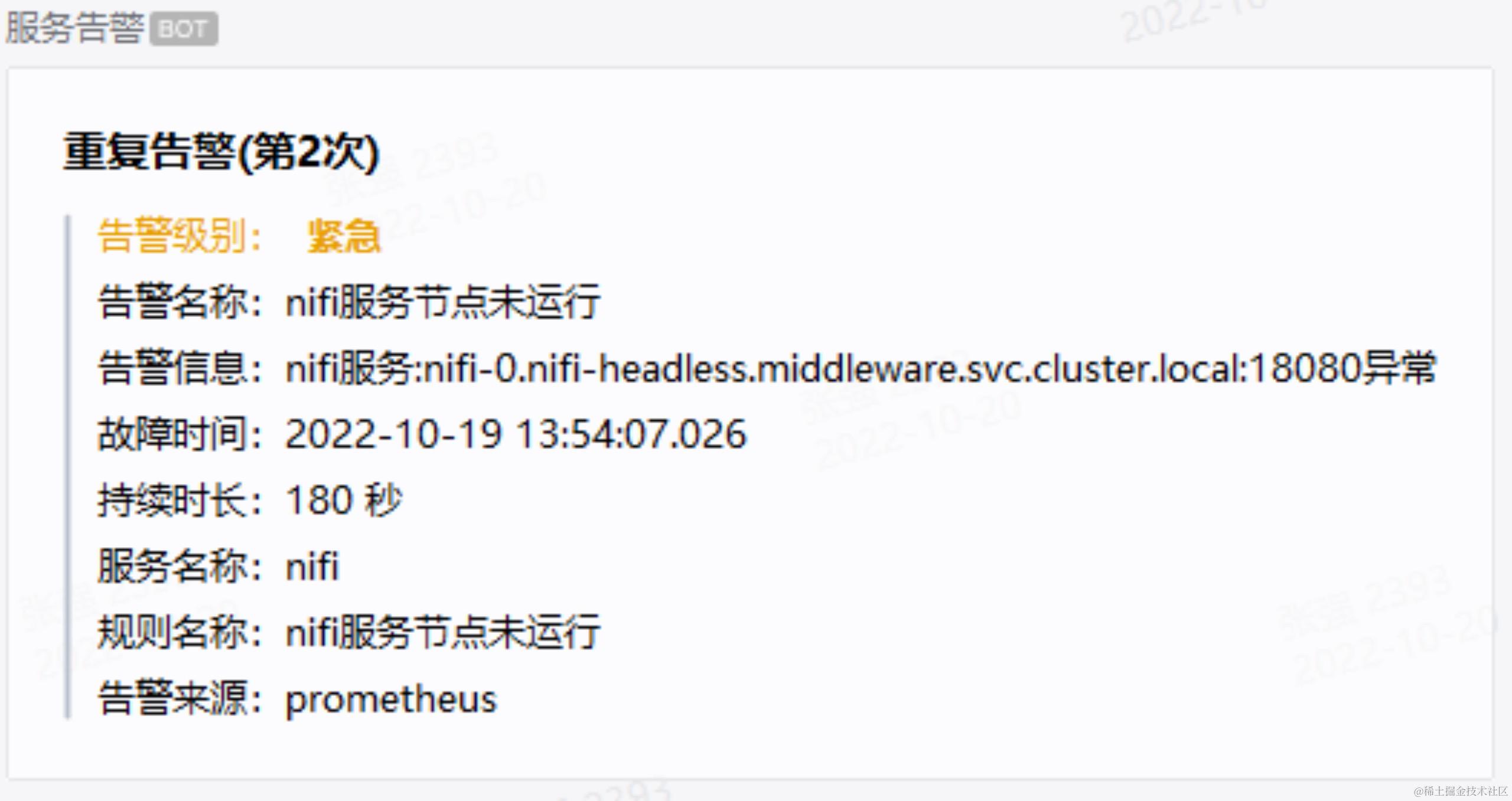
自定义告警规则(产品化)
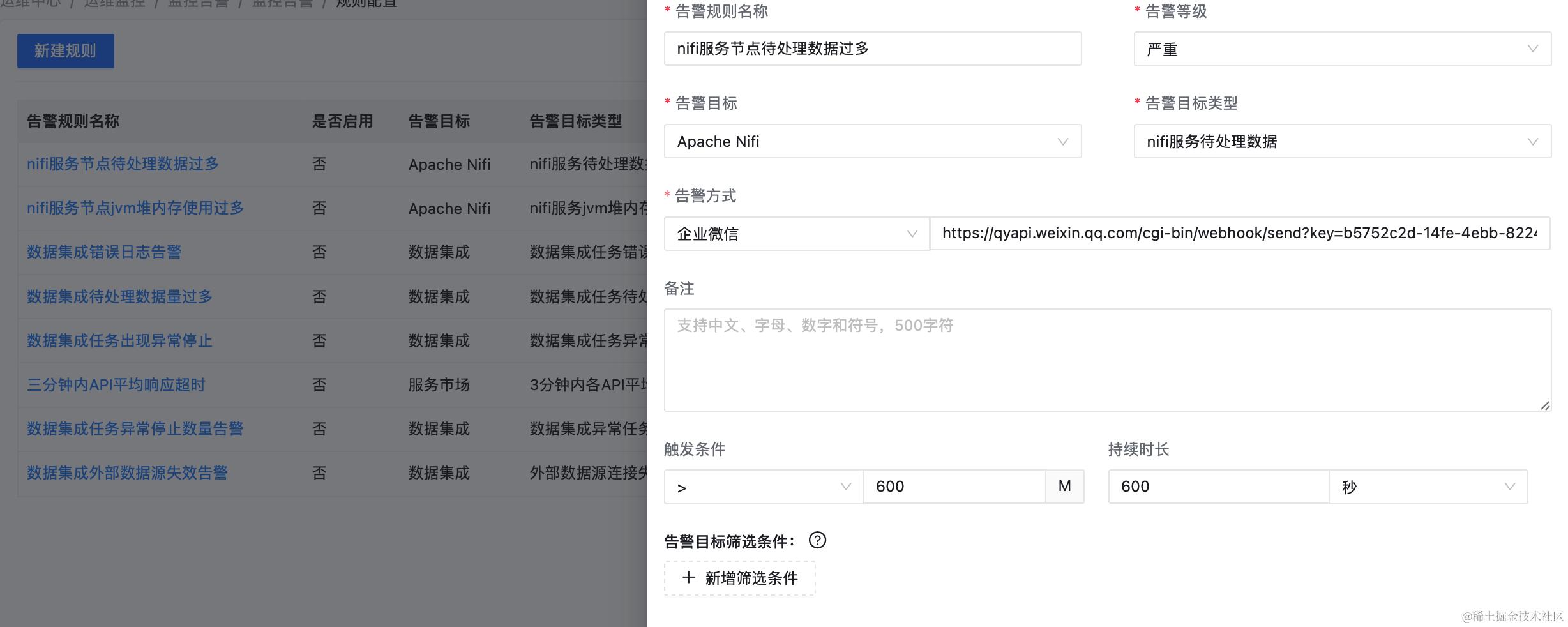
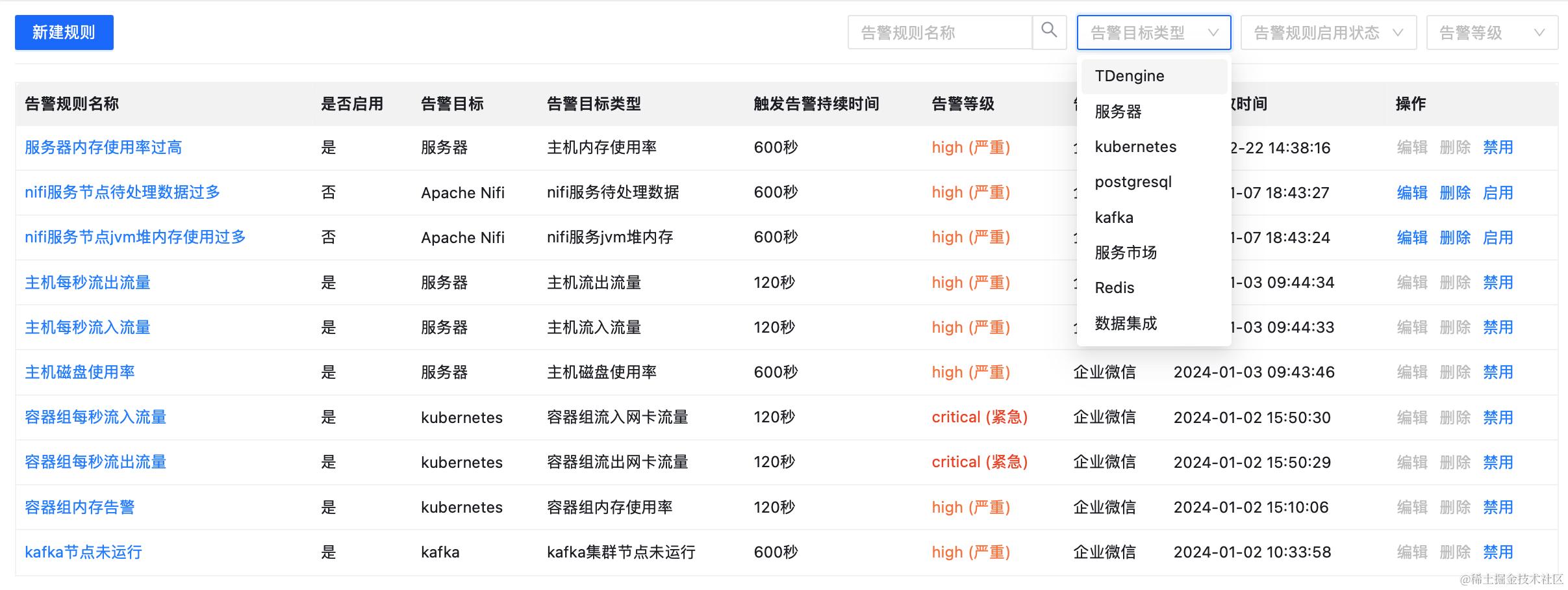
告警触发逻辑
自定义告警消息(产品化)
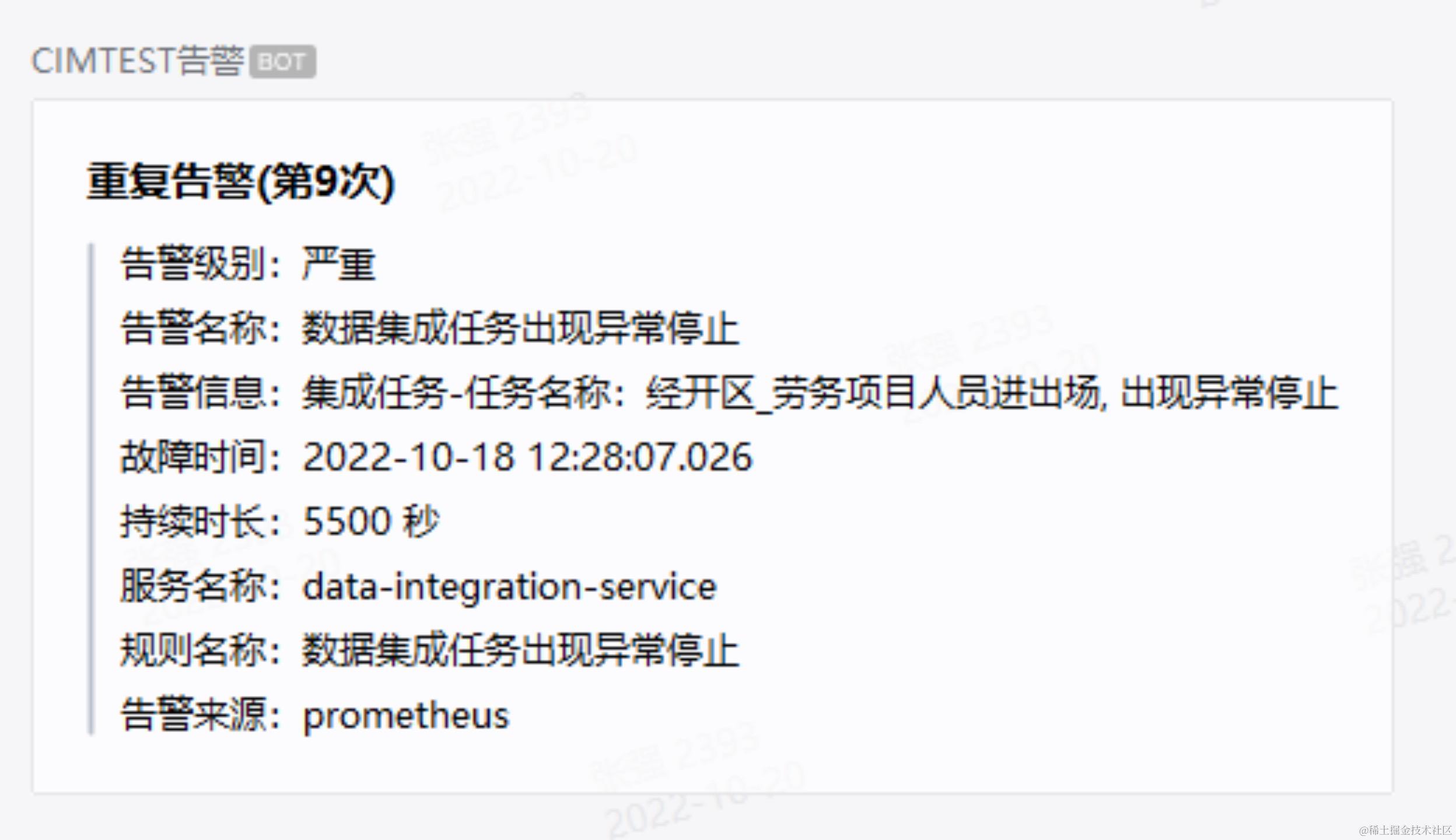
告警状态
- Inactive:这里什么都没有发生。
- Pending:已触发阈值,但未满足告警持续时间
- Firing:已触发阈值且满足告警持续时间。警报发送给接受者。
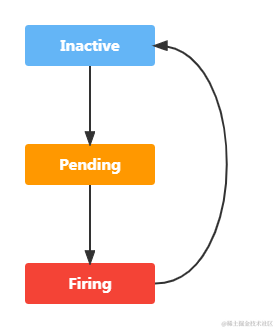
以上述主机CPU告警规则为例:
-
收集到的round(100-cpu_usage_idle{cpu="cpu-total",release="node"}) <= 90,告警状态为inactive
-
收集到的round(100-cpu_usage_idle{cpu="cpu-total",release="node"}) > 90,且持续时间小于600s,告警状态为pending
-
收集到的round(100-cpu_usage_idle{cpu="cpu-total",release="node"}) > 90,且持续时间大于600s,告警状态为firing
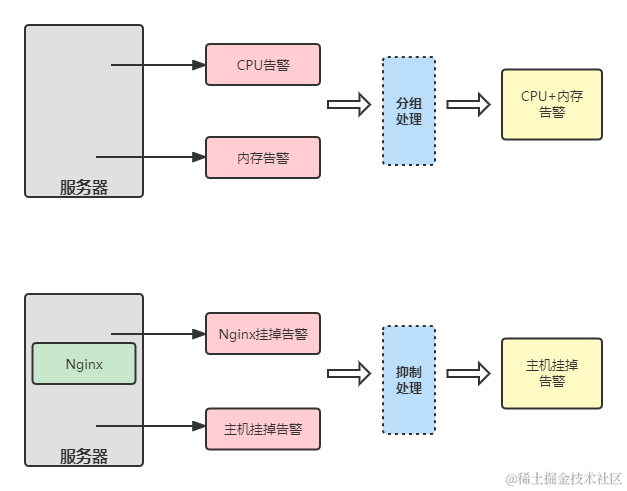
告警收敛
- 分组(group):将类似性质的警报分类为单个通知
- 抑制(Inhibition):当警报发出后,停止重复发送由此警报引发的其他警报
- 静默(Silences):是一种简单的特定时间静音提醒的机制
Promethues不适合做什么
- Prometheus 是基于 Metric 的监控,不适用于日志(Logs)、事件(Event)、调用链(Tracing)。它更多地展示的是趋势性的监控。
- Prometheus 不一定保证数据准确,这里的不准确一是指 rate、histogram_quantile 等函数会做统计和推断
参考源:

