Matplotlib定义了一个轴类(轴域类)。这个类的对象被称为轴对象(即轴域对象)。它指定了一个具有数值范围限制的绘图区域。本文将通过一些例子告诉你如何使用Matplotlib的轴类。
1.Matplotlib轴类介绍
-
一个给定的图中可以包含多个轴对象,但同一个轴对象只能在一个图中使用。
-
二维绘图区(axes)包含两个轴对象。如果是三维绘图区,它包含三个。
-
通过调用add_axes()方法,我们可以在画布上添加轴对象。这个方法是用来生成一个轴的轴域对象。该对象的位置由参数rect的值决定。
-
rect参数是一个位置参数。它接受一个由四个元素组成的浮点数列表,如[左、下、宽、高],表示添加到画布上的矩形区域的左下角坐标(x、y)、宽度和高度。
ax = figure_object.add_axes([0.1,0.1,0.8,0.8]) -
每个元素的值都是画布宽度和高度的一个百分比。例如,[0.2, 0.2, 0.9, 0.9],它意味着绘画从画布面积的20%开始,宽度和高度为画布宽度和高度的90%。
1.1 轴类legend()方法
-
轴类的**legend()**方法负责在画布上绘制图例。它需要三个参数,如下所示。
ax.legend(handles, labels, loc)

handles : It is a sequence that contains all instances of linetypes.

labels : Is a string sequence that specifies the name of the label.

loc : The parameter that specifies the location of the legend. The parameter value can be expressed as a string or an integer.

the loc parameter's value can be one of the below list.

self-adaption : best or 0.

upper right : upper right or 1.

upper left : upper left or 2.

lower left : lower left or 3.

lower right : lower right or 4.

right : right or 5.

center left : center left or 6.

center right : center right or 7.

lower center: lower center or 8.

upper center : upper center or 9.

center : center or 10.
1.2 轴类 plot() 方法
-
这是坐标轴类的基本方法,它将一个数组的值和另一个数组的值绘制成线或标记。
-
plot()方法有可选择的格式化字符串参数,指定线型、标记颜色、样式和大小。
-
颜色代码表:
'b' : blue. 'c' : cyan. 'g' : green. 'k' : black. 'm' : magenta. 'r' : red. 'w' : white. 'y' : yellow. -
标记符号表:
'.' : Point mark. 'o' : Circle mark. 'x' : X mark. 'D' : Diamond mark. 'H' : Hexagon mark. 's' : Square mark. '+' : Plus sign mark -
线型表示字符表:
'-' : Solid line.

'--' : Dash line.

'-.' : Dotted line.

':' : Dash line.

'H' : Hexagon mark.
2.Matplotlib轴的例子
-
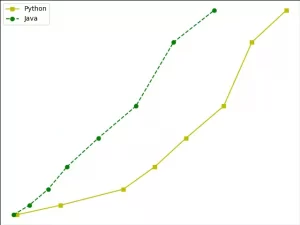
这个例子将使用axes类的plot()方法绘制2条具有不同风格的线条。
import matplotlib.pyplot as plt def axes_example(): # create a y axis position array. y = [2, 5, 10, 17, 26,36, 56, 66] # create 2 x axis position array. x1 = [2, 16, 36, 46, 56, 68, 77,88] x2 = [1, 6, 12, 18, 28, 40, 52, 65] # create a figure object. figure_object = plt.figure() # add the axes in the figure object. ax = figure_object.add_axes([0,0,1,1]) # draw a yellow solid curve. l1 = ax.plot(x1,y,'ys-') # draw a green circle dash curve. l2 = ax.plot(x2,y,'go--') # add a legend on the upper left corner, the legend label is Python & Java. ax.legend(labels = ('Python', 'Java'), loc = 'upper left') # show the figure. plt.show() if __name__ == '__main__': axes_example() -
当你运行它时,你会得到下图。