

我最近在寻找一种方法来监视我们工作中的容器和应用程序。特别是,我对检测配置中的异常情况感兴趣。经过一番研究,我偶然发现了Falco。
我发现这是一个非常完整的开源平台,有很多功能和优秀的文档。所以我想和你分享我的经验。
在这篇文章中,我们将介绍什么?
- 如何在你要监控的主机上安装Falco代理(异常/违规)
- 如何调整Falco以减少误报并获得你真正需要的信息
- 如何使用Prometheus收集Falco事件到一个中心位置,在出口商和搜刮器的帮助下
- 最后,如何将搜刮器与Grafana连接起来,以实现可视化和警报
本教程需要什么?
- 一台或几台安装有Linux的机器。虚拟机也可以。
- 你需要有超级用户的权限,以便能够安装/设置Docker、RPM和systemd进程。
- 我们将使用Docker容器,所以需要Docker的基本知识。
- 要有Python/Bash的工作知识,因为我们会写一些脚本来测试和改进我们的配置。
在课程结束时,你将能够设置以下每一个组件
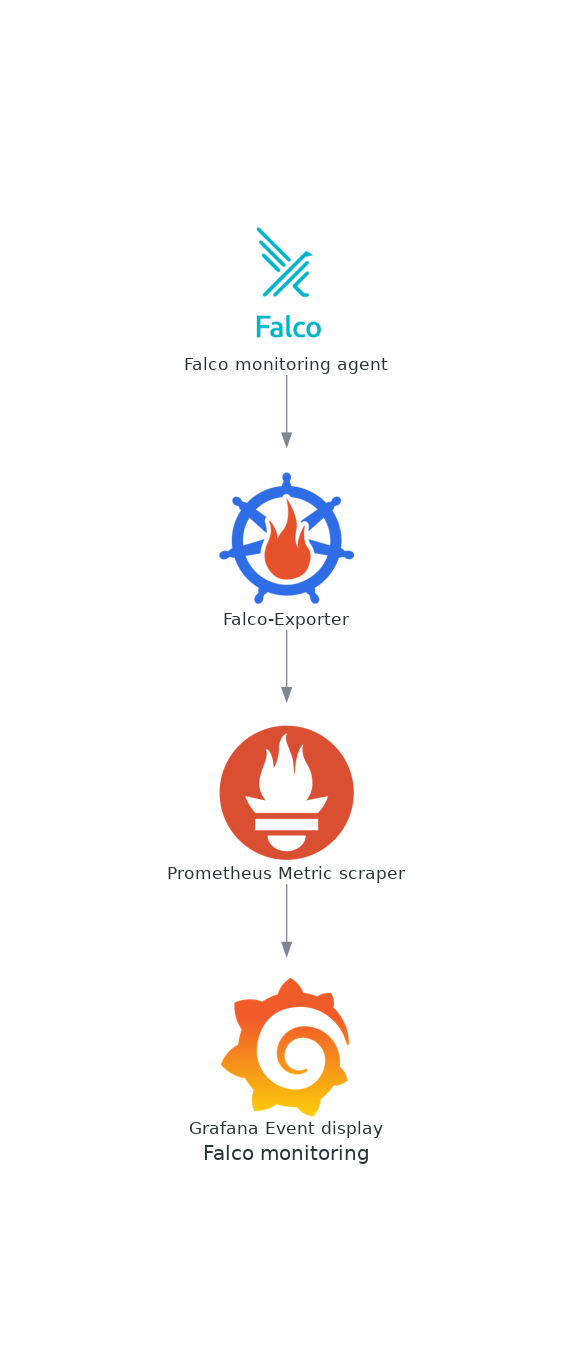
不要被吓倒--在我们前进的过程中,我会提供文档的链接和对这些任务中的每一项的详尽解释。
目录
什么是Falco?
描述这个工具的最好方法是了解它能做什么:
Falco可以对任何涉及Linux系统调用的行为进行检测和报警。
Falco的警报可以通过使用特定的系统调用、其参数以及调用进程的属性来触发。例如,Falco可以轻松检测到包括但不限于以下事件:
- Kubernetes中的容器或pod内正在运行一个shell。
- 容器以特权模式运行,或从主机挂载敏感路径,如/proc。
- 一个服务器进程正在生成一个意外类型的子进程。
- 意外读取一个敏感文件,如/etc/shadow。
- 一个非设备文件被写到/dev。
- 一个标准的系统二进制文件,如ls,正在进行一个外向的网络连接。
- 在Kubernetes集群中启动一个有特权的pod。
如何安装Falco
我将使用RPM安装Falco(apt-get也有类似的说明,甚至Docker容器也有)。在我的案例中,我觉得本机安装是最好的,而RPM使其非常容易做到。
[josevnz@macmini2 ~]$ sudo -i dnf install https://download.falco.org/packages/rpm/falco-0.31.1-x86_64.rpm
Last metadata expiration check: 2:53:53 ago on Sun 01 May 2022 04:13:09 PM EDT.
falco-0.31.1-x86_64.rpm                                                                                                                                                                                                       1.7 MB/s |  12 MB     00:07
Dependencies resolved.
==============================================================================================================================================================================================================================================================
 Package                                                          Architecture                                      Version                                                                     Repository                                               Size
==============================================================================================================================================================================================================================================================
Installing:
 falco                                                            x86_64                                            0.31.1-1                                                                    @commandline                                             12 M
Installing dependencies:
 dkms                                                             noarch                                            2.8.1-4.20200214git5ca628c.fc30                                             updates                                                  78 k
 elfutils-libelf-devel                                            x86_64                                            0.179-2.fc30                                                                updates                                                  27 k
 kernel-devel                                                     x86_64                                            5.6.13-100.fc30                                                             updates                                                  14 M

Transaction Summary
==============================================================================================================================================================================================================================================================
Install  4 Packages

Total size: 26 M
Total download size: 14 M
Installed size: 92 M
Is this ok [y/N]: y
Downloading Packages:
(1/3): elfutils-libelf-devel-0.179-2.fc30.x86_64.rpm                                                                                                                                                                          253 kB/s |  27 kB     00:00
(2/3): dkms-2.8.1-4.20200214git5ca628c.fc30.noarch.rpm                                                                                                                                                                        342 kB/s |  78 kB     00:00
(3/3): kernel-devel-5.6.13-100.fc30.x86_64.rpm                                                                                                                                                                                1.9 MB/s |  14 MB     00:07
--------------------------------------------------------------------------------------------------------------------------------------------------------------------------------------------------------------------------------------------------------------
Total                                                                                                                                                                                                                         1.8 MB/s |  14 MB     00:07
Running transaction check
Transaction check succeeded.
Running transaction test
Transaction test succeeded.
Running transaction
  Preparing        :                                                                                                                                                                                                                                      1/1
  Installing       : kernel-devel-5.6.13-100.fc30.x86_64                                                                                                                                                                                                  1/4
  Running scriptlet: kernel-devel-5.6.13-100.fc30.x86_64                                                                                                                                                                                                  1/4
  Installing       : elfutils-libelf-devel-0.179-2.fc30.x86_64                                                                                                                                                                                            2/4
  Installing       : dkms-2.8.1-4.20200214git5ca628c.fc30.noarch                                                                                                                                                                                          3/4
  Running scriptlet: dkms-2.8.1-4.20200214git5ca628c.fc30.noarch                                                                                                                                                                                          3/4
  Running scriptlet: falco-0.31.1-1.x86_64                                                                                                                                                                                                                4/4
  Installing       : falco-0.31.1-1.x86_64                                                                                                                                                                                                                4/4
  Running scriptlet: falco-0.31.1-1.x86_64
基本配置
除非我们想做非常基本的输出处理,否则我们要启用JSON输出。
# Whether to output events in json or text
json_output: true
很快就能看出原因了。
接下来启动Falco代理:
[josevnz@macmini2 falco]$ sudo systemctl start falco.service
[josevnz@macmini2 falco]$ sudo systemctl status falco.service
● falco.service - Falco: Container Native Runtime Security
   Loaded: loaded (/usr/lib/systemd/system/falco.service; disabled; vendor preset: disabled)
   Active: active (running) since Sun 2022-05-01 19:20:52 EDT; 1s ago
     Docs: https://falco.org/docs/
  Process: 26887 ExecStartPre=/sbin/modprobe falco (code=exited, status=0/SUCCESS)
 Main PID: 26888 (falco)
    Tasks: 1 (limit: 2310)
   Memory: 65.8M
   CGroup: /system.slice/falco.service
           └─26888 /usr/bin/falco --pidfile=/var/run/falco.pid

May 01 19:20:52 macmini2 systemd[1]: Starting Falco: Container Native Runtime Security...
May 01 19:20:52 macmini2 systemd[1]: Started Falco: Container Native Runtime Security.
May 01 19:20:52 macmini2 falco[26888]: Falco version 0.31.1 (driver version b7eb0dd65226a8dc254d228c8d950d07bf3521d2)
May 01 19:20:52 macmini2 falco[26888]: Falco initialized with configuration file /etc/falco/falco.yaml
May 01 19:20:52 macmini2 falco[26888]: Loading rules from file /etc/falco/falco_rules.yaml:
May 01 19:20:53 macmini2 falco[26888]: Loading rules from file /etc/falco/falco_rules.local.yaml:
May 01 19:20:54 macmini2 falco[26888]: Loading rules from file /etc/falco/k8s_audit_rules.yaml:
如何测试默认配置
根据你的配置,启动Falco后,你可能会也可能不会马上得到任何事件:
[josevnz@macmini2 falco]$ sudo journalctl --unit falco --follow
-- Logs begin at Tue 2021-05-25 00:15:22 EDT. --
May 01 19:20:52 macmini2 systemd[1]: Starting Falco: Container Native Runtime Security...
May 01 19:20:52 macmini2 systemd[1]: Started Falco: Container Native Runtime Security.
May 01 19:20:52 macmini2 falco[26888]: Falco version 0.31.1 (driver version b7eb0dd65226a8dc254d228c8d950d07bf3521d2)
May 01 19:20:52 macmini2 falco[26888]: Falco initialized with configuration file /etc/falco/falco.yaml
May 01 19:20:52 macmini2 falco[26888]: Loading rules from file /etc/falco/falco_rules.yaml:
May 01 19:20:53 macmini2 falco[26888]: Loading rules from file /etc/falco/falco_rules.local.yaml:
May 01 19:20:54 macmini2 falco[26888]: Loading rules from file /etc/falco/k8s_audit_rules.yaml:
May 01 19:20:55 macmini2 falco[26888]: Starting internal webserver, listening on port 8765
不用担心。我们将运行一些命令,使Falco记录一些警告和警报。是时候看看它是如何工作的了!
如何运行一个有特权的容器
使用有特权的容器被认为是一种不好的做法,所以让我们看看这个事件是否被Falco检测到。
[josevnz@macmini2 ~]$ docker run --rm --interactive --tty --privileged --volume /etc/shadow:/mnt/shadow fedora:latest ls -l /mnt/shadow
----------. 1 root root 1198 Nov 21 20:51 /mnt/shadow
我们的Falco日志呢?
May 01 19:29:32 macmini2 falco[26888]: {"output":"19:29:32.918828894: Informational Privileged container started (user=root user_loginuid=0 command=container:bfb9637a47a6 kind_lumiere (id=bfb9637a47a6) image=fedora:latest)","priority":"Informational","rule":"Launch Privileged Container","source":"syscall","tags":["cis","container","mitre_lateral_movement","mitre_privilege_escalation"],"time":"2022-05-01T23:29:32.918828894Z", "output_fields": {"container.id":"bfb9637a47a6","container.image.repository":"fedora","container.image.tag":"latest","container.name":"kind_lumiere","evt.time":1651447772918828894,"proc.cmdline":"container:bfb9637a47a6","user.loginuid":0,"user.name":"root"}}
它显示为一个信息性事件。绝对是需要注意的事情之一。问问自己,容器上的应用程序是否需要提升权限。
你可能还注意到,每个信息都有标签。请注意 "mitre_*"的标签,它们确实与Mitre攻击知识库中的攻击和缓解措施相关。是的,你会花一些时间阅读这些内容。
如何在/root目录下创建一个文件
这个例子显示了如何滥用root用户与容器中的卷相结合...
[josevnz@macmini2 ~]$ docker run --rm --interactive --tty --user root --volume /root:/mnt/ fedora:latest touch /mnt/test_file
[josevnz@macmini2 ~]$
Falco反应。
May 01 19:32:02 macmini2 falco[26888]: {"output":"19:32:02.434286167: Informational Container with sensitive mount started (user=root user_loginuid=0 command=container:ef061174c7ef distracted_lalande (id=ef061174c7ef) image=fedora:latest mounts=/root:/mnt::true:rprivate)","priority":"Informational","rule":"Launch Sensitive Mount Container","source":"syscall","tags":["cis","container","mitre_lateral_movement"],"time":"2022-05-01T23:32:02.434286167Z", "output_fields": {"container.id":"ef061174c7ef","container.image.repository":"fedora","container.image.tag":"latest","container.mounts":"/root:/mnt::true:rprivate","container.name":"distracted_lalande","evt.time":1651447922434286167,"proc.cmdline":"container:ef061174c7ef","user.loginuid":0,"user.name":"root"}}
检测到敏感的挂载!
让我们通过在/bin目录下创建一个文件来提高风险
好吧,让我们假设我们这样做了:
[josevnz@macmini2 ~]$ sudo -i
[root@macmini2 ~]# touch /bin/should_not_be_here
Falco是怎么想的?
May 01 19:36:41 macmini2 falco[26888]: {"output":"19:36:41.237634398: Error File below a known binary directory opened for writing (user=root user_loginuid=1000 command=touch /bin/should_not_be_here file=/bin/should_not_be_here parent=bash pcmdline=bash gparent=sudo container_id=host image=<NA>)","priority":"Error","rule":"Write below binary dir","source":"syscall","tags":["filesystem","mitre_persistence"],"time":"2022-05-01T23:36:41.237634398Z", "output_fields": {"container.id":"host","container.image.repository":null,"evt.time":1651448201237634398,"fd.name":"/bin/should_not_be_here","proc.aname[2]":"sudo","proc.cmdline":"touch /bin/should_not_be_here","proc.pcmdline":"bash","proc.pname":"bash","user.loginuid":1000,"user.name":"root"}}
一个错误,二进制目录已被打开供写入,接得好。
默认状态不一定好
在Falco运行了一段时间后,我们最好了解一下哪些事件是我们想忽略的,哪些是我们想调查的。
第一步是使用我们的JSON格式的有效载荷,获得所有事件的列表。
sudo journalctl --unit falco --no-page --output=cat > /tmp/falco_json_lines.txt
output=cat'告诉 journalctl 给我们没有时间戳的消息有效载荷(别担心,JSON 消息本身就有时间戳)。
Starting Falco: Container Native Runtime Security...
Started Falco: Container Native Runtime Security.
Falco version 0.31.1 (driver version b7eb0dd65226a8dc254d228c8d950d07bf3521d2)
Falco initialized with configuration file /etc/falco/falco.yaml
Loading rules from file /etc/falco/falco_rules.yaml:
Loading rules from file /etc/falco/falco_rules.local.yaml:
Loading rules from file /etc/falco/k8s_audit_rules.yaml:
Starting internal webserver, listening on port 8765
{"output":"19:29:32.918828894: Informational Privileged container started (user=root user_loginuid=0 command=container:bfb9637a47a6 kind_lumiere (id=bfb9637a47a6) image=fedora:latest)","priority":"Informational","rule":"Launch Privileged Container","source":"syscall","tags":["cis","container","mitre_lateral_movement","mitre_privilege_escalation"],"time":"2022-05-01T23:29:32.918828894Z", "output_fields": {"container.id":"bfb9637a47a6","container.image.repository":"fedora","container.image.tag":"latest","container.name":"kind_lumiere","evt.time":1651447772918828894,"proc.cmdline":"container:bfb9637a47a6","user.loginuid":0,"user.name":"root"}}
{"output":"19:32:02.434286167: Informational Container with sensitive mount started (user=root user_loginuid=0 command=container:ef061174c7ef distracted_lalande (id=ef061174c7ef) image=fedora:latest mounts=/root:/mnt::true:rprivate)","priority":"Informational","rule":"Launch Sensitive Mount Container","source":"syscall","tags":["cis","container","mitre_lateral_movement"],"time":"2022-05-01T23:32:02.434286167Z", "output_fields": {"container.id":"ef061174c7ef","container.image.repository":"fedora","container.image.tag":"latest","container.mounts":"/root:/mnt::true:rprivate","container.name":"distracted_lalande","evt.time":1651447922434286167,"proc.cmdline":"container:ef061174c7ef","user.loginuid":0,"user.name":"root"}}
到目前为止,它看起来很有趣,但这又是怎么回事?
{"output":"23:04:10.609949471: Warning Shell history had been deleted or renamed (user=josevnz user_loginuid=1000 type=openat command=bash fd.name=/home/josevnz/.bash_history-01112.tmp name=/home/josevnz/.bash_history-01112.tmp path=<NA> oldpath=<NA> host (id=host))","priority":"Warning","rule":"Delete or rename shell history","source":"syscall","tags":["mitre_defense_evasion","process"],"time":"2022-05-04T03:04:10.609949471Z", "output_fields": {"container.id":"host","container.name":"host","evt.arg.name":"/home/josevnz/.bash_history-01112.tmp","evt.arg.oldpath":null,"evt.arg.path":null,"evt.time":1651633450609949471,"evt.type":"openat","fd.name":"/home/josevnz/.bash_history-01112.tmp","proc.cmdline":"bash","user.loginuid":1000,"user.name":"josevnz"}}
{"output":"23:04:10.635602857: Warning Shell history had been deleted or renamed (user=josevnz user_loginuid=1000 type=openat command=bash fd.name=/home/josevnz/.bash_history-01627.tmp name=/home/josevnz/.bash_history-01627.tmp path=<NA> oldpath=<NA> host (id=host))","priority":"Warning","rule":"Delete or rename shell history","source":"syscall","tags":["mitre_defense_evasion","process"],"time":"2022-05-04T03:04:10.635602857Z", "output_fields": {"container.id":"host","container.name":"host","evt.arg.name":"/home/josevnz/.bash_history-01627.tmp","evt.arg.oldpath":null,"evt.arg.path":null,"evt.time":1651633450635602857,"evt.type":"openat","fd.name":"/home/josevnz/.bash_history-01627.tmp","proc.cmdline":"bash","user.loginuid":1000,"user.name":"josevnz"}}
{"output":"23:04:10.635851215: Warning Shell history had been deleted or renamed (user=josevnz user_loginuid=1000 type=rename command=bash fd.name=<NA> name=<NA> path=<NA> oldpath=/home/josevnz/.bash_history-01627.tmp host (id=host))","priority":"Warning","rule":"Delete or rename shell history","source":"syscall","tags":["mitre_defense_evasion","process"],"time":"2022-05-04T03:04:10.635851215Z", "output_fields": {"container.id":"host","container.name":"host","evt.arg.name":null,"evt.arg.oldpath":"/home/josevnz/.bash_history-01627.tmp","evt.arg.path":null,"evt.time":1651633450635851215,"evt.type":"rename","fd.name":null,"proc.cmdline":"bash","user.loginuid":1000,"user.name":"josevnz"}}
{"output":"23:04:10.661829867: Warning Shell history had been deleted or renamed (user=josevnz user_loginuid=1000 type=rename command=bash fd.name=<NA> name=<NA> path=<NA> oldpath=/home/josevnz/.bash_history-01112.tmp host (id=host))","priority":"Warning","rule":"Delete or rename shell history","source":"syscall","tags":["mitre_defense_evasion","process"],"time":"2022-05-04T03:04:10.661829867Z", "output_fields": {"container.id":"host","container.name":"host","evt.arg.name":null,"evt.arg.oldpath":"/home/josevnz/.bash_history-01112.tmp","evt.arg.path":null,"evt.time":1651633450661829867,"evt.type":"rename","fd.name":null,"proc.cmdline":"bash","user.loginuid":1000,"user.name":"josevnz"}}
这是一个正常/合法的操作。让我们找到一种方法来强化这个规则或完全删除它。
首先,打开/etc/falco/falco_rules.yaml 文件,寻找 "删除或重命名shell历史 "规则(我们之前看到的JSON输出)。
- list: docker_binaries
  items: [docker, dockerd, exe, docker-compose, docker-entrypoi, docker-runc-cur, docker-current, dockerd-current]

 macro: var_lib_docker_filepath
  condition: (evt.arg.name startswith /var/lib/docker or fd.name startswith /var/lib/docker)

- rule: Delete or rename shell history
  desc: Detect shell history deletion
  condition: >
    (modify_shell_history or truncate_shell_history) and
       not var_lib_docker_filepath and
       not proc.name in (docker_binaries)
  output: >
    Shell history had been deleted or renamed (user=%user.name user_loginuid=%user.loginuid type=%evt.type command=%proc.cmdline fd.name=%fd.name name=%evt.arg.name path=%evt.arg.path oldpath=%evt.arg.oldpath %container.info)
  priority:
    WARNING
  tags: [process, mitre_defense_evasion]
Falco规则在官方文档上有详细解释。只要看一下这块,你就会发现一些问题。
关于条件:
- 支持复杂的逻辑
- 像宏
var_lib_docker_filepath - 列表,如
(docker_binaries) - 和特殊变量的字段,如
proc.name
建议你不要改变这个文件。相反,你应该在/etc/falco/falco_rules.local.yaml 上覆盖你需要的东西。
# Add new rules, like this one
# - rule: The program "sudo" is run in a container
#   desc: An event will trigger every time you run sudo in a container
#   condition: evt.type = execve and evt.dir=< and container.id != host and proc.name = sudo
#   output: "Sudo run in container (user=%user.name %container.info parent=%proc.pname cmdline=%proc.cmdline)"
#   priority: ERROR
#   tags: [users, container]

# Or override/append to any rule, macro, or list from the Default Rules
为了举例说明,如果超级用户(root)的历史被覆盖,我们会很在意,但其他人都可以。最好的部分是,你不必覆盖整个规则。
所以原来的规则会被附加上一个条件:
- rule: Delete or rename shell history
  append: true
  condition: and user.name=root
验证你的规则写得是否正确总是一个好主意。为此,你可以告诉Falco检查原始规则和你的重写规则。
[root@macmini2 ~]# falco --validate /etc/falco/falco_rules.yaml --validate /etc/falco/falco_rules.local.yaml
Fri May  6 20:48:00 2022: Validating rules file(s):
Fri May  6 20:48:00 2022:    /etc/falco/falco_rules.yaml
Fri May  6 20:48:00 2022:    /etc/falco/falco_rules.local.yaml
/etc/falco/falco_rules.yaml: Ok
/etc/falco/falco_rules.local.yaml: Ok
Fri May  6 20:48:01 2022: Ok

# If the rules are OK, restart Falco
[root@macmini2 ~]# systemctl restart falco.service
如何在Python中制作一个简单的事件浏览器
你可能会同意,了解哪些规则是噪音,哪些规则是有用的是很繁琐的。
我们需要对这些数据进行规范化处理,我们将使用一个Python脚本,它将:
- 删除非JSON数据
- 聚合没有时间戳的事件类型
- 生成一些聚合的统计数据,这样我们就可以关注我们系统中最频繁的事件。
一个小的Python脚本可以做到这一点。我省略了UI渲染部分(请查看代码以了解全貌),而将向你展示文件解析部分。
#!/usr/bin/env python3
"""
Aggregate Falco events to make it easier to override rules
Jose Vicente Nunez (kodegeek.com@protonmail.com)
"""
import json
import re
from argparse import ArgumentParser
from pathlib import Path
from rich.console import Console
from falcotutor.ui import EventDisplayApp, create_event_table, add_rows_to_create_event_table


def filter_events(journalctl_out: Path) -> dict[any, any]:
    """
    :param journalctl_out:
    :return:
    """
    with open(journalctl_out, 'r') as journalctl_file:
        for row in journalctl_file:
            if re.search("^{", row):
                data = json.loads(row)
                if 'rule' in data and 'output_fields' in data:
                    yield data


def aggregate_events(local_event: dict[any, any], aggregated_events: dict[any, any]):
    rule = local_event['rule']
    if rule not in aggregated_events:
        aggregated_events[rule] = {
            'count': 0,
            'priority': local_event['priority'],
            'last_timestamp': "",
            'last_fields': ""
        }
    aggregated_events[rule]['count'] += 1
    aggregated_events[rule]['last_timestamp'] = local_event['time']
    del local_event['output_fields']['evt.time']
    aggregated_events[rule]['last_fields'] = json.dumps(local_event['output_fields'], indent=True)


if __name__ == "__main__":
    CONSOLE = Console()
    AGGREGATED = {}
    PARSER = ArgumentParser(description=__doc__)
    PARSER.add_argument(
        "falco_event",
        action="store"
    )
    ARGS = PARSER.parse_args()
    try:
        event_table = create_event_table()
        for event in filter_events(ARGS.falco_event):
            aggregate_events(local_event=event, aggregated_events=AGGREGATED)
        add_rows_to_create_event_table(AGGREGATED, event_table)
        EventDisplayApp.run(
            event_file=ARGS.falco_event,
            title="Falco aggregated events report",
            event_table=event_table
        )
    except KeyboardInterrupt:
        CONSOLE.print("[bold]Program interrupted...[/bold]")
一旦文件被加载为字典,我们只需要对其进行迭代,以汇总事件,然后将结果显示为一个按计数排序的整洁的表格。

如何显示Falco规则
如果你像我一样,你总是在看/etc/falco/falco_rules.yaml文件,以了解被监控的内容。简要查看这些规则(无需查看带有注释的冗长YAML文件)是一个不错的补充。
#!/usr/bin/env python3
"""
Show brief content of default Falco rule YAML files
Jose Vicente Nunez (kodegeek.com@protonmail.com)
"""
from argparse import ArgumentParser
from pathlib import Path
from rich.console import Console
import yaml
from falcotutor.ui import create_rules_table, add_rows_to_create_rules_table, RulesDisplayApp


def load_rulez(falco_rulez: Path) -> dict[any, any]:
    rulez = {}
    with open(falco_rulez, 'rt') as falco_file:
        for rule_data in yaml.full_load(falco_file):
            if 'rule' in rule_data:
                rule_name = rule_data['rule']
                del rule_data['rule']
                rulez[rule_name] = rule_data
    return rulez


if __name__ == "__main__":
    CONSOLE = Console()
    AGGREGATED = {}
    PARSER = ArgumentParser(description=__doc__)
    PARSER.add_argument(
        "falco_rules",
        action="store"
    )
    ARGS = PARSER.parse_args()
    try:
        RULES = load_rulez(ARGS.falco_rules)
        RULE_TBL = create_rules_table()
        add_rows_to_create_rules_table(lrules=RULES, rules_tbl=RULE_TBL)
        RulesDisplayApp.run(
            rules_file=ARGS.falco_rules,
            title="Falco brief rule display",
            rules_table=RULE_TBL
        )
    except KeyboardInterrupt:
        CONSOLE.print("[bold]Program interrupted...[/bold]")
你可以通过添加某些标准的规则过滤来改进这个脚本,例如(规则名称、优先级、启用/禁用)。这个版本并没有做任何过滤。

Falco集成
你可能注意到了我们之前的实验中的两件事:
- 事件的有效载荷中没有主机。如果你想找到一个违规的服务器,你需要改进多主机事件的报告方式(解析许多主机的 journalctl 文件并不实际)。
- 我们想在一个集中的地方获得警报。如果有一种方法可以 "推送 "这些事件,而不是我们去钓鱼,那就更好了。
现在是时候把这些警报整合到一个地方了。
如何使用Falco导出器
Falco导出器将允许我们与Prometheus刮刀共享Falco警报。我们首先需要在/etc/falco/falco.yaml中启用gRPC。
# gRPC server using an unix socket
grpc:
  enabled: true
  bind_address: "unix:///var/run/falco.sock"
  # when threadiness is 0, Falco automatically guesses it depending on the number of online cores
  threadiness: 0

# gRPC output service.
# By default it is off.
# By enabling this all the output events will be kept in memory until you read them with a gRPC client.
# Make sure to have a consumer for them or leave this disabled.
grpc_output:
  enabled: true
重新启动Falco:
[root@macmini2 ~]# systemctl restart falco.service
[root@macmini2 ~]# systemctl status falco.service
● falco.service - Falco: Container Native Runtime Security
   Loaded: loaded (/usr/lib/systemd/system/falco.service; disabled; vendor preset: disabled)
   Active: active (running) since Sun 2022-05-01 20:35:01 EDT; 26s ago
     Docs: https://falco.org/docs/
  Process: 28285 ExecStartPre=/sbin/modprobe falco (code=exited, status=0/SUCCESS)
 Main PID: 28288 (falco)
    Tasks: 11 (limit: 2310)
   Memory: 80.9M
   CGroup: /system.slice/falco.service
           └─28288 /usr/bin/falco --pidfile=/var/run/falco.pid

May 01 20:35:01 macmini2 systemd[1]: Starting Falco: Container Native Runtime Security...
May 01 20:35:01 macmini2 systemd[1]: Started Falco: Container Native Runtime Security.
May 01 20:35:01 macmini2 falco[28288]: Falco version 0.31.1 (driver version b7eb0dd65226a8dc254d228c8d950d07bf3521d2)
May 01 20:35:01 macmini2 falco[28288]: Falco initialized with configuration file /etc/falco/falco.yaml
May 01 20:35:01 macmini2 falco[28288]: Loading rules from file /etc/falco/falco_rules.yaml:
May 01 20:35:02 macmini2 falco[28288]: Loading rules from file /etc/falco/falco_rules.local.yaml:
May 01 20:35:03 macmini2 falco[28288]: Loading rules from file /etc/falco/k8s_audit_rules.yaml:
May 01 20:35:04 macmini2 falco[28288]: Starting internal webserver, listening on port 8765
May 01 20:35:04 macmini2 falco[28288]: gRPC server threadiness equals to 2
May 01 20:35:04 macmini2 falco[28288]: Starting gRPC server at unix:///var/run/falco.sock
迅速确认一切正常(提醒,Falco代理正在macmini2上运行):
josevnz@raspberrypi:~$ curl --fail http://macmini2:8765/healthz
{"status": "ok"}josevnz@raspberrypi:~$
然后我们运行falco-exporter。为了方便起见,我们将使用一个Docker容器,在命令行中进行一些重写。
[root@macmini2 ~]# docker run --restart always --name falco-exporter --detach --volume /var/run/falco.sock:/var/run/falco.sock --network=host falcosecurity/falco-exporter --listen-address 192.168.1.16:9376
7d157af0251ea4bc73b8c355a74eaf4dd24a5348cbe3f5f2ea9d7147c6c366c8
[root@macmini2 ~]# docker logs falco-exporter
2022/05/02 00:56:30 connecting to gRPC server at unix:///var/run/falco.sock (timeout 2m0s)
2022/05/02 00:56:30 listening on http://192.168.1.16:9376/metrics
2022/05/02 00:56:30 connected to gRPC server, subscribing events stream
2022/05/02 00:56:30 ready

# Check with CURL if the URL is reachable
[root@macmini2 ~]# curl http://192.168.1.16:9376/metrics
# HELP go_gc_duration_seconds A summary of the pause duration of garbage collection cycles.
# TYPE go_gc_duration_seconds summary
go_gc_duration_seconds{quantile="0"} 0
go_gc_duration_seconds{quantile="0.25"} 0
go_gc_duration_seconds{quantile="0.5"} 0
go_gc_duration_seconds{quantile="0.75"} 0
go_gc_duration_seconds{quantile="1"} 0
go_gc_duration_seconds_sum 0
go_gc_duration_seconds_count 0
# HELP go_goroutines Number of goroutines that currently exist.
# TYPE go_goroutines gauge
go_goroutines 18
# HELP go_info Information about the Go environment.
# TYPE go_info gauge
go_info{version="go1.14.15"} 1
# HELP go_memstats_alloc_bytes Number of bytes allocated and still in use.
# TYPE go_memstats_alloc_bytes gauge
go_memstats_alloc_bytes 2.011112e+06
为了完整起见,让我告诉你如何使用节点导出器捕获主机性能指标(我们以后会用它来关注Falco使用了多少资源,并确保我们的安装没有伤害到服务器)。
docker run --detach --net="host" --pid="host" --volume "/:/host:ro,rslave" quay.io/prometheus/node-exporter:latest --path.rootfs=/host
node-exporter和falco-exporter将在每个需要刮取其数据的主机上运行。现在你需要等待将所有这些指标收集到一个地方。为此将使用Prometheus代理。
---
# /etc/prometheus.yaml on raspberrypi
global:
    scrape_interval: 30s
    evaluation_interval: 30s
    scrape_timeout: 10s
    external_labels:
        monitor: 'nunez-family-monitor'

scrape_configs:
  - job_name: 'falco-exporter'
    static_configs:
      - targets: ['macmini2.home:9376']
  - job_name: 'node-exporter'
    static_configs:
      - targets: ['macmini2.home:9100', 'raspberrypi.home:9100', 'dmaf5:9100']
  - job_name: 'docker-exporter'
    static_configs:
      - targets: ['macmini2.home:9323', 'raspberrypi.home:9323', 'dmaf5:9323']

    tls_config:
      insecure_skip_verify: true
然后确保Prometheus搜刮器可以与每个节点对话。我们访问Web UI:
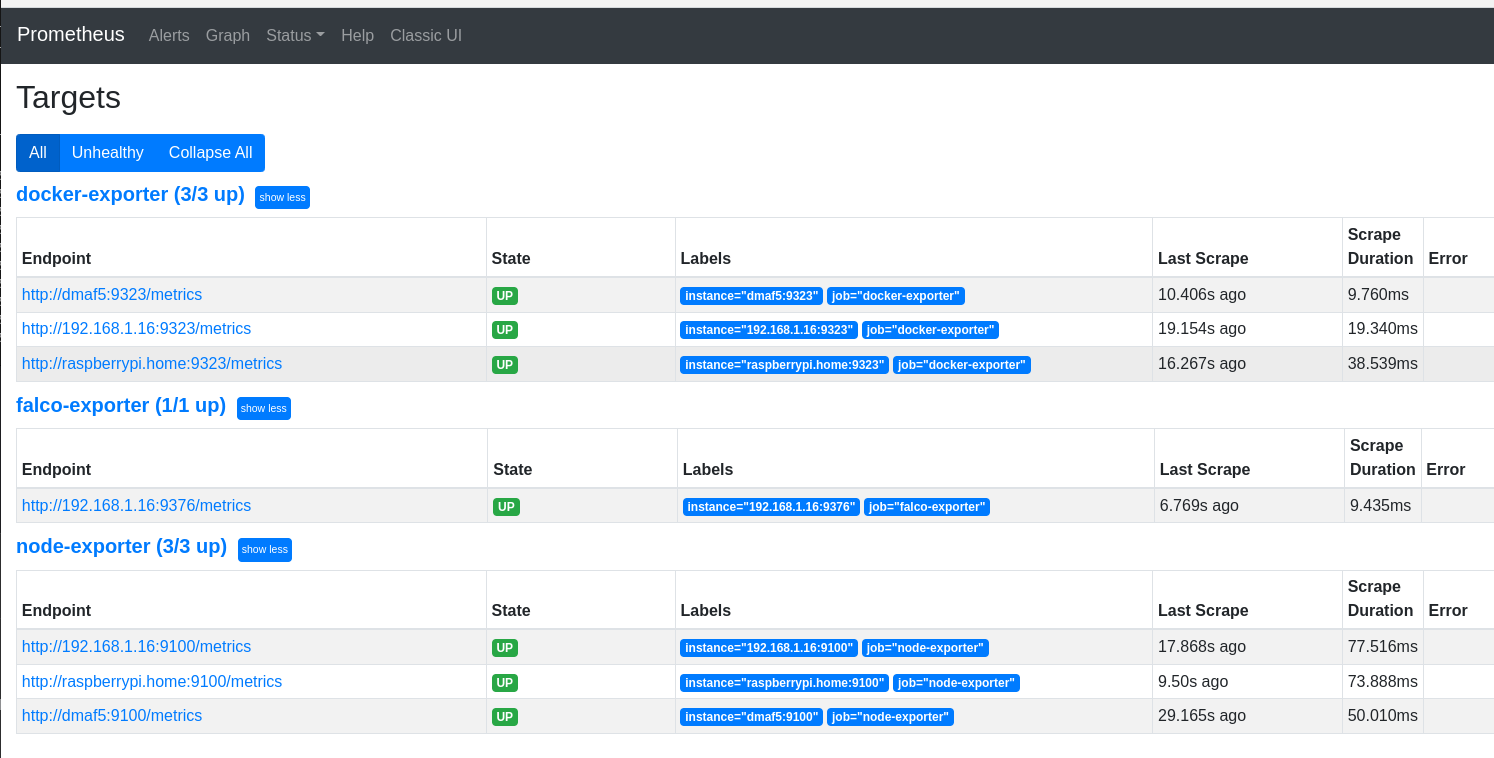
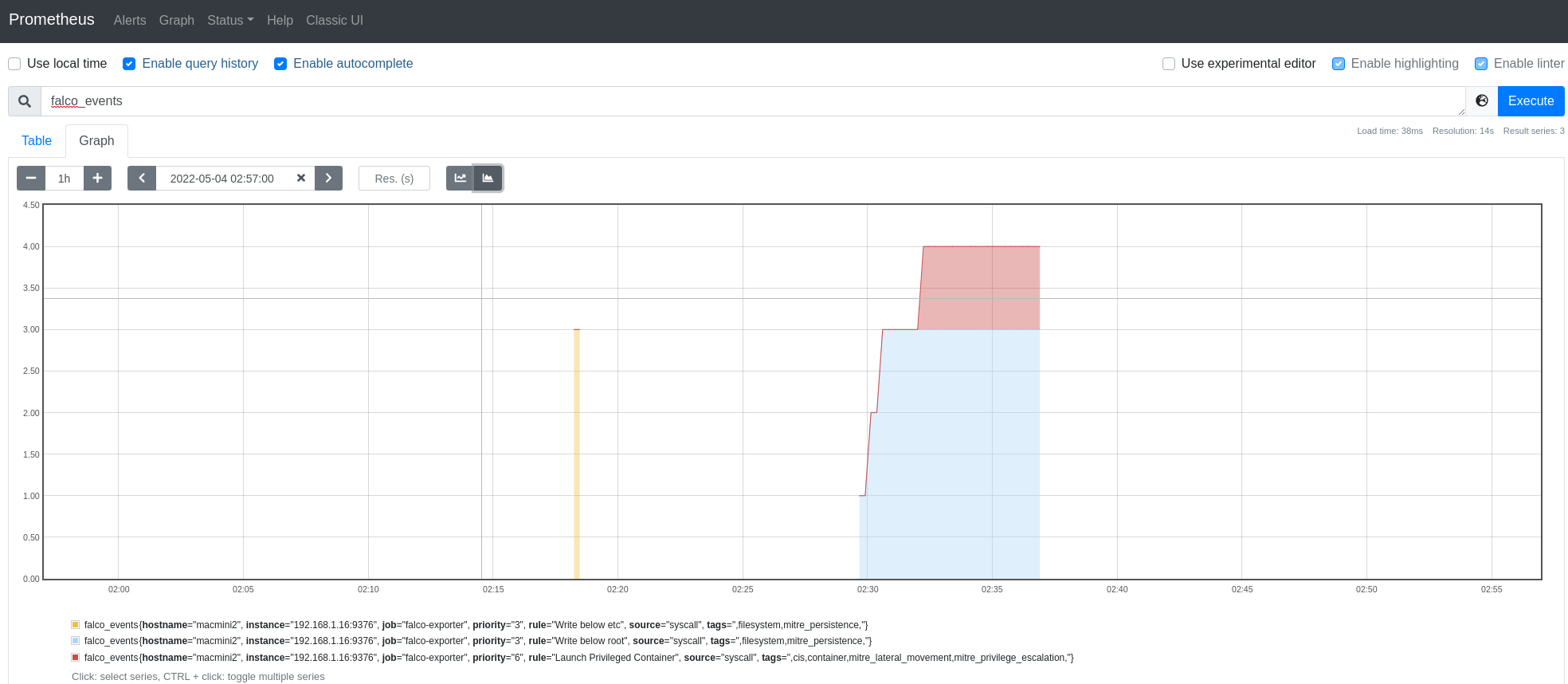
很好,Prometheus能够搜刮Falco。我们甚至可以运行一个简单的查询来查看一些事件。
接下来我们需要设置事件的UI视图,为此我们将使用Grafana。
有很多方法来安装Grafana。在我的例子中,我将使用Grafana Docker容器(我将在运行Prometheus的同一主机上运行Grafana:raspberripi.home)。
docker pull grafana/grafana:main-ubuntu
mkdir -p /data/grafana
chown syslog /data/grafana
docker run --user 104 --name grafana --detach --tty --volume /data/grafana:/var/lib/grafana -p 3000:3000 grafana/grafana:main-ubuntu
在Grafana出现后,你需要改变你的密码,也需要与Prometheus连接。
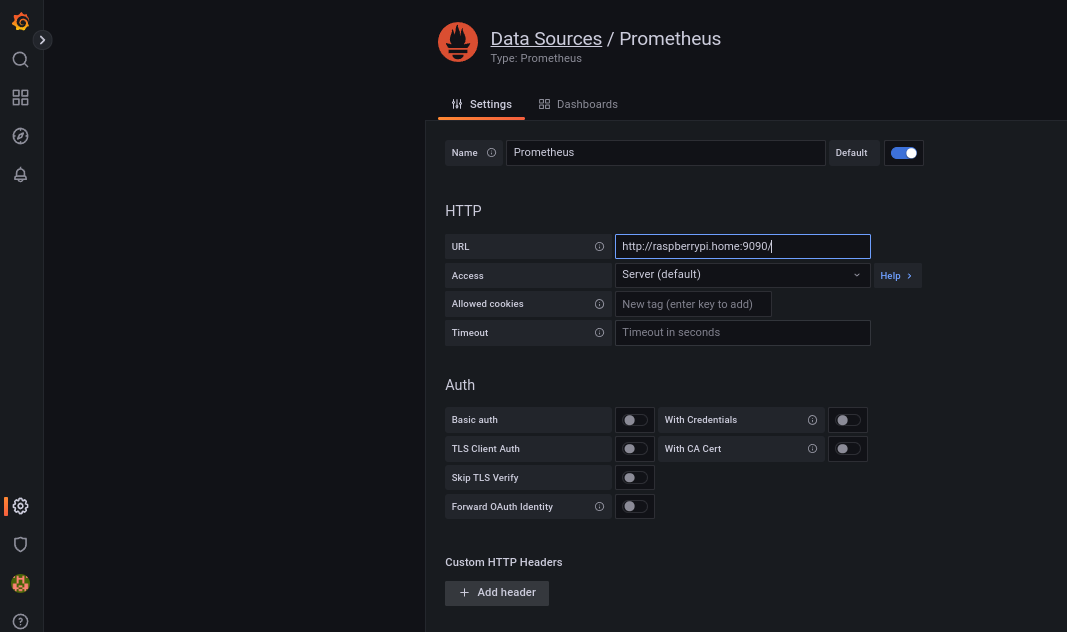
一旦Grafana启动,我们就可以导入Falco仪表盘,如这里所解释的。
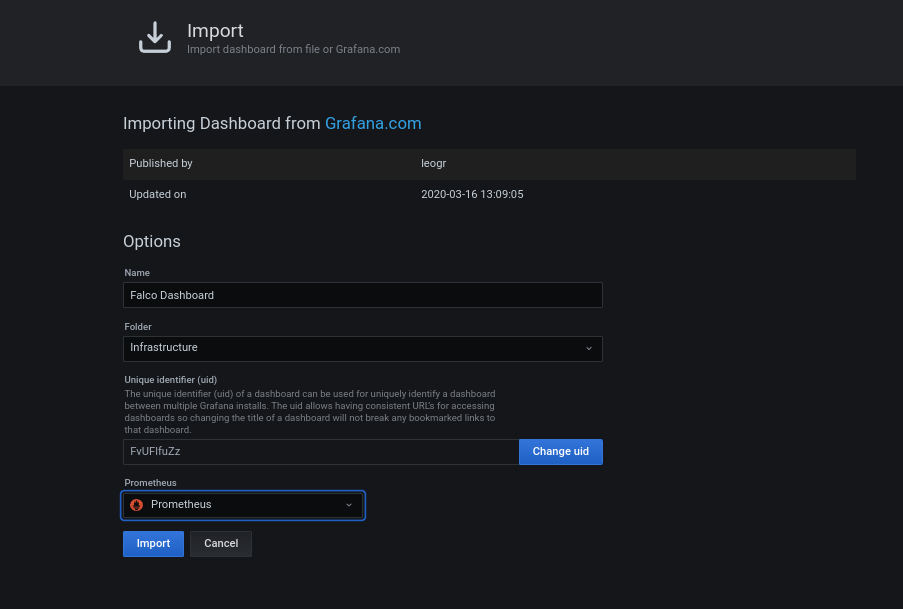
一旦仪表盘被导入,我们就可以在安装Falco的主机上生成一些事件来触发Falco。
[root@macmini2 ~]# for i in $(seq 1 60); do docker run --rm --interactive --tty --privileged fedora:latest /bin/bash -c ls; touch /root/test; rm -f /root/test; sleep 1; done
稍后,你应该在你的Grafana仪表盘上看到这样的东西。
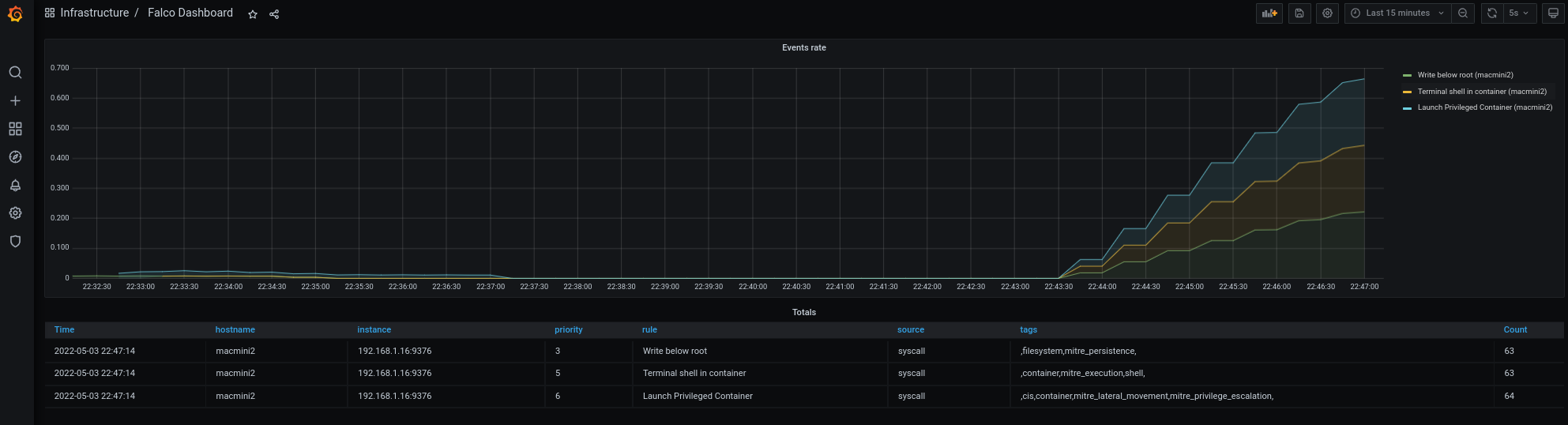
事件正在流动,你可以看到它们来自哪个主机。
如何为你的Falco事件创建警报
理想情况下,如果你在Grafana中拥有Falco事件,你可以使这些可操作的项目并从中产生警报。
我不希望被非关键性的警报轰炸,所以首先要知道要过滤什么级别的事件。
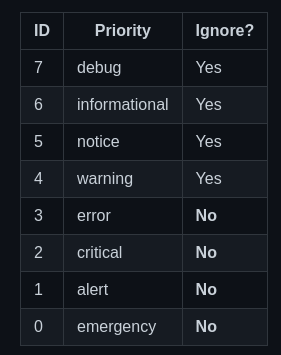
任何优先级低于3的事件都将被视为警报。
Grafana有很好的关于如何设置警报的文档,所以我在这里只展示最终结果。
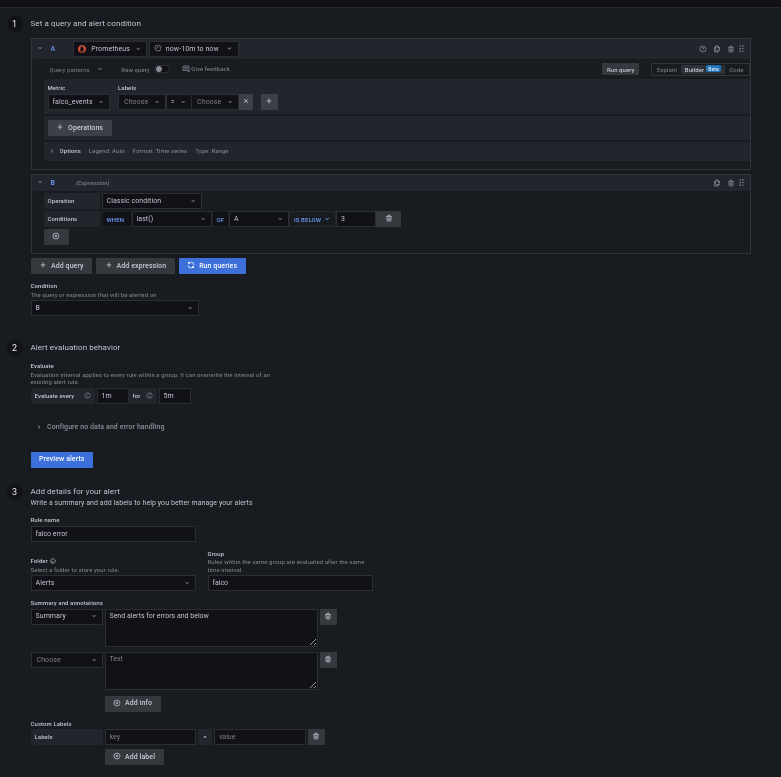
下一步是将警报发送到某个地方。
警报需要送到某个地方--如何使用Discord定义一个联络点
在这个例子中,我们将使用Discord作为警报的终端。Discord对于如何设置WebHook有一个非常详细的指南,所以我在这里只向你展示我的discord Webhook的最终结果。
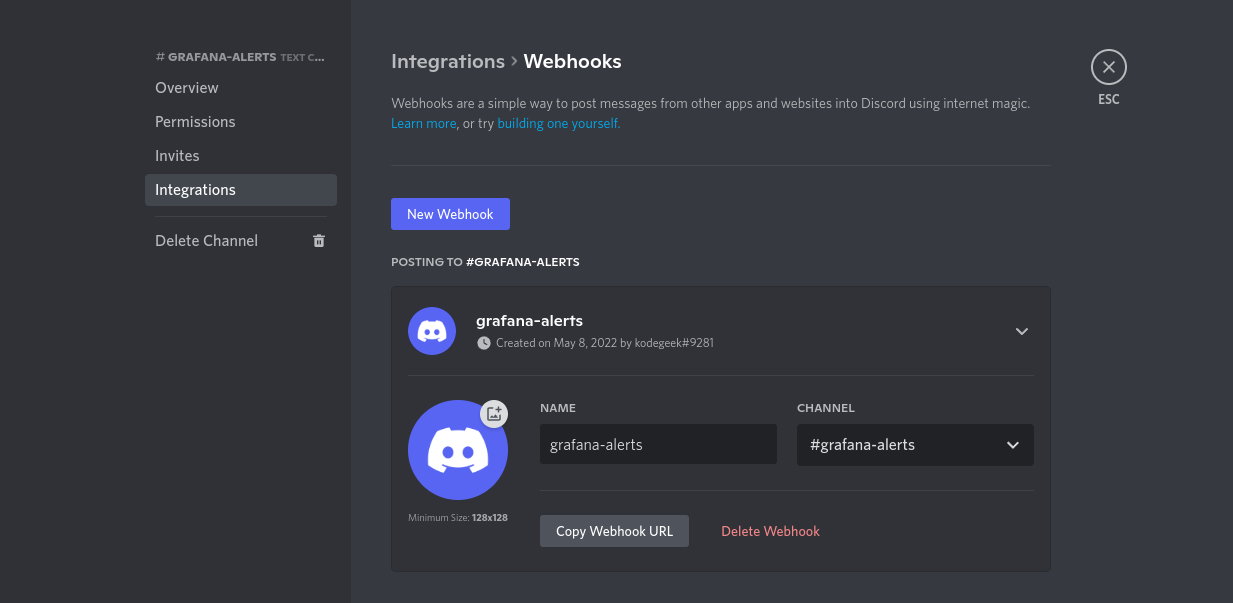
我们复制该URL,然后将配置一个新的Grafana联络点,使用我们的Discord Webhook*(我们将其设置为所有警报的默认联络点*)。
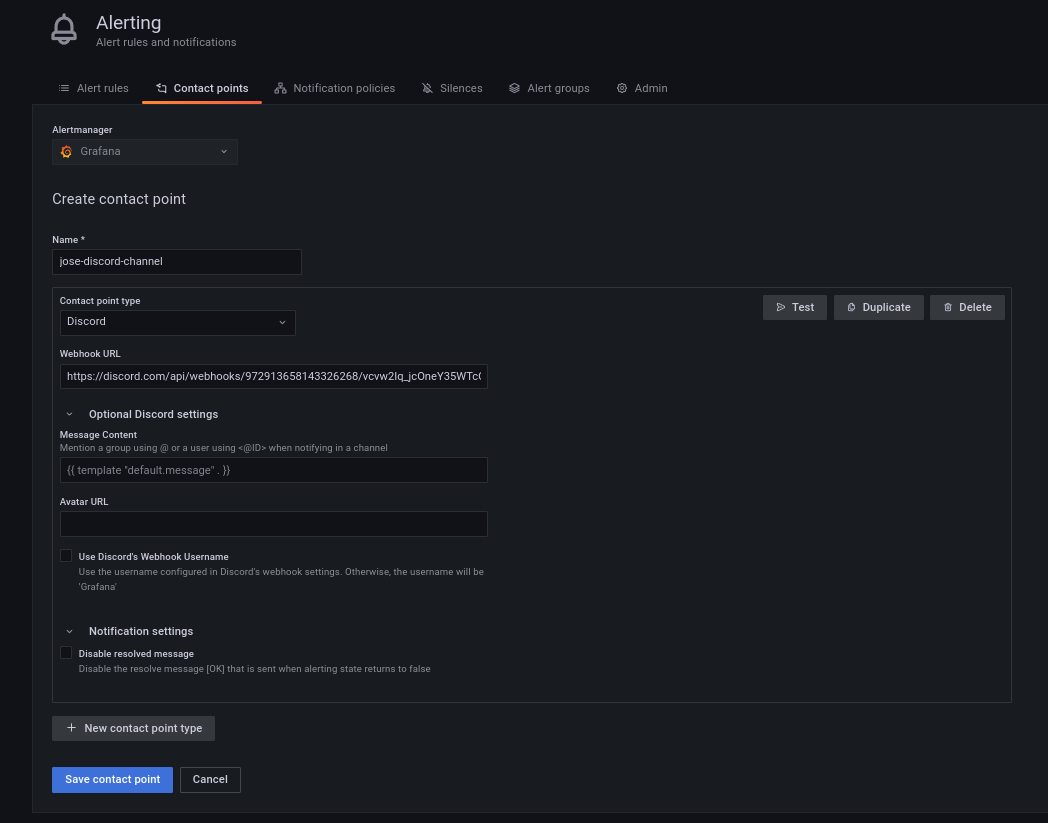
从那里我们可以向Discord发送一个测试信息,只是为了确认这个管道的工作。
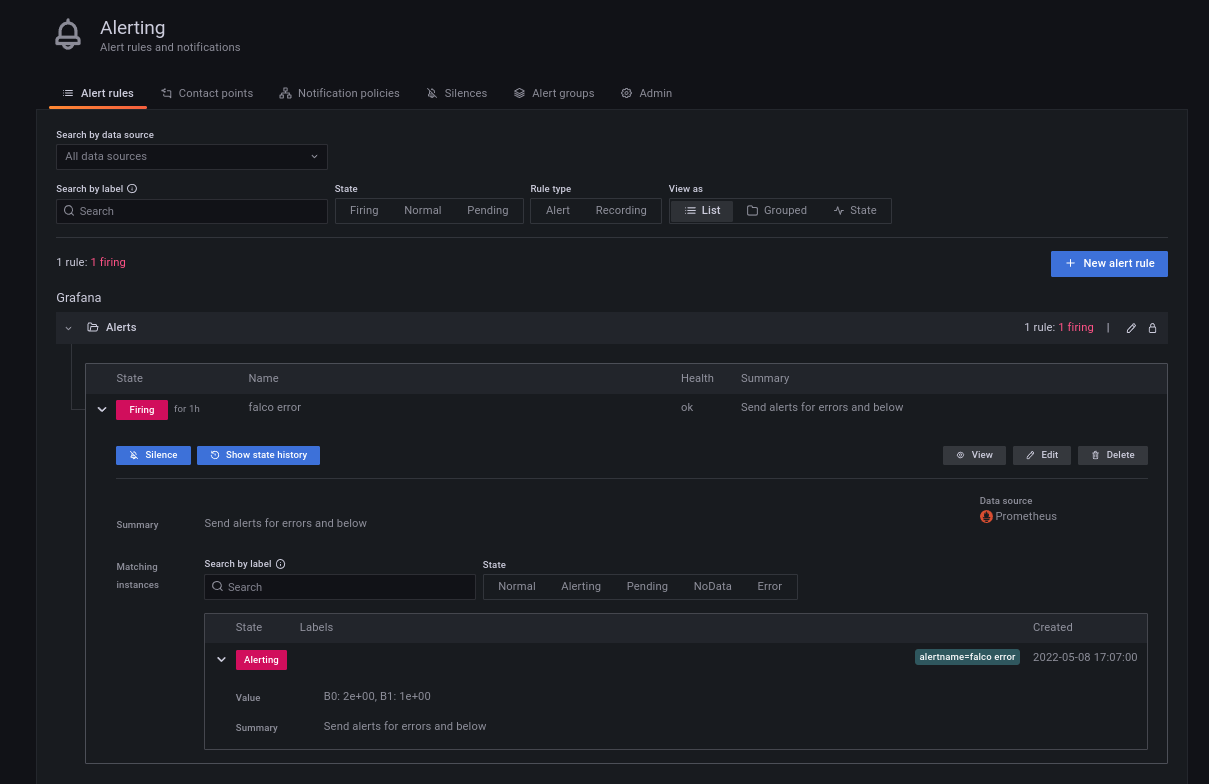
我们越来越接近了。现在,如果我们回到我们的警报定义,我们应该看到它是在 "发射 "的状态。
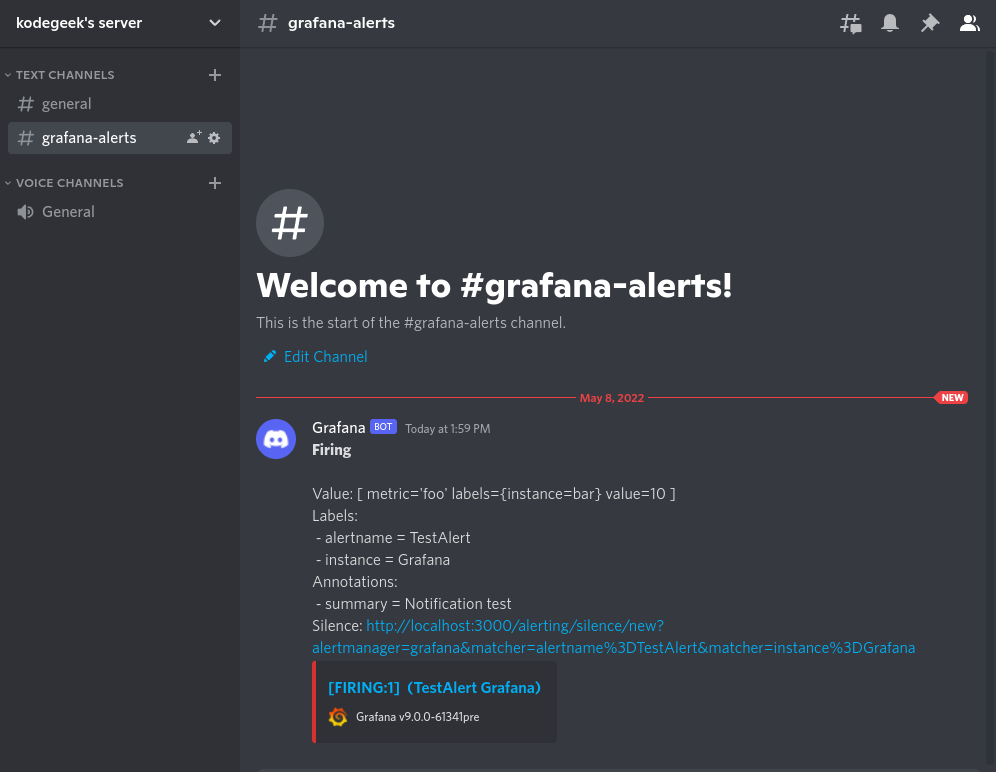
如果一切顺利的话,我们还可以在Discord看到我们的第一个Falco警报。
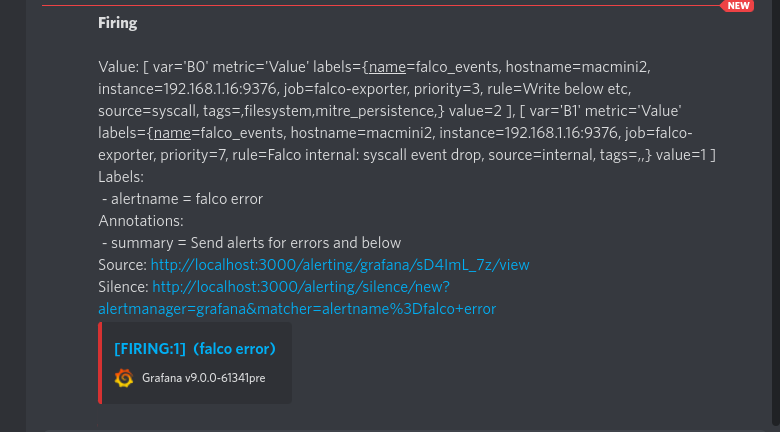
我们可以在这里看到所有在 journalctl 输出中得到的字段。不同的是,所有这些信息都来自你定义了Falco-Prometheus-Grafana桥的所有服务器。
值得称赞的是。如何使用Falcon Sidekick/Falcon Sidekick-UI聚合警报
Falco Sidekick是另一种收集和发送事件到其他目的地的方法,比如Falco Sidekick-UI。但它不会告诉你始发主机(至少在Falco 0.31.1之前)。
对于来自K8s集群或容器化应用程序的警报来说,这很可能不是一个问题,因为镜像名称会给你很多信息。但如果你的事件发生在裸机环境中,并且你有超过两台机器,这将成为一个令人头痛的问题。
由于这个原因,我不会在这里介绍Sidekick--你可能想暂时坚持使用Grafana的集成。
学习更多
Falco有一个很好的互动学习环境。你应该试试,看看还有什么可以做的。有很多东西我在这里没有涉及,比如说规则例外。
另外,你知道Falco可以使用插件进行扩展吗?你可以使用C++或Go作为首选语言,从中获得乐趣和学习。
Falco博客有很多有趣的文章,包括针对最新威胁的帖子。
最后,该项目在许多频道上有一个非常活跃的社区。选择你的并探索。
