

在漫长的一天之后,解谜是一种放松和打发时间的方式。它也有益于头脑。
更妙的是--解谜和提高解决问题的能力之间存在着关联。
Wordle是一个新的文字拼图游戏,它挑战玩家在六次尝试中猜出一个五个字母的单词。
在本教程中,你将建立一个类似Wordle的猜词游戏,其规则与原始游戏相同。我们将用Python构建这个游戏。通过这个挑战,将提高你对函数和while循环的认识,并将帮助你更熟悉zip方法。
前提条件
- Python的基本知识
我们将讨论的内容
- 游戏如何运行
- 如何编写游戏逻辑
- 游戏的结果
游戏是如何工作的
游戏将由以下部分组成
- 一个存储五个字母的单词的变量,称为 "hidden_word"。
- 来自用户的输入。
- 一个变量,用于存储用户尝试猜测该词的次数(最多六次)。
- 一个条件,用于检查一个字母是否被猜对,并且在正确的位置,用"✔"表示。
- 另一个条件是检查一个字母是否猜对了,但在错误的位置,用"➕"表示。
- 最后一个条件是检查是否有一个字母被猜中,但不在隐藏的单词中,用"❌"表示。
如何编写游戏逻辑
第一个功能块
首先,我们需要告知玩家有关规则。这是必要的,以便人们知道如何正确地玩。
首先,创建一个名为 "game_instruction "的函数
def game_instruction():
然后,将指令作为字符串传给 "print "函数以显示结果。用docstrings("""""")包装字符串,因为符号("✔❌✔")将被包裹在双引号("")中。另外,每条指令将出现在一个新的行上,而不使用("\n")标签。
print("""Wordle is a single player game
A player has to guess a five letter hidden word
You have six attempts
Your Progress Guide "✔❌❌✔➕"
"✔" Indicates that the letter at that position was guessed correctly
"➕" indicates that the letter at that position is in the hidden word, but in a different position
"❌" indicates that the letter at that position is wrong, and isn't in the hidden word   """)
每个句子都是在新的一行开始的,它将以这种方式出现在控制台中。我们通过调用我们的函数来收尾,这样指令就会被打印在屏幕上。
game_instruction()
如果你得到一个错误,可能是你忘了把冒号(:)放在函数定义的最后def game_instruction() ,或者你的代码格式不正确。注意观察控制台记录的错误,因为它将为你提供指导。
把它放在一起
 def game_instruction():
     print("""Wordle is a single player game
A player has to guess a five letter hidden word
You have six attempts
Your Progress Guide "✔❌❌✔➕"
"✔" Indicates that the letter at that position was guessed correctly
"➕" indicates that the letter at that position is in the hidden word, but in a different position
"❌" indicates that the letter at that position is wrong, and isn't in the hidden word   """)
game_instruction()
最后,如果你运行了你的代码,而你的控制台没有任何结果,这意味着你可能忘记了调用该函数。
输出

玩家的游戏指令
第二个功能块
下一步是对用户的输入进行处理,并将其与隐藏的单词进行比较。做到这一点的能力对游戏至关重要。
创建一个名为 "check_word "的函数。在代码块中,创建一个名为 "隐藏字 "的变量,并将其分配给你选择的任何五个字母的单词。这个隐藏的单词是用户将尝试猜对的。
def check_word():
  hidden_word = "snail"
由于玩家有6次尝试的机会,所以将一个名为 "尝试 "的新变量分配给 "6 "的值,并创建一个while语句。
在这里最好使用while循环,因为这个过程一直运行到用户猜对了单词或用完了他们的尝试。while语句运行的条件是如果尝试次数大于 "0"。
def check_word():
  hidden_word = "snail"
  attempt = 6
  while attempt > 0:
然后在while循环内创建用户的输入,并根据隐藏的单词检查条件。如果用户的输入与隐藏字相同,循环结束,游戏结束。
def check_word():
  hidden_word = "snail"
  attempt = 6
  while attempt > 0:
    guess = str(input("Guess the word: "))
    if guess == hidden_word:
      print("You guessed the words correctly! WIN 🕺🕺🕺 ")
      break
格式化字符串(f" ")是将变量和字符串连接在一起的另一种方法,无需使用 "+"号。
这里有一个例子:
# Instead of,
print("you have" + attempt + " attempt(s) ,, \n") # '\n' is used for new line

# use this,
print(f"you have {attempt} attempt(s) ,, \n") # the variable to be printed is wrapped in curly braces
如果用户的输入不等于隐藏的单词,引入一个else语句,所有的条件都将在 "else "块中被检查。在用户玩游戏时,尝试次数会减少1,剩下的尝试次数会打印在控制台。
def check_word():
  hidden_word = "snail"
  attempt = 6
  while attempt > 0:
    guess = str(input("Guess the word: "))
    if guess == hidden_word:
      print("You guessed the words correctly! WIN 🕺🕺🕺 ")
      break
    else:
      attempt = attempt - 1
      print(f"you have {attempt} attempt(s) ,, \n ")
如果用户的输入与隐藏的单词不匹配,有三个条件需要检查:
- 首先,如果字母在错误的位置但在隐藏的单词中,在字母旁边打印一个"➕"。
- 第二,如果该字母在正确的位置并且在隐藏的单词中,在该字母旁边打印一个"✔"。
- 第三,如果该字母根本不在隐藏的单词中,在该字母旁边打印一个"❌"。
为了比较用户输入的字母和隐藏单词中的字母,可以在语句中加入一个for循环和一个zip()函数。
for i, j in zip(food, drink):
zip()函数是一个内置的函数,可以在列表和图元等项目中循环。它可以从相同大小的多个变量中提取数值。
对于字符串,你不能直接单独使用zip()函数。包括 "for "循环,以从存储字符串的变量中获取字母。
这里有一个例子:
一个用户输入了一个5个字母的单词,一个包含5个字母的变量被创建。用zip()同时循环这两个变量,所有的元素都将被打印出来,并以连字符分隔。
代码块
user_entry = input("spell 5 letter word: ")
default_value = "shell"
for i, j in zip(user_entry, default_value):
  print(i + " - " +  j)
输出

回到我们的代码:
def check_word():
  hidden_word = "snail"
  attempt = 6
  while attempt > 0:
    guess = str(input("Guess the word: "))
    if guess == hidden_word:
      print("You guessed the words correctly! WIN 🕺🕺🕺 ")
      break
    else:
      attempt = attempt - 1
      print(f"you have {attempt} attempt(s) ,, \n ")
      for char, word in zip(hidden_word, guess):
            if word in hidden_word and word in char:
                print(word + " ✔ ")

            elif word in hidden_word:
                print(word + " ➕ ")
            else:
                print(" ❌ ")
让我们来看看这里发生了什么:
for char, word in zip(hidden_word, guess) - 这条语句意味着用变量名 ,在 中循环,用变量名 ,在 中循环。隐藏单词中的所有字母都由 ,猜测中的所有字母都由 。char hidden_word word guess char word
然后,前面提到的三个条件将被检查,比较word (用户的输入)和char (隐藏字)中的两个字母。
def check_word():
  hidden_word = "snail"
  attempt = 6
  while attempt > 0:
    guess = str(input("Guess the word: "))
    if guess == hidden_word:
      print("You guessed the words correctly! WIN 🕺🕺🕺 ")
      break
    else:
      attempt = attempt - 1
      print(f"you have {attempt} attempt(s) ,, \n ")
      for char, word in zip(hidden_word, guess):
            if word in hidden_word and word in char:
                print(word + " ✔ ")

            elif word in hidden_word:
                print(word + " ➕ ")
            else:
                print(" ❌ ")
      if attempt == 0:
        print(" Game over !!!! ")
最后一步是调用函数:
def check_word():
  hidden_word = "snail"
  attempt = 6
  while attempt > 0:
    guess = str(input("Guess the word: "))
    if guess == hidden_word:
      print("You guessed the words correctly! WIN 🕺🕺🕺 ")
      break
    else:
      attempt = attempt - 1
      print(f"you have {attempt} attempt(s) ,, \n ")
      for char, word in zip(hidden_word, guess):
            if word in hidden_word and word in char:
                print(word + " ✔ ")

            elif word in hidden_word:
                print(word + " ➕ ")
            else:
                print(" ❌ ")
      if attempt == 0:
        print(" Game over !!!! ")

check_word()
把所有的代码块放在一起,它应该是这样的:
def game_instruction():
    print("""Wordle is a single player game
A player has to guess a five letter hidden word
You have six attempts
Your Progress Guide "✔❌❌✔➕"
"✔" Indicates that the letter at that position was guessed correctly
"➕" indicates that the letter at that position is in the hidden word, but in a different position
"❌" indicates that the letter at that position is wrong, and isn't in the hidden word   """)


game_instruction()

def check_word():
  hidden_word = "snail"
  attempt = 6
  while attempt > 0:
    guess = str(input("Guess the word: "))
    if guess == hidden_word:
      print("You guessed the words correctly! WIN 🕺🕺🕺 ")
      break
    else:
      attempt = attempt - 1
      print(f"you have {attempt} attempt(s) ,, \n ")
      for char, word in zip(hidden_word, guess):
            if word in hidden_word and word in char:
                print(word + " ✔ ")

            elif word in hidden_word:
                print(word + " ➕ ")
            else:
                print(" ❌ ")
      if attempt == 0:
        print(" Game over !!!! ")

check_word()
输出:
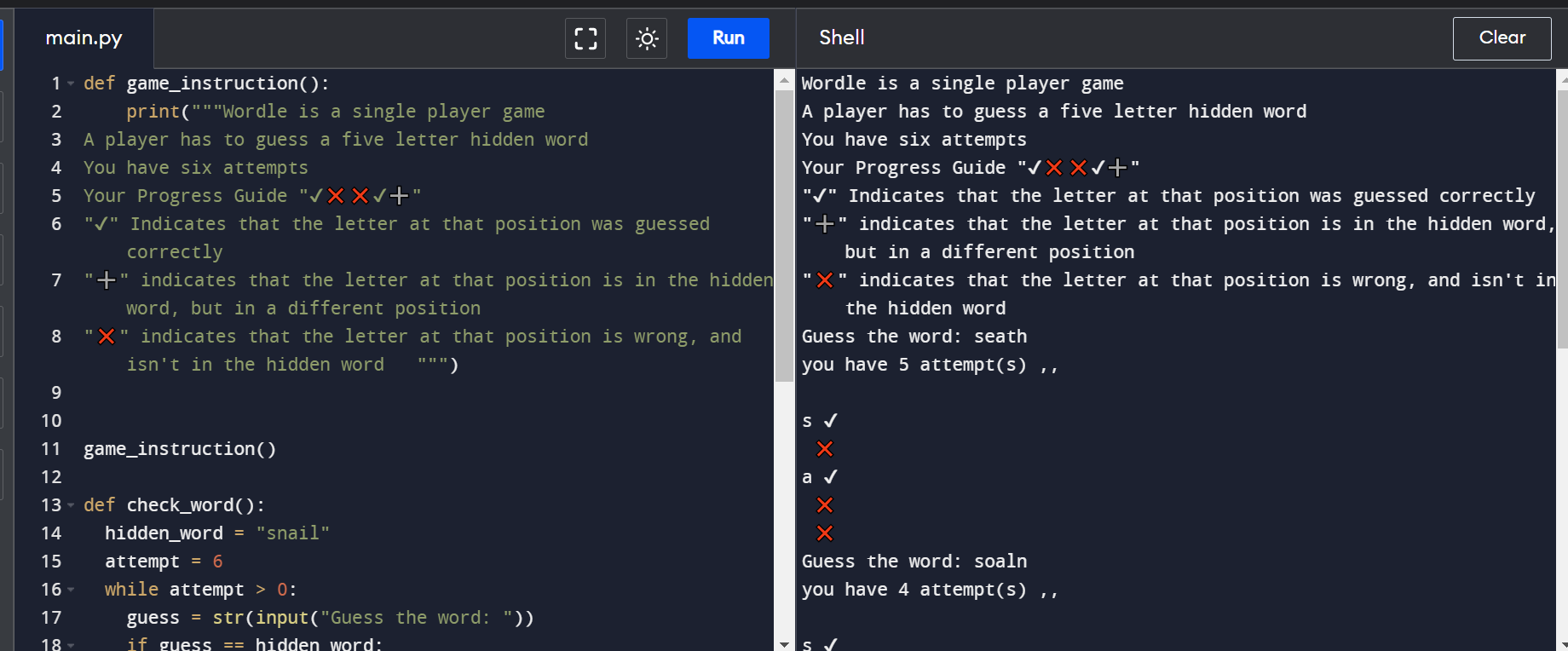

结论
干得好!你已经完成了用Python创建一个字谜游戏。代码样本可以在这里找到,如果你有任何问题,可以在Twitter上与我联系。💙
