本文已参与「新人创作礼」活动,一起开启掘金创作之路。

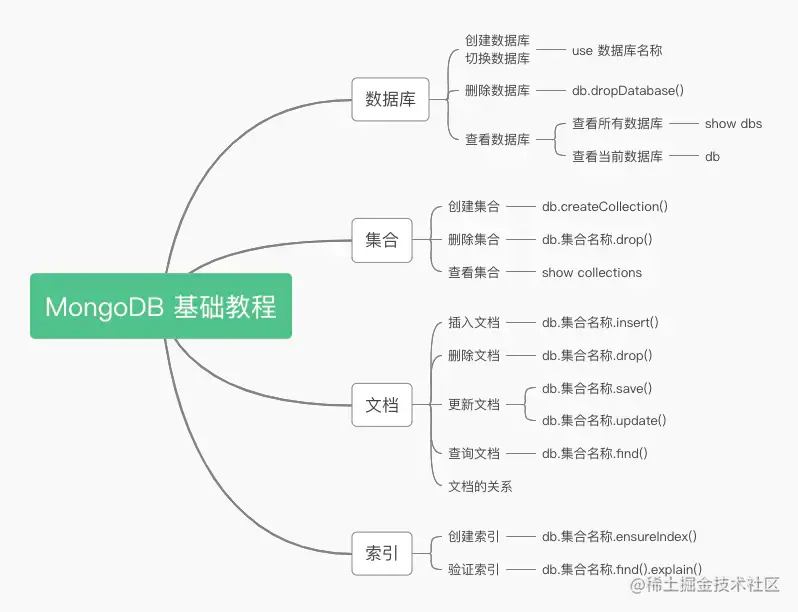
创建数据库
# 格式
> use 数据库名称
# 例如
> use school
创建集合
# 格式
> db.createCollection(集合名称)
# 例如
> db.createCollection("student")
# 格式
> db.createCollection(集合名称,可选参数)
# 例如
> db.createCollection("subject", {autoIndexId:true} )
| 可选参数 | 类型 | 说明 |
|---|
| autoIndexId | bool | 默认为 false,如果设置为 true,则会在 _id 字段上自动创建索引 |
| capped | bool | 如果为 true 则创建一个固定大小的集合,当其条目达到最大时可以自动覆盖以前的条目。在设置其为 true 时也要指定参数大小 |
| size | int | 如果 capped 为 true 则需要指定,指定参数的最大值,单位为 byte |
| max | int | 指定最大的文档数 |
插入文档
> db.student.insert([
{name:"小兰",gender:"女",age:18 },
{name:"新一",gender:"男",age:18 }
])
> subject_list = [{"name":"算数"},{"name":"图画"},{"name":"体育"}]
> db.subject.insert(subject_list)
更新文档
> db.集合名称.save({_id:ObjectId(文档的_id),key:value})
> db.student.save({_id:ObjectId("5f3633a5a36e80089d0c495d"),"name":"新一","gender":"男"})
根据 _id 更新会替换之前的文档,而非只更新某个字段。
> db.集合名称.update( {key1:value1},{$set:{key2:value2}} )
> db.student.update( {"age":18},{$set:{"age":19}},{multi:true} )
update 默认只对一个文档更新,更新所有文档需要添加 multi:true。
查询文档
# 格式
> db.集合名称.find()
# 例如
> db.student.find()
# 格式
> db.集合名称.find({ key: value })
# 例如
> db.student.find({ "name": "小兰" })
> db.集合名称.find({ $or: [{key1: value1},{key2: value2}] })
> db.student.find({ $or: [{"name": "柯南"},{"name": "新一"}] })
# 格式
> db.集合名称.find({ key: {条件操作符:value} })
# 例如
> db.student.find({ "age": {$gte:18} })
| 条件操作符 | 含义 |
|---|
| $lt | 小于 |
| $gt | 大于 |
| $lte | 小于等于 |
| $gte | 大于等于 |
| $ne | 不等于 |
# 匹配前缀格式
> db.集合名称.find({ key:"/^value/" })
# 例如
> db.student.find({ "age":"/^1/" })
# 匹配后缀格式
> db.集合名称.find({ key:"/value$/" })
# 例如
> db.student.find({ "name":"/$兰/" })
# 格式
> db.集合名称.find({ key:{$type:value} })
# 例如
> db.student.find({ "name":{$type:"string"} })
# 等同于
> db.student.find({ "name":{$type:2} })
| 类型值 | 数据类型 | 类型别名 |
|---|
| 1 | 双精度型(Double) | double |
| 2 | 字符串(String) | string |
| 3 | 对象(Object) | object |
| 4 | 数组(Array) | array |
| 5 | 二进制数据(Binary data) | binData |
| 7 | 对象 ID(Object id) | objectId |
| 8 | 布尔类型(Boolean) | bool |
| 9 | 日期(Date) | date |
| 10 | 空(Null) | null |
| 11 | 正则表达式(Regular Expression) | regex |
| 13 | JS 代码(Javascript) | javascript |
| 14 | 符号(Symbol) | symbol |
| 15 | 有作用域的 JS 代码(JavaScript with scope) | javascriptWithScope |
| 16 | 32 位整型数(32-bit integer) | int |
| 17 | 时间戳(Timestamp) | timestamp |
| 18 | 64 位整型数(64-bit integer) | long |
| -1 | 最小值(Min key) | minKey |
| 127 | 最大值(Max key) | maxKey |
# 格式
> db.集合名称.find().limit(value)
# 例如
> db.student.find().limit(1)
# 格式
> db.集合名称.find().skip(value)
# 例如
> db.student.find().skip(1)
# 格式
> db.集合名称.find().sort({key:value})
# 例如
> db.student.find().sort({"name":1})
> db.student.find().sort({"age":-1})
> db.集合名称.aggregate(可选参数)
> db.student.aggregate([{
$group:{_id:"$age", count:{$sum:1}}
}])
| 可选参数 | 说明 |
|---|
| $match | 查询,跟 find 一样 | |
| $limit | 限制显示结果数量 |
| $skip | 忽略结果数量 |
| $sort | 排序 |
| $group | 按照给定表达式组合结果 |
| 聚合表达式 | 说明 |
|---|
| $sum | 计算总和 |
| $avg | 计算平均值 |
| min和max | 计算最小值和最大值 |
| $push | 在结果文档中插入值到一个数组 |
| $addToSet | 在结果文档中插入值到一个数组,但不创建副本 |
| $first | 根据资源文档的排序获取第一个文档数据 |
| $last | 根据资源文档的排序获取最后一个文档数据 |
文档的关系
{
   "name": "小兰",
   "age": 18,
   "gender": "女",
   "subject":
    [
       {
       "name": "图画 "
       }
    ]
}
把 subject 文档嵌入到 student 文档中,嵌入式关系比较适合一对一的情况。
{
   "name": "新一",
   "age": 18,
   "gender": "男",
   "subject_ids": [
      ObjectId("5f36426fa36e80089d0c4960"),
      ObjectId("5f36426fa36e80089d0c4962")
   ]
}
通过引用 subject 文档的 _id 来与 student 文档建立关系,引用式关系比较适合一对多或者多对多的情况。
创建索引
# 格式
> db.集合名称.ensureIndex({key:value})
# 例如
> db.student.ensureIndex({"name":1})
> db.student.ensureIndex({"age":-1})
> db.集合名称.ensureIndex({key1:value1,key2:value2})
> db.student.ensureIndex({"name":1,"age":1})
> db.集合名称.ensureIndex({key:value},可选参数)
> db.student.ensureIndex({"name":1},{unique:true})
| 可选参数 | 类型 | 说明 |
|---|
| background | Boolean | 建立索引要不要阻塞其他数据库操作,默认为 false |
| unique | Boolean | 建立的索引是否唯一,默认 false |
| name | string | 索引的名称,若未指定,系统自动生成 |
| dropDups | Boolean | 建立唯一索引时,是否删除重复记录,默认 flase |
| sparse | Boolean | 对文档不存在的字段数据不启用索引,默认 false |
| expireAfterSeconds | integer | 设置集合的生存时间,单位为秒 |
| v | index version | 索引的版本号 |
| weights | document | 索引权重值,范围为 1 到 99999 |
| default-language | string | 默认为英语 |
| language_override | string | 默认值为 language |
验证索引
# 格式
> db.集合名称.find({key:value}).explain()
# 例如
> db.student.find({"name":"小兰"}).explain()
> db.集合名称.find({key:value}).hint({key:value}).explain()
> db.student.find({"name":"小兰"}).hint({name:1}).explain()