


PHP zlib的介绍
为了能够在PHP中读写用gzip压缩的文件,我们使用了一个叫做PHP zlib模块的模块。通过在PHP中使用zlib模块,可以以更快的方式向最终用户提供内容,因为数据流被压缩了,为了在我们的程序中启用zlib模块,我们应该在程序中加入zlib.output_compression = on一行,zlib模块必须在某些应用程序中强制启用,比如pligg,这个模块定义了两个常量,即FORCE_GZIP和FORCE_DEFLATE,在运行时手动加载扩展时可以使用它们。
在PHP中声明zlib模块的语法
zlib.output_compression = on
zlib模块在PHP中的工作
- 为了能够在 PHP 中读写使用 gzip 压缩的文件,我们使用了一个叫做 PHP zlib 模块的模块。
- 通过使用PHP中的zlib模块,由于数据流被压缩,内容以更快的方式提供给终端用户。
- 为了在我们的程序中启用zlib模块,我们应该在程序中加入zlib.output_compression = on一行。
- zlib模块在某些应用程序中必须被强制启用,如pligg。
- zlib模块定义了两个常量,即FORCE_GZIP和FORCE_DEFLATE,它们在运行时手动加载扩展时可用。
PHP zlib的例子
下面给出了PHP zlib的例子。
例子 #1
用来说明zlib模块透明地读写已经用gzip压缩过的文件的PHP程序。
代码
<html>
<body>
<?php
#creating a temporary file which is compressed by gzip using tempnum function and storing the path to the file location in a variable called newfile
$newfile = tempnam('/tmp','exfile') . '.gz';
#storing the contents to be written to the file in a variable called data
$data = "Welcome to PHP\n";
#opening the gzip compressed file using gzopen function
$fileopen = gzopen($newfile, "w9");
#writing the contents to the gzip compressed file using gzwrite function
gzwrite($fileopen, $data);
#closing the file after writing the contents to the gzip compressed file
gzclose($fileopen);
#opening the gzip compressed file for reading using gzopen function
$fileopen = gzopen($newfile, "r");
#reading the contents written to the created file using gzread function
echo gzread($fileopen);
#closing the file after reading the contents of the file
gzpassthru($fileopen);
gzclose($fileopen);
echo "\n";
#unlink function is used to delete the file that was just being read
unlink($newfile);
?>
</body>
</html>
输出
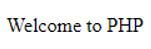
在上面的程序中,使用tempnum函数创建了一个临时文件,该文件是用gzip压缩的,文件位置的路径被存储在一个叫做newfile的变量中。然后,要写入新创建的被gzip压缩的文件中的内容被存储在一个叫做data的变量中。然后用 gzopen 函数在写模式下打开 gzip 压缩的文件。然后用 gzwrite 函数将存储在 data 变量中的内容写到 gzip 压缩文件中。然后用 gzclose 函数关闭 gzip-compressed 文件。然后用 gzopen 函数在读取模式下打开 gzip 压缩文件,读取刚刚用 gzread 函数写入文件中的内容,并在屏幕上显示为输出。然后用gzclose函数关闭gzip压缩的文件。然后使用 unlink 函数删除该文件。
例子 #2
用PHP程序来说明zlib模块对已用gzip压缩的文件进行透明读写。
代码
<html>
<body>
<?php
#creating a temporary file which is compressed by gzip using tempnum function and storing the path to the file location in a variable called newfile
$newfile = tempnam('/tmp','exfile') . '.gz';
#storing the contents to be written to the file in a variable called data
$data = "Learning is fun\n";
#opening the gzip compressed file using gzopen function
$fileopen = gzopen($newfile, "w9");
#writing the contents to the gzip compressed file using gzwrite function
gzwrite($fileopen, $data);
#closing the file after writing the contents to the gzip compressed file
gzclose($fileopen);
#opening the gzip compressed file for reading using gzopen function
$fileopen = gzopen($newfile, "r");
#reading the contents written to the created file using gzread function
echo gzread($fileopen);
#closing the file after reading the contents of the file
gzpassthru($fileopen);
gzclose($fileopen);
echo "\n";
#unlink function is used to delete the file that was just being read
unlink($newfile);
?>
</body>
</html>
输出
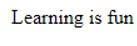
在上面的程序中,使用tempnum函数创建了一个临时文件,该文件是用gzip压缩的,文件位置的路径被存储在一个叫做newfile的变量中。然后,要写入新创建的被gzip压缩的文件中的内容被存储在一个叫做data的变量中。然后用 gzopen 函数在写模式下打开 gzip 压缩的文件。然后用 gzwrite 函数将存储在 data 变量中的内容写到 gzip 压缩文件中。然后用 gzclose 函数关闭 gzip-compressed 文件。然后用 gzopen 函数在读取模式下打开 gzip 压缩文件,读取刚刚用 gzread 函数写入文件中的内容,并在屏幕上显示为输出。然后用gzclose函数关闭gzip压缩的文件。然后用unlink函数删除该文件。
优点
- 使用 gzip 压缩的文件可以使用 PHP 中的 zlib 模块透明地读或写。
- 通过使用PHP中的zlib模块,内容可以更快地传递给最终用户,因为数据流是通过使用zlib模块压缩的。
- 使用zlib模块可以在更大程度上提高性能。
