vue
注意
扁平化路由'/travel/china',会没有travel父级节点的,就不会展示TravelPage组件
 // 嵌套路由
 const routes = [
   {
     path: '/travel', component: TravelPage,
     children: [
       { path: '/travel/america', component: TravelAmericaPage },
     ]
   },
   {
     path: '/travel/china', component: AboutPage
   }
 ];
路由接口
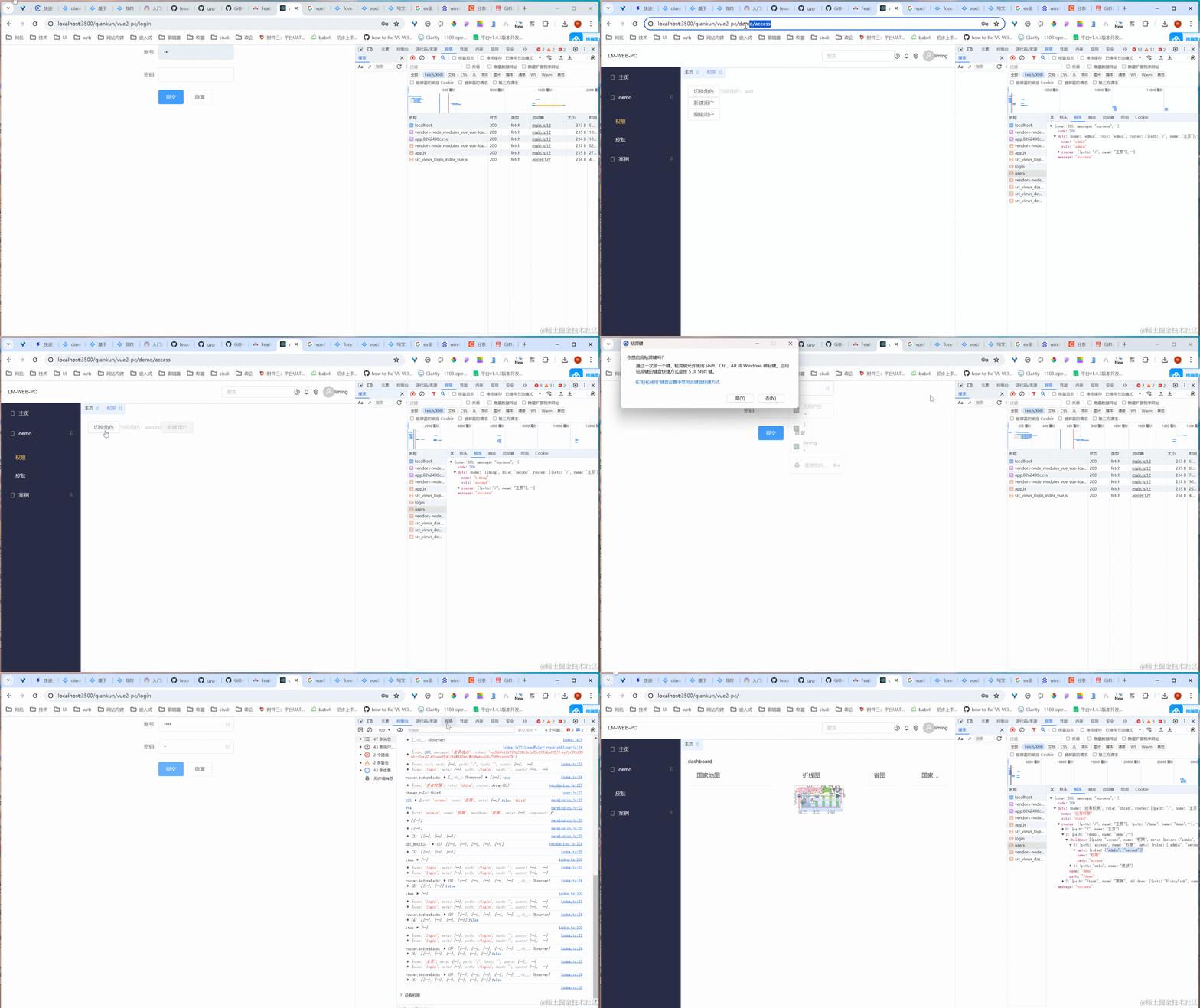
后端采用node-express,这里配置的接口包括用户信息,路由信息
const express = require('express');
const router = express.Router();
/* GET users listing. */
router.get('/', (req, res, next) => {
console.log(req.cookies);
const data = req.cookies.USER === 'admin'
? {
name: 'admin',
role: 'admin',
routes: [{
path: '/',
children: [
{
path: 'demo',
name: 'demo',
meta: {
sidebar: true,
menuName: 'demo'
},
component: 'demo/index.vue',
children: [
{
path: 'access',
name: 'access',
component: 'demo/Access/index.vue',
meta: {
sidebar: true,
menuName: '权限',
button: {
'btn:createUser': 2, // 显示
'btn:editUser': 2, // 显示
'module:module1': 2// 显示
},
roles: ['admin', 'liming']
}
}
]
}
]
}]
}
: req.cookies.USER === 'liming' ? {
name: 'liming',
role: 'second',
routes: [{
path: '/',
children: [
{
path: 'demo',
name: 'demo',
meta: {
sidebar: true,
menuName: 'demo'
},
component: 'demo/index.vue',
children: [
{
path: 'access',
name: 'access',
component: 'demo/Access/index.vue',
meta: {
sidebar: true,
menuName: '权限',
button: {
'btn:createUser': 1, // 禁用
'btn:editUser': 0, // 隐藏
'module:module1': 2// 显示
},
roles: ['admin', 'liming']
}
}
]
}
]
}]
}
: {
name: 'third',
role: 'third',
routes: []
}
res.send({
code: 200,
message: 'success',
data: {
...data
}
});
});
module.exports = router;
路由权限
-
静态路由(路由白名单):固定的路由。如 login 页面
-
动态路由/权限路由
- 要求少可以通过用户角色筛选路由表
- 要求多可以直接返回路由表
store
-
state
state: { commonMenu: [], // 菜单栏 whiteRoutes, // 静态路由 asyncRoutes: [], // 动态路由 flatAsyncRoutes: [], // 扁平化动态路由 routes: whiteRoutes, // 静态路由+动态路由 registerRouteFresh: true // 动态路由注册状态,账号切换,路由需要更新 } -
mutations
   mutations: {
     SET_ROUTES: (state, routes) => {
       console.log('SET_ROUTES:', routes)
       state.routes = routes
     },
     // SET_PERMISSION会在登录成功的时候触发,更新路由表
     SET_PERMISSION: (state, data) => {
       state[data.type] = data.data
     }
   },
//login.vue //登录成功后,改变动态路由注册状态 store.commit('SET_PERMISSION', { type: 'registerRouteFresh', data: true }); -
actions
这里配置的接口包括用户信息,路由信息
   actions: {
     async generateRoutes({ commit, state }) {
       return new Promise((resolve) => {
         (async () => {
           const { data: { role, name, routes: asyncRoutes } } = await userInfoApi()
           commit('change_role', {
             role
           })// 修改角色
           commit('SET_USER_INFO', {
             type: 'name',
             data: name
           })// 修改用户信息
           console.log(state.whiteRoutes, 'state.whiteRoutes')
           state.routes = $lm.lodash.cloneDeep(state.whiteRoutes) // 初始化routes为静态路由,同时深拷贝防止影响静态路由
           filterAsyncRoutes(whiteRoutes, asyncRoutes, state.flatAsyncRoutes, state.routes, '')
           state.asyncRoutes = asyncRoutes
           state.commonMenu = state.routes[0].children // 配置菜单栏
           console.log('routes----', state.routes, state.whiteRoutes, asyncRoutes, commonMenu)
           resolve(state.routes)
         })()
       })
     }
   }
//网上说后端给的动态路由组件地址不能包含@/views/ export const loadView = (view) => { return () => import(`@/views/${view}`) } /** * 合并静态路和动态路由,并构建最终的路由列表。 * @param {*} whiteRoutes 静态路由 * @param {*} asyncRoutes 动态路由 * @param {*} flatAsyncRoutes 扁平化动态路由 * @param {*} routes 静态路由+动态路由 * @param {*} path 扁平化动态路由父级路径 * @returns */ export function filterAsyncRoutes(whiteRoutes, asyncRoutes, flatAsyncRoutes, routes, path) { asyncRoutes.forEach((element, index) => { let pos = -1 // 静态和动态路由匹配索引 const whiteRoutesItem = whiteRoutes.find((item, index) => { if (item.path === element.path) { pos = index } return item.path === element.path }) if (pos === -1) { // TODO: 优化element还可能有children const componentPath = element.component const urlPath = `${path}/${element.path}`.replace('//', '') // 处理路径 routes.push({ ...element, component: loadView(componentPath) }) flatAsyncRoutes.push({ ...element, path: urlPath, component: loadView(componentPath) }) } else if (whiteRoutesItem && whiteRoutesItem.children && element.children) { filterAsyncRoutes(whiteRoutesItem.children, element.children, flatAsyncRoutes, routes[pos].children, `${path}/${element.path}`) } }) return routes }
router
-
加载基础路由
import Vue from 'vue'; import VueRouter, { RouteConfig } from 'vue-router'; import $lm from '@lm/shared/lib/src/utils'; import store from '@/store'; Vue.use(VueRouter); // 安装路由功能 const isProd = process.env.NODE_ENV === 'production'; // 基础路由 const whiteRoutes: Array<RouteConfig> = store.getters.whiteRoutes; console.log(whiteRoutes, 'router:whiteRoutes'); const createRouter = () => new VueRouter({ mode: 'history', base: window.__POWERED_BY_QIANKUN__ ? '/qiankun/vue2-pc/' // 配置子应用的路由根路径 : isProd ? '/vue2-pc/' // 单一项目下的访问路径 : '/', routes: whiteRoutes, }); const router: any = createRouter(); -
解决编程式路由往同一地址跳转时会报错的情况
// 解决编程式路由往同一地址跳转时会报错的情况 const originalPush = VueRouter.prototype.push; const originalReplace = VueRouter.prototype.replace; // push // @ts-ignore VueRouter.prototype.push = function push(location: any, onResolve: any, onReject: any) { if (onResolve || onReject) return originalPush.call(this, location, onResolve, onReject); // @ts-ignore return originalPush.call(this, location).catch((err: any) => console.log(err)); }; // replace // @ts-ignore VueRouter.prototype.replace = function push(location: any, onResolve: any, onReject: any) { if (onResolve || onReject) return originalReplace.call(this, location, onResolve, onReject); // @ts-ignore return originalReplace.call(this, location).catch((err: any) => err); }; -
登录
-
点击登录执行事件:更改 动态路由注册状态
login(this.ruleForm).then( res => { Vue.ls.set('token', res.token); //路由表状态刷新 this.$store.commit('SET_PERMISSION', { type: 'registerRouteFresh', data: true }); this.$router.push('/'); }, err => { console.log(err); this.$message.error(err.message); } ); -
登录后先清空动态路由(账号不同,路由权限不同),再执行 generateRoutes 获取动态路由
 /**
  * 全局全局前置守卫
  * to : 将要进入的目标路由对象
  * from : 即将离开的目标路由对象
  */
 router.beforeEach(async (to: any, from: any, next: any) => {
   console.log('router.beforeEach:', to, from, router.getRoutes(), store.getters.registerRouteFresh);
   // 设置当前页的title;
   document.title = to.meta.title || 'vue2-pc';
   if (to.path !== '/login' && !localStorage.getItem('token')) {
     // 如果没有登录,跳转到登录页
     next('/login');
   } else if (store.getters.registerRouteFresh && to.path !== '/login') {
     // 如果to找不到对应的路由那么他会再执行一次beforeEach((to, from, next))直到找到对应的路由,
     store.commit('SET_PERMISSION', { type: 'registerRouteFresh', data: false });
     // 获取路由
     const routes = await store.dispatch('generateRoutes');
     console.log('routes', routes);
     resetRouter(); // 重置路由信息
     routes.forEach((item: RouteConfig) => {
       router.addRoute(item);
     });
     // 获取路由配置
     console.log('getRoutes', router.getRoutes());
     // 解决登录或者刷新后路由找不到的问题:
     // 虽然to找不到对应的路由那么他会再执行一次beforeEach,但是登录或者刷新前路由表没有动态路由信息,那么to.name还是找不到对应的路由,最后会跳转到404页面
     // next({ ...to, replace: true }); // 解决刷新后路由失效的问题
     next(to.path); // 需要指向确切的地址
   } else {
     next();
   }
 });
-
菜单权限
因为动态路由直接从后端给,所以不需要判断,从store里面获取commonMenu,并循环渲染出来就行
<template>
<el-menu
@select="selectSiderBar"
router
:default-active="currentRouteInfo.path"
class="app-menu"
background-color="#292C45"
text-color="#fff"
active-text-color="#ffd04b"
>
<template v-for="item in routeList">
<el-menu-item
v-if="item.meta.sidebar && (!item.children || item.children.length === 0)"
:key="item.path"
:index="`/${item.path}`"
>
<i class="el-icon-menu"></i>
<span slot="title">{{ item.meta.menuName }}</span>
</el-menu-item>
<el-submenu v-if="item.children && item.children.length !== 0" :key="item.path" :index="item.path">
<template slot="title">
<i class="el-icon-menu"></i>
<span>{{ item.meta.menuName }}</span>
</template>
<el-menu-item-group v-if="item.children">
<el-menu-item
v-for="child in item.children"
:key="`${item.path}/${child.path}`"
:index="`/${item.path}/${child.path}`"
>
{{ child.meta.menuName }}
</el-menu-item>
</el-menu-item-group>
</el-submenu>
</template>
</el-menu>
</template>
<script lang="ts">
import { Component, Vue, PropSync, Watch } from 'vue-property-decorator';
@Component({
watch: {
$route(to: any, from: any) {
console.log(to,'to')
window.sessionStorage.setItem('currentRouteInfo', JSON.stringify({ path: to.path, meta: to.meta }));
this.$store.commit('setRouteInfo');
this.$store.commit('setTagNav', { path: to.path, meta: to.meta });
},
},
computed: {
routeList() {
return this.$store.getters.commonMenu;
},
},
})
export default class Sidebar extends Vue {
@PropSync('collapse') isCollapse!: boolean;
private readonly name = 'Sidebar';
get currentRouteInfo() {
return this.$store.getters.currentRouteInfo;
}
selectSiderBar() {
console.log();
}
}
</script>
<style scoped>
.el-menu {
width: 220px;
border-right: initial;
height: calc(100vh - 60px);
/* overflow-y: scroll; */
}
.el-menu-item.is-active {
background: #3f4b99;
}
.el-aside {
overflow: initial;
}
</style>
按钮权限
通过路由中 meta 的按钮权限控制
 meta: {
   button: {
   'btn:createUser': 0, //隐藏
   'btn:editUser': 1, //禁用
   'module:module1': 2 //启用
   },
 },
权限按钮
     <a-button :disabled="false" v-permission="{ type: 'btn:createUser', route: $route }"> 新建用户 </a-button>
     <a-button :disabled="false" v-permission="{ type: 'btn:editUser', route: $route }"> 编辑用户 </a-button>
v-permission指令
import store from '@/store';
function checkPermission(el, binding) {
const { type, route } = binding.value;
//权限按钮
const mockButton = store.getters && store.getters.mockButton;
if (route.meta.button[type] === 0) {
el.disabled = true;
el.setAttribute('disabled', true);
} else if (route.meta.button[type] === 1) {
el.style.display = 'none';
} else {
el.style.display = 'block';
el.disabled = false;
}
throw new Error(`need roles! Like v-permission="['admin','editor']"`)
}
export default {
inserted(el, binding) {
checkPermission(el, binding);
},
update(el, binding) {
checkPermission(el, binding);
},
};