Spring Boot测试简介
Spring Boot测试为我们提供了许多注释和工具,支持我们测试应用程序。基本上,它提供了两种方法,第一种是自动配置(spring-boot-test-autoconfigure),第二种是弹簧引导测试(spring-boo-test)。春天启动测试(spring-boo-test)方法包含核心项目,自动配置(spring-boot-test-autoconfigure)方法支持自动配置测试,而使用春天启动测试自动配置(spring-boot-test-autoconfigure)方法,将导入这两个模块。基本上,应用程序上下文被定义为spring boot应用程序,它提供了spring boot测试(@SpringBootTest)注解。
什么是Spring Boot测试?
我们可以通过使用名为@SpringBootTest的注解来测试我们的spring boot应用程序,基本上,它提供了一种非常有效的方式来启动我们在项目中使用的应用环境。使用spring boot的单元测试将涵盖单一单元,该单元除了是一个类之外,也是一个有凝聚力的类群。集成测试包括以下几点。集成测试测试多个单元。它将在集群的两个或多个内聚类之间进行交互。
集成测试涵盖了更多的层次。我们可以说,这可能是第一个案例的专业化,它是覆盖持久化层和业务层之间的交互。集成测试使用它将覆盖应用程序的整个路径。使用这个测试,我们向应用程序发送一个请求,在发送请求后,我们要检查正确的响应。我们使用了@SpringBootTest注解来创建应用程序的上下文。
我们正在使用以下库和spring boot starter测试(spring-boot-starter-test)。
- JsonPath: 这只不过是JSON的X路径。
- JSONassert: 这只不过是用于JSON的断言库。
- Mockito: 这是一个java的嘲讽框架。
- JUnit: 这是一个事实上的标准,用于java应用程序的单元测试。
- Spring boot test和spring test: 这是在spring boot应用程序中使用的工具。
- AssertJ: 这是一个断言流畅库,用于spring boot应用程序。
- Hamcrest: 只是一个在spring boot应用程序中使用的匹配对象库。
我们可以使用单元测试来测试我们的应用程序,逐个单元进行测试,也可以一次性测试整个应用程序。注解被用来加载spring的所有应用上下文。相比之下,测试切片注解将只加载特定层所需的Bean。
我们可以在项目中使用以下注解,如下:
- SpringBootTest
- WebMvcTest
- WebFluxTest
- DataJpaTest
- DataJdbcTest
Web MVC上下文注解用于使用指定的组件来设置我们的应用程序上下文。Web Flux测试注解用于测试Web Flux控制器,该注解与Web MVC测试类似。两个注解的唯一区别是配置和注解。数据JPA测试注解被用来测试持久化层。这个注解用于配置存储库,设置嵌入式数据库。spring data JDBC是它的另一个注解。如果我们在使用java项目的同时测试持久化层,我们可以使用DataJdbcTest注解。
下面是用于测试java中的spring boot应用程序的依赖项,如下。
- Spring boot starter测试: 这是用来测试java应用程序的方法。
- Junit版本: 这是一个库,它的版本被用来测试java应用程序。
项目设置
以下是用于设置java项目的步骤。
1.添加maven的依赖性
第一步是在当前项目中添加maven的依赖关系。
代码:
<dependency> -- start of dependency section.
<groupId>org.springframework.boot</groupId> -- Start and end of groupid section.
<artifactId>spring-boot-starter-test</artifactId> -- Start and end of artifactid section.
<scope>springboottest</scope> -- -- Start and end of scope section.
<version>2.5.0</version> -- -- Start and end of version section.
</dependency> -- end of dependency section.
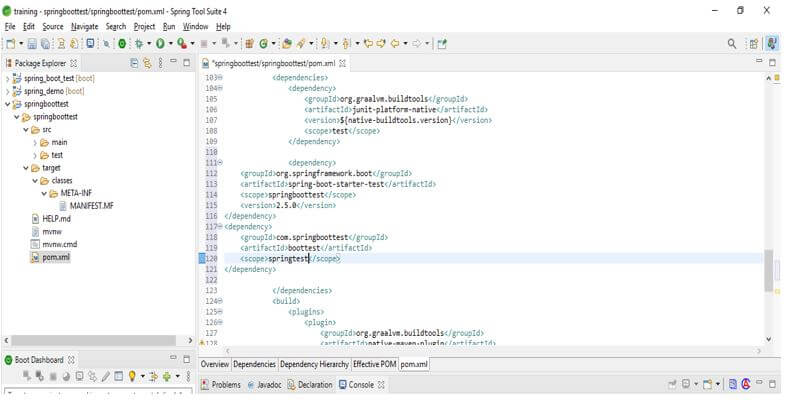
<dependency> -- start of dependency section.
<groupId>com.springboottest</groupId> -- -- Start and end of groupid section.
<artifactId>boottest</artifactId> -- -- Start and end of artifactid section.
<scope>springtest</scope> -- -- Start and end of scope section.
</dependency> -- end of dependency section.
输出:
2.添加JUnit库
添加完maven依赖后,我们要在项目中添加JUnit库。
代码:
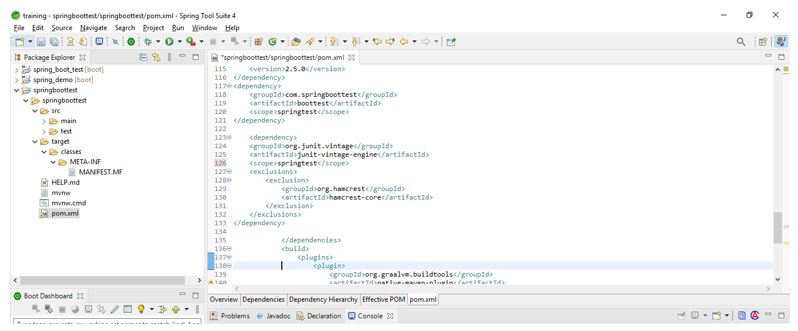
<dependency> -- start of dependency section.
<groupId>org.junit.vintage</groupId> -- -- Start and end of groupId section.
<artifactId>junit-vintage-engine</artifactId> -- -- Start and end of artifactid section.
<scope>springtest</scope> -- -- Start and end of scope section.
<exclusion>
<groupId>org.hamcrest</groupId> -- -- Start and end of groupId section.
<artifactId>hamcrest-core</artifactId> -- -- Start and end of artifactid section.
</exclusion>
</dependency> -- end of dependency section.
输出:
3.使用@SpringBootTest注解进行集成测试
在下面的例子中,我们正在检查如何使用@SpringBootTest注解来测试应用程序。
代码:
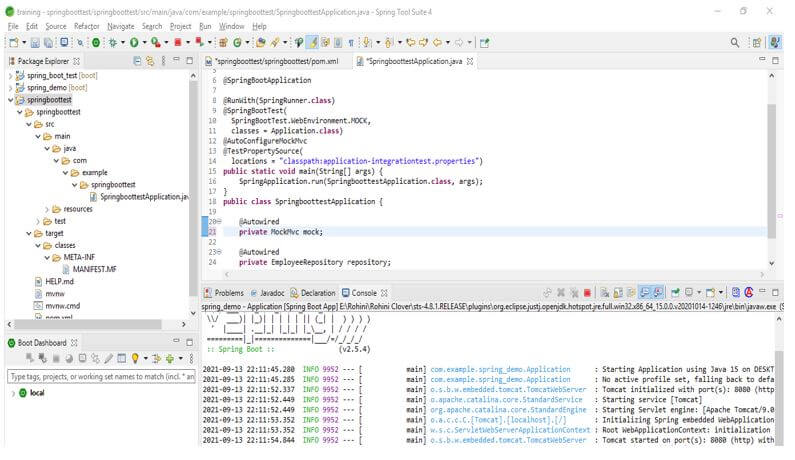
@SpringBootApplication -- Spring boot application annotation.
@RunWith(SpringRunner.class) -- Run with annotation.
@SpringBootTest(
SpringBootTest.WebEnvironment.MOCK,
classes = Application.class)
@AutoConfigureMockMvc – Auto configure mockmvc annotation.
@TestPropertySource ( -- test property service annotation.
locations = "classpath:application-integrationtest.properties") -- Class path location.
public static void main /* Main method used with string arguments*/ (String[] args) {
SpringApplication.run (SpringboottestApplication.class, args);
}
public class SpringboottestApplication { -- class name as SpringboottestApplication
@Autowired -- Auto wired annotation
private MockMvc mock; -- Object creation of MockMvc method.
@Autowired -- Auto wired annotation
private EmployeeRepository repository; -- Object creation of EmployeeRepository.
}
输出:
4.使用@MockBean注解进行应用测试
在下面的例子中,我们将检查如何使用@MockBean注解来测试应用程序。
代码:
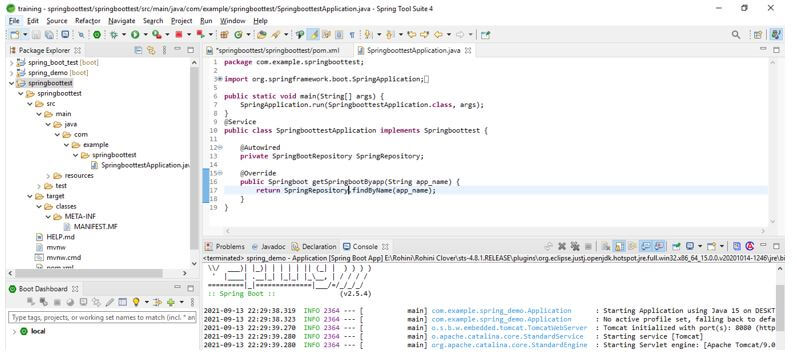
public class SpringboottestApplication implements Springboottest { /* class name as SpringboottestApplication */
@Autowired -- Auto wired annotation
private SpringBootRepository SpringRepository;
@Override -- override annotation
public Springboot getSpringbootByapp(String app_name) {
return SpringRepository.findByName (app_name);
}
}
输出结果: