1 定义菜单数据。
const menus = reactive([
  {
    path: '/',
    redirect: '/index',
    name: 'Index',
    meta: {
      title: '首页',
      icon:'house',
    },
    children: [
      {
        path: 'index',
        name: 'Index',
        meta: {
          title: '首页',
          icon:'house',
        },
      },
    ],
  },
  {
    path: '/user',
    redirect: '/user/manger',
    name: 'User',
    meta: {
      title: '用户管理',
      affix: true,
      icon:'UserFilled',
    },
    children: [
      {
        path: 'manger',
        name: 'UserManger',
        meta: {
          title: '用户管理',
          icon:'UserFilled',
        },
      },
    ],
  },
  {
    path: '/order',
    name: 'Order',
    meta: {
      title: '订单管理',
      icon: 'Notebook',
      roles: ['admin', 'editor']
    },
    children: [
      {
        path: 'orderQuery',
        name: 'orderQuery',
        meta: {
          title: '订单查询',
          icon: 'Notification',
        },
        children: [
          {
            path: 'orderQuery',
            name: 'orderQuery',
            meta: {
              title: '2订单查询',
              icon: 'Notification',
            },
          },
          {
            path: 'orderAction',
            name: 'orderAction',
            meta: {
              title: '2订单处理',
              icon: 'Money',
            },
          },
        ],
      },
      {
        path: 'orderAction',
        name: 'orderAction',
        meta: {
          title: '订单处理',
          icon: 'Money',
        },
      },
    ],
  },
  {
    path: '/stores',
    redirect: '/stores/Location',
    name: 'storesLocation',
    meta: {
      title: '门店管理',
      icon:'LocationInformation',
    },
    children: [
      {
        path: 'Location',
        name: 'storesLocation',
        meta: {
          title: '门店管理',
          icon:'LocationInformation',
        },
      },
    ],
  },

])
2 交menu-items 渲染菜单 。(支持递归)
<template>
<template v-for="menu in menus" :key="menu.path" >
<el-sub-menu v-if="menu.children && menu.children.length >1" >
<template #title>
<el-icon><location /></el-icon>
<span>{{menu.meta?.title}}</span>
</template>
<MenuItem :menus="menu.children"></MenuItem>
</el-sub-menu>
<el-menu-item v-else index="2">
<el-icon><component :is="menu.meta?.icon" /></el-icon>
<template #title>{{menu.meta?.title}}</template>
</el-menu-item>
</template>
</template>
<script setup lang = "ts">
import {defineProps} from "vue";
defineProps({
menus:{
type:Array,
}
})
</script>
<style lang = "scss" scoped>
</style>
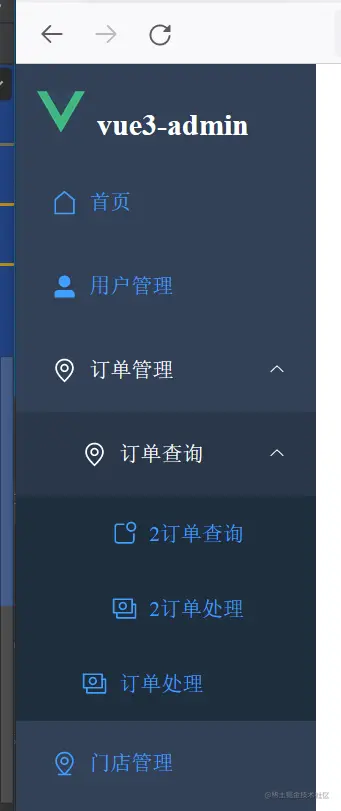
3 设置跳转。
3.1 在menuItem 中加上事件。
<el-menu-item v-else @click="toPath(menu.name)" >
<script setup lang = "ts">
...
import {useRouter} from "vue-router"
const router = useRouter()
const toPath = (item:string) =>{
router.push({name:item})
}
.....
<script>
3.2 router.ts
{
    path: '/home',
    name:'home',
    component:() => import('@/views/Home.vue'),
},

{
    path: '/user',
    name:'user',
    component:() => import('@/views/UserManage.vue'),
},
总结,配置数据(类route 的结构,方便迁移) , 用v-for 加递归生成菜单。 自己调用自己,无需再import
总结2 要习惯这种数据驱动。 跳转用 router.push({name:item}) 对应的name 是router.ts 中配置的。