

我们正在使用AWS CloudFormation创建一个安装了Ruby的EC2实例。
什么是AWS CloudFormation?
AWS CloudFormation是一项服务,它为开发人员和企业提供了一种简单的方法来创建相关的AWS和第三方资源的集合,并以有序和可预测的方式配置和管理它们。我们将在这个项目中使用映射、资源和输出。
下面是我们要创建的核心组件。
- 网络服务器安全组
- 带有Ubuntu 20.04镜像和8Gb Ebs卷和Ruby安装的EC2实例。
关于创建VPC和子网,请查看下面的文章,在这篇文章中我们将创建一个带有Ruby安装的EC2实例。
使用CloudFormation创建一个带有私有和公共子网的VPC
映射。
Mappings部分基本上是一个使用键:值关系的查找表。在这个模板中,亚马逊机器图像被映射到其各自的区域。我在这个项目中只使用了一个区域的映射,所以模板被限制在这一个区域内,如果在这些区域之外启动会失败。
"Mappings": {
  "RegionMap": {
    "ap-northeast-1": {
      "AMI": "ami-0a3eb6ca097b78895"
    }
  }
}
参数。
使用可选的参数部分来定制你的模板。参数使你能够在每次创建或更新堆栈时向你的模板输入自定义值。
"Parameters": {
  "KeyName": {
    "Description" : "The name of an existing EC2 keypair for this instance",
    "Type": "AWS::EC2::KeyPair::KeyName",
    "MinLength": "1",
    "MaxLength": "255",
    "AllowedPattern" : "[\\x20-\\x7E]*",
    "ConstraintDescription" : "can contain only ASCII characters.",
    "Default": "First_EC2"
  },

  "SSHLocation" : {
    "Description" : "The IP address range that can be used to SSH to the EC2 instances",
    "Type": "String",
    "MinLength": "9",
    "MaxLength": "18",
    "Default": "0.0.0.0/0",
    "AllowedPattern": "(\\d{1,3})\\.(\\d{1,3})\\.(\\d{1,3})\\.(\\d{1,3})/(\\d{1,2})",
    "ConstraintDescription": "must be a valid IP CIDR range of the form x.x.x.x/x."
 }
}
改变你的键名。
资源。
资源部分包括你想在堆栈中创建的所有AWS资源。
- 对于WebserverSecurityGroup,模板正在创建一个安全组,其入站规则允许HTTP上的所有流量。
"WebServerSecurityGroup": {
  "Type": "AWS::EC2::SecurityGroup",
  "Properties": {
    "GroupName": "WebServerSecurityGroup",
    "SecurityGroupIngress": [
      {
        "IpProtocol": "tcp",
        "FromPort": 22,
        "ToPort": 22,
        "CidrIp": {
          "Ref": "SSHLocation"
        },
        "Description": "For EC2 connection with SSH"
      },
      {
        "IpProtocol": "tcp",
        "FromPort": 80,
        "ToPort": 80,
        "CidrIp": {
          "Ref": "SSHLocation"
        },
        "Description": "For traffic from Internet Http"
      }
    ],
    "GroupDescription": "Security Group for demo server",
    "VpcId": {
      "Ref": "VPC"
    }
  }
}
2.对于EC2Instance,该模板正在创建一个具有以下属性的EC2实例。
- ImageID: 你可以直接为这个属性输入AMI-Id,但是由于我们希望能够在一个区域内使用这个模板,我们使用FindInMap函数来引用我们的Mappings。
- UserData。这一部分用于使用CloudFormation::Init来安装Ruby
**AWS::CloudFormation::Init
**使用AWS::CloudFormation::Init类型来包含亚马逊EC2实例上的元数据
EC实例模板
"EC2Instance": {
  "Type": "AWS::EC2::Instance",
  "Metadata" : {
    "Comment" : "Install Ruby On EC2 using CloudFormation::Init",
    "AWS::CloudFormation::Init" : {
      "configSets" : {
        "full_install" : [ "install_cfn", "install_ruby_3" ]
      },
      "install_cfn" : {
        "files" : {
          "/etc/cfn/cfn-hup.conf" : {
            "content" : { "Fn::Join" : ["", [
              "[main]\n",
              "stack=", { "Ref" : "AWS::StackId" }, "\n",
              "region=", { "Ref" : "AWS::Region" }, "\n"
            ]]},
            "mode"    : "000400",
            "owner"   : "root",
            "group"   : "root"
          },

          "/etc/cfn/hooks.d/cfn-auto-reloader.conf" : {
            "content": { "Fn::Join" : ["", [
              "[cfn-auto-reloader-hook]\n",
              "triggers=post.update\n",
              "path=Resources.EC2Instance.Metadata.AWS::CloudFormation::Init\n",
              "action=/opt/aws/bin/cfn-init -v ",
              "         --stack ", { "Ref" : "AWS::StackName" },
              "         --resource EC2Instance ",
              "         --configsets full_install ",
              "         --region ", { "Ref" : "AWS::Region" }, "\n",
              "runas=root\n"
            ]]},
            "mode"    : "000400",
            "owner"   : "root",
            "group"   : "root"
          },
          "/lib/systemd/system/cfn-hup.service" : {
            "content": { "Fn::Join" : ["", [
              "[Unit]\n",
              "Description=cfn-hup daemon\n",
              "[Service]\n",
              "Type=simple\n",
              "ExecStart=/opt/aws/bin/cfn-hup\n",
              "Restart=always\n",
              "[Install]\n",
              "WantedBy=multi-user.target\n"
            ]]}
          }
        },
        "commands": {
          "01enable_cfn_hup": {
            "command": "systemctl enable cfn-hup.service"
          },
          "02start_cfn_hup": {
            "command": "systemctl start cfn-hup.service"
          }
        }
      },

      "install_ruby_3": {
        "files": {
          "/tmp/install_ruby": {
            "content": {
              "Fn::Join": [
                "\n",
                [
                  "#!/bin/bash",
                  "curl -sSL https://rvm.io/mpapis.asc | sudo gpg --import -",
                  "curl -sSL https://rvm.io/pkuczynski.asc | sudo gpg --import -",
                  "curl -sSL https://get.rvm.io | sudo bash -s stable --ruby",
                  "source /usr/local/rvm/scripts/rvm",
                  "rvm gemset create own_gemset_name"
                ]
              ]
            },
            "mode": "000500",
            "owner": "root",
            "group": "root"
          }
        },
        "commands": {
          "01_install_ruby": {
            "command": "/tmp/install_ruby > /var/log/install_ruby.log"
          }
        }
      }
    }
  },
  "Properties": {
    "ImageId": { "Fn::FindInMap" : [ "RegionMap", { "Ref" : "AWS::Region" }, "AMI" ]},
    "InstanceType": { "Ref" : "InstanceType" },
    "SubnetId" : { "Ref" : "PublicSubnet" },
    "KeyName": { "Ref" : "KeyName" },
    "SecurityGroupIds" : [ { "Ref": "WebServerSecurityGroup" } ],
    "Tags": [
      { "Key" : "EC-2", "Value" :  { "Fn::Sub": "${AWS::StackName}-EC2" } }
    ],
    "BlockDeviceMappings": [
      {
        "DeviceName": "/dev/sda1",
        "Ebs": {
          "DeleteOnTermination": "true",
          "VolumeSize": "8",
          "VolumeType": "gp2"
        }
      }
    ],
    "UserData": {
      "Fn::Base64": {
        "Fn::Join": [
          "",
          [
            "#!/bin/bash\n",
            "apt-get update\n",
            "apt-get install -y python-setuptools\n",
            "mkdir -p /opt/aws/bin\n",
            "apt-get install -y wget\n",
            "wget https://s3.amazonaws.com/cloudformation-examples/aws-cfn-bootstrap-py3-latest.tar.gz\n",
            "python3 -m easy_install --script-dir /opt/aws/bin aws-cfn-bootstrap-py3-latest.tar.gz\n",
            "/opt/aws/bin/cfn-init -v ",
            "         --stack ", { "Ref" : "AWS::StackId" },
            "         --resource EC2Instance ",
            "         --configsets full_install ",
            "         --region ", { "Ref" : "AWS::Region" }, "\n",

            "/opt/aws/bin/cfn-signal -e $? ",
            "         --stack ", { "Ref" : "AWS::StackId" },
            "         --resource EC2Instance ",
            "         --region ", { "Ref" : "AWS::Region" }, "\n"
          ]
        ]
      }
    }
  }
}
输出。
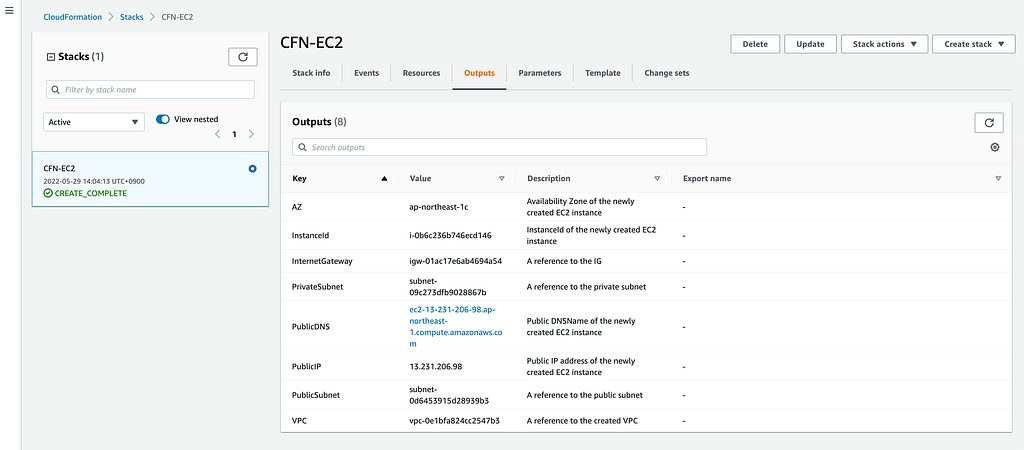
输出部分在堆栈创建后将信息打印到CloudFormation中的Outputs标签,也可以用来将信息导入到其他堆栈。
"Outputs" : {
  "InstanceId" : {
    "Description" : "InstanceId of the newly created EC2 instance",
    "Value" : { "Ref" : "EC2Instance" }
  },
  "AZ" : {
    "Description" : "Availability Zone of the newly created EC2 instance",
    "Value" : { "Fn::GetAtt" : [ "EC2Instance", "AvailabilityZone" ] }
  },
  "PublicDNS" : {
    "Description" : "Public DNSName of the newly created EC2 instance",
    "Value" : { "Fn::GetAtt" : [ "EC2Instance", "PublicDnsName" ] }
  },
  "PublicIP" : {
    "Description" : "Public IP address of the newly created EC2 instance",
    "Value" : { "Fn::GetAtt" : [ "EC2Instance", "PublicIp" ] }
  }
}
完整的CloudFormation模板。
{
  "AWSTemplateFormatVersion": "2010-09-09",
  "Description": "This template deploys EC2 with a VPC and pair of public and private subnets. It deploys an Internet Gateway, with a default route on the public subnets and NAT gateway and route for private subnet.\n",
  "Parameters": {
    "InstanceType" : {
      "Description" : "The EC2 instance type",
      "Type" : "String",
      "Default" : "t2.micro",
      "AllowedValues" : [ "t2.nano","t2.micro","t2.small","t2.medium","m1.small","m1.medium","m1.large","m1.xlarge","m2.xlarge","m2.2xlarge","m2.4xlarge","m3.medium","m3.large","m3.xlarge","m3.2xlarge","c1.medium","c1.xlarge","cc1.4xlarge","cc2.8xlarge","cg1.4xlarge"],
      "ConstraintDescription" : "Must be a valid EC2 instance type."
    },

    "VPCCIDR" : {
      "Type" : "String",
      "Description" : "Please enter the IP range (CIDR notation) for this VPC",
      "MinLength": "9",
      "MaxLength": "18",
      "Default": "10.22.0.0/16",
      "AllowedPattern": "(\\d{1,3})\\.(\\d{1,3})\\.(\\d{1,3})\\.(\\d{1,3})/(\\d{1,2})",
      "ConstraintDescription": "must be a valid IP CIDR range of the form x.x.x.x/x."
    },

    "PublicSubnetCIDR" : {
      "Type" : "String",
      "Description" : "Please enter the IP address range for the VPC subnet",
      "MinLength": "9",
      "MaxLength": "18",
      "Default": "10.22.0.0/24",
      "AllowedPattern": "(\\d{1,3})\\.(\\d{1,3})\\.(\\d{1,3})\\.(\\d{1,3})/(\\d{1,2})",
      "ConstraintDescription": "must be a valid IP CIDR range of the form x.x.x.x/x."
    },

    "PrivateSubnetCIDR" : {
      "Type" : "String",
      "Description" : "Please enter the IP address range for the VPC subnet",
      "MinLength": "9",
      "MaxLength": "18",
      "Default": "10.22.1.0/24",
      "AllowedPattern": "(\\d{1,3})\\.(\\d{1,3})\\.(\\d{1,3})\\.(\\d{1,3})/(\\d{1,2})",
      "ConstraintDescription": "must be a valid IP CIDR range of the form x.x.x.x/x."
    },

    "KeyName": {
      "Description" : "The name of an existing EC2 keypair for this instance",
      "Type": "AWS::EC2::KeyPair::KeyName",
      "MinLength": "1",
      "MaxLength": "255",
      "AllowedPattern" : "[\\x20-\\x7E]*",
      "ConstraintDescription" : "can contain only ASCII characters.",
      "Default": "First_EC2"
    },

    "SSHLocation" : {
      "Description" : "The IP address range that can be used to SSH to the EC2 instances",
      "Type": "String",
      "MinLength": "9",
      "MaxLength": "18",
      "Default": "0.0.0.0/0",
      "AllowedPattern": "(\\d{1,3})\\.(\\d{1,3})\\.(\\d{1,3})\\.(\\d{1,3})/(\\d{1,2})",
      "ConstraintDescription": "must be a valid IP CIDR range of the form x.x.x.x/x."
   }
  },

  "Mappings": {
    "RegionMap": {
      "ap-northeast-1": { "AMI" : "ami-0a3eb6ca097b78895" }
    }
  },

  "Resources": {
    "VPC": {
      "Type": "AWS::EC2::VPC",
      "Properties": {
        "CidrBlock": { "Ref" : "VPCCIDR" },
        "EnableDnsSupport": true,
        "EnableDnsHostnames": true,
        "InstanceTenancy": "default",
        "Tags": [
           { "Key" : "Name", "Value" : { "Fn::Sub": "${AWS::StackName}-VPC" } }
        ]
      }
    },
    "InternetGateway": {
      "Type": "AWS::EC2::InternetGateway",
      "Properties": {
        "Tags": [
          { "Key" : "Name", "Value" :  { "Fn::Sub": "${AWS::StackName}-IG" } }
        ]
      }
    },
    "GatewayToInternet": {
      "Type": "AWS::EC2::VPCGatewayAttachment",
      "Properties": {
        "InternetGatewayId": { "Ref": "InternetGateway" },
        "VpcId": { "Ref": "VPC" }
      }
    },
    "PublicSubnetRouteTable": {
      "Type": "AWS::EC2::RouteTable",
      "Properties": {
        "VpcId": { "Ref": "VPC" },
        "Tags": [
          { "Key" : "Name", "Value" :  { "Fn::Sub": "${AWS::StackName}-public" } }
        ]
      }
    },
    "PublicSubnetRoute": {
      "Type": "AWS::EC2::Route",
      "DependsOn": "GatewayToInternet",
      "Properties": {
        "RouteTableId": { "Ref": "PublicSubnetRouteTable" },
        "DestinationCidrBlock": "0.0.0.0/0",
        "GatewayId": { "Ref": "InternetGateway" }
      }
    },
    "PublicSubnet": {
      "Type": "AWS::EC2::Subnet",
      "Properties": {
        "VpcId": { "Ref": "VPC" },
        "CidrBlock": { "Ref" : "PublicSubnetCIDR" },
        "MapPublicIpOnLaunch": true,
        "Tags": [
          { "Key" : "Name", "Value" :  { "Fn::Sub": "${AWS::StackName}-public-subnet" } }
        ]
      }
    },
    "PublicSubnetRouteTableAssociation": {
      "Type": "AWS::EC2::SubnetRouteTableAssociation",
      "Properties": {
        "RouteTableId": { "Ref" : "PublicSubnetRouteTable" },
        "SubnetId": { "Ref" : "PublicSubnet" }
      }
    },
    "PrivateSubnetRouteTable": {
      "Type": "AWS::EC2::RouteTable",
      "Properties": {
        "VpcId": { "Ref": "VPC" },
        "Tags": [
          { "Key" : "Name", "Value" :  { "Fn::Sub": "${AWS::StackName}-private" } }
        ]
      }
    },
    "PrivateSubnet": {
      "Type": "AWS::EC2::Subnet",
      "Properties": {
        "VpcId": { "Ref": "VPC" },
        "CidrBlock": { "Ref" : "PrivateSubnetCIDR" },
        "MapPublicIpOnLaunch": false,
        "Tags": [
          { "Key" : "Name", "Value" :  { "Fn::Sub": "${AWS::StackName}-private-subnet" } }
        ]
      }
    },
    "PrivateSubnetRouteTableAssociation": {
      "Type": "AWS::EC2::SubnetRouteTableAssociation",
      "Properties": {
        "RouteTableId": { "Ref" : "PrivateSubnetRouteTable" },
        "SubnetId": { "Ref" : "PrivateSubnet" }
      }
    },
    "WebServerSecurityGroup": {
      "Type": "AWS::EC2::SecurityGroup",
      "Properties": {
        "GroupName": "WebServerSecurityGroup",
        "SecurityGroupIngress": [
          {
            "IpProtocol": "tcp",
            "FromPort": 22,
            "ToPort": 22,
            "CidrIp": { "Ref" : "SSHLocation"},
            "Description": "For traffic from Internet"
          },
          {
            "IpProtocol": "tcp",
            "FromPort": 80,
            "ToPort": 80,
            "CidrIp": { "Ref" : "SSHLocation"},
            "Description": "For traffic from Internet Http"
          }
        ],
        "GroupDescription": "Security Group for demo server",
        "VpcId":  { "Ref": "VPC" }
      }
    },
    "EC2Instance": {
      "Type": "AWS::EC2::Instance",
      "Metadata" : {
        "Comment" : "Install Ruby On EC2 using CloudFormation::Init",
        "AWS::CloudFormation::Init" : {
          "configSets" : {
            "full_install" : [ "install_cfn", "install_ruby_3" ]
          },
          "install_cfn" : {
            "files" : {
              "/etc/cfn/cfn-hup.conf" : {
                "content" : { "Fn::Join" : ["", [
                  "[main]\n",
                  "stack=", { "Ref" : "AWS::StackId" }, "\n",
                  "region=", { "Ref" : "AWS::Region" }, "\n"
                ]]},
                "mode"    : "000400",
                "owner"   : "root",
                "group"   : "root"
              },

              "/etc/cfn/hooks.d/cfn-auto-reloader.conf" : {
                "content": { "Fn::Join" : ["", [
                  "[cfn-auto-reloader-hook]\n",
                  "triggers=post.update\n",
                  "path=Resources.EC2Instance.Metadata.AWS::CloudFormation::Init\n",
                  "action=/opt/aws/bin/cfn-init -v ",
                  "         --stack ", { "Ref" : "AWS::StackName" },
                  "         --resource EC2Instance ",
                  "         --configsets full_install ",
                  "         --region ", { "Ref" : "AWS::Region" }, "\n",
                  "runas=root\n"
                ]]},
                "mode"    : "000400",
                "owner"   : "root",
                "group"   : "root"
              },
              "/lib/systemd/system/cfn-hup.service" : {
                "content": { "Fn::Join" : ["", [
                  "[Unit]\n",
                  "Description=cfn-hup daemon\n",
                  "[Service]\n",
                  "Type=simple\n",
                  "ExecStart=/opt/aws/bin/cfn-hup\n",
                  "Restart=always\n",
                  "[Install]\n",
                  "WantedBy=multi-user.target\n"
                ]]}
              }
            },
            "commands": {
              "01enable_cfn_hup": {
                "command": "systemctl enable cfn-hup.service"
              },
              "02start_cfn_hup": {
                "command": "systemctl start cfn-hup.service"
              }
            }
          },

          "install_ruby_3": {
            "files": {
              "/tmp/install_ruby": {
                "content": {
                  "Fn::Join": [
                    "\n",
                    [
                      "#!/bin/bash",
                      "curl -sSL https://rvm.io/mpapis.asc | sudo gpg --import -",
                      "curl -sSL https://rvm.io/pkuczynski.asc | sudo gpg --import -",
                      "curl -sSL https://get.rvm.io | sudo bash -s stable --ruby",
                      "source /usr/local/rvm/scripts/rvm",
                      "rvm gemset create own_gemset_name"
                    ]
                  ]
                },
                "mode": "000500",
                "owner": "root",
                "group": "root"
              }
            },
            "commands": {
              "01_install_ruby": {
                "command": "/tmp/install_ruby > /var/log/install_ruby.log"
              }
            }
          }
        }
      },
      "Properties": {
        "ImageId": { "Fn::FindInMap" : [ "RegionMap", { "Ref" : "AWS::Region" }, "AMI" ]},
        "InstanceType": { "Ref" : "InstanceType" },
        "SubnetId" : { "Ref" : "PublicSubnet" },
        "KeyName": { "Ref" : "KeyName" },
        "SecurityGroupIds" : [ { "Ref": "WebServerSecurityGroup" } ],
        "Tags": [
          { "Key" : "EC-2", "Value" :  { "Fn::Sub": "${AWS::StackName}-EC2" } }
        ],
        "BlockDeviceMappings": [
          {
            "DeviceName": "/dev/sda1",
            "Ebs": {
              "DeleteOnTermination": "true",
              "VolumeSize": "8",
              "VolumeType": "gp2"
            }
          }
        ],
        "UserData": {
          "Fn::Base64": {
            "Fn::Join": [
              "",
              [
                "#!/bin/bash\n",
                "apt-get update\n",
                "apt-get install -y python-setuptools\n",
                "mkdir -p /opt/aws/bin\n",
                "apt-get install -y wget\n",
                "wget https://s3.amazonaws.com/cloudformation-examples/aws-cfn-bootstrap-py3-latest.tar.gz\n",
                "python3 -m easy_install --script-dir /opt/aws/bin aws-cfn-bootstrap-py3-latest.tar.gz\n",
                "/opt/aws/bin/cfn-init -v ",
                "         --stack ", { "Ref" : "AWS::StackId" },
                "         --resource EC2Instance ",
                "         --configsets full_install ",
                "         --region ", { "Ref" : "AWS::Region" }, "\n",

                "/opt/aws/bin/cfn-signal -e $? ",
                "         --stack ", { "Ref" : "AWS::StackId" },
                "         --resource EC2Instance ",
                "         --region ", { "Ref" : "AWS::Region" }, "\n"
              ]
            ]
          }
        }
      }
    }
  },
  "Outputs" : {
    "InternetGateway" : {
      "Description" : "A reference to the IG",
      "Value" :  { "Ref" : "InternetGateway" }
    },
    "VPC" : {
      "Description" : "A reference to the created VPC",
      "Value" :  { "Ref" : "VPC" }
    },
    "PublicSubnet" : {
      "Description" : "A reference to the public subnet",
      "Value" :  { "Ref" : "PublicSubnet" }
    },
    "PrivateSubnet" : {
      "Description" : "A reference to the private subnet",
      "Value" :  { "Ref" : "PrivateSubnet" }
    },
    "InstanceId" : {
      "Description" : "InstanceId of the newly created EC2 instance",
      "Value" : { "Ref" : "EC2Instance" }
    },
    "AZ" : {
      "Description" : "Availability Zone of the newly created EC2 instance",
      "Value" : { "Fn::GetAtt" : [ "EC2Instance", "AvailabilityZone" ] }
    },
    "PublicDNS" : {
      "Description" : "Public DNSName of the newly created EC2 instance",
      "Value" : { "Fn::GetAtt" : [ "EC2Instance", "PublicDnsName" ] }
    },
    "PublicIP" : {
      "Description" : "Public IP address of the newly created EC2 instance",
      "Value" : { "Fn::GetAtt" : [ "EC2Instance", "PublicIp" ] }
    }
  }
}
最终输出
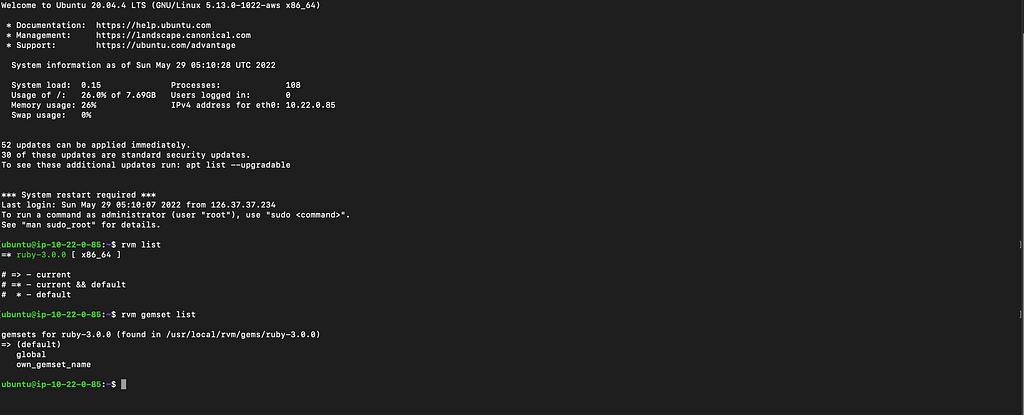
RVM和Ruby默认安装输出。
注意,通过 DeletionPolicy这个属性,你可以保留,在某些情况下,当资源的堆栈被删除时,还可以备份。你 为每个你想控制的资源 指定一个 DeletionPolicy属性。如果一个资源没有 DeletionPolicy属性,Amazon CloudFormation默认会删除该资源。如果你想保留你的所有资源,那么添加 *DeletionPolicy。保留
更多细节。
*AWS文档
结论
使用这个模板,你可以使用AWS CloudFormation创建具有公共和私人子网的VPC,Web服务器安全组,并启动具有Ruby安装的EC2实例。它建立了一个私有的网络环境,你可以在其中安全地运行AWS资源,以及相关的网络资源。
