

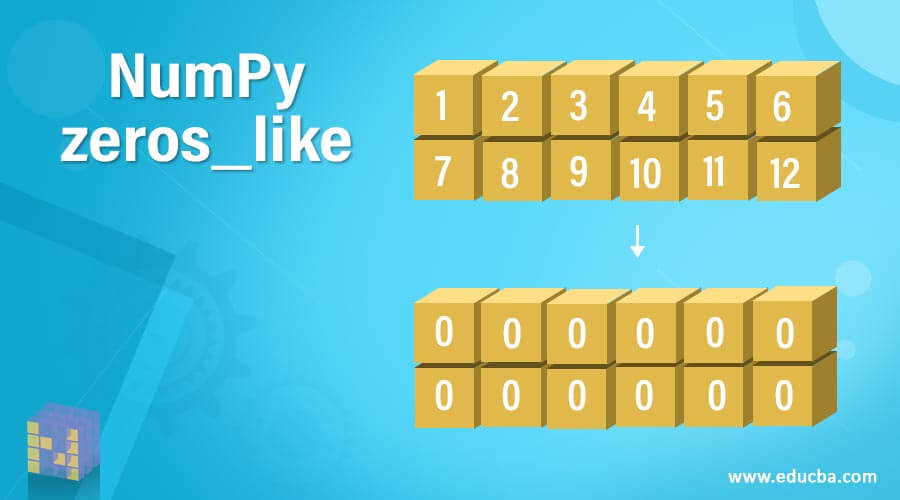
NumPy zeros_like简介
当我们有一个数组,其值必须被替换为所有的0,并且数组的大小和形状必须保留为原始数组时,我们就可以使用numpy中的一个叫做zeros-like的函数。这些类零函数需要四个参数arrayname、datatype、memory order和subok,其中datatype和subok参数是可选的,datatype表示存储在数组中的值的数据类型,其名称由第一个参数arrayname表示,memoryorder表示内存中的顺序,subok表示一个布尔值,如果使用类零函数返回的数组是输入数组的子类,则为真,如果返回的数组与原数组相同则为假。在本主题中,我们将学习NumPy zeros_like。
在Python中NumPy zeros_like函数的语法如下:
numpy.zeros_like(arrayname, datatype, memoryorder, subok)
其中arrayname是数组的名称,其值必须被替换成0,而不改变数组的大小和形状。
数据类型是存储在数组中的值的数据类型。数组中给定值的默认数据类型是float。这个参数是可选的。
Memoryorder代表内存中的顺序。subok代表一个布尔值,如果使用zeros like函数返回的数组是输入数组的子类,该值为真,如果返回的数组与原始数组相同,该值为假。这个参数是可选的。
NumPy zeros_like函数的工作原理
- 当我们有一个数组的值必须被替换成所有的零,而数组的大小和形状必须保留原数组的样子时,我们就可以使用numpy中一个叫做zeros like的函数。
- 类似零的函数需要四个参数arrayname, datatype, memoryorder和subok,其中datatype和subok参数是可选的。
- datatype表示存储在数组中的值的数据类型,数组名称由第一个参数arrayname表示。
- memoryorder代表内存中的顺序。
- subok代表一个布尔值,如果使用zeros like函数返回的数组是输入数组的子类,则为真,如果返回的数组与原始数组相同,则为假。
NumPy zeros_like的例子
下面提到不同的例子。
例子 #1
演示NumPy zeros like函数的Python程序,使用numpy中的数组函数创建一个数组,然后使用zeros like函数将数组中的元素替换为0。
代码:
#importing the package numpy
import numpy as n
#Creating an array by making use of array function in NumPy and storing it in a variable called orgarray
orgarray = n.array([[1,2],[3,4]])
#Displaying the elements of orgarray followed by one line space by making use of \n
print ("The elements of the given array are:")
print (orgarray)
print ("\n")
#using zeros like function of NumPy and passing the created array as the parameter to that function to replace all the elements of the array with zeros and store it in a variable called zerosarray
zerosarray = n.zeros_like(orgarray, float)
#Displaying the array consisting of all zero elements
print ("The array with all its elements zero after using zeros like function is as follow:")
print (zerosarray)
输出:
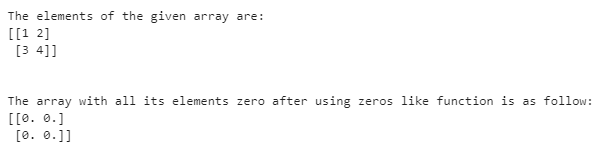
在上面的程序中,我们导入了numpy包,它允许我们使用数组和zeros_like函数。然后我们通过使用numpy中的数组函数创建一个名为orgarray的数组。然后将数组orgarray的元素显示在屏幕上。然后我们使用zeros_like函数,将新创建的数组orgarray作为参数传递给该函数,在不改变数组大小和形状的情况下将数组中的所有元素转换为零,并将生成的数组存储在一个名为zerosarray的变量中。最后,zerosarray中的元素被显示在屏幕上。
例子 #2
演示NumPy zeros like函数的Python程序,使用numpy中的array函数创建一个数组,然后使用zeros like函数将数组中的元素替换为0。
代码:
#importing the package numpy
import numpy as n
#Creating an array by making use of array function in NumPy and storing it in a variable called orgarray
orgarray = n.array([[5,6],[7,8]])
#Displaying the elements of orgarray followed by one line space by making use of \n
print ("The elements of the given array are:")
print (orgarray)
print ("\n")
#using zeros like function of NumPy and passing the created array as the parameter to that function to replace all the elements of the array with zeros and store it in a variable called zerosarray
zerosarray = n.zeros_like(orgarray, int)
#Displaying the array consisting of all zero elements
print ("The array with all its elements zero after using zeros like function is as follow:")
print (zerosarray)
输出:
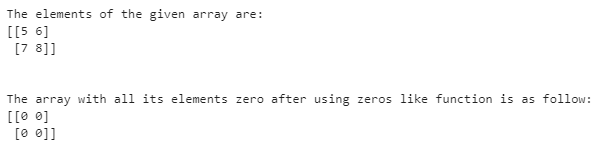
在上面的程序中,我们导入了numpy包,它允许我们使用数组和zeros_like函数。然后我们通过使用numpy中的数组函数创建一个名为orgarray的数组。然后将数组orgarray的元素显示在屏幕上。然后我们使用zeros_like函数。新创建的数组orgarray被作为参数传递给该函数,以便在不改变数组大小和形状的情况下将数组中的所有元素转换为零。数据类型int也作为参数被传递,它将结果数组中的零显示为整数值。然后,生成的数组被存储在一个叫做zerosarray的变量中。最后,zerosarray的元素被显示在屏幕上。
总结
在本教程中,我们通过定义了解了Python中NumPy零点函数的概念,零点函数的语法,以及通过编程实例和它们的输出了解零点函数的工作。
