蓝牙测距技术是非常流行的。有许多基于信标的定位系统存在。信标技术通常使用接收信号强度(RSSI)来估计设备之间的距离。
蓝牙可以成为追踪某物时缩小近距离搜索范围的绝佳方式。这一功能可用于多个领域,如建筑物和汽车的安全锁,资产定位和跟踪,室内导航等。
GPS跟踪在给出近距离的精确测量方面并不出色,尤其是在室内环境中。另一方面,蓝牙在短距离内非常出色,因为其电波可以穿过墙壁。这可能填补了GPS跟踪在室内空间跟踪设备时的空白。
然而,对两个蓝牙设备之间距离的计算大多是估算。很难确定两个蓝牙设备之间的确切距离,因为许多因素会影响计算结果。尽管存在挑战,但有一些方法可以确定两个蓝牙设备之间的距离,准确率至少为80%。
测距法实现起来很简单,它有计算两个蓝牙设备之间距离的公式。顾名思义,两个设备都需要在蓝牙范围内才能估算出距离。
本文将分享一个简单的python脚本来确定附近的蓝牙设备和它们的距离(米)。
这个脚本扫描附近的蓝牙设备,并通过使用众所周知的RSSI到距离的公式得到一个近似的距离。
阅读更多关于如何计算距离
所需条件
说明
- 从GitHub获取脚本:github.com/smart-senso…
- 将BleuIO连接到你的电脑。该脚本使用pyserial来连接蓝牙USB加密狗BleuIO。
- 更新脚本并写入正确的COM端口,即连接加密狗的地方。
- 连接到加密狗后,我们把加密狗放入中心角色,这样它就可以扫描附近的蓝牙设备。
- 然后我们使用AT+GAPSCAN=3命令做一个简单的Gap扫描,扫描附近的蓝牙设备3秒钟。
- 之后,我们从串行端口读取输出,并使用我们的RSSI到距离的公式来获得距离(米)。
- 最后,我们按照距离对结果进行排序,然后在屏幕上打印出来。
下面是最终的脚本文件。
import serial
import time
your_com_port = "COM18"  # Change this to the com port your dongle is connected to.
connecting_to_dongle = True
print("Connecting to dongle...")
# Trying to connect to dongle until connected. Make sure the port and baudrate is the same as your dongle.
# You can check in the device manager to see what port then right-click and choose properties then the Port Settings
# tab to see the other settings
while connecting_to_dongle:
    try:
        console = serial.Serial(
            port=your_com_port,
            baudrate=57600,
            parity="N",
            stopbits=1,
            bytesize=8,
            timeout=0,
        )
        if console.is_open.__bool__():
            connecting_to_dongle = False
    except:
        print("Dongle not connected. Please reconnect Dongle.")
        time.sleep(5)
print("Connected to Dongle.")
# function to convert rssi to distance in meter
def rssiToDistance(rssi):
  n=2
  mp=-69
  return round(10 ** ((mp - (int(rssi)))/(10 * n)),2)
#put the dongle in dual role, so we can scan for nearby device
console.write(str.encode("AT+CENTRAL"))
console.write("\r".encode())
print("Putting dongle in Central role.")
time.sleep(0.1)
# Scan for nearby devices for 3 seconds
console.write(str.encode("AT+GAPSCAN=3"))
console.write("\r".encode())
time.sleep(0.1)
print("Looking for nearby Bluetooth devices ...")
dongle_output2 = console.read(console.in_waiting)
time.sleep(3)
print("Scan Complete!")
filtered = []
# Filter out unncecssary outputs and keep only the list of devices (also remove index)
for dev in dongle_output2.decode().splitlines():
    if len(dev)>20:
        filtered.append(dev.split(maxsplit=1)[1])
# Get unique device by device id and add distance to each raw
seen = set()
out = []
for elem in filtered:
    prefix = elem.split(' ')[1]
    if prefix not in seen:
        seen.add(prefix)
        out.append(elem + " Distance: "+str(rssiToDistance(elem.split()[3]))+" meter")
# sort list by closest device
out.sort(key=lambda x:int(x.split()[3]),reverse=True)
# print(out)
for i in range(0, len(out)):
    print (out[i])
time.sleep(0.1)
console.close()
输出
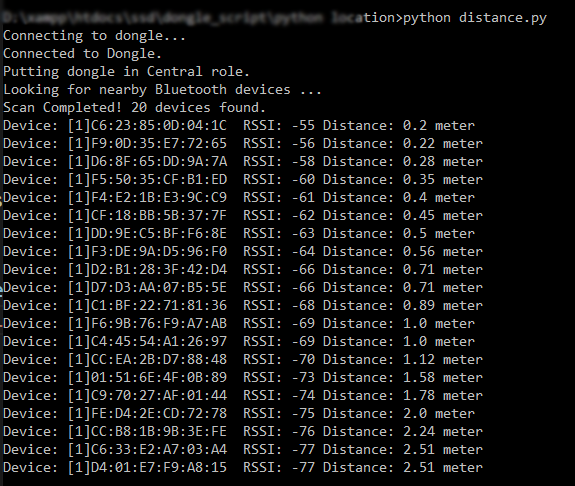
运行该脚本后,我们看到附近共有20个设备。列表中显示了它们与中心设备的距离(米)。