

简介
*便携文档格式(PDF)*不是所见即所得(WYSIWYG)格式。它被开发成与平台无关,独立于底层操作系统和渲染引擎。
为了实现这一点,PDF的构造是通过更像编程语言的东西进行交互,并依靠一系列的指令和操作来实现结果。事实上,PDF是基于一种脚本语言--PostScript,它是第一个独立于设备的页面描述语言。
在本指南中,我们将使用 borb- 一个专门用于阅读、操作和生成 PDF 文档的 Python 库。它同时提供了一个低级模型(如果你选择使用精确的坐标和布局,允许你访问这些)和一个高级模型(你可以将边距、位置等的精确计算委托给一个布局管理器)。
Matplotlib是一个数据可视化库,它推动了整整一代工程师开始可视化数据,也是Seaborn等许多其他流行库背后的引擎。
鉴于PDF文档在创建报告(通常包括图表)时非常常见,我们将看看如何使用borb在PDF文档中集成Matplotlib图表。
安装borb(和Matplotlib)
borb可以从GitHub上的源代码下载,或者通过pip 。
$ pip install borb
Matplotlib可以通过pip 来安装。
$ pip install matplotlib
用borb在PDF文档中集成Matplotlib图表
在我们创建图表(如饼图)之前,我们要写一个小的实用函数,生成N ,均匀地分布在色谱中。
这将有助于我们在任何时候创建一个图并为每个部分着色。
from borb.pdf.canvas.color.color import HSVColor, HexColor
from decimal import Decimal
import typing

def create_n_colors(n: int) -> typing.List[str]:
  # The base color is borb-blue
  base_hsv_color: HSVColor = HSVColor.from_rgb(HexColor("56cbf9"))
  # This array comprehension creates n HSVColor objects, transforms then to RGB, and then returns their hex string
  return [HSVColor(base_hsv_color.hue + Decimal(x / 360), Decimal(1), Decimal(1)).to_rgb().to_hex_string() for x in range(0, 360, int(360/n))]

注意。 ***HSL(色相、饱和度、亮度)***和 ***HSV/HSB(色调、饱和度、值/色调、饱和度、亮度)***是RGB颜色模型的替代表示。
HSL和HSV/HSB是由计算机图形学研究人员在20世纪70年代设计的,以更接近于人类视觉对造色属性的感知方式。在这些模型中,每个色相的颜色都被安排在一个径向切片中,围绕着中性色的中心轴,其范围从底部的黑色到顶部的白色。
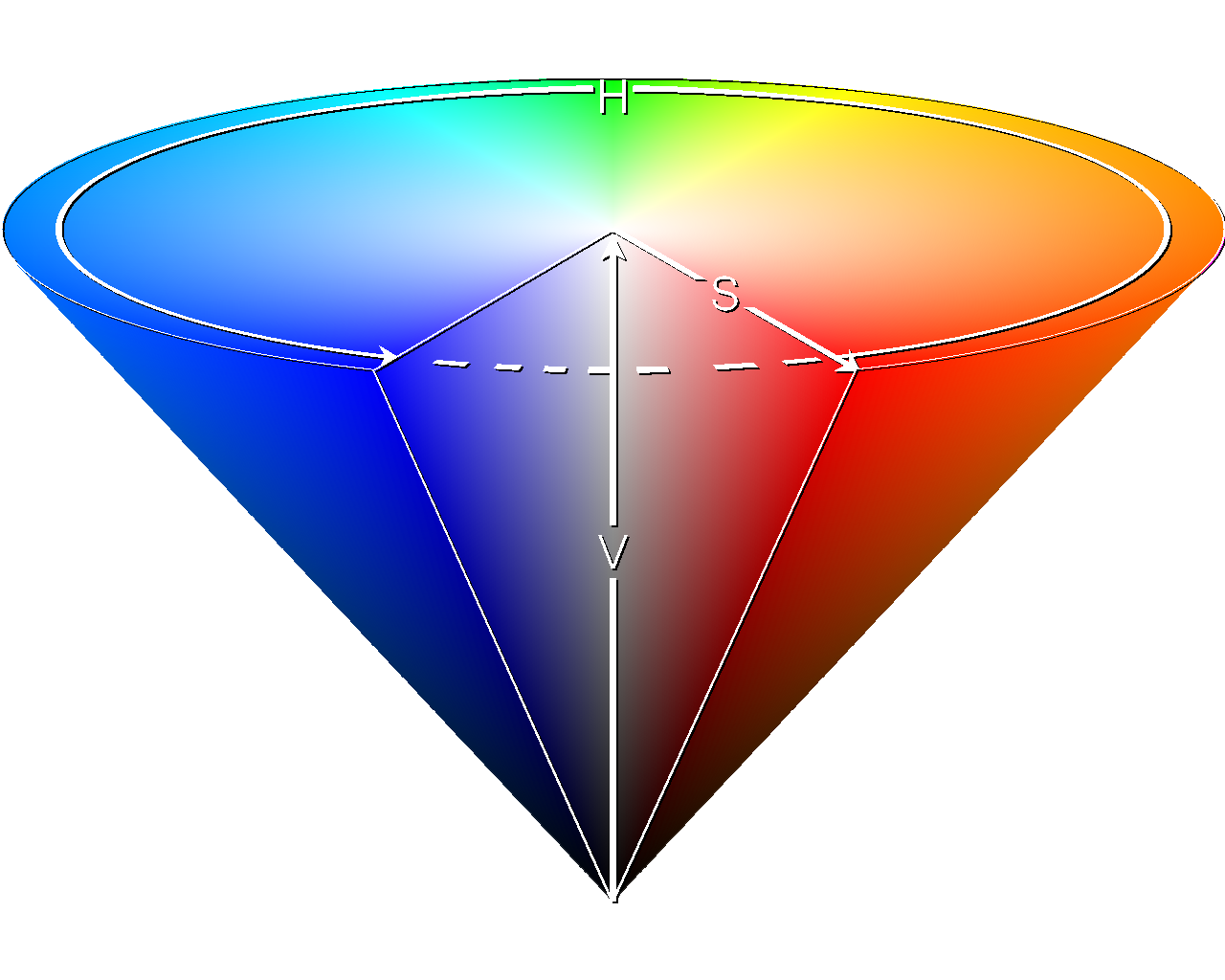
鸣谢。维基媒体(CC BY-SA 3.0)许可
使用这种表示方法进行Color 的好处是,我们可以很容易地将色彩频谱分成相等的部分。
现在我们可以定义一个create_pie_chart() 函数(或其他类型的图的函数)。
# New import(s)
import matplotlib.pyplot as plt
from borb.pdf.canvas.layout.image.chart import Chart
from borb.pdf.canvas.layout.layout_element import Alignment

def create_piechart(labels: typing.List[str], data: typing.List[float]):

  # Symetric figure to ensure equal aspect ratio
  fig1, ax1 = plt.subplots(figsize=(4, 4))
  ax1.pie(
    data,
    explode=[0 for _ in range(0, len(labels))],
    labels=labels,
    autopct="%1.1f%%",
    shadow=True,
    startangle=90,
    colors=create_n_colors(len(labels)),
  )

  ax1.axis("equal")  # Equal aspect ratio ensures that pie is drawn as a circle.

  return Chart(
    plt.gcf(),
    width=Decimal(200),
    height=Decimal(200),
    horizontal_alignment=Alignment.CENTERED,
  )
在这里,我们使用Matplotlib来创建一个饼图,通过pie() 函数。
如果你想了解更多关于创建饼图的信息,请阅读我们的《Matplotlib饼图指南》!
PyPlot 实例的gcf() 函数返回当前的数字**(get** current figure)。这个数字可以被嵌入到一个PDF文档中,方法是将它注入到Chart 构造函数中,与你的自定义参数一起,如width 、height 和horizontal_alignment 。
就这样!你只需向Chart 构造函数提供一个Matplotlib图表。
将Matplotlib图表添加到一个PDF文档中
现在是时候创建我们的基本PDFDocument ,并向其添加内容。
# New import(s)
from borb.pdf.document import Document
from borb.pdf.page.page import Page
from borb.pdf.pdf import PDF
from borb.pdf.canvas.layout.page_layout.multi_column_layout import MultiColumnLayout
from borb.pdf.canvas.layout.page_layout.page_layout import PageLayout
from borb.pdf.canvas.layout.text.paragraph import Paragraph

# Create empty Document
pdf = Document()

# Create empty Page
page = Page()

# Add Page to Document
pdf.append_page(page)

# Create PageLayout
layout: PageLayout = MultiColumnLayout(page)

# Write title
layout.add(Paragraph("About Lorem Ipsum",
                     font_size=Decimal(20),
                     font="Helvetica-Bold"))
我们将在这个PDF中使用连字符,以确保文本可以更流畅地布局。borb中的连字符是非常直接的。
# New import(s)
from borb.pdf.canvas.layout.hyphenation.hyphenation import Hyphenation

# Create hyphenation algorithm
hyphenation_algorithm: Hyphenation = Hyphenation("en-gb")

# Write paragraph
layout.add(Paragraph(
    """
    Lorem Ipsum is simply dummy text of the printing and typesetting industry.
    Lorem Ipsum has been the industry's standard dummy text ever since the 1500s,
    when an unknown printer took a galley of type and scrambled it to make a type specimen book.
    It has survived not only five centuries, but also the leap into electronic typesetting, remaining essentially unchanged.
    It was popularised in the 1960s with the release of Letraset sheets containing Lorem Ipsum passages,
    and more recently with desktop publishing software like Aldus PageMaker including versions of Lorem Ipsum.
    """, text_alignment=Alignment.JUSTIFIED, hyphenation=hyphenation_algorithm))
现在我们可以使用我们先前声明的函数添加一个饼图。
# Write graph
layout.add(create_piechart(["Loren", "Ipsum", "Dolor"],
                           [0.6, 0.3, 0.1]))
接下来我们再写三个Paragraph 对象。
其中一个要更多地引用(边框,不同的字体,等等)。
# Write paragraph
layout.add(Paragraph(
    """
    Contrary to popular belief, Lorem Ipsum is not simply random text.
    It has roots in a piece of classical Latin literature from 45 BC, making it over 2000 years old.
    Richard McClintock, a Latin professor at Hampden-Sydney College in Virginia, looked up one of the more obscure Latin words,
    consectetur, from a Lorem Ipsum passage, and going through the cites of the word in classical literature,
    discovered the undoubtable source.
    """, text_alignment=Alignment.JUSTIFIED, hyphenation=hyphenation_algorithm))

# Write paragraph
layout.add(Paragraph(
    """
    Lorem Ipsum is simply dummy text of the printing and typesetting industry.
    """,
    font="Courier-Bold",
    text_alignment=Alignment.JUSTIFIED,
    hyphenation=hyphenation_algorithm,
    border_color=HexColor("56cbf9"),
    border_width=Decimal(3),
    border_left=True,
    padding_left=Decimal(5),
    padding_bottom=Decimal(5),
))

# Write paragraph
layout.add(Paragraph(
    """
    Lorem Ipsum comes from sections 1.10.32 and 1.10.33 of "de Finibus Bonorum et Malorum"
    (The Extremes of Good and Evil) by Cicero, written in 45 BC.
    This book is a treatise on the theory of ethics, very popular during the Renaissance.
    """, text_alignment=Alignment.JUSTIFIED, hyphenation=hyphenation_algorithm))
让我们再添加一个情节
# Write graph
layout.add(create_piechart(["Loren", "Ipsum", "Dolor", "Sit", "Amet"],
                           [600, 30, 89, 100, 203]))
和一个更多的Paragraph 的内容
# Write paragraph
layout.add(Paragraph(
    """
    It is a long established fact that a reader will be distracted by the readable content of a page when looking at its layout.
    The point of using Lorem Ipsum is that it has a more-or-less normal distribution of letters, as opposed to using 'Content here, content here',
    making it look like readable English. Many desktop publishing packages and web page editors now use Lorem Ipsum as their default model text,
    and a search for 'lorem ipsum' will uncover many web sites still in their infancy.
    Various versions have evolved over the years, sometimes by accident, sometimes on purpose (injected humour and the like).
    """, text_alignment=Alignment.JUSTIFIED, hyphenation=hyphenation_algorithm))
最后,我们可以存储Document 。
# Write to disk
with open("output.pdf", "wb") as pdf_file_handle:
  PDF.dumps(pdf_file_handle, pdf)
运行这段代码的结果是一个看起来像这样的PDF文档。

结语
在本指南中,你已经学会了如何使用borb 在PDF中集成Matplotlib图表。从这里开始,天空是无限的!你在数据可视化方面越有创意,你的PDF就越漂亮。
