1.在开发过程中,遇到一个上传文件并获取后台返回数据下载二进制流文件的需求,这个过程遇到一个很迷惑的问题,就是在上传过程中post请求接口,后台返回的是一个二进制文件流,传的数据中要加上{responseType:"blob"},使得返回的数据转换为blob格式可正常下载。
2.但是在开发中有这样一个需求,上传文件内容缺少或不正确,后台会返回一个错误提示数据,需要前端来弹窗提示,但是后台返回的res.data数据是这样的。
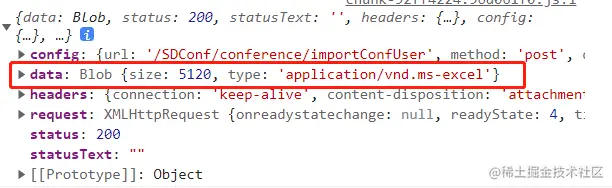
3.于是就需要通过res.data.type进行判断是否上传正常,当res.data.type == "application/json"时代表上传的文件有问题,要根据后台返回的提示展示;当res.data.type == "application/vnd.ms-excel"时,代表上传文件正常,可根据后台返回的blob数据进行下载文件表格。
4.现在导入成功返回的正常数据可以正常下载文件,具体操作代码如下:
if (res.data.type == "application/vnd.ms-excel") {
this.$message({
type: "success",
message: "导入成功!"
})
setTimeout(() => {
let url = window.URL.createObjectURL(res.data)
let link = document.createElement("a")
let fileName = "文件名可在res.headers.content-disposition里获取/自己写一个文件名"
link.style.display = "none"
link.href = url
link.setAttribute("download", fileName)
link.click()
window.URL.revokeObjectURL(url)
}, 500)
}
5.现在导入失败返回的错误数据需要正常获取,但是在这里又出现一个问题,就是blob格式下的data没办法直接拿到里面的message数据,于是就需要把blob格式进行转换回来,才能拿到obj格式的数据。具体操作如下:
else if (res.data.type == "application/json") {
const reader = new FileReader();
reader.readAsText(res.data, "utf-8");
reader.onload = e => {
const readerres = reader.result;
const parseObj = JSON.parse(readerres);
console.log(parseObj);
this.$MessageBox({
type: "warning",
title: "提示",
dangerouslyUseHTMLString: true,
message: `${parseObj.message}`
}
});
};
}
6.大致就是这样,解决了既能正常下载二进制文件流不出现乱码的现象,又能对blob格式的数据转换获取需要数据;完美解决问题。全部代码附在下面:
let conferenceId = this.getQueryString("conferenceId"),
fd = new FormData()
fd.append("file", file.raw)
fd.append("conferenceId", conferenceId)
// { responseType: "blob" }
this.$axios.post("xxxxxxxxx", fd, { responseType: "blob" }).then(res => {
console.log(res)
if (res.data.type == "application/vnd.ms-excel") {
this.$message({
type: "success",
message: "导入成功!"
})
setTimeout(() => {
let url = window.URL.createObjectURL(res.data)
let link = document.createElement("a")
let fileName = "文件名可在res.headers.content-disposition里截取,也可自己写"
link.style.display = "none"
link.href = url
link.setAttribute("download", fileName)
link.click()
window.URL.revokeObjectURL(url)
}, 500)
} else if (res.data.type == "application/json") {
//错误提示
const reader = new FileReader()
reader.readAsText(res.data, "utf-8")
reader.onload = e => {
const readerres = reader.result
const parseObj = JSON.parse(readerres)
console.log(parseObj)
this.$MessageBox({
type: "warning",
title: "提示",
dangerouslyUseHTMLString: true,
message: `${parseObj.message}`,
callback: action => {
if (action == "confirm") {
console.log("已确定")
}
}
})
}
} else {
this.$MessageBox({
type: "warning",
title: "提示",
message: "系统异常"
})
}
})