

RegEx(正则表达式)是一个特殊的字符序列,用于使用专门的语法形成一个搜索模式。
在进行数据操作时,特别是文本数据,你需要操作特定的字符串模式。这些可能包括从一条推文中检索标签,从文本中提取日期,或删除网站链接。 Pandasreplace() 函数被用来替换数据框架中的一个字符串regex、列表、字典、系列、数字。在这篇文章中,我们将通过实例解释如何使用regex替换模式。
替换regex的函数
对于使用pandasreplace 函数与regex,你需要定义3个参数。to_replace,regex 和value :
to_replace:表示在数据框或系列中必须被替换的值。在正则表达式的情况下,必须要传递一个regex模式。这个模式代表一个通用的字符序列。regex:为了让pandas将替换解释为正则表达式替换,请将其设置为Truevalue:这代表了要替换的值,以代替to_replace值。
如果你是第一次听说正则表达式,我们有一个初学者 教程,可以让你尽快掌握/。
让我们尝试用各种用例来实现这一点。
创建一个样本数据集
如下图所示,用样本数据创建一个pandas数据框。之后,我们会说各种使用regex替换pandas的例子。
# Import packages
import pandas as pd

df = pd.DataFrame(
                   data= [                        ['@mlplus', 'We are excited to launch our new course on ML. #newcourse #machinelearning #python','mlplus@mlplus.tech'],
                        ['@kaustubhgupta', "@gmail Gmail is down for 30 minutes. What's the matter? #gmaildown #google #gmail",'kaustubh@random.in'],
                        ['@rajveer', 'Excited to lauch our new product! #newproduct #startup ','rajveer@twitter.me'],
                        ['@joe', 'When will this coronavirus end? #thoughts','joe@facebook.pl'],
                        ['@abhishek', 'I want to become web developer. Any tips? @webdeveloper @randomxyz','abhishek@orkut.tech'],
                        ['@ayushi', 'Missing college! @colllege','ayushi@space.org' ]
                         ],
                    columns=['twitter_username', 'tweet', 'email']
                )
df

情况1:使用regex替换删除hashtags
上面的数据集有一个tweet列。这些列的值包含hashtags,一般用于交叉引用内容。如果你想从推文中删除所有的标签怎么办?
使用带有regex的pandas replace函数。这种情况下的regex应该是#\w+ 。
替换前的推文
df.tweet[0]
输出。
'We are excited to launch our new course on ML. #newcourse #machinelearning #python'
替换后的推文
# using replace function with regex pattern, regex=True and value as empty string
df.tweet.replace(to_replace='#\w+', regex=True, value='')[0]
输出
'We are excited to launch our new course on ML.'
情况2:使用regex将所有域名后缀替换为.edu
假设你想在数据集的电子邮件列中把所有的域名后缀如.com, .in, .tech等替换成.edu。这种情况下的regex模式将是\.\w+ 。
替换前的电子邮件
df.email
输出
0     mlplus@mlplus.tech
1     kaustubh@random.in
2     rajveer@twitter.me
3        joe@facebook.pl
4    abhishek@orkut.tech
5       ayushi@space.org
Name: email, dtype: object
替换后的电子邮件
df.email.replace(to_replace='\.\w+', value='.edu', regex=True)
输出
0      mlplus@mlplus.edu
1    kaustubh@random.edu
2    rajveer@twitter.edu
3       joe@facebook.edu
4     abhishek@orkut.edu
5       ayushi@space.edu
Name: email, dtype: object
情况3:用$ 替换tweets中的所有元音。
在这种情况下,元音将被替换成$ 。例如,Miss 这个词将变成M$iss 。
这种情况下的正则表达式将是。[aeiouAEIOU]
替换前的推文
df.tweet[5]
'Missing college! @colllege'
替换后的推文
df.tweet.replace(to_replace="[aeiouAEIOU]", regex=True, value='$')[5]
'M$ss$ng c$ll$g$! @c$lll$g$'
实用技巧
- 正则表达式在替换通常难以通过其他函数替换的复杂字符串模式时非常方便。
- 例如,你可以用正则表达式替换一个文本中的所有脏话,用特殊字符替换。
测试你的知识
Q1: 要在replace 函数中启用正则表达式搜索,应该启用什么参数?
答案: regex 参数应设置为True
Q2: replace 函数中的value 参数是用来:
A) 定义字符串中哪些值应该被替换。
b) 定义替换值。
c) 定义regex模式
d) 这些都不是
答案:(B)选项
Q3: 考虑下面的数据框架:
import pandas as pd

df = pd.DataFrame(
                    data= [                        ['@mlplus', 'Our new course on ML price: 3222'],
                        ['@kaustubhgupta', "Gmail down for 30 minutes. What's the matter?"],
                        ['@rajveer', 'Excited to lauch our new product on 5th Jan!'],
                        ['@joe', 'Will coronavirus end in 2021? #thoughts'],
                        ['@abhishek', 'I want to become web developer in 4 months. Any tips? @webdeveloper @randomxyz'],
                        ['@ayushi', 'Missing college! @colllege']
                         ],

                    columns=['username', 'tweet']
                )

df
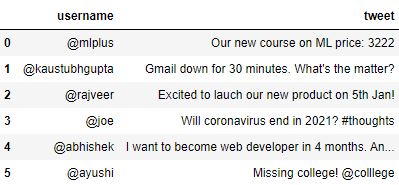
写出代码,使用替换函数和regex表达式将tweets中的数字替换成文本00number00
答案: 使用正则表达式:\d+
df.tweet.replace(to_replace="\d+", value='00number00', regex=True)
0               Our new course on ML price: 00number00
1    Gmail down for 00number00 minutes. What's the ...
2    Excited to lauch our new product on 00number00...
3        Will coronavirus end in 00number00? #thoughts
4    I want to become web developer in 00number00 m...
5                           Missing college! @colllege
Name: tweet, dtype: object
