

pandas.reset_index 在pandas中用于将数据框架对象的索引重置为默认索引(0到行数减去1),或者重置多级索引。通过这样做,原来的索引被转换为一个列。
在本文结束时,你将知道reset_index 函数的不同功能,以及可以定制的参数,以便从该函数中获得所需的输出。这也涵盖了与在pandas中做重置索引密切相关的用例。
pandas.reset_index
语法
-
- pandas.reset_index(level=None, drop=False, inplace=False, col_level=0, col_fill= " )
目的
-
- 重置索引或其中的一个级别。重置DataFrame的索引,并使用默认索引。如果DataFrame有一个MultiIndex,该方法可以删除一个或多个级别。
参数
-
- level:
-
-
- int, str, tuple or list, (default None) 只从索引中移除提供的级别。默认情况下删除所有的级别。
-
-
- drop:
-
-
- bool, (默认为False) 不将旧的索引添加到数据框架中。默认情况下,它会添加。
-
-
- inplace:
-
-
- bool, (默认为False) 在当前的数据框架对象中进行修改。
-
-
- col_level:
-
-
- int或str, (默认为0) 如果列有多个级别,决定在哪个级别插入标签。默认情况下,它被插入到第一层(0)。
-
-
- col_fill:
-
-
- object, (default " ) 如果列有多个层次,决定其他层次的命名方式。如果没有,那么索引名称将被重复。
-
-
- level:
返回
-
- DataFrame或无,带有新索引的DataFrame或无(如果inplace=True)。
1.如何重设索引?
要在pandas中重置索引,你只需要将函数.reset_index() 与数据框架对象链接起来。
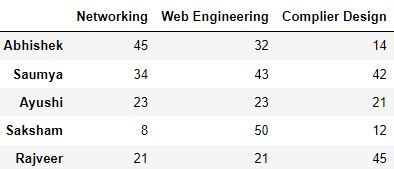
步骤1:创建一个简单的DataFrame
import pandas as pd
import numpy as np
import random
# A dataframe with an initial index. The marks represented here are out of 50

df = pd.DataFrame({
                    'Networking': [45, 34, 23, 8, 21],
                    'Web Engineering': [32, 43, 23, 50, 21],
                    'Complier Design': [14, 42, 21, 12, 45]
                  }, index=['Abhishek', 'Saumya', 'Ayushi', 'Saksham', 'Rajveer']
                 )
df
第2步:重置索引
df.reset_index()
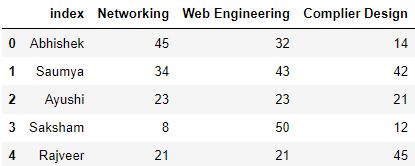
在应用.reset_index() 函数时,索引会作为一个单独的列被转移到数据框架中。它被命名为index 。数据框架的新索引现在是整数,范围从0到数据框架的长度。
2.2.如果一个命名的索引被重置会怎样?
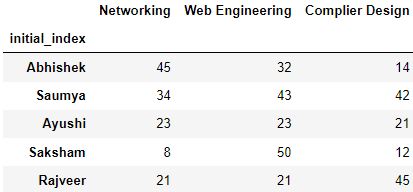
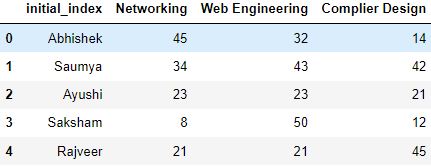
对于带有命名索引的数据框架,那么,索引的名称将被作为数据框架中的一个列名,而不是默认的名称index 。命名的索引意味着该索引有一个分配给它的名称。
步骤1:创建一个带有命名索引的数据框架
# Create a Series with name
namedIndex = pd.Series(['Abhishek', 'Saumya', 'Ayushi', 'Saksham', 'Rajveer'], name='initial_index')

# Create the dataframe and pass the named series as index
df = pd.DataFrame({
                    'Networking': [45, 34, 23, 8, 21],
                    'Web Engineering': [32, 43, 23, 50, 21],
                    'Complier Design': [14, 42, 21, 12, 45]
                    }, index=namedIndex
                 )
df
第2步:重置索引
在这种情况下,重设索引会返回一个数据框架,initial_index ,作为旧索引的列名:-。
df.reset_index()
3.如何坚持改变?
考虑一下下面的数据框架,其中的索引已经被重置。
# Create the dataframe
df = pd.DataFrame({
                    'Networking': [45, 34, 23, 8, 21],
                    'Web Engineering': [32, 43, 23, 50, 21],
                    'Complier Design': [14, 42, 21, 12, 45]
                    }, index=['Abhishek', 'Saumya', 'Ayushi', 'Saksham', 'Rajveer']
                    )

# reset the index
df.reset_index()
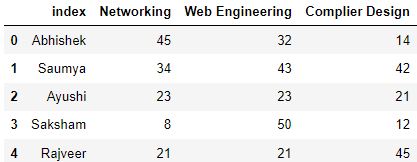
上面的输出显示,数据框架的索引已经被改变。但是如果你检查数据框架,它并没有被永久地应用。
df
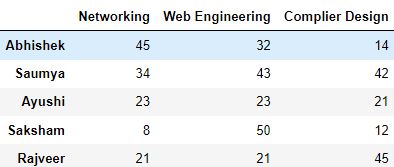
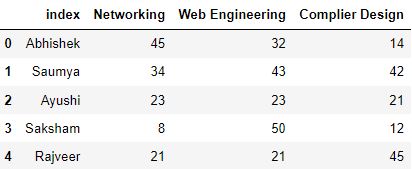
如果你想保留你的改变,那么你需要传递一个名为inplace 的参数,并将它的值设置为True ,这样你的索引重置就会在运行reset_index 函数时应用到数据框架对象。
# reset the index with inplace=True
df.reset_index(inplace=True)
df
4.4.如何删除旧的索引?
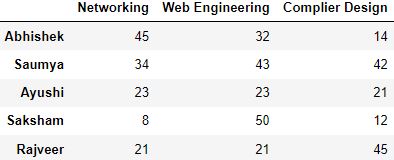
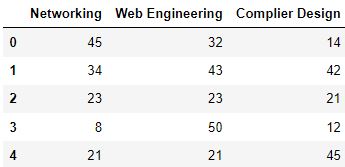
你可能对丢弃在重置索引时添加的数据框架的旧索引感兴趣。尽管你可以通过使用.drop() 函数手动完成,但你可以在重置索引时通过drop=True 参数来节省这个时间。
步骤1:创建一个数据框架
df = pd.DataFrame({
                    'Networking': [45, 34, 23, 8, 21],
                    'Web Engineering': [32, 43, 23, 50, 21],
                    'Complier Design': [14, 42, 21, 12, 45]
                    }, index=['Abhishek', 'Saumya', 'Ayushi', 'Saksham', 'Rajveer']
                    )
df
第2步:用drop=True重置索引
df.reset_index(drop=True)
5.如何将一个列转换为一个索引?
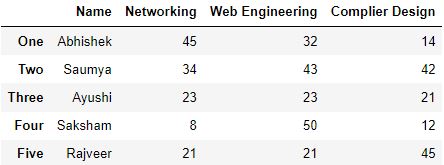
你可以通过以下步骤重置你的数据框架的索引,而不删除默认索引。
第1步:创建一个具有初始索引的数据框架
df = pd.DataFrame({
                    'Name': ['Abhishek', 'Saumya', 'Ayushi', 'Saksham', 'Rajveer'],
                    'Networking': [45, 34, 23, 8, 21],
                    'Web Engineering': [32, 43, 23, 50, 21],
                    'Complier Design': [14, 42, 21, 12, 45],
                  }, index=['One', 'Two', 'Three', 'Four', 'Five']
                 )
df
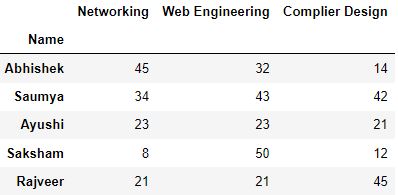
第2步:将列设置为索引 使用set_index
# Set 'Name' as the index of the dataframe
df.set_index('Name', inplace=True)
df
6.如何重置多级索引?
# Create a Multi-Level Index
newIndex = pd.MultiIndex.from_tuples(
                                      [('IT', 'Abhishek'),                                       ('IT', 'Rajveer'),                                       ('CSE', 'Saumya'),                                       ('CSE', 'Saksham'),                                       ('EEE', 'Ayushi')                                      ],
                                  names=['Branch', 'Name'])


# Optionally, you can also create multilevel columns
columns = pd.MultiIndex.from_tuples(
                                    [('subject1', 'Networking'),                                     ('subject2', 'Web Engineering'),                                     ('subject3', 'Complier Design')                                    ])

df = pd.DataFrame([                    (45, 32, 14),                    (21, 21, 25),                    (23, 23, 21),                    (8, 50, 12),                    (34, 43, 42)                          ], index=newIndex,
                    columns=columns)
df
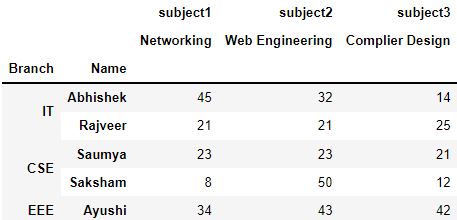
在这里你可以看到,Branch 级映射到多行。这是一个多级索引。Multi-level index ,以更大的颗粒度显示细节,当我们处理分层数据的时候,它们可能非常有用。
如果你对这种类型的数据框架应用.reset_index() 函数,默认情况下,所有的级别都会作为列合并到数据框架中。
# convert multi-level index to columns.
df.reset_index()
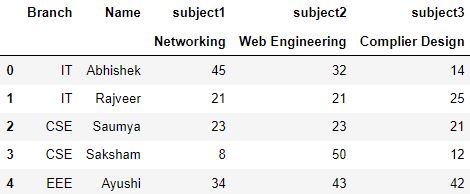
假设,你想重置Branch 水平上的索引。要重置这种索引,你需要向reset_index 函数提供level 参数。
df.reset_index(level='Branch')
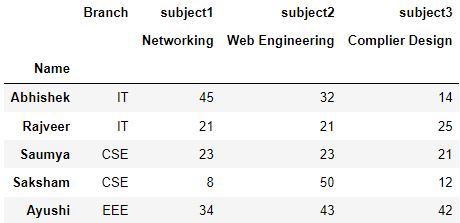
Name 列仍然作为索引保留。因为我们指定了 作为我们要重置索引的级别。Branch
7.在多级索引中只重置一个级别
考虑一下我们之前的数据框架,当它被重置在Branch 水平时。
df.reset_index(level='Branch')
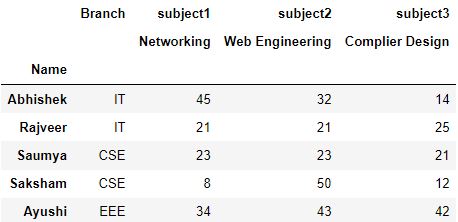
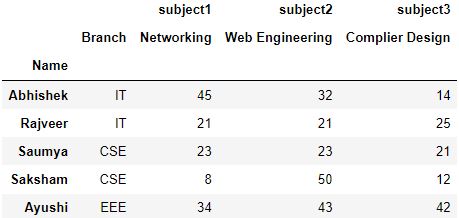
你可以看到,Branch 列,在被重置时,默认被放在最高层(0)。你可以通过指定col_level 参数来修改这个级别。
它定义了移位后的索引列应该放在哪一级。请看下面的一个实现。
# Changing the level of column to 1
df.reset_index(level='Branch', col_level=1)
8.如何填补空白层?
继续前面的例子,你可以看到,由于Branch 列的级别被降低了(1级),在它上面的级别产生了一个空白。
df.reset_index(level='Branch', col_level=1)
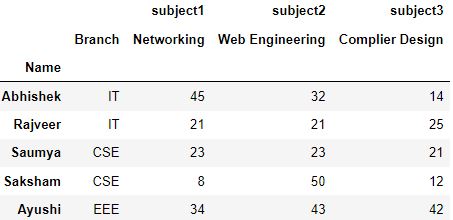
你也可以使用col_fill 参数来填补这个层次,该参数接收的是这个名字。
df.reset_index(level='Branch', col_level=1, col_fill='Department')
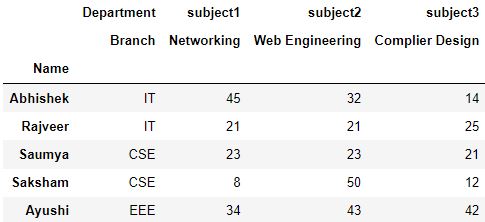
9.实用提示
.reset_index() 当你对你的数据进行了大量的预处理步骤时,如去除空值行或过滤数据,该函数非常有用。
这些处理可能会返回一个不同的数据框架,其索引不再是连续的方式。让我们试试一个小例子。
# Create a dataframe

df = pd.DataFrame({
                    'Name': ['Abhishek', 'Saumya', 'Ayushi', 'Ayush', 'Saksham', 'Rajveer'],
                    'Networking': [45, 34, 23, np.nan, 8, 21],
                    'Web Engineering': [32, 43, 23, np.nan, 50, 21],
                    'Complier Design': [14, 42, 21, 14, 12, 45]
                    })

df['Percentage'] = round((df.sum(axis=1)/150)*100, 2)

df
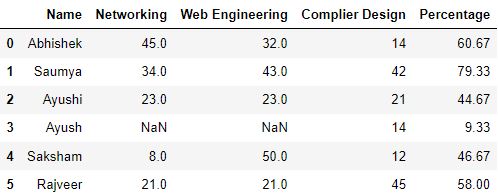
# Drop null values
df.dropna(axis=0, inplace=True)

# filter rows with percentage > 55
output = df[df.Percentage > 55]

output
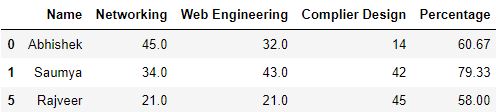
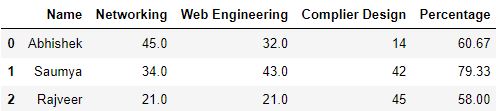
正如你在上表中看到的,行的索引已经改变。最初是0,1,2...但现在变成了0,1,5。
在这种情况下,你可以使用.reset_index() ,以正确的顺序对行进行编号。
# Set drop=True if you don't want old index to be added as column
output.reset_index(drop=True)
10.测试你的知识
Q1: 只要对pandas数据框架应用.reset_index() 函数,该数据框架的索引就会被重置。真的还是假的?
答案: 错。因为,输出的数据框架只是一个变化的视图。为了应用这些变化,我们使用inplace 参数。
Q2: drop 参数在.reset_index() 函数中的用途是什么?
答复
答案: 它是用来避免旧的索引被发现。**它是用来避免在重置索引时将旧的索引添加到pandas数据框中。
Q3: 在重设多级索引时,哪个参数用于改变列的默认级别?
答案: 我们使用col_level 参数来定义列的级别。
Q4: 使用给定的数据集回答下列问题。
import pandas as pd
import numpy as np

# Multi-Level Index
newIndex = pd.MultiIndex.from_tuples(
                                      [('IT', 'Abhishek'),                                       ('IT', 'Rajveer'),                                       ('MAE', 'Jitender'),                                       ('CSE', 'Saumya'),                                       ('CSE', 'Saksham'),                                       ('CSE', 'Ayushi')                                      ],
                                  names=['Branch', 'Name'])


# Multilevel columns
columns = pd.MultiIndex.from_tuples(
                                    [('subject1', 'Computer Graphics'),                                     ('subject2', 'Artificial Intelligence'),                                     ('subject3', 'Micro Processors')                                    ])

df = pd.DataFrame([                    (21, 21, 25),                    (45, 32, 14),                    (8, 50, 12),                    (23, 23, 21),                    (34, 43, 42),                    (42, 46, 21)                    ], index=newIndex,
                    columns=columns)

df['Percentage'] = round((df.sum(axis=1)/150)*100, 2)
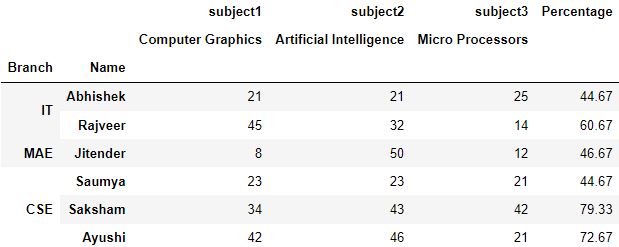
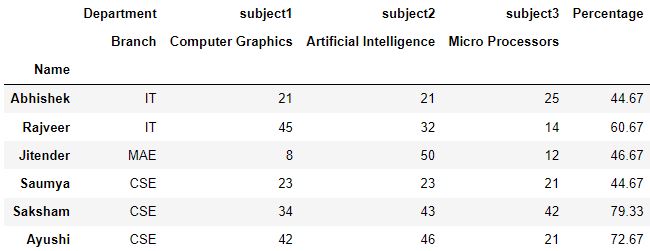
Q4.1: 在branch 水平上重置索引,并为branch 指定一个上层的Department 。将输出结果保存为ques1 。
答案:
# Make a copy of dataframe
ques1 = df.copy()

# Reset the index, define the column level, name to fill in col_fill
ques1.reset_index(level='Branch', col_level=1, col_fill='Department', inplace=True)

ques1
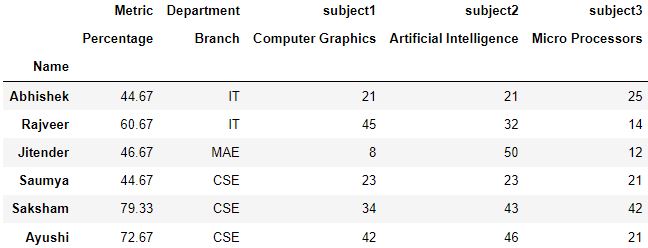
Q4.2: 使用问题1的输出,为Percentage 添加一个名为Metric 的上层。确保name 仍然是索引。
答案:
# Make a copy of dataframe
ques2 = ques1.copy()

# Reset the index so that names are shifted to dataframe as column
ques2.reset_index(inplace=True)

# Set the index as Percentage
ques2.set_index('Percentage', inplace=True)

# Reset the index with column level and col_fill defined
ques2.reset_index(col_level=1, col_fill='Metric', inplace=True)

# Set the index again as Name
ques2.set_index('Name')
Q4.3: 计算学生的排名,其中分支是CSE ,并按照Percentage 的递减顺序排序。打印排名和学生的名字。
答案:
# make a copy of dataframe
que3 = df.copy()

# Reset the index
que3.reset_index(inplace=True)

# filter the rows by Branch, and then sort by Percentage in decreasing order
output = que3[que3.Branch == 'CSE'].sort_values(by='Percentage', ascending=False)


# Reset the index
output.reset_index(drop=True, inplace=True)

print([(rank, name) for rank, name in zip(output.index.values + 1, output.Name.values)])

