

pandas中的数据透视表是一个很好的工具,可以根据其他两个分类变量来总结一个或多个数字变量。
pandas中的透视表在MS Excel文件中很常见。在python中,pandas数据框架的数据透视表可以通过以下命令来创建。pandas.pivot_table.
你可以将一个数字列作为交叉表与两个分类列进行汇总。在这篇文章中,你将看到如何在pandas中创建数据透视表,并通过工作实例了解其参数。
pandas.pivot_table
语法
-
- pandas.pivot_table(data, values=None, index=None, columns=None, aggfunc='mean', fill_value=None, margins=False, dropna=True, margins_name='All', observed=False)
目的
-
- 创建一个电子表格风格的数据透视表,作为一个DataFrame。pandas透视表中的层级将被存储在结果DataFrame的索引和列上的MultiIndex对象(分层索引)中。
参数
-
- data
-
- Dataframe,要制作透视表的数据集。
-
- 值
-
- 列,需要查看其统计摘要的特征。
-
- 索引
-
- 列,用于索引在value参数中传递的特征。
-
- 列
-
- 列,用于根据某些特征对数值进行汇总
-
- 观察到的
-
- *bool, (default False):*这个参数只适用于分类特征。如果它被设置为'True',那么表格将只显示分类组的值
-
- data
返回
-
- DataFrame, 一个Excel风格的透视表
如何制作一个透视表?
使用pd.pivot_table() 函数,并使用index 和columns 参数分别指定行和列中的特征。应在values 参数中指定用于填充单元格值的特征。
让我们创建一个样本数据集。
import pandas as pd
import numpy as np

df = pd.DataFrame({'First Name': ['Aryan', 'Rohan', 'Riya', 'Yash', 'Siddhant', ],
                   'Last Name': ['Singh', 'Agarwal', 'Shah', 'Bhatia', 'Khanna'],
                   'Type': ['Full-time Employee', 'Intern', 'Full-time Employee',
                            'Part-time Employee', 'Full-time Employee'],
                   'Department': ['Administration', 'Technical', 'Administration',
                                  'Technical', 'Management'],
                   'YoE': [2, 3, 5, 7, 6],
                   'Salary': [20000, 5000, 10000, 10000, 20000]})

df
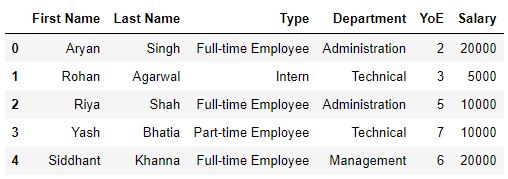
使用pd.pivot_table and specify the data, index, columns, aggfunc 和 `values`参数。
output = pd.pivot_table(data=df,
                        index=['Type'],
                        columns=['Department'],
                        values='Salary',
                        aggfunc='mean')
output
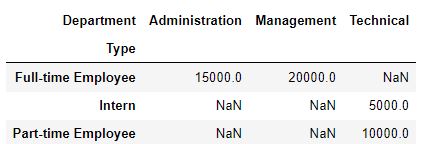
在这里,我们在pandas中做了一个基本的透视表,它显示了每个部门每类员工的平均工资。由于没有传递用户定义的参数,其余的参数都是默认值。
我们还可以制作同时显示多个统计值的透视表。
具有多个聚合功能的透视表
如果没有指定column 参数,它将根据index 。
# Pivot table with multiple aggfuncs
output = pd.pivot_table(data=df, index=['Type'],
                        values='Salary',
                        aggfunc=['sum', 'mean', 'count'])
output
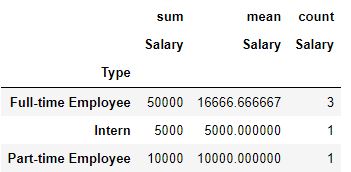
在这里,透视表显示了每一类员工的工资总和和平均值以及每一类员工的数量。
如何在pivot_table中计算行和列的大总数?
现在,让我们来看看每一类雇员的工资总和。为此,我们将使用margins和margins_name参数。
# Calculate row and column totals (margins)
output = pd.pivot_table(data=df, index=['Type'],
                        values='Salary',
                        aggfunc=['sum', 'mean', 'count'],
                        margins=True,
                        margins_name='Grand Total')
output
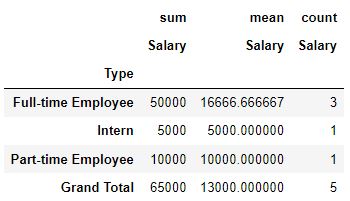
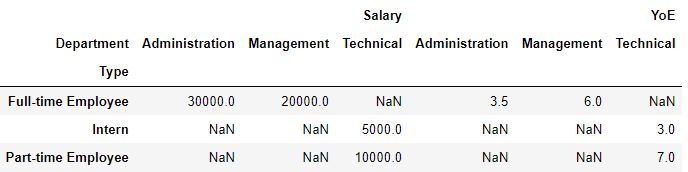
如何在数据透视表中对多个特征进行汇总?
我们还可以对不同的特征进行不同的聚合。这有助于在不同的特征上应用适当的操作,而不必创建多个透视表。
# Aggregating for multiple features
output = pd.pivot_table(data=df, index='Type', values=['Salary', 'YoE'],
                        columns=['Department'],
                        aggfunc={'Salary': np.sum, 'YoE': np.mean})
output
替换缺失值
在上一节的最后一张表格中,我们可以看到每个部门的员工收到的总工资和每个部门的员工的平均经验。
然而,该表中存在NaNs。
我们可以使用fill_value参数将NaNs替换成一个合适的值。在本例中,我们将用 "不适用 "替换NaN。
# Replacing missing values
output = pd.pivot_table(data=df, index='Type', values=['Salary', 'YoE'],
                        columns=['Department'],
                        aggfunc={'Salary': np.sum, 'YoE': np.mean},
                        fill_value='Not applicable')

output
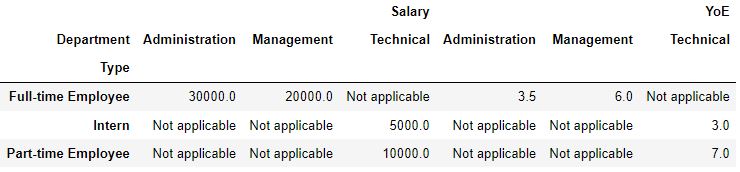
fill_value参数可以用来用任何合适的值来替换NaN,包括其他特征的平均值、中位数或模式。
多级索引透视表
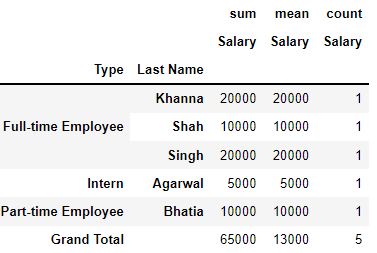
上面的透视表是使用单级索引制作的,即只使用了一个特征作为索引。然而,我们也可以用多个指数来制作我们的透视表。多级索引透视表以更大的颗粒度显示汇总的细节,当我们处理分层数据时,它们会非常有用。
# Passing Type and then Last Name as indices
output = pd.pivot_table(data=df, index=['Type', 'Last Name'],
                        values='Salary',
                        aggfunc=['sum', 'mean', 'count'],
                        margins=True,
                        margins_name='Grand Total')
output
实用技巧
数据透视表可以是一个非常方便的数据分析工具。这里有一些提示,可以帮助你使用数据透视表来发挥其最大潜力。
产生洞察力。数据透视表可以提供整个数据集的快照视图,这就简化了推断有用的见解和在数据集中进行重要观察的过程。
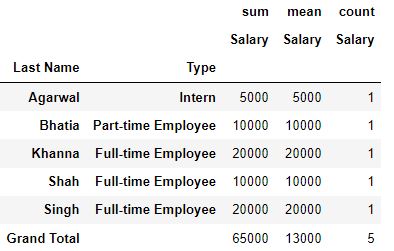
为多级索引透视表排序。将特征作为索引传递给数据透视表的顺序可以影响表中显示的数值。
# Passing Last Name and then Type as indices
output = pd.pivot_table(data=df, index=['Last Name', 'Type'],
                        values='Salary',
                        aggfunc=['sum', 'mean', 'count'],
                        margins=True,
                        margins_name='Grand Total')
output
# Passing Type and then Last Name as indices
type_pivot_table = pd.pivot_table(data=df,
                                  index=['Type', 'Last Name'],
                                  values='Salary',
                                  aggfunc=['sum', 'mean', 'count'],
                                  margins=True,
                                  margins_name='Grand Total')
type_pivot_table

GroupBy功能
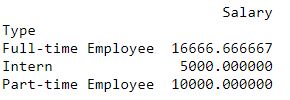
数据透视表与pandasDataFrame.groupby() 方法类似,后者也用于查看数据集中某个特征的统计特性。
然而,应该记住的是,groupby() 函数返回的对象是一个DataFrameGroupBy 对象,而不是一个数据框架。因此,传统的数据框架操作对这个对象不起作用。
# Pivot tables
output = pd.pivot_table(data=df,
                        index=['Type'],
                        values='Salary')
print(output)
# Example of a groupby function

grouped_pivot_table = df[['Salary', 'Department', 'Type']].groupby(['Type'])
print(grouped_pivot_table)

print(type(output))
print(type(grouped_pivot_table))

总结
我们看到了如何制作一个pandas数据框架的透视表,以及如何配置其参数以查看不同粒度的统计细节。
测试一下你的知识
Q1: 在一个多索引透视表中,索引的传递顺序并不重要。真的还是假的?
答案: 错。因为,数据透视表中显示的数值会根据传递指数的顺序而改变。
Q2: 哪个参数用于改变数据透视表中的聚合方法?
答案: aggfunc
Q3: 我们如何在同一个透视表中查看不同特征的不同聚合?
答案: 将特征名称和要执行的聚合操作作为字典中相应的键值对传递给aggfunc函数。另外,特征名称也应传给values参数。
