

pandas系列是一个一维标记的数据结构,它可以保存诸如字符串、整数甚至其他Python对象的数据。它建立在numpy数组之上,是pandas中用来保存一维数据的主要数据结构。
在Python中,可以使用构造函数pandas.Series() 来创建一个pandas系列。
pandas.Series
语法
-
- pandas.Series(data=None, index=None, dtype=None, name=None, copy=False)
目的
-
- 创建一个可以存储不同类型数据的一维数据结构。
参数
-
- 数据
- 数组、dict、标量值或迭代值*(默认:无*)。它用于填充系列对象的行。
- 索引
- 数组或索引*(默认:无*)。它用于标记系列的行。它的长度必须与数据参数中传递的对象相同,所有的值必须是唯一的。它的默认值是 "无",但是如果没有传递索引参数,那么从0到1的整数值范围将被视为索引,该范围小于数据对象中的总行数。
- dtype
- 字符串或numpy.dtype或ExtensionDtype(默认:无)。它用于指定将形成的系列的数据类型。如果没有指定这个参数,那么数据类型将从系列中存在的值推断出来。
- 名称
- 字符串*(默认:无*)。它用于给系列命名。
- 复制
- 布尔型(默认为*:假*)。它用于复制输入数据。
- 数据
注意: 如果你查看pandas Series的正式文档,那么那里会提到另一个叫做fastpath的参数。然而,该参数是一个内部参数,用户实际上不能修改它。
如何从一个列表中创建一个pandas系列
通过将列表传递给数据参数,可以从一个列表中创建一个pandas系列。
# Make a series from a list
import pandas as pd
# Create the list

data_list = ['Jeff Bezos', 'Elon Musk',
             'Bernard Arnault', 'Bill Gates', 'Warren Buffett']

# pass the list to the data parameter of the series constructor
series = pd.Series(data=data_list)
series
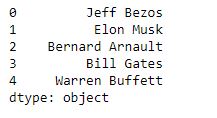
正如你所看到的,一个pandas系列已经从列表中被创建。由于没有传入索引,所以假设从0到1的整数值小于总行数(本例中为5)作为索引。
从元组中创建一个pandas系列
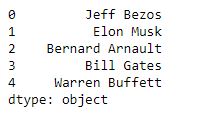
从元组中创建一个pandas系列与从列表中创建一个系列相似。制作包含所需数据的元组,然后将其传递给系列构造函数的数据参数。
# Create the tuple

data_tuple = tuple(
    ['Jeff Bezos', 'Elon Musk', 'Bernard Arnault', 'Bill Gates', 'Warren Buffett'])

# Pass the tuple to the data parameter of the series constructor
series = pd.Series(data=data_tuple)
series
从字典中创建pandas系列
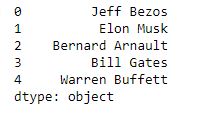
对于从字典中创建一个系列,系列的索引是由字典的键形成的,而系列的值是由传递给字典的相应键的值形成的。
创建完字典后,将其传递给系列构造函数的数据参数,以制作pandas系列。
# Make the dictionary

data_dict = {0: 'Jeff Bezos', 1: 'Elon Musk',
             2: 'Bernard Arnault', 3: 'Bill Gates', 4: 'Warren Buffett'}

# Pass the dictionary to the data parameter of the series constructor
series = pd.Series(data=data_dict)
series
使用numpy数组制作一个pandas系列
潘达斯系列也可以使用Numpy数组来制作。
Numpy提供了一些方法来创建具有随机值或指定范围内的值的数组。
然后,这些数组也可以被转换为系列。
从Numpy数组中创建一个系列
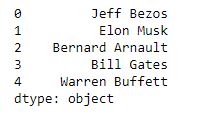
为了从Numpy数组中创建一个系列,只需将数组传递给系列构造函数的数据参数。
# Create the series from array
import numpy as np
data_nparray = np.array(
    ['Jeff Bezos', 'Elon Musk', 'Bernard Arnault', 'Bill Gates', 'Warren Buffett'])

series = pd.Series(data=data_nparray)
series
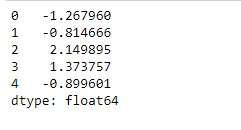
使用Numpy random.randn函数
该函数用于创建一个指定维度的Numpy数组,该数组将包含从单变量正态分布中采样的随机值。
制作完数组后,将其传递给系列构造函数的数据参数,以制作系列。
# Create the numpy array

# The parameter '5' indicates that the dimensions of the arrays is (5,1)
data_nparray_random = np.random.randn(5)

# pass the array to the data parameter of the series constructor
series = pd.Series(data_nparray_random)
series
使用Numpy linspace函数
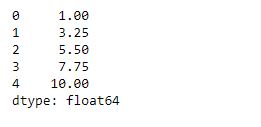
这个函数用来创建一个具有一定范围内数值的数组。
创建完数组后,将数组传递给系列构造函数的数据参数,以创建pandas系列。
# Create the array using linspace

# the first two parameters define the range and the third parameter defines the length of the array
data_nparray_linspace = np.linspace(1, 10, 5)

# pass the array to the data parameter of the series constructor
series = pd.Series(data_nparray_linspace)
series
使用range函数
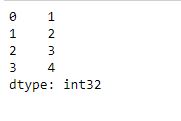
这个函数用来创建Numpy数组,而这些数组又将被用来创建一个具有一定范围内数值的系列。这些值在给定范围内也是等距的。
使用该函数创建数组后,将其传递给系列构造函数的数据参数以创建系列。
# The first two parameters define the range while the third parameter defines
# the interval at which the values are inserted
data_arange = np.arange(1, 5, 1)

# Pass the array to the data parameter of the series constructor
series = pd.Series(data_arange)
series
使用多维Numpy数组
系列也可以使用多维Numpy数组来创建。
然而,在制作多维数组后,首先将数组转换为嵌套列表,然后将列表传递给系列构造函数的数据参数。
# Create the multi-dimensional array
ndarray = np.array([[1, 2, 3],
                    [4, 5, 6],
                    [7, 8, 9]])

# Convert the array to a list using the tolist method
nd_list = ndarray.tolist()

# Convert the list
nd_series = pd.Series(nd_list)
nd_list

使用标量值创建系列
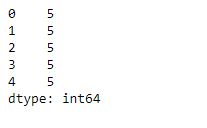
Pandas系列也可以通过使用单个标量值来创建。
在这种情况下,为了确定系列的长度,你也需要明确地传递索引。
# Create series from scalar value
data = 5

# Passing the value to the data parameter of the series constructor
series = pd.Series(data, index=[0, 1, 2, 3, 4])
series
用定义的索引制作一个系列
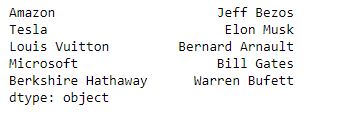
要创建一个带有预定义索引的系列,请将索引列表传递给index参数。
# Create series from a list and defined index.

data_list = ['Jeff Bezos', 'Elon Musk',
             'Bernard Arnault', 'Bill Gates', 'Warren Bufett']

# Create the indices
indices = ['Amazon', 'Tesla', 'Louis Vuitton',
           'Microsoft', 'Berkshire Hathaway']

# Pass them to the series constructor
series = pd.Series(data=data_list, index=indices)
series
总结
在这篇文章中,你看到了使用不同的方法来创建pandas系列:
- 列表
- 图元
- 字典
- Numpy数组
- 标量值
- 定义的索引
实用技巧
- 多维Numpy数组首先要转换成一个列表,然后再转换成一个系列。多维数组不能直接转换为Series。
- 索引值必须是可散列的,并且与传递给数据参数的对象的长度相同。
测试你的知识
Q1: Pandas系列不能使用图元来形成。真的还是假的?
答案: 错,它们可以用图元组成。
Q2: 如果没有明确传递dtype参数,如何确定pandas系列的数据类型?
答案: 数据类型是由系列中的值推断出来的。
Q3: 找出给定代码中的错误并写出正确的代码。
new_series = pd.Series(data=[1,2,3,4,5,6,7,8,9],index=[1,2,3,4,5,5,6,7,8,9]
答案:
new_series = pd.Series(data=[1,2,3,4,5,6,7,8,9],index=[1,2,3,4,5,6,7,8,9]
Q4: 写出代码,从一个Numpy数组中生成一个系列,该数组的值是使用range函数从1到10的整数。
答案:
pd.Series(np.range(1,11,1))
Q5: 将一个3×3的Numpy数组转换为pandas数列,其值是数字9的前9个倍数。
ndarray = ([[9,18,27],
      [36,45,54],
      [63,72,81]])
答案:
nd_list = ndarray.tolist()
nd_series = pd.series(nd_list)
