

在Pandas中,DataFrame是用来保存表格数据的主要数据结构。你可以使用DataFrame构造函数pandas.DataFrame(),或者直接从各种数据源导入数据来创建它。
位于大型外部数据库或存在于不同格式文件中的表格数据集,如*.csv*文件或excel文件,可以使用pandas 库以DataFrame 的形式读入Python。
在这篇文章中,你将看到制作DataFrame或以DataFrame形式加载现有表格数据集的不同方法。
pandas.DataFrame
语法
-
- pandas.DataFrame(data=None, index=None, columns=None, dtype=None, copy=False)
目的
-
- 创建一个类似于电子表格的二维数据结构,用于以表格的形式存储数据。
参数
-
- 数据
- 字典或列表*(默认:无*)。它将被用于填充DataFrame的行和列。
- 索引
- 索引或数组(默认:无)它用于指定数据集的特征,其值将被用于标记和识别数据集的每一行。虽然它的默认值是 "无",但如果没有指定索引,那么比数据集中的总行数少0到1的整数值将被用作索引。
- 列
- 索引或数组*(默认:无*)。它用于指定数据集的列或特征名称。虽然它的默认值是'None',但如果没有指定列参数,那么将使用整数值作为列名,范围从0到1,小于数据集中存在的特征总数。
- dtype
- dtype*(默认:无*)。它用于强制创建DataFrame,并且只有这些值,或者将这些值转换为指定的dtype。如果没有指定这个参数,那么DataFrame将根据每个特征中存在的值来推断其数据类型。
- 复制
- 布尔型*(默认:无*)。它用于从输入中复制数据
- 数据
返回
-
- 一个二维数据结构,包含表格格式的数据,即行和列。
创建一个基本的单列Pandas DataFrame
一个基本的DataFrame可以通过使用一个列表来制作。
# Create a single column dataframe
import pandas as pd
data = ['India', 'China', 'United States', 'Pakistan', 'Indonesia']

df = pd.DataFrame(data)

df
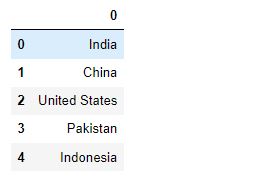
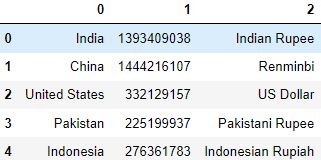
这将创建一个默认的列名(0)和索引名(0,1,2,3...)。
从一个列表的字典中制作一个DataFrame
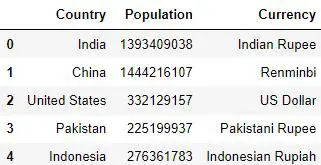
一个 pandas DataFrame 可以用一个字典来创建,字典中的键是列名,数组或列表的特征值被作为值传递给 dict。
然后将这个字典作为一个值传递给DataFrame构造函数的数据参数。
# Create a dictionary where the keys are the feature names and the values are a list of the feature values
data_dict = {'Country': ['India', 'China', 'United States', 'Pakistan', 'Indonesia'],
             'Population': [1393409038, 1444216107, 332129157, 225199937, 276361783],
             'Currency': ['Indian Rupee', 'Renminbi', 'US Dollar', 'Pakistani Rupee', 'Indonesian Rupiah']}

df = pd.DataFrame(data=data_dict)

df
从一个列表的列表制作一个 DataFrame
列表的列表指的是一个列表,其中每个元素本身就是一个列表。这样的列表中的每个元素形成了DataFrame的一行。
因此,Pandas DataFrame的行数等于外层列表的元素数。
# Create a list of lists where each inner list is a row of the DataFrame
data_list = [['India', 1393409038, 'Indian Rupee'],
             ['China', 1444216107, 'Renminbi'],
             ['United States', 332129157, 'US Dollar'],
             ['Pakistan', 225199937, 'Pakistani Rupee'],
             ['Indonesia', 276361783, 'Indonesian Rupiah']]


df = pd.DataFrame(data=data_list, columns=[                  'Country', 'Population', 'Currency'])

df
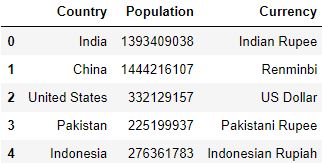
内层列表的元素,也就是data_list 内的列表是每一行中不同特征的值。
另外,看到列名已经作为一个列表传递给columns参数。
这意味着传递给data_list 的内部列表被严格视为DataFrame的行。
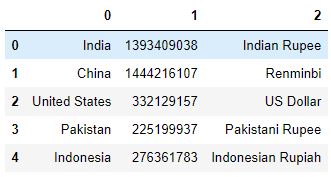
因此,当使用一个列表制作DataFrame时,如果没有指定columns参数的值,那么从0到 "比总列数少1 "的整数值,将被假定为列名。
比如说:
# Create dataframe from a list of lists
data_list = [['India', 1393409038, 'Indian Rupee'],
             ['China', 1444216107, 'Renminbi'],
             ['United States', 332129157, 'US Dollar'],
             ['Pakistan', 225199937, 'Pakistani Rupee'],
             ['Indonesia', 276361783, 'Indonesian Rupiah']]


df = pd.DataFrame(data=data_list)

df
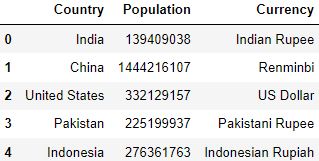
从一个字典列表中制作一个DataFrame
字典列表是指一个列表,其中每个元素是一个字典。
在字典中,键是列名,值是相应的列值。
# Create a list of dictionaries where the keys are the column names and the values are a particular feature value.
list_of_dicts = [{'Country': 'India', 'Population': 139409038, 'Currency': 'Indian Rupee'},
                 {'Country': 'China', 'Population': 1444216107,
                     'Currency': 'Renminbi'},
                 {'Country': 'United States', 'Population': 332129157,
                     'Currency': 'US Dollar'},
                 {'Country': 'Pakistan', 'Population': 225199937,
                     'Currency': 'Pakistani Rupee'},
                 {'Country': 'Indonesia', 'Population': 276361763, 'Currency': 'Indonesian Rupiah'}, ]


df = pd.DataFrame(list_of_dicts)

df
从Numpy数组制作一个DataFrame
一个多维numpy数组也可以用来创建一个DataFrame。它看起来类似于列表的列表,其中有一个外部数组,内部数组构成DataFrame的行。
# Create a numpy array where each inner array is a row of the DataFrame

import numpy as np

data_nparray = np.array([['India', 1393409038, 'Indian Rupee'],
                         ['China', 1444216107, 'Renminbi'],
                         ['United States', 332129157, 'US Dollar'],
                         ['Pakistan', 225199937, 'Pakistani Rupee'],
                         ['Indonesia', 276361783, 'Indonesian Rupiah']])


df = pd.DataFrame(data=data_nparray)
df
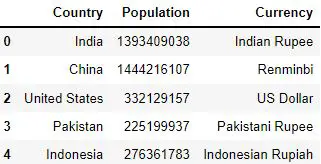
对于列名,你需要向列参数传递一个列名列表,就像上一节中显示的那样。
# Create dataframe with user specified column names
data_nparray = np.array([['India', 1393409038, 'Indian Rupee'],
                         ['China', 1444216107, 'Renminbi'],
                         ['United States', 332129157, 'US Dollar'],
                         ['Pakistan', 225199937, 'Pakistani Rupee'],
                         ['Indonesia', 276361783, 'Indonesian Rupiah']])


df = pd.DataFrame(data=data_nparray, columns=[                  'Country', 'Population', 'Currency'])
df
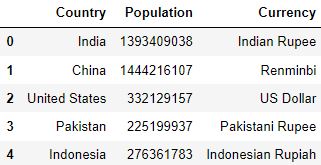
另外,你也可以制作一个numpy数组的字典,其中的键是列名,每个键对应的值是内部数组,是特征值。
# Create a numpy array where each inner array is a list of values of a particular feature
data_array = np.array(
    [['India', 'China', 'United States', 'Pakistan', 'Indonesia'],
     [1393409038, 1444216107, 332129157, 225199937, 276361783],
     ['Indian Rupee', 'Renminbi', 'US Dollar', 'Pakistani Rupee', 'Indonesian Rupiah']])

# Create a dictionary where the keys are the column names and each element of data_array is the feature value.
dict_array = {
    'Country': data_array[0],
    'Population': data_array[1],
    'Currency': data_array[2]}

# Create the DataFrame
df = pd.DataFrame(dict_array)
df
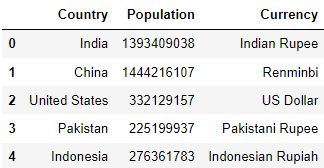
使用zip函数制作DataFrame
zip函数可以用来将多个对象合并成一个对象,然后将其传入pandas.DataFrame函数来制作DataFrame。
# Create the countries list(1st object)
countries = ['India', 'China', 'United States', 'Pakistan', 'Indonesia']

# Create the population list(2nd object)
population = [1393409038, 1444216107, 332129157, 225199937, 276361783]

# Create the currency list (3rd object)
currency = ['Indian Rupee', 'Renminbi', 'US Dollar',
            'Pakistani Rupee', 'Indonesian Rupiah']

# Zip the three objects
data_zipped = zip(countries, population, currency)

# Pass the zipped object as the data parameter and mention the column names explicitly
df = pd.DataFrame(data_zipped, columns=['Country', 'Population', 'Currency'])

df
制作索引的Pandas数据框架
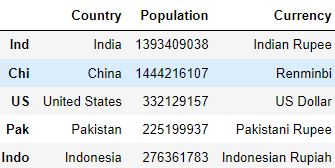
具有预定义索引的Pandas DataFrame也可以通过向index参数传递一个索引列表来制作。
# Create the DataFrame
data_dict = {'Country': ['India', 'China', 'United States', 'Pakistan', 'Indonesia'],
             'Population': [1393409038, 1444216107, 332129157, 225199937, 276361783],
             'Currency': ['Indian Rupee', 'Renminbi', 'US Dollar', 'Pakistani Rupee', 'Indonesian Rupiah']}

# Make the list of indices
indices = ['Ind', 'Chi', 'US', 'Pak', 'Indo']

# Pass the indices to the index parameter
df = pd.DataFrame(data=data_dict, index=indices)

df
从现有的DataFrame制作一个新的DataFrame
pandas.concat
你也可以使用pandas.concat 函数从现有的DataFrames中制作新的DataFrames。这些数据框架可以根据需要在垂直或水平方向上连接或串联。
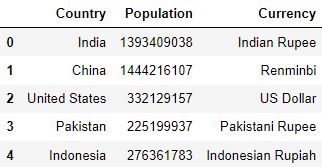
横向连接两个DataFrames
你可以通过设置轴参数的值为0来水平连接两个DataFrames。
# -- Joining Horizontally
# Create 1st DataFrame
countries = ['India', 'China', 'United States', 'Pakistan', 'Indonesia']

df1 = pd.DataFrame(countries, columns=['Country'])

# Create 2nd DataFrame

df2_data = {'Population': [1393409038, 1444216107, 332129157, 225199937, 276361783],
            'Currency': ['Indian Rupee', 'Renminbi', 'US Dollar', 'Pakistani Rupee', 'Indonesian Rupiah']}

df2 = pd.DataFrame(df2_data)

# Join the two DataFrames horizontally by setting the axis value equal to 1
df_joined = pd.concat([df1, df2], axis=1)

df_joined
纵向连接两个DataFrames
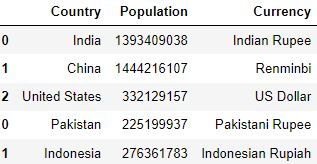
如果两个DataFrames有相同的列名,你也可以通过设置轴参数的值为1来垂直连接这两个DataFrames。
# -- Joining Vertically
# Create the 1st DataFrame
df_top_data = {'Country': ['India', 'China', 'United States'],
               'Population': [1393409038, 1444216107, 332129157],
               'Currency': ['Indian Rupee', 'Renminbi', 'US Dollar']}

df_top = pd.DataFrame(df_top_data)

# Create the 2nd DataFrame
df_bottom_data = {'Country': ['Pakistan', 'Indonesia'], 'Population': [
    225199937, 276361783], 'Currency': ['Pakistani Rupee', 'Indonesian Rupiah']}

df_bottom = pd.DataFrame(df_bottom_data)

# Join the two DataFrames vertically by setting the axis value equal to 0
df_joined = pd.concat([df_top, df_bottom], axis=0)

df_joined
从文本文件制作pandas DataFrames
pandas.read_csv 函数是用于读取外部文本文件的最流行的函数之一。
尽管该函数的名称是 "csv",但它可以读取其他类型的文本文件,这些文件通常是从不同的数据库中导入的,因为它们可能是不同的格式(.csv,.txt等)或编码(utf-8,ascii等)。pandas.read_csv 函数提供了一些参数,可以根据需要配置这些参数来读取和解析这些文件。
现在,你将看到如何使用read_csv函数加载一个数据集。
# Enter the path where the file is located
df = pd.read_csv(filepath_or_buffer='D:/PERSONAL/DATASETS/household_power_consumption.txt')
df
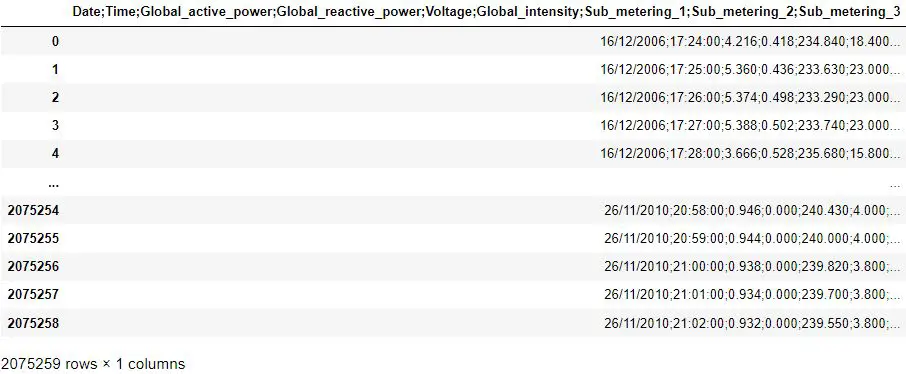
这似乎不对。数据框架没有被正确加载,因为所有的行的值都出现在一列中。
这是因为,Python 用来分隔一行中不同列的值的默认字符是逗号 (,)。
最有可能的情况是,Python在读取文件时没有发现任何逗号。因此,数据集的所有值都被分配到了一列。
如果你仔细看一下行中的数据,你会发现各行的不同值是由分号(;)分开的。因此,在这种情况下,你需要将sep的值指定为';'。
# Define the sep parameter
df = pd.read_csv(filepath_or_buffer='D:/PERSONAL/DATASETS/household_power_consumption.txt', sep=';')
df
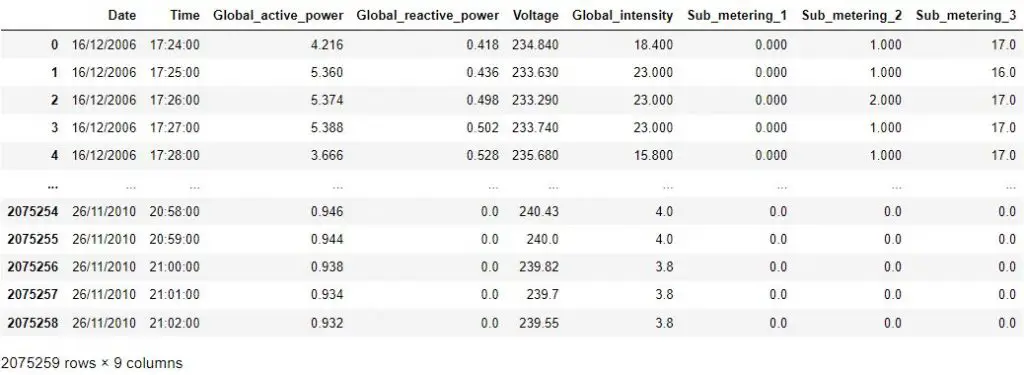
现在,你可以看到,行中的不同特征值已经以适当的方式放在了列下。
从不同类型的文件制作pandas DataFrames
pandas 框架也有多种函数用于读取除文本文件之外的不同文件,并将其加载为数据帧,如;
- read_excel:用于读取.xlsx、.xls和.odf文件。
- read_parquet:用于读取Apache Parquet文件。
- read_orc:用于读取 .orc 文件。
- read_spss:用于读取SPSS(.sav)文件。
- Stata:用于读取Stata(.dta)文件。
- SQL:用于对远程数据库中的表执行SQL查询。
- Google BigQuery:用于对存储在Google BigQuery中的表执行SQL查询。
实用提示
-
请记住,当使用一个列表制作DataFrame时,内部列表的元素是不同特征的值。
当使用字典制作DataFrame时,特征值的数组被作为值参数传递给相应的键。 -
read_csv函数的chunksize参数对于那些太大或不适合内存的数据集非常有用。通过定义chunksize,Python将一次只加载chunk_size行数,并在加载下一个chunk前对其进行处理。 -
在将数据集加载到Python之前,试着先手动检查一下数据集。这可以让你了解所使用的分隔符,或者在数据集的开头或结尾是否有任何行,在加载数据集时应该被忽略。
-
如果你希望传递一个与数据集中不同的列名列表。你可以使用名称参数来实现。这将把列名推到第一行,但这一行可以通过设置skiprows=1而被忽略。
测试你的知识
Q1: 在read_csv 函数中,哪个参数是用来传递自定义的列名列表的?
答案: 名称,并设置`标题=0`。
Q2: 你有一个无法装入内存的DataFrame。你将如何在Python中加载这样一个DataFrame?
答案: 使用chunksize参数加载。使用chunksize参数,每次只加载一定数量的行。
Q3: 写出代码:使用一个numpy数组制作显示的DataFrame,而不明确传递列名的列表。
答案:
data_array = np.array(
    [['India', 'China',],
     ['Indian Rupee', 'Renminbi']])

dict_array = {
    'Country': data_array[0],
    'Currency': data_array[1]}

df = pd.DataFrame(dict_array)

df
Q4:完成下面一行代码,忽略数据集底部的100条记录。
df = pd.read_csv(filepath_or_buffer='household_power_consumption.txt',sep=';')
答案:
df = pd.read_csv(filepath_or_buffer='household_power_consumption.txt',sep=';',skipfooter=100)
