

。在本教程中,我们将用PHP和MySQL实现费用管理系统。
费用管理系统是基于网络的应用程序,用于管理他们的收入和支出。用户可以登录系统,管理他们的收入和支出,并查看一定时间内的支出报告。这是一个初步的项目,我们已经涵盖了诸如管理收入、支出、用户等部分。
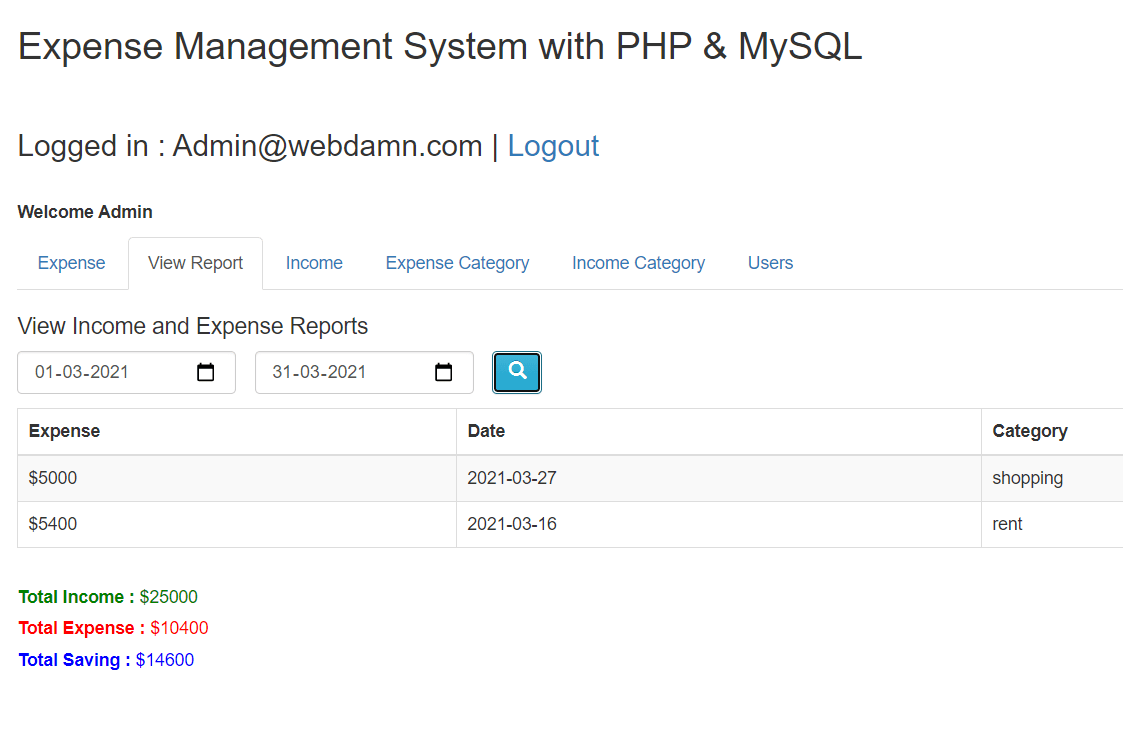
在这里,我们将开发一个费用管理系统并涵盖以下内容。
管理员将做以下工作:
- 管理收入和它的类别。
- 管理支出和它的类别。
- 查看报告
- 管理用户
因此,让我们开始开发费用管理系统。主要的文件有:
- index.php
- income.php
- expense.php
- report.php
- user.php
- User.php:一个包含用户方法的类。
- Income.php:一个包含与收入有关的方法的类。
- Expense. php:一个包含与费用有关的方法的类。
- Report. php:一个包含与报告有关的方法的类。
步骤1:创建MySQL数据库表
我们将创建数据库表expense_users 来存储用户的登录信息。
CREATE TABLE `expense_users` (
  `id` int(11) UNSIGNED NOT NULL,
  `first_name` varchar(255) DEFAULT NULL,
  `last_name` varchar(255) DEFAULT NULL,
  `email` varchar(255) DEFAULT NULL,
  `password` varchar(64) NOT NULL,
  `role` enum('admin') DEFAULT 'admin'
) ENGINE=InnoDB DEFAULT CHARSET=utf8;

ALTER TABLE `expense_users`
  ADD PRIMARY KEY (`id`);

ALTER TABLE `expense_users`
  MODIFY `id` int(11) UNSIGNED NOT NULL AUTO_INCREMENT, AUTO_INCREMENT=5;
我们将创建数据库表expense_income_category ,以存储收入类别的详细信息。
CREATE TABLE `expense_income_category` (
  `id` int(11) NOT NULL,
  `name` varchar(250) NOT NULL,
  `status` enum('enable','disable') NOT NULL
) ENGINE=InnoDB DEFAULT CHARSET=utf8mb4;

ALTER TABLE `expense_income_category`
  ADD PRIMARY KEY (`id`);

ALTER TABLE `expense_income_category`
  MODIFY `id` int(11) NOT NULL AUTO_INCREMENT, AUTO_INCREMENT=4;
我们将创建数据库表expense_income ,以存储收入细节。
CREATE TABLE `expense_income` (
  `id` int(11) NOT NULL,
  `amount` int(11) NOT NULL,
  `date` date NOT NULL,
  `category_id` int(11) NOT NULL,
  `user_id` int(11) NOT NULL
) ENGINE=InnoDB DEFAULT CHARSET=utf8mb4;

ALTER TABLE `expense_income`
  ADD PRIMARY KEY (`id`);

ALTER TABLE `expense_income`
  MODIFY `id` int(11) NOT NULL AUTO_INCREMENT, AUTO_INCREMENT=5;
我们将创建数据库表expense_category ,以存储费用类别的详细信息。
CREATE TABLE `expense_category` (
  `id` int(11) NOT NULL,
  `name` varchar(250) NOT NULL,
  `status` enum('enable','disable') NOT NULL
) ENGINE=InnoDB DEFAULT CHARSET=utf8mb4;

ALTER TABLE `expense_category`
  ADD PRIMARY KEY (`id`);

ALTER TABLE `expense_category`
  MODIFY `id` int(11) NOT NULL AUTO_INCREMENT, AUTO_INCREMENT=8;
我们将创建数据库表expense_expense ,以存储费用的详细信息。
CREATE TABLE `expense_expense` (
  `id` int(11) NOT NULL,
  `amount` int(11) NOT NULL,
  `date` date NOT NULL,
  `category_id` int(11) NOT NULL,
  `user_id` int(11) NOT NULL
) ENGINE=InnoDB DEFAULT CHARSET=utf8mb4;

ALTER TABLE `expense_expense`
  ADD PRIMARY KEY (`id`);

ALTER TABLE `expense_expense`
  MODIFY `id` int(11) NOT NULL AUTO_INCREMENT, AUTO_INCREMENT=4;
第二步:管理收入
在income.php 文件中,我们将创建HTML来管理收入。
<div>
	<div class="panel-heading">
		<div class="row">
			<div class="col-md-10">
				<h3 class="panel-title"></h3>
			</div>
			<div class="col-md-2" align="right">
				<button type="button" id="addIncome" class="btn btn-info" title="Add Income"><span class="glyphicon glyphicon-plus"></span></button>
			</div>
		</div>
	</div>
	<table id="incomeListing" class="table table-bordered table-striped">
		<thead>
			<tr>
				<th>Sn.</th>
				<th>Amount</th>
				<th>Category</th>
				<th>Date</th>
				<th></th>
				<th></th>
			</tr>
		</thead>
	</table>
</div>
我们将向income_action.php 发出ajax请求,并将动作listIncome ,以便在Datatable中加载incode数据。
var incomeRecords = $('#incomeListing').DataTable({
	"lengthChange": false,
	"processing":true,
	"serverSide":true,
	"bFilter": false,
	'serverMethod': 'post',
	"order":[],
	"ajax":{
		url:"income_action.php",
		type:"POST",
		data:{action:'listIncome'},
		dataType:"json"
	},
	"columnDefs":[
		{
			"targets":[0, 4, 5],
			"orderable":false,
		},
	],
	"pageLength": 10
});
我们将检查income_action.php 中的动作listIncome ,并从Income.php 类中调用方法listIncome() 来加载收入数据。
$income = new Income($db);
if(!empty($_POST['action']) && $_POST['action'] == 'listIncome') {
	$income->listIncome();
}
我们将在类Income.php 中实现方法listIncome() ,并将收入数据作为JSON数据返回,以加载到可数据库。
public function listIncome(){

	if($_SESSION["userid"]) {
		$sqlQuery = "SELECT income.id, income.amount, income.date, category.name
			FROM ".$this->incomeTable." AS income
			LEFT JOIN ".$this->incomeCategoryTable." AS category ON income.category_id = category.id
			WHERE income.user_id = '".$_SESSION["userid"]."' ";

		if(!empty($_POST["search"]["value"])){
			$sqlQuery .= ' AND (income.id LIKE "%'.$_POST["search"]["value"].'%" ';
			$sqlQuery .= ' OR income.amount LIKE "%'.$_POST["search"]["value"].'%" ';
			$sqlQuery .= ' OR income.date LIKE "%'.$_POST["search"]["value"].'%" ';
			$sqlQuery .= ' OR category.name LIKE "%'.$_POST["search"]["value"].'%" ';
		}

		if(!empty($_POST["order"])){
			$sqlQuery .= 'ORDER BY '.$_POST['order']['0']['column'].' '.$_POST['order']['0']['dir'].' ';
		} else {
			$sqlQuery .= 'ORDER BY income.id ';
		}

		if($_POST["length"] != -1){
			$sqlQuery .= 'LIMIT ' . $_POST['start'] . ', ' . $_POST['length'];
		}

		$stmt = $this->conn->prepare($sqlQuery);
		$stmt->execute();
		$result = $stmt->get_result();

		$stmtTotal = $this->conn->prepare($sqlQuery);
		$stmtTotal->execute();
		$allResult = $stmtTotal->get_result();
		$allRecords = $allResult->num_rows;

		$displayRecords = $result->num_rows;
		$records = array();
		$count = 1;
		while ($income = $result->fetch_assoc()) {
			$rows = array();
			$rows[] = $count;
			$rows[] = ucfirst($income['amount']);
			$rows[] = $income['name'];
			$rows[] = $income['date'];
			$rows[] = '<button type="button" name="update" id="'.$income["id"].'" class="btn btn-warning btn-xs update"><span class="glyphicon glyphicon-edit" title="Edit"></span></button>';
			$rows[] = '<button type="button" name="delete" id="'.$income["id"].'" class="btn btn-danger btn-xs delete" ><span class="glyphicon glyphicon-remove" title="Delete"></span></button>';
			$records[] = $rows;
			$count++;
		}

		$output = array(
			"draw"	=>	intval($_POST["draw"]),
			"iTotalRecords"	=> 	$displayRecords,
			"iTotalDisplayRecords"	=>  $allRecords,
			"data"	=> 	$records
		);

		echo json_encode($output);
	}
}
第三步:管理费用
我们将在expense.php 中创建HTML来列出费用记录。
<div>
	<div class="panel-heading">
		<div class="row">
			<div class="col-md-10">
				<h3 class="panel-title"></h3>
			</div>
			<div class="col-md-2" align="right">
				<button type="button" id="addExpense" class="btn btn-info" title="Add expense"><span class="glyphicon glyphicon-plus"></span></button>
			</div>
		</div>
	</div>
	<table id="expenseListing" class="table table-bordered table-striped">
		<thead>
			<tr>
				<th>Sn.</th>
				<th>Amount</th>
				<th>Category</th>
				<th>Date</th>
				<th></th>
				<th></th>
			</tr>
		</thead>
	</table>
</div>
我们将初始化数据集,并通过动作listExpense 进行ajax请求来加载支出记录。
var expenseRecords = $('#expenseListing').DataTable({
	"lengthChange": false,
	"processing":true,
	"serverSide":true,
	"bFilter": false,
	'serverMethod': 'post',
	"order":[],
	"ajax":{
		url:"expense_action.php",
		type:"POST",
		data:{action:'listExpense'},
		dataType:"json"
	},
	"columnDefs":[
		{
			"targets":[0, 4, 5],
			"orderable":false,
		},
	],
	"pageLength": 10
});
我们将检查expense_action.php 中的动作listExpense ,并从类Expense.php 中调用方法listExpense() 。
if(!empty($_POST['action']) && $_POST['action'] == 'listExpense') {
	$expense->listExpense();
}
我们将在类Expense.php 中实现方法listExpense() ,以json数据形式返回费用列表。
public function listExpense(){
	if($_SESSION["userid"]) {
		$sqlQuery = "SELECT expense.id, expense.amount, expense.date, category.name
			FROM ".$this->expenseTable." AS expense
			LEFT JOIN ".$this->categoryTable." AS category ON expense.category_id = category.id
			WHERE expense.user_id = '".$_SESSION["userid"]."' ";

		if(!empty($_POST["search"]["value"])){
			$sqlQuery .= ' AND (expense.id LIKE "%'.$_POST["search"]["value"].'%" ';
			$sqlQuery .= ' OR expense.amount LIKE "%'.$_POST["search"]["value"].'%" ';
			$sqlQuery .= ' OR expense.date LIKE "%'.$_POST["search"]["value"].'%" ';
			$sqlQuery .= ' OR category.name LIKE "%'.$_POST["search"]["value"].'%") ';
		}

		if(!empty($_POST["order"])){
			$sqlQuery .= 'ORDER BY '.$_POST['order']['0']['column'].' '.$_POST['order']['0']['dir'].' ';
		} else {
			$sqlQuery .= 'ORDER BY expense.date DESC ';
		}

		if($_POST["length"] != -1){
			$sqlQuery .= 'LIMIT ' . $_POST['start'] . ', ' . $_POST['length'];
		}

		$stmt = $this->conn->prepare($sqlQuery);
		$stmt->execute();
		$result = $stmt->get_result();

		$stmtTotal = $this->conn->prepare($sqlQuery);
		$stmtTotal->execute();
		$allResult = $stmtTotal->get_result();
		$allRecords = $allResult->num_rows;

		$displayRecords = $result->num_rows;
		$records = array();
		$count = 1;
		while ($expense = $result->fetch_assoc()) {
			$rows = array();
			$rows[] = $count;
			$rows[] = ucfirst($expense['amount']);
			$rows[] = $expense['name'];
			$rows[] = $expense['date'];
			$rows[] = '<button type="button" name="update" id="'.$expense["id"].'" class="btn btn-warning btn-xs update"><span class="glyphicon glyphicon-edit" title="Edit"></span></button>';
			$rows[] = '<button type="button" name="delete" id="'.$expense["id"].'" class="btn btn-danger btn-xs delete" ><span class="glyphicon glyphicon-remove" title="Delete"></span></button>';
			$records[] = $rows;
			$count++;
		}

		$output = array(
			"draw"	=>	intval($_POST["draw"]),
			"iTotalRecords"	=> 	$displayRecords,
			"iTotalDisplayRecords"	=>  $allRecords,
			"data"	=> 	$records
		);

		echo json_encode($output);
	}
}
第四步:实现报告
在report.php 文件中,我们将创建HTML,按日期范围生成费用报告。
<div>
	<div class="panel-heading">
		<div class="row">
			<div>
				<h4>View Income and Expense Reports</h4>
			</div>
			<div class="col-md-2" style="padding-left:0px;">
				<input type="date" class="form-control" id="from_date" name="from_date" placeholder="From date" >
			</div>
			<div class="col-md-2" style="padding-left:0px;">
				<input type="date" class="form-control" id="to_date" name="to_date" placeholder="To date" >
			</div>
			<div class="col-md-2" style="padding-left:0px;">
				<button type="submit" id="viewReport" class="btn btn-info" title="View Report"><span class="glyphicon glyphicon-search"></span></button>
			</div>
		</div>
	</div>
	<table class="table table-bordered table-striped" id="reportTable" style="display:none;">
		<thead>
			<tr>
				<th>Expense</th>
				<th>Date</th>
				<th>Category</th>
			</tr>
		</thead>
		<tbody id="listReports">

		</tbody>
	</table>
	<div class="panel-heading" id="detailSection" style="display:none;">
		<div class="row">
			<div style="padding-bottom:5px;color:green"><strong>Total Income : </strong><span id="totalIncome"></span></div>
			<div style="padding-bottom:5px;color:red"><strong>Total Expense : </strong><span id="totalExpense"></span></div>
			<div style="padding-bottom:5px;color:blue"><strong>Total Saving : </strong><span id="totalSaving"></span></div>
		</div>
	</div>
	<div class="panel-heading" id="noRecords" style="display:none;">
	</div>
</div>
在report.js ,我们将获得日期范围的数据来生成报告,并进行ajax请求来获得数据和显示报告。
$('#viewReport').click(function(){
	var fromDate = $('#from_date').val();
	var toDate = $('#to_date').val();
	var action = 'getReports';
	$.ajax({
		url:'report_action.php',
		method:"POST",
		data:{fromDate:fromDate, toDate:toDate, action:action},
		dataType:"json",
		success:function(respData){
			var reportHTML = '';
			var totalExpense = 0;
			$('#reportTable').hide();
			$('#noRecords').hide();
			respData.data.forEach(function(item){
				reportHTML+= '<tr>';
				reportHTML+= '<td>$'+item['amount']+'</td>';
				reportHTML+= '<td>'+item['date']+'</td>';
				reportHTML+= '<td>'+item['category']+'</td>';
				reportHTML+= '</tr>';
				totalExpense = totalExpense + parseInt(item['amount']);
				$('#reportTable').show();
			});
			$('#listReports').html(reportHTML);
			$('#detailSection').hide();
			$('#totalIncome').text("");
			$('#totalExpense').text("");
			$('#totalSaving').text("");
			respData.income.forEach(function(income){
				$('#totalIncome').text("$"+income['total']);
				$('#totalExpense').text("$"+totalExpense);
				var finalTotal = income['total'] - totalExpense;
				$('#totalSaving').text("$"+finalTotal);
				$('#detailSection').show();
			});

			if(!totalExpense) {
				$('#noRecords').html("<strong>No record found!</strong>").show();
			}
		}
	});
});
我们将在report_action 中检查动作getReports ,并从类中调用方法getReports() 。Report.php
if(!empty($_POST['action']) && $_POST['action'] == 'getReports') {
	$report->fromDate = $_POST['fromDate'];
	$report->toDate = $_POST['toDate'];
	$report->getReports();
}
最后,我们将在类Report.php 中实现方法getReports() ,以获得报告。
public function getReports(){
	if($this->fromDate && $this->toDate && $_SESSION["userid"]) {

		$sqlQuery = "SELECT expense.id, expense.amount, expense.date, category.name AS category
			FROM ".$this->incomeTable." AS expense
			LEFT JOIN ".$this->incomeCategoryTable." AS category ON expense.category_id = category.id
			WHERE expense.user_id = '".$_SESSION["userid"]."' AND expense.date BETWEEN  '".$this->fromDate."' AND '".$this->toDate."'";

		$stmt = $this->conn->prepare($sqlQuery);
		$stmt->execute();
		$result = $stmt->get_result();
		$incomeRecords = array();
		$totalIncome = 0;
		while ($income = $result->fetch_assoc()) {
			$totalIncome+=$income['amount'];
		}
		if($totalIncome) {
			$row = array();
			$row['total'] = $totalIncome;
			$incomeRecords[] = $row;
		}

		$sqlQuery = "SELECT expense.id, expense.amount, expense.date, category.name AS category
			FROM ".$this->expenseTable." AS expense
			LEFT JOIN ".$this->categoryTable." AS category ON expense.category_id = category.id
			WHERE expense.date BETWEEN  '".$this->fromDate."' AND '".$this->toDate."'";

		$stmt = $this->conn->prepare($sqlQuery);
		$stmt->execute();
		$result = $stmt->get_result();
		$records = array();
		while ($expense = $result->fetch_assoc()) {
			$rows = array();
			$rows['id'] = $expense['id'];
			$rows['amount'] = $expense['amount'];
			$rows['date'] = $expense['date'];
			$rows['category'] = $expense['category'];
			$records[] = $rows;
		}
		$output = array(
			"data"	=> 	$records,
			"income" => $incomeRecords
		);
		echo json_encode($output);
	}
}
我们还实现了所有部分的添加、编辑和删除功能。
