

要从Python中的pandas数据框架中删除单列或多列,你可以使用`df.drop`和其他不同的方法。
如果数据框架中的列与你的分析或你试图解决的问题不相关,就会被删除。当建立机器学习模型时,如果它是多余的或者对你的模型没有帮助,就会被删除。
最常见的方法是使用df.drop() 删除一个列。有时,也会使用Python中的del 命令。
创建一个基本的数据框架
import pandas as pd

# Create the data for the Dataframe
data_df = {'Name': ['Harvard', 'Yale', 'Cornell', 'Princeton', 'Dartmouth'],
           'Locations': ['Cambridge', 'New Haven', 'Ithaca', 'Princeton', 'Hanover'],
           'States': ['Massachusetts', 'Connecticut', 'New York', 'New Jersey', 'New Hampshire'],
           'Founder': ['John Harvard', 'The Founders', 'Ezra Cornell', 'John Witherspoon', 'George III'],
           'Founding Year': [1650, 1701, 1865, 1746, 1769]}

# Create the DataFrame
df = pd.DataFrame(data_df)
df
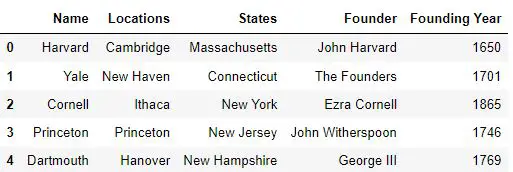
使用del命令来删除列
对于删除一个列,你可以使用python中内置的del命令。
# delete the column 'Locations'
del df['Locations']
df
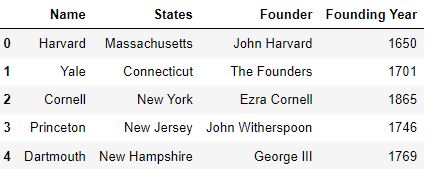
使用删除方法
你可以使用Dataframes的drop方法,以不同的方式删除单列或多列。
pandas.DataFrame.drop(labs=None, axis=0, index=None, columns=None, level=None, inplace=False, errors='raising')
目的。 从DataFrame中删除指定的行或列。
参数。
labels: 单个标签或列表(默认:无)。用于指定要删除的行或列索引标签。
axis: 0或1(默认:0)。指定要丢弃的标签的方向。如果这个参数的值设置为0,那么标签将沿着行丢弃,如果设置为1,那么标签将沿着列丢弃。
index: 单个标签或列表(默认:无)。作为轴参数的替代,用于指定标签的投放方向。
列: 单个标签或列表(默认值:无)。可替代指定标签投放方向的参数。
level: int或级别名称(缺省:无)。在存在多级索引的情况下,指定要删除的标签的级别。
布尔值(默认值为假)。指定是否要返回DataFrame的副本。如果这个参数的值被设置为'False',那么将返回原始DataFrame的副本。如果它被设置为'True',那么将在原始DataFrame中进行修改。
错误: '忽略'或'提高'(默认:提高)。指定错误是被提出还是被忽略。如果'忽略'值被传递给这个参数,那么错误会被抑制,只有现有的标签被丢弃。
丢弃单列
对于放弃一个单列,在标签参数中指定该列的名称。
# Drop the label 'Locations'
df.drop(labels='Locations', axis=1)
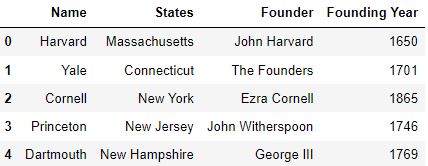
丢弃多列
对于删除多列,在标签参数中传递要删除的列名的列表。
df.drop(labels=['Locations', 'Founder'], axis=1)
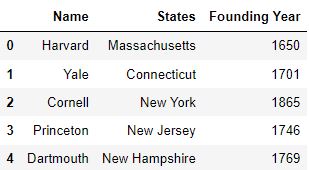
使用列参数
通过使用列参数,你不需要指定轴参数为1来删除列。
在这里传递参数可以确保只针对列的标签
# Pass the column name as the value to the columns parameter. The value of the axis parameter need not be passed.
df.drop(columns='Founder')
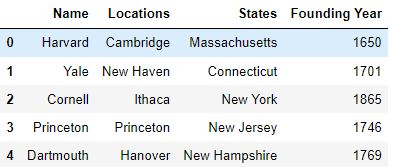
对于使用columns参数丢弃多个列,你可以传递一个要丢弃的列名列表。
# Pass a list of column names to the columns parameter to drop multiple columns
df.drop(columns=['Founder', 'Locations'])
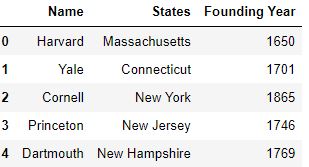
使用列索引丢弃列
如果你运行df.columns ,那么你会看到一个DataFrame的列名数组。
df.columns
Index(['Name', 'Locations', 'States', 'Founder', 'Founding Year'], dtype='object')
这个数组的元素可以通过索引进行访问。因此,你也可以使用列索引来删除列。
# Use df.columns command to drop columns via indexing
df.drop(df.columns[[1, 3]], axis=1)
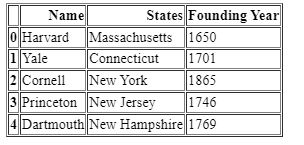
使用loc索引
你可以使用loc索引来访问DataFrame的行和列。
loc索引方法接受索引标签的名称来访问它们。
你需要传递行标签和列标签的标签名称,以便使用该方法访问行和列。
# Pass column names to the loc indexing method
df.drop(df.loc[:, ['Locations', 'Founder']], axis=1)
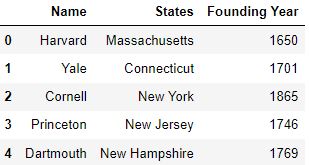
你也可以将名称模式作为标签名称传递给loc索引。
使用名称模式,你可以从一个DataFrame中移除所有有指定模式的列。
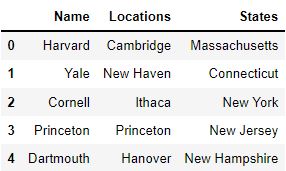
df.drop(df.loc[:, df.columns[df.columns.str.startswith('F')]], axis=1)
# .startswith() is a string function which is used to check if a string starts with the specified character or not
使用iloc索引
你也可以使用iloc索引来访问DataFrame的行和列。
iloc方法类似于loc
方法,但是它接受基于整数的行和列的索引标签,而不是标签名称。
要了解更多关于使用iloc方法访问DataFrame的行和列,请点击这里。
# Pass the integer-based index values to the iloc indexing method
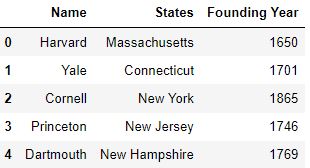
df.drop(df.iloc[:, [1, 3]], axis=1)
使用DataFrame.columns.difference方法
DataFrame.columns.difference函数被用作对DataFrame.columns方法的否定操作,该方法用于访问列名数组。
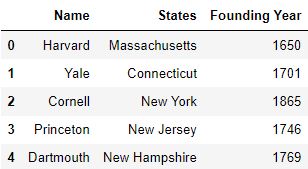
通过使用这个函数,你可以提到你想保留的列名,其余的列将被移除。
# Pass the column names which are to be retained
df.drop(df.columns.difference(['Name', 'States', 'Founding Year']), axis=1)
使用pop方法
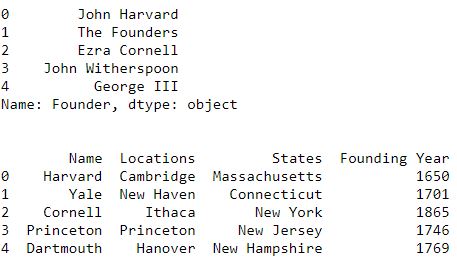
pop方法用于从DataFrame中移除指定的列,并将移除的列作为一个pandas系列返回。
# Pass the name of the column which is to be removed and return it as a pandas Series
founder = df.pop('Founder')
print(founder)
print('\n')  # Escape character to print an empty new line
print(df)
实用提示
- 确保在使用drop方法时,如果没有指定columns参数,那么axis参数的值应该被设置为1。
- del命令可以用来删除单列,但不能删除多列。
- 你可以使用slice对象来传递连续的列标签。
总结
在这篇文章中,你学到了如何使用方法来删除列。
- del命令
- 删除方法
- DataFrame.columns.difference方法
- 弹出方法
测试你的知识
Q1: pop函数从DataFrame中删除指定的列,并返回DataFrame。真的还是假的?
答案
错。pop函数将指定的列从DataFrame中移除,并将列作为pandas系列返回。
**Q2:**哪个函数是Python中的内置函数,用于从pandas Dataframe中删除列?
答案:
Thedelcommand
**Q3:**找出代码中的错误,并写出以下代码。
df.drop(labels=['col_A', 'col_B'],axis=0)
答案
df.drop(labels=['col_A', 'col_B'],axis=1)
**Q4:**你有一个DataFramedf,它有三列:'col_A', 'col_B' 和 'col_c'。请写出删除col_C列的代码,并将其作为pandas系列的'ser_col_c'返回。
答案
ser_col_c = df.pop('col_C')
**Q5:**你有一个DataFramedf,它有三列:'col_A', 'col_B' 和 'col_c'。编写代码,使用loc函数删除 "col_A "和 "col_B "列。确保这些列是在同一个DataFrame中删除的,并且不会形成DataFrame的副本。
答案
df.drop(df.loc[:,['col_A', 'col_B']],axis=1,inplace=True)
这篇文章是由 **Shreyansh**贡献的 。
The postPandas drop columns using dataframe.drop and all other methodsappeared first onMachine Learning Plus.
