

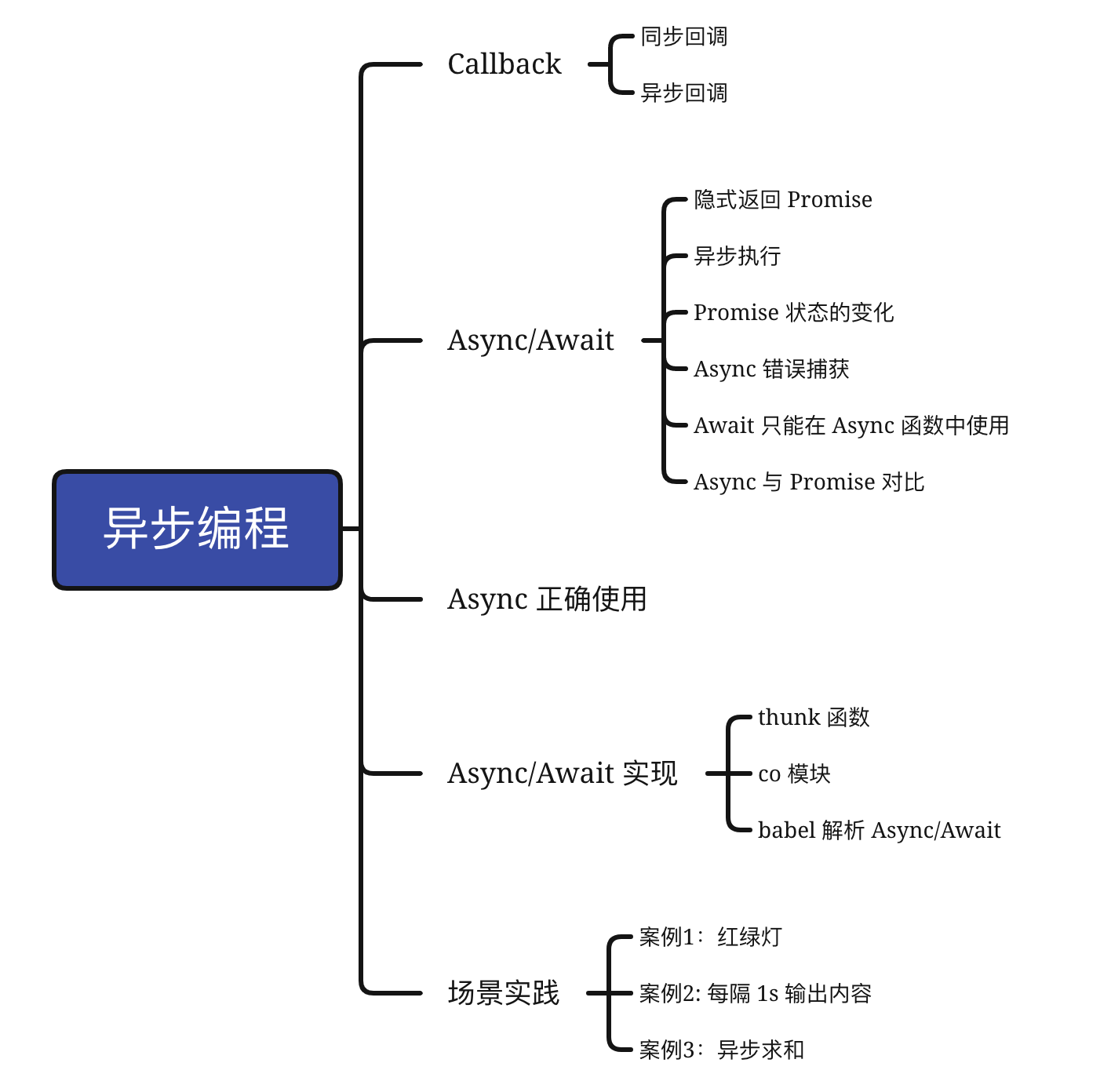
CallBack
同步回调
let callback = function(){
    console.log('i am do homework')
}
function doWork(cb) {
    console.log('start do work')
    cb()
    console.log('end do work')
}
doWork(callback)
//start do work
//i am do homework
//end do work
异步回调
let callback = function(){
    console.log('i am do homework')
}
function doWork(cb) {
    console.log('start do work')
    setTimeout(cb,1000)
    console.log('end do work')
}
doWork(callback)
//start do work
//end do work
//i am do homework
Async/Await
基础认识
Async 是一个通过异步执行并隐式返回 Promise 作为结果的函数。
- 隐式返回 Promise
async function foo() {
    return 2
}
console.log(foo())  // Promise {<resolved>: 2}
- 异步执行
async function foo() {
    console.log(1)
    let a = await 100
    console.log(a)
    console.log(2)
}
console.log(0)
foo()
console.log(3)
//0 1 3 100 2
- Promise 状态的变化
async 函数返回的 Promise 对象必须等内部所有 await 命令执行完后状态才会改变,除非遇到 return 语句或抛出错误。
async function a(){
    await 1;
    await Promise.resolve(1111)
}
let p = a();
setTimeout(()=>{
    console.log(p) // Promise {<fulfilled>: undefined}
})
- Async 错误捕获,当异步函数内部的异常未被捕获,返回的 Promsie 的状态为 rejected
async function main() {
  try {
    const val1 = await firstStep();
    const val2 = await secondStep(val1);
    const val3 = await thirdStep(val1, val2);

    console.log('Final: ', val3);
  }
  catch (err) {
    console.error(err);
  }
}
- Await 只能在 Async 函数中使用
- Async 与 Promise 对比
- 代码更简洁
- 错误处理
Async 正确使用
(async () => {
  const getList = await getList();
  const getAnotherList = await getAnotherList();
})();
getList() 和 getAnotherList() 其实并没有依赖关系,但是现在的这种写法,虽然简洁,却导致了 getAnotherList() 只能在 getList() 返回后才会执行,从而导致了多一倍的请求时间。我们有两种思路进行改写。
方案1
(async () => {
  const listPromise = getList();
  const anotherListPromise = getAnotherList();
  await listPromise;
  await anotherListPromise;
})();
方案2
(async () => {
  Promise.all([getList(), getAnotherList()]).then(...);
})();
在业务开发中,我们如何合理使用 Async 和 Await 呢?
(async () => {
  const listPromise = await getList();
  const anotherListPromise = await getAnotherList();

  // do something

  await submit(listData);
  await submit(anotherListData);

})();
因为 await 的特性,整个例子有明显的先后顺序,然而 getList() 和 getAnotherList() 其实并无依赖,submit(listData) 和 submit(anotherListData) 也没有依赖关系,我们该怎么改写呢?
基本分为三个步骤:
- 找出依赖关系
在这里,submit(listData) 需要在 getList() 之后,submit(anotherListData) 需要在 anotherListPromise() 之后。
- 将互相依赖的语句包裹在 Async 函数中
async function handleList() {
  const listPromise = await getList();
  // ...
  await submit(listData);
}

async function handleAnotherList() {
  const anotherListPromise = await getAnotherList()
  // ...
  await submit(anotherListData)
}
3.并发执行 Async 函数
// 方法一
(async () => {
  const handleListPromise = handleList()
  const handleAnotherListPromise = handleAnotherList()
  await handleListPromise
  await handleAnotherListPromise
})()

// 方法二
(async () => {
  Promise.all([handleList(), handleAnotherList()]).then()
})()
Async/Await 实现
thunk 函数
什么是 thunk 函数
// 传名传值
function f(m) {
  return m * 2;
}

f(6);

f(x + 5)
function f(m) {
  return (x+5) * 2;
}

// 我们称这个临时函数为 thunk 函数
var thunk = function (x) {
  return x + 5;
};

function f() {
  return thunk(x) * 2;
}
JavaScript 中的 thunk
JavaScript 中的 thunk 并不是指是传值调用还是传名调用,而是一种函数式编程思维,将多参数函数转换为接收回调函数的单参数函数。
// 正常版本的readFile(多参数版本)
fs.readFile(fileName, callback);

// Thunk版本的readFile(单参数版本)
var Thunk = function (fileName) {
  return function (callback) {
    return fs.readFile(fileName, callback);
  };
};

var readFileThunk = Thunk(fileName);
readFileThunk(callback);
thunk 函数的意义
我们先来看一个例子,Generator 函数流程管理不清晰,并不知何时执行第一阶段、何时执行第二阶段。
var fetch = require('node-fetch');

function* gen(){
  var url = 'https://api.github.com/users/github';
  var result = yield fetch(url);
  console.log(result.bio);
}

var g = gen();
var result = g.next();

result.value.then(function(data){
  return data.json();
}).then(function(data){
  g.next(data);
});
// Generator 自动执行
const fs = require("fs");
const path = require("path");

const Thunk = function (fn) {
  return function (...args) {
    return function (callback) {
      return fn.call(this, ...args, callback);
    };
  };
};

var readFileThunk = Thunk(fs.readFile);

function run(fn) {
  var gen = fn();

  function next(err, data) {
    var result = gen.next(data);
    if (result.done) return;
    result.value(next);
  }

  next();
}

function* g() {
  let a = yield readFileThunk(path.resolve(__dirname, "text.txt"), "utf-8");
  console.log(a);
}

run(g);
案例1:红绿灯
题目:红灯三秒亮一次,绿灯一秒亮一次,黄灯2秒亮一次;如何让三个灯不断交替重复亮灯?
回调函数
function red() {
  console.log("red");
}
function green() {
  console.log("green");
}
function yellow() {
  console.log("yellow");
}
function step() {
  setTimeout(() => {
    red();
    setTimeout(() => {
      green();
      setTimeout(() => {
        yellow();
        step();
      }, 1000);
    }, 2000);
  }, 3000);
}
step();
Promise
function red() {
  console.log("red");
}
function green() {
  console.log("green");
}
function yellow() {
  console.log("yellow");
}

var light = function (timmer, cb) {
  return new Promise(function (resolve, reject) {
    setTimeout(function () {
      cb();
      resolve();
    }, timmer);
  });
};

var step = function () {
  Promise.resolve()
    .then(function () {
      return light(3000, red);
    })
    .then(function () {
      return light(2000, green);
    })
    .then(function () {
      return light(1000, yellow);
    })
    .then(function () {
      step();
    });
};

step();
Promise + Generator
function red() {
  console.log("red");
}
function green() {
  console.log("green");
}
function yellow() {
  console.log("yellow");
}

var light = function (timmer, cb) {
  return new Promise(function (resolve, reject) {
    setTimeout(function () {
      cb();
      resolve();
    }, timmer);
  });
};

var step = function* () {
  yield light(3000, red);
  yield light(2000, green);
  yield light(1000, yellow);
  co(step);
};

function co(gen) {
  return new Promise((resolve) => {
    const g = gen();
    function next(param) {
      const { done, value } = g.next(param);
      if (!done) {
        Promise.resolve(value).then((res) => next(res));
      } else {
        resolve(value);
      }
    }
    next();
  });
}
co(step);
Async/Await
function red() {
  console.log("red");
}
function green() {
  console.log("green");
}
function yellow() {
  console.log("yellow");
}

var light = async function (timmer, cb) {
  return new Promise((resolve) => {
    setTimeout(() => {
      cb();
      resolve();
    }, timmer);
  });
};

var step = async function () {
  await light(3000, red);
  await light(2000, green);
  await light(1000, yellow);
  step();
};

step();
案例2: 每隔 1s 输出内容
递归回调函数
function myPromise(i){
  return Promise.resolve(i)
}
let arr = [myPromise(1), myPromise(2), myPromise(3)];
function timeout(count = 0) {
  if (count == arr.length) return;
  setTimeout(() => {
    arr[count].then(res=>{
       console.log(res)
    })
    timeout(++count);
  }, 1000);
}
timeout();
Promise
function myPromise(i){
  return Promise.resolve(i)
}
let arr = [myPromise(1), myPromise(2), myPromise(3)];
arr.reduce((pre, next) => {
  return pre.then(() => {
    return new Promise((resolve) => {
      next.then(res => console.log(res))
      setTimeout(() => resolve(next), 1000);
    });
  });
}, Promise.resolve());
Async/Await
function myPromise(i){
  return Promise.resolve(i)
}
let arr = [myPromise(1), myPromise(2), myPromise(3)];
function timeout(i) {
  return new Promise((resolve) => {
    setTimeout(() => {
      resolve(i);
    }, 1000);
  });
}
(async function () {
  for (let i of arr) {
    let res = await timeout(i);
    console.log(res);
  }
})();
案例3:异步求和
(async function () {
  const res = await sum(1, 2, 3, 4, 5);
  console.log(res, "res");
})();
function asyncAdd(a, b, callback) {
  setTimeout(function () {
    callback(null, a + b);
  }, 1000);
}

function add(a, b) {
  return new Promise((resolve) => {
    asyncAdd(a, b, (_, sum) => {
      console.log(sum);
      resolve(sum);
    });
  });
}
function sum(...arg) {
  return arg.reduce(
    (p, n) => p.then((total) => add(total, n)),
    Promise.resolve(0)
  );
}
babel 解析 Async/Await
function _asyncToGenerator(fn) {
  return function() {
    var gen = fn.apply(this, arguments);
    return new Promise(function(resolve, reject) {
      function step(key, arg) {
        try {
          var info = gen[key](arg);
          var value = info.value;
        } catch (error) {
          reject(error);
          return;
        }
        if (info.done) {
          resolve(value);
        } else {
          return Promise.resolve(value).then(
            function(value) {
              step("next", value);
            },
            function(err) {
              step("throw", err);
            }
          );
        }
      }
      return step("next");
    });
  };
}

