redux核心知识
简介
redux是一个JavaScript状态容器,提供可预测化的状态管理。
redux主要有四个核心概念
- Store 存储状态的容器,JavaScript对象
- View 视图,html页面
- Action 对象,描述对状态进行怎样的操作
- Reducers 函数,操作并返回新的状态
案例
接下来通过redux实现一个简单的计数器,加深对redux的认识:
<button id="plus">+</button>
<span id="count">0</span>
<button id="minus">-</button>
// 3. 存储默认状态
var initialState = {
  count: 0
}
// 2. 创建 reducer 函数
function reducer (state = initialState, action) {
  switch (action.type) {
    case 'increment':
      return {count: state.count + 1};
    case 'decrement':
      return {count: state.count - 1}
    default:
      return state;
  }
}
// 1. 创建 store 对象
var store = Redux.createStore(reducer);

// 4. 定义 action
var increment = { type: 'increment' };
var decrement = { type: 'decrement' };

// 5. 获取按钮 给按钮添加点击事件
document.getElementById('plus').onclick = function () {
  // 6. 触发action
  store.dispatch(increment);
}

document.getElementById('minus').onclick = function () {
  // 6. 触发action
  store.dispatch(decrement);
}

// 7. 订阅 store
store.subscribe(() => {
  // 获取store对象中存储的状态
  // console.log(store.getState());
  document.getElementById('count').innerHTML = store.getState().count;
})
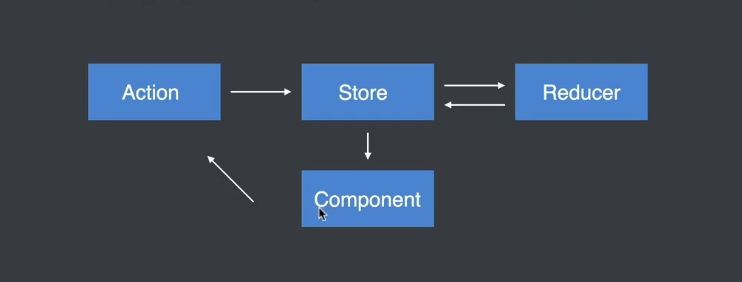
首先通过Redux.createStore创建redux实例,参数就是我们的reducer函数,reducer函数有两个参数,一个就是我们state仓库,第二个就是我们的action。通过上图,我们看到要更新视图,首先要dispatch来触发action,于是第五步、第六步就是通过点击函数来触发action,通过action去触发reducer更改我们的state仓库;仓库更改了,就需要更新视图,就需要subscribe函数出场了,在subscribe中对视图进行更新。
这个demo还是非常简单的,使用redux来更改数据,有点杀鸡用牛刀的感觉。在一个较大的项目中,数据管理一直都是一个难点,比如在react项目中,react组件间的通信都是单向数据流的,如果涉及层级过多,传参就会很困难,使用context如果数据过多,就会变得很难维护,这个时候redux就排上了用场。由于Store独立于组件,是的数据管理同样独立于组件,这就使得数据管理变得有迹可循,后期容易维护,组件通信也容易了许多。
react+redux
上面为了了解redux,流程图画的较为的简单,接下来再重新介绍下redux工作流程
- 组件通过dispatch方法触发action
- Store接受action并将Action分发给Reducer
- Reducer根据Action类型对状态进行更改并将更改后的状态返回给Store
- 组件订阅了Store中的状态,Store中的状态更新会同步到组件中
接下来使用react来重构上述的计数器
//index.js
import React from 'react';
import ReactDOM from 'react-dom/client';
// import App from './App';

import {createStore} from 'redux';

const initialState = {
  count:0
}

function reducer(state = initialState,action){
  switch (action.type) {
    case 'increment':
      return {count: state.count + 1};
    case 'decrement':
      return {count: state.count - 1}
    default:
      return state;
  }
}

const store = createStore(reducer)

const increment = {type:'increment'}
const decrement = {type:'decrement'}

function Counter(){
  return (
    <div>
      <button onClick={() => store.dispatch(increment)}>+</button>
      <span>{store.getState().count}</span>
      <button onClick={() => store.dispatch(decrement)}>-</button>
    </div>
  )
}

store.subscribe(() => {
  root.render(
    <Counter/>
  );
})

const root = ReactDOM.createRoot(document.getElementById('root'));
root.render(
  <Counter/>
);
这种写法实际上有个很大的问题,平常我们封装的组件都是在一个文件夹里单独导入的,在单独的组件内如何拿到Store实例,以及触发subscribe函数,这就需要一个插件react-redux出场了。这个插件中主要暴露了一个组件和一个方法,Provider组件和contect方法。
-
Provider组件,这个组件将我们的Store实例放到全局作用域上,让所有的组件都能够引用,使用方法如下:
<Provider store={store}> <Counter/> </Provider> //需要包裹项目的所有的组件 -
contect方法主要有以下几个功能
- 会订阅store,当store中的状态发生更改时,会重新渲染组件
- 可以获取store中的状态,将状态通过组件的props属性映射给组件
- 可以获取dispatch方法
接下来是代码编写:
//index.js
import React from 'react';
import ReactDOM from 'react-dom/client';
// import App from './App';

import {createStore} from 'redux';
import { Provider } from 'react-redux';

import Counter from './components/Counter.js'

const initialState = {
  count:0
}

function reducer(state = initialState,action){
  switch (action.type) {
    case 'increment':
      return {count: state.count + 1};
    case 'decrement':
      return {count: state.count - 1}
    default:
      return state;
  }
}

const store = createStore(reducer)


const root = ReactDOM.createRoot(document.getElementById('root'));
root.render(
  <Provider store={store}>
   <Counter/>
</Provider>
);
// /components/Counter.js
import React from "react";
import {connect} from 'react-redux'

const increment = {type:'increment'}
const decrement = {type:'decrement'}

function Counter({count,increment,decrement}){
  return (
    <div>
      <button onClick={increment}>+</button>
      <span>{count}</span>
      <button onClick={decrement}>-</button>
    </div>
  )
}

const mapStateToProps = state => ({
  count:state.count
})

const mapDispatchToProps = dispatch => ({
  increment() {
    dispatch(increment)
  },
  decrement() {
    dispatch(decrement)
  }
})

// connect  第一个参数  就是state仓库  组件中的属性可以通过props.state拿到state
//          第二个参数  是一个函数 返回一个对象  该对象的属性都可以通过props拿到
export default connect(mapStateToProps,mapDispatchToProps)(Counter)
首先通过函数createStore创建一个store实例,参数就是reducer函数,用以更改state仓库;然后用Provider组件包裹我们的组件,这样我们的业务组件就可以拿到store实例;在组件中定义了一个Counter函数组件,返回时用被传入connect返回函数,connect函数有两个参数,第一个是我们的state仓库,第二个就是action,用以更改state仓库。在react中使用redux流程就如上述,虽然目前有点繁琐,那是因为代码少,一旦项目复杂起来,redux状态共享就会变得非常的有用。
稍微复杂一点的项目,都会将store单独拆分成一个模块出来,而不是都写在index.js中,接下来在优化一下代码:
// src/store/actions/counter.actions.js
import { INCREMENT, DECREMENT } from "../const/counter.const";

export const increment = () => ({type: INCREMENT});
export const decrement = () => ({type: DECREMENT});
// src/store/const/counter.const.js
export const INCREMENT = 'increment';
export const DECREMENT = 'decrement';
// src/store/reducer/counter.reducer.js
import { INCREMENT, DECREMENT } from "../const/counter.const";

const initialState = {
  count: 0
}

const reducer = (state = initialState, action) => {
  switch(action.type) {
    case INCREMENT:
      return {
        count: state.count + 1
      }
    case DECREMENT:
      return {
        count: state.count - 1
      }
    default:
      return state;
  }
}

export default reducer
//// src/store/index.js
import { createStore } from "redux";
import Reducer from './reducers/counter.reducer'

export const store = createStore(Reducer)
这样我们的根目录下的index.js就会非常的简洁了:
import React from 'react';
import ReactDOM from 'react-dom/client';
// import App from './App';

import { Provider } from 'react-redux';

import Counter from './components/Counter.js'
import { store } from './store';

const root = ReactDOM.createRoot(document.getElementById('root'));
root.render(
  <Provider store={store}>
   <Counter/>
</Provider>
);
实际上action也可以传参的:
在action中传入参数
<button onClick={ () => increment(5)}>+</button>
定义action时接受参数
const reducer = (state = initialState, action) => {
  switch(action.type) {
    case INCREMENT:
      return {
        count: state.count + action.payload
      }
    case DECREMENT:
      return {
        count: state.count - action.payload
      }
    default:
      return state;
  }
}
中间件开发
概念
中间件本质就是一个函数,允许我们来扩展redux程序,很大的扩展了我们对action的扩展能力。当我们增加了中间件以后,组件触发了action,首先执行中间件函数,当中间件处理完成后,才会执行reducer。
加入了中间件的redux,其工作流程是这样的

案例
现在在点击按钮加减时需要延时1s才会数值才会改变,首先编写一个中间件:
//  middleware/thunk.js
const thunkMd =  ({dispatch}) => next => action => {
  if(action.type === 'increment' || action.type === 'decrement'){
    setTimeout(() => {
      next(action)
    },1000)
  }
  // next(action)
}

export default thunkMd
然后注册这个中间件
// store/index.js
import thunk from './middleware/thunk'

export const store = createStore(Reducer,applyMiddleware(thunk))
功能已经出现了,然而这个中间件不够灵活,我们想实现一个延时中间件,不仅仅只有这个计数器案例可以使用,要足够的抽象,可以根据传入的参数来判断,如果传入的那参数是函数,就执行我们的函数,在函数中执行异步操作;不然就正常往后执行:
const thunkMd =  ({dispatch}) => next => action => {
  // 1. 当前这个中间件函数不关心你想执行什么样的异步操作 只关心你执行的是不是异步操作
  // 2. 如果你执行的是异步操作 你在触发action的时候 给我传递一个函数 如果执行的是同步操作 就传递action对象
  // 3. 异步操作代码要写在你传递进来的函数中
  // 4. 当前这个中间件函数在调用你传递进来的函数时 要将dispatch方法传递过去
  if (typeof action === 'function') {
    return action(dispatch)
  }
  next(action)
}

export default thunkMd
定义异步action
export const increment_async = payload => dispatch => {
  setTimeout(() => {
    dispatch(increment(payload))
  },1000)
}
然后触发action时
function Counter({count,increment,decrement,increment_async}){
  return (
    <div>
      <button onClick={ () => increment_async(5)}>+</button>
      <span>{count}</span>
      <button onClick={() => decrement(5)}>-</button>
    </div>
  )
}
常用的中间件
-
redux-thnk
这个中间件和上述编写的中间件完全一样的,用法也很简单,和上述完全类似,首先
npm install redux-thunkimport {applyMiddleware} from 'redux' createStore(rootReducer,applyMiddleware(thunk))const loadPosts = () => async dispatch => { const posts = await axios,get('api').then(res => res.data) dispatch({type:LOADPOSTS,payload:posts}) } -
redux-saga
redux-saga和redux -thunk一样,都是在redux工作流程中添加异步代码 ,redux-saga更加强大,它允许将异步操作从Action Creator文件中抽离出来,放在一个单独的文件中。
首先安装下这个插件npm install redux-saga
// store/index.js
import createSagaMidddleware from 'redux-saga';
import counterSaga from './sagas/counter.saga'

// 创建 sagaMiddleware
const sagaMiddleware = createSagaMidddleware();

export const store = createStore(Reducer, applyMiddleware(sagaMiddleware));

sagaMiddleware.run(counterSaga)
//src/sagas/counter.saga.js import { takeEvery, put, delay } from 'redux-saga/effects'; import { increment } from '../actions/counter.actions'; import { INCREMENT_ASYNC } from '../const/counter.const'; // takeEvery 接收 action // put 触发 action function* increment_async_fn (action) { yield delay(2000); yield put(increment(action.payload)) } export default function* counterSaga () { // 接收action yield takeEvery(INCREMENT_ASYNC, increment_async_fn) }export const INCREMENT_ASYNC = 'increment_async';触发actions
function Counter({count,increment,decrement,increment_async}){
  return (
    <div>
      <button onClick={ () => increment_async(5)}>+</button>
      <span>{count}</span>
      <button onClick={() => decrement(5)}>-</button>
    </div>
  )
}
第一篇基础总结,后面写一个购物车的案例,在研究下源码手写一个redux。加油。