如下key值:
struct MyKey{

    MyKey(QString key1, int key2){

        this->key1 = key1;
        this->key2 = key2;
    }

    QString key1;
    int key2;
};
自定义key时会出现如下问题:
需要重写左操作符号,如下:
struct MyKey{

    MyKey(QString key1, int key2){

        this->key1 = key1;
        this->key2 = key2;
    }

    bool operator < (const MyKey &key) const{

		return std::tie(key1, key2) < std::tie(key.key1, key.key2);
    }

    QString key1;
    int key2;
};
所有源码如下:
#include <QCoreApplication>
#include <QMap>
#include <QDebug>
struct MyKey{
MyKey(QString key1, int key2){
this->key1 = key1;
this->key2 = key2;
}
bool operator < (const MyKey &key) const{
return std::tie(key1, key2) < std::tie(key.key1, key.key2);
}
QString key1;
int key2;
};
int main(int argc, char *argv[])
{
QCoreApplication a(argc, argv);
QMap<MyKey, QString> map;
map.insert(MyKey("10086", 0), "value1");
map.insert(MyKey("10086", 1), "value2");
map.insert(MyKey("10086", 2), "value3");
map.insert(MyKey("10010", 1), "value4");
map.insert(MyKey("10010", 2), "value5");
return a.exec();
}
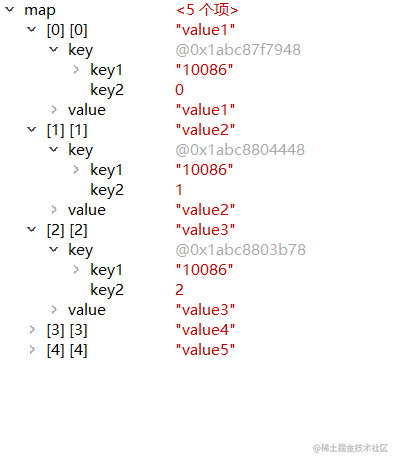
调试截图如下:
源码打包下载地址: