

在这篇文章中,你将在后端使用GraphQL和Node.js构建一个全栈应用程序。同时,我们的前端将使用 [graphql-request](https://github.com/prisma-labs/graphql-request)库来对我们的后端进行网络操作。
我们将涵盖以下步骤。
为什么使用graphql-request和TypeScript?
每当开发者使用Apollo构建GraphQL服务器时,该库会生成一个 "前端",看起来像这样。
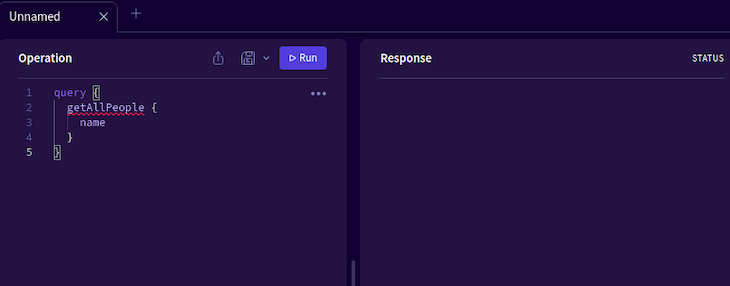
这个界面允许用户通过代码向服务器提出查询或变异请求。然而,让我们来谈谈房间里的大象:它看起来并不十分友好。由于前台没有任何按钮或任何有用的界面元素,对许多用户来说,可能很难在你的应用程序中导航。因此,这就缩小了你的用户群。那么,我们如何解决这个问题呢?
这就是 [graphql-request](https://github.com/prisma-labs/graphql-request)来了。它是一个开源的库,可以让用户在GraphQL服务器上进行查询。它拥有以下特点。
- 轻量级 - 这个库仅有超过21千字节的最小值,这确保了你的应用程序保持性能。
- 基于承诺的API - 这带来了对异步应用的支持
- 支持TypeScript -
graphql-request是许多允许使用TypeScript的库中的一个。TypeScript的一个主要优势是,它允许稳定和可预测的代码。
例如,请看下面的程序。
let myNumber = 9; //here, myNumber is an integer
myNumber = 'hello'; //now it is a string.
myNumber = myNumber + 10; //even though we are adding a string to an integer,
//JavaScript won't return an error. In the real world, it might bring unexpected outputs.
//However, in Typescript, we can tell the compiler..
//what data types we need to choose.
let myNumber:number = 39; //tell TS that we want to declare an integer.
myNumber = 9+'hello'; //returns an error. Therefore, it's easier to debug the program
//this promises stability and security.
在这篇文章中,我们将使用GraphQL和TypeScript构建一个全栈应用程序。在这里,我们将使用 [apollo-server-express](https://www.npmjs.com/package/apollo-server-express)包来构建一个后端服务器。此外,对于前端,我们将使用Next和graphql-request ,以消费我们的GraphQL API。
构建我们的服务器
项目初始化
为了初始化一个空白的Node.js项目,运行这些终端命令。
mkdir graphql-ts-tutorial #create project folder
cd graphql-ts-tutorial
npm init -y #initialize the app
完成后,我们现在要告诉Node,我们需要在代码库中使用TypeScript。
#configure our Typescript:
npx tsc --init --rootDir app --outDir dist --esModuleInterop --resolveJsonModule --lib es6 --module commonjs --allowJs true --noImplicitAny true
mkdir app #our main code folder
mkdir dist #Typescript will use this folder to compile our program.
接下来,安装这些依赖项。
#development dependencies. Will tell Node that we will use Typescript
npm install -d ts-node @types/node typescript @types/express nodemon
#Installing Apollo Server and its associated modules. Will help us build our GraphQL
#server
npm install apollo-server-express apollo-server-core express graphql
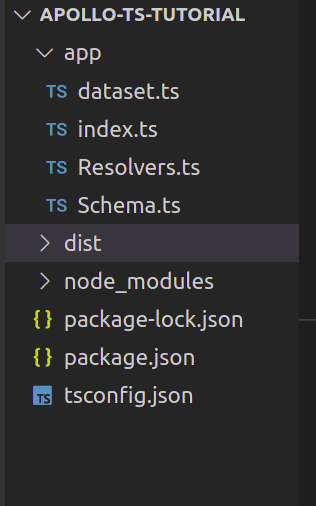
在这一步之后,导航到你的app 文件夹。在这里,创建以下文件。
index.ts:我们的主文件。这将执行和运行我们的Express GraphQL服务器dataset.ts:这将作为我们的数据库,它将被提供给客户端Resolvers.ts:这个模块将处理用户命令。我们将在本文的后面学习解析器。Schema.ts:顾名思义,这个文件将存储向客户端发送数据所需的原理图。
最后,你的文件夹结构应该看起来像这样。
创建我们的数据库
在这一节中,我们将创建一个虚拟数据库,它将被用来发送请求的数据。要做到这一点,请到app/dataset.ts ,并编写以下代码。
let people: { id: number; name: string }[] = [
  { id: 1, name: "Cassie" },
  { id: 2, name: "Rue" },
  { id: 3, name: "Lexi" },
];
export default people;
- 首先,我们创建一个对象数组,称为
people - 这个数组将有两个字段:类型为
number的id,以及类型为name的 。string
定义我们的模式
在这里,我们现在将为我们的GraphQL服务器创建一个模式。
简单地说,GraphQL模式是对客户可以从API请求的数据集的描述。这个概念类似于Mongoose库的概念。
要建立一个模式,请导航到app/Schema.ts 文件。在那里,写下以下代码。
import { gql } from "apollo-server-express"; //will create a schema
const Schema = gql`
  type Person {
    id: ID!
    name: String
  }
  #handle user commands
  type Query {
    getAllPeople: [Person] #will return multiple Person instances
    getPerson(id: Int): Person #has an argument of 'id` of type Integer.
  }
`;
export default Schema;
//export this Schema so we can use it in our project
让我们把这段代码逐块分解。
Schema变量包含我们的GraphQL模式- 首先,我们创建了一个
Person模式。它将有两个字段:id,类型为ID,name,类型为 。String - 后来,我们指示GraphQL,如果客户端运行
getAllPeople命令,服务器将返回一个数组的Person对象 - 此外,如果用户使用
getPerson命令,GraphQL将返回一个单一的Person实例。
创建解析器
现在我们已经编码了我们的模式,我们的下一步是定义我们的解析器。
简单地说,解析器是一组为GraphQL查询生成响应的函数。换句话说,一个解析器作为一个GraphQL查询处理程序。
在Resolvers.ts ,写下以下代码。
import people from "./dataset"; //get all of the available data from our database.
const Resolvers = {
  Query: {
    getAllPeople: () => people, //if the user runs the getAllPeople command
    //if the user runs the getPerson command:
    getPerson: (_: any, args: any) => {
      console.log(args);
      //get the object that contains the specified ID.
      return people.find((person) => person.id === args.id);
    },
  },
};
export default Resolvers;
- 在这里,我们创建了一个
Query对象,处理所有进入服务器的查询 - 如果用户执行
getAllPeople命令,该程序将返回我们数据库中的所有对象 - 此外,
getPerson命令需要一个参数id。这将返回一个具有匹配ID的Person实例。 - 最后,我们导出了我们的解析器,这样它就可以与我们的应用程序相连接了。
配置我们的服务器
我们几乎完成了!现在我们已经建立了我们的模式和解析器,我们的下一步是将它们连接起来。
在index.js ,写下这段代码。
import { ApolloServer } from "apollo-server-express";
import Schema from "./Schema";
import Resolvers from "./Resolvers";
import express from "express";
import { ApolloServerPluginDrainHttpServer } from "apollo-server-core";
import http from "http";

async function startApolloServer(schema: any, resolvers: any) {
  const app = express();
  const httpServer = http.createServer(app);
  const server = new ApolloServer({
    typeDefs: schema,
    resolvers,
    //tell Express to attach GraphQL functionality to the server
    plugins: [ApolloServerPluginDrainHttpServer({ httpServer })],
  }) as any;
  await server.start(); //start the GraphQL server.
  server.applyMiddleware({ app });
  await new Promise<void>((resolve) =>
    httpServer.listen({ port: 4000 }, resolve) //run the server on port 4000
  );
  console.log(`Server ready at http://localhost:4000${server.graphqlPath}`);
}
//in the end, run the server and pass in our Schema and Resolver.
startApolloServer(Schema, Resolvers);
让我们来测试一下!要运行这段代码,使用这个Bash命令。
npx nodemon app/index.ts
这将在localhost:4000/graphql URL上创建一个服务器。
在这里,你可以在用户界面中看到你的可用模式。
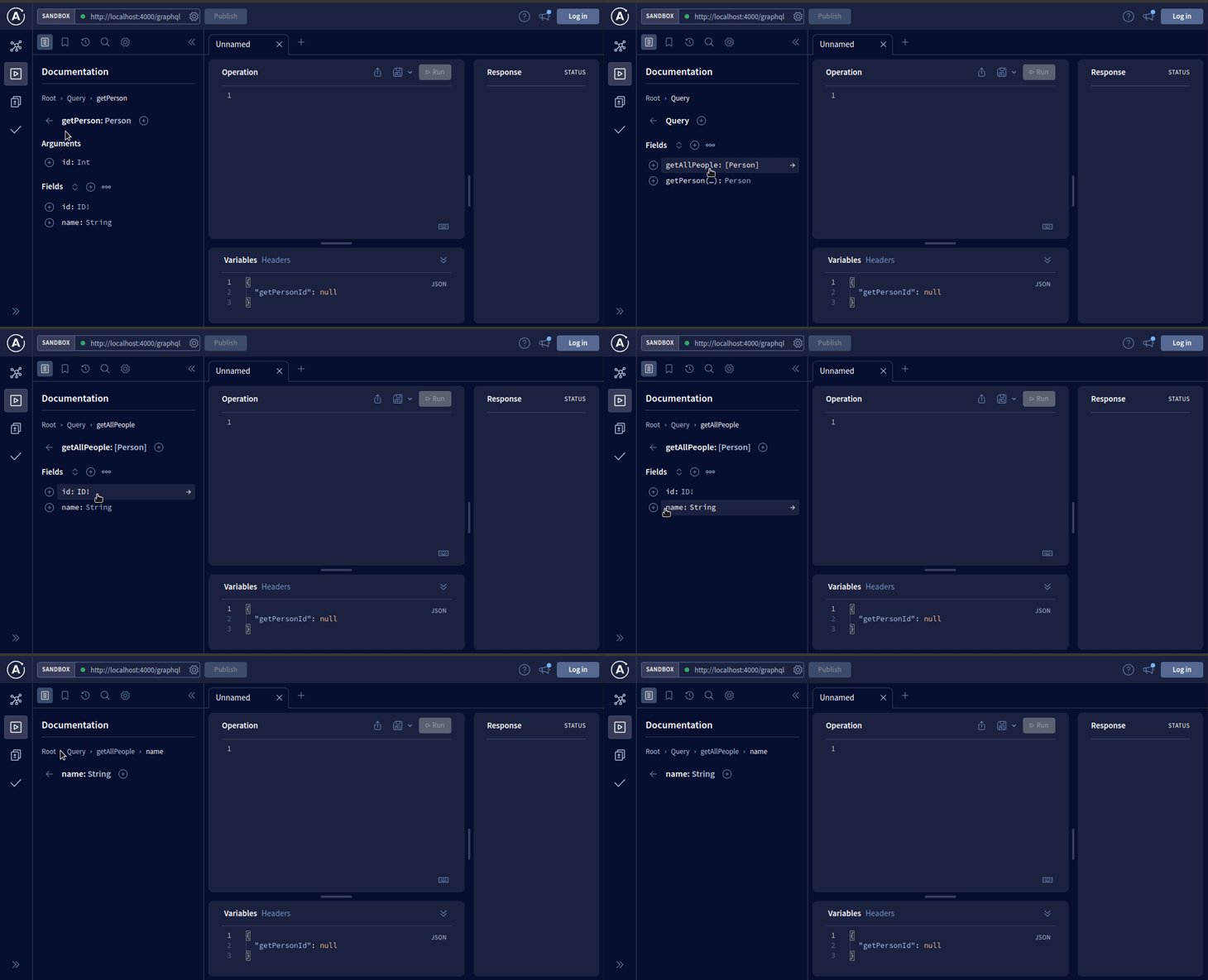
这意味着我们的代码是有效的
我们所有的GraphQL查询将在操作面板中进行。要看到它的运行,请在这个盒子里输入这个片段。
#make a query:
query {
  #get all of the people available in the server
  getAllPeople {
    #procure their IDs and names.
    id
    name
  }
}
要看到结果,请点击运行按钮。
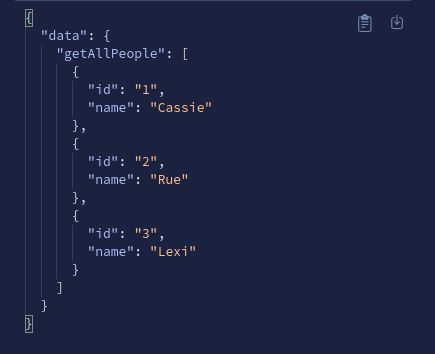
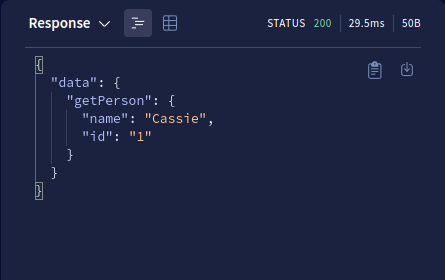
我们甚至可以通过getPerson 查询来搜索一个特定的实体。
query ($getPersonId: Int) { #the argument will be of type Integer
  getPerson(id: 1) {
    #get the person with the ID of 1
    name
    id
  }
}
创建突变
在GraphQL世界中,突变是在数据库中执行副作用的命令。常见的例子包括。
- 将用户添加到数据库中 - 当客户注册网站时,用户会执行突变,将他们的数据保存在数据库中
- 编辑或删除一个对象 - 如果一个用户修改或删除数据库中的数据,他们基本上是在服务器上创建一个突变
为了处理突变,进入你的Schema.ts 模块。在这里,在Schema 变量中,添加以下几行代码。
const Schema = gql`
  #other code..
  type Mutation {
    #the addPerson commmand will accept an argument of type String.
    #it will return a 'Person' instance.
    addPerson(name: String): Person
  }
`;
我们的下一步是创建一个解析器来处理这个突变。要做到这一点,在Resolvers.ts 文件中,添加这段代码。
const Resolvers = {
  Query: {
    //..further code..
  },
  //code to add:
  //all our mutations go here.
  Mutation: {
    //create our mutation:
    addPerson: (_: any, args: any) => {
      const newPerson = {
        id: people.length + 1, //id field
        name: args.name, //name field
      };
      people.push(newPerson);
      return newPerson; //return the new object's result
    },
  },
};
addPerson突变接受了一个name参数- 当一个
name被传递时,程序将创建一个新的对象,其键值与name相匹配。 - 接下来,它将使用
push方法将该对象添加到people数据集中。 - 最后,它将把新对象的属性返回给客户。
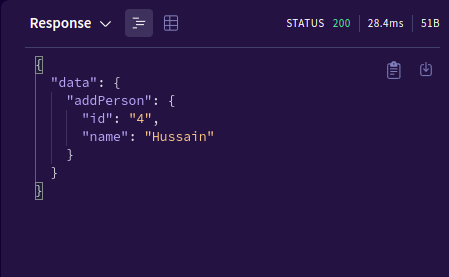
这就是了!为了测试它,在操作窗口中运行这段代码。
#perform a mutation on the server
mutation($name: String) {
  addPerson(name:"Hussain") { #add a new person with the name "Hussain"
    #if the execution succeeds, return its 'id' and 'name` to the user.
    id
    name
  }
}
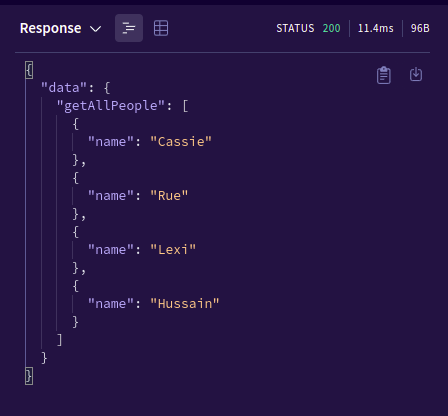
让我们验证一下GraphQL是否已经将新条目添加到数据库中。
query {
  getAllPeople { #get all the results within the 'people' database.
  #return only their names
  name
  }
}
建立我们的客户端
我们已经成功地建立了我们的服务器。在本节中,我们将使用 Next 构建一个客户端应用程序,它将监听服务器并向用户界面渲染数据。
作为第一步,像这样初始化一个空白的Next.js应用程序。
npx create-next-app@latest graphql-client --ts
touch constants.tsx #our query variables go here.
为了执行GraphQL操作,我们将使用graphql-request库。这是一个最小的、开源的模块,将帮助我们在服务器上进行突变和查询。
npm install graphql-request graphql
npm install react-hook-form #to capture user input
创建查询变量
在本节中,我们将对查询和突变进行编码,以帮助我们进行GraphQL操作。要做到这一点,请到constants.tsx ,并添加以下代码。
import { gql } from "graphql-request";
//create our query
const getAllPeopleQuery = gql`
  query {
    getAllPeople { #run the getAllPeople command
      id
      name
    }
  }
`;
//Next, declare a mutation
const addPersonMutation = gql`
  mutation addPeople($name: String!) {
    addPerson(name: $name) { #add a new entry. Argument will be 'name'
      id
      name
    }
  }
`;
export { getAllPeopleQuery, addPersonMutation };
- 在第一部分,我们创建了
getAllPeopleQuery变量。当用户运行这个查询时,程序将指示服务器获取数据库中存在的所有条目 - 后来,
addPerson变量告诉GraphQL添加一个新的条目,其尊重的name字段 - 最后,我们使用
export关键字,将我们的变量与项目的其他部分联系起来。
执行查询
在pages/index.ts ,写下以下代码。
import type { NextPage, GetStaticProps, InferGetStaticPropsType } from "next";
import { request } from "graphql-request"; //allows us to perform a request on our server
import { getAllPeopleQuery } from "../constants";
import Link from "next/link";
const Home: NextPage = ({
  result, //extract the 'result' prop
}: InferGetStaticPropsType<typeof getStaticProps>) => {
  return (
    <div className={styles.container}>
      {result.map((item: any) => { //render the 'result' array to the UI
        return <p key={item.id}>{item.name}</p>;
      })}
    <Link href="/addpage">Add a new entry </Link>
    </div>
  );
};
//fetch data from the server
export const getStaticProps: GetStaticProps = async () => {
  //the first argument is the URL of our GraphQL server
  const res = await request("http://localhost:4000/graphql", getAllPeopleQuery);
  const result = res.getAllPeople;
  return {
    props: {
      result,
    }, // will be passed to the page component as props
  };
};
export default Home;
下面是对这段代码的逐条分解。
- 在
getStaticProps方法中,我们指示Next在我们的GraphQL服务器上运行getAllPeople命令 - 后来,我们将其响应返回到
Home功能组件。这意味着我们现在可以将结果呈现在用户界面上 - 接下来,程序使用
map方法,将getAllPeople命令的所有结果渲染到用户界面。每个段落元素将显示每个条目的name字段 - 此外,我们还使用了一个
Link组件,将用户重定向到addpage路线。这将允许用户在表格中添加一个新的Person实例
为了测试该代码,运行以下终端命令。
npm run dev
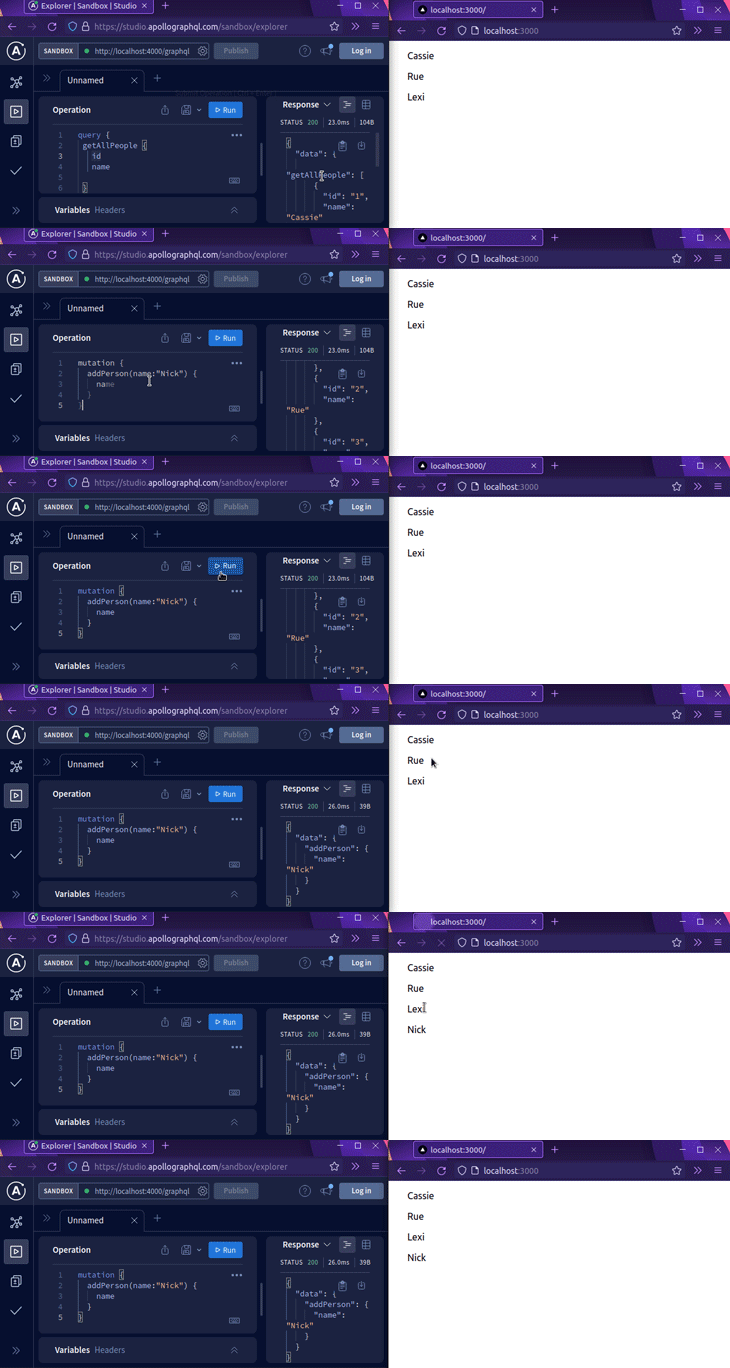
这将是结果。
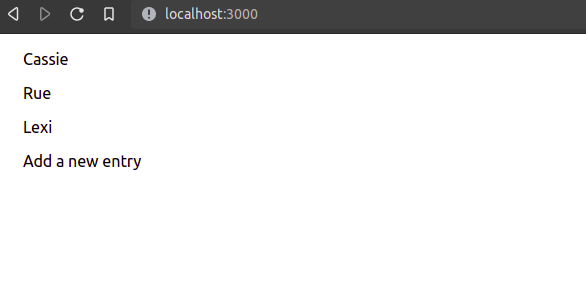
我们的GraphQL服务器甚至实时更新。
执行突变
现在我们已经成功地执行了一个查询,我们甚至可以通过graphql-request 库执行突变。
在你的pages 文件夹中,创建一个名为addpage.tsx 的新文件。顾名思义,这个组件将允许用户向数据库添加一个新条目。在这里,先写下下面的代码块。
import type { NextPage, GetStaticProps, InferGetStaticPropsType } from "next";
import { request } from "graphql-request";
import { addPersonMutation } from "../constants";
const AddPage: NextPage = () => {
  return (
    <div>
      <p>We will add a new entry here. </p>
    </div>
  );
};
export default AddPage;
在这段代码中,我们正在创建一个带有一段文字的空白页面。我们这样做是为了确保我们的URL路由系统是否工作。
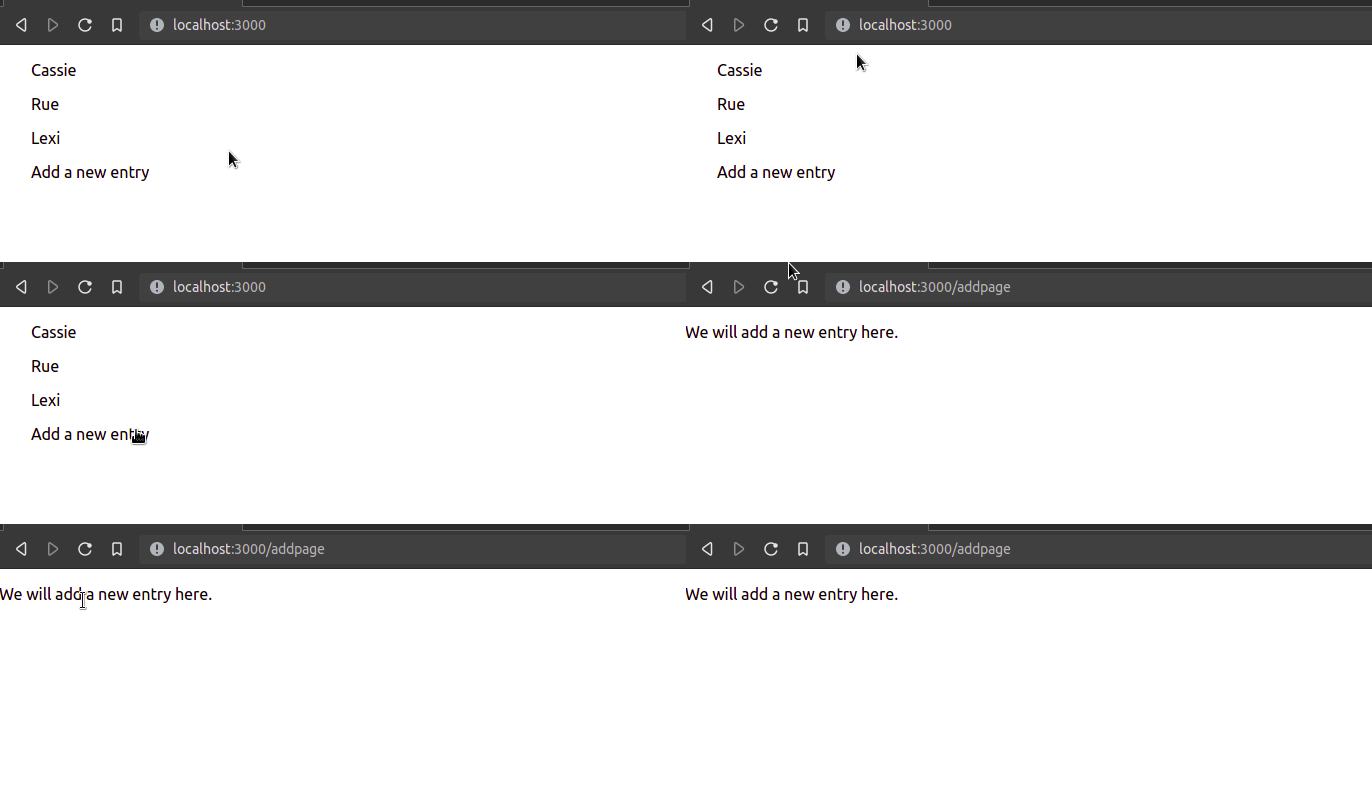
这意味着我们成功地使用了routing!接下来,在你的addpage.tsx 文件中写下这段代码。
import { useForm } from "react-hook-form";
const { register, handleSubmit } = useForm();
//if the user submits the form, then the program will output the value of their input.
const onSubmit = (data: any) => console.log(data);
return (
  <div>
    <form onSubmit={handleSubmit(onSubmit)}> {/*Bind our handler to this form.*/}
      {/* The user's input will be saved within the 'name' property */}
      <input defaultValue="test" {...register("name")} />
      <input type="submit" />
    </form>
  </div>
);
这将是输出结果。
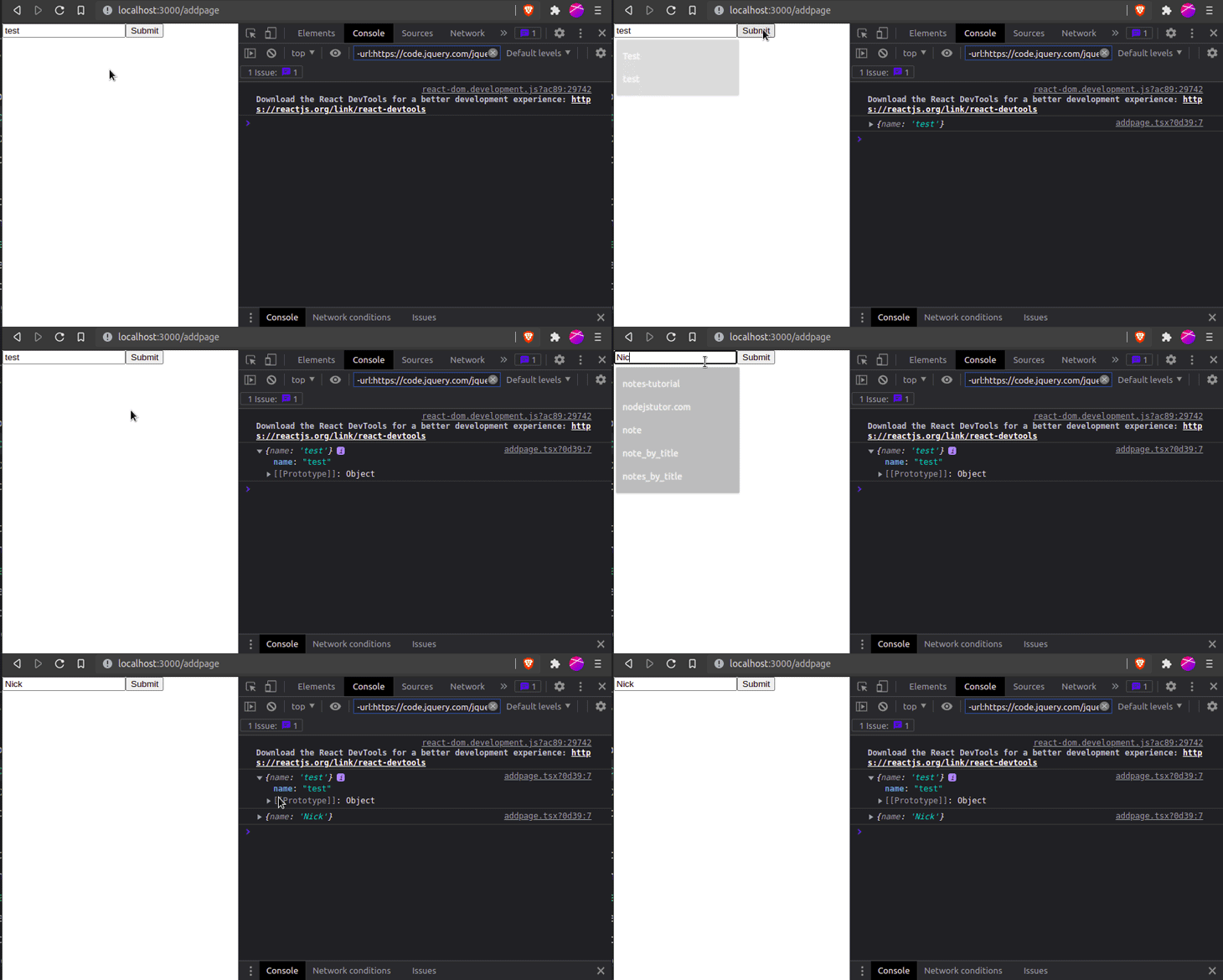
现在我们已经成功地捕获了用户的输入,我们的最后一步是将他们的条目添加到服务器上。
要做到这一点,请像这样修改位于pages/addpage.tsx 文件中的onSubmit 处理器。
const onSubmit = async (data: any) => {
  const response = await request(
    "http://localhost:4000/graphql",
    addPersonMutation,
    data
  );
  console.log(response);
};
- 在这里,我们通过
request函数向我们的GraphQL服务器执行一个突变请求 - 此外,我们还将
addPerson突变命令传递到我们的请求头中。这将告诉GraphQL在我们的服务器上执行addMutation行动
这将是结果。
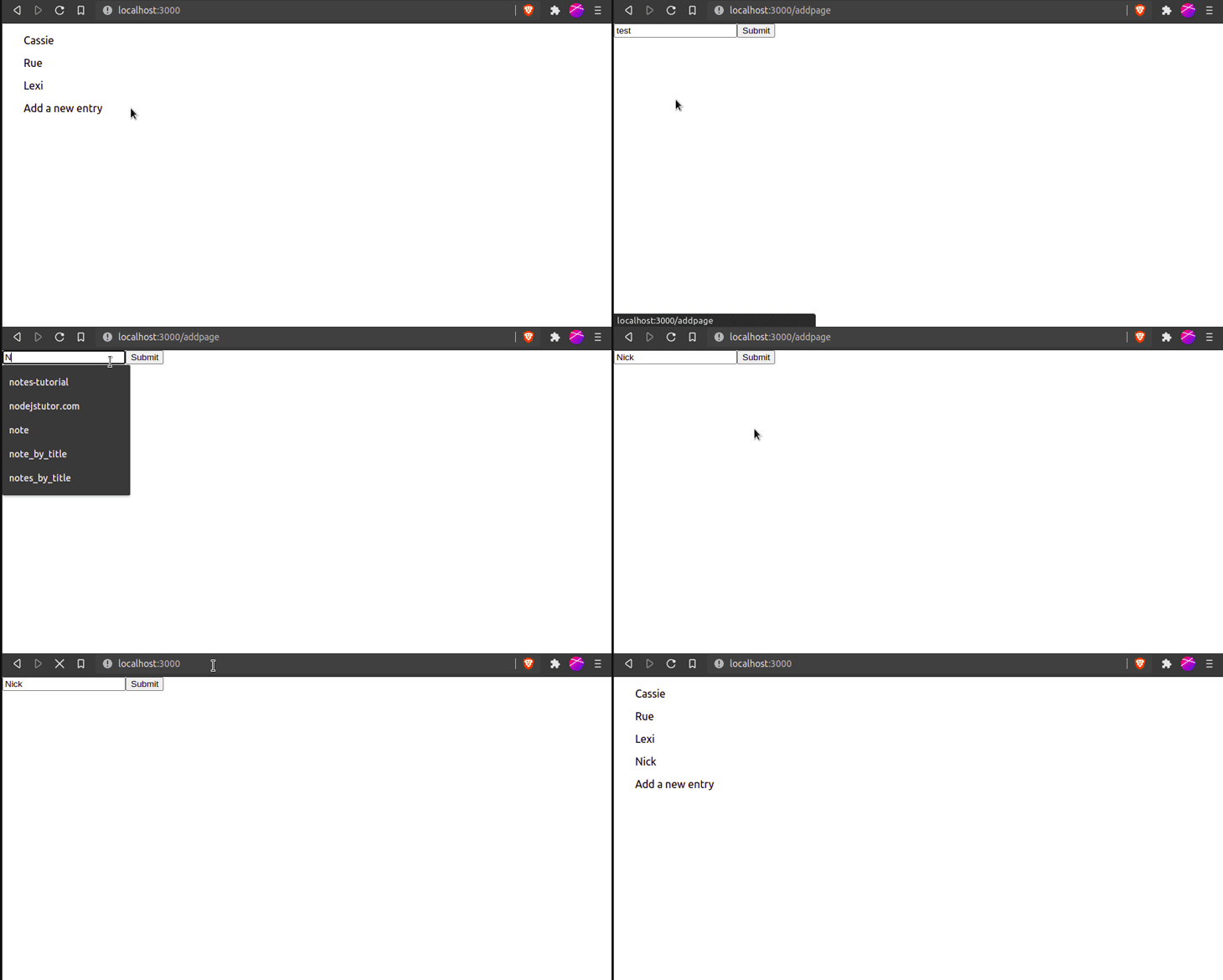
然后我们就完成了!
总结
在这篇文章中,你学到了如何使用GraphQL和TypeScript创建一个全栈应用程序。它们都是编程领域中极为关键的技能,因为它们在当今的需求量很大。
如果你在这段代码中遇到任何困难,我建议你解构代码并进行游戏,以便你能完全掌握这个概念。
非常感谢您的阅读!编码愉快
