1.放大镜
css样式:
.zoomglass{
position: relative
}
.clear::after
{
content: ""
display: block
height: 0
overflow: hidden
clear: both
visibility: hidden
}
.carouel-con{
position: absolute
width: 452px
height: 58px
left:0px
top:460px
}
.left,.right{
width: 22px
height: 32px
background-image: url(./img/iphone/download-1.png)
background-position: 0 -54px
float: left
top:50%
transform: translate(0,-50%)
position: relative
}
.right{
background-position: -78px 0
right:0px
position: absolute
}
.carousel{
float: left
width: 380px
height: 58px
position: absolute
margin: 0 auto
left: 0
right:0
overflow: hidden
}
.imgcon{
position: absolute
left: 0
transition: all 0.5s
}
.imgcon>img{
width: 54px
height: 54px
border: 2px solid transparent
margin: 0 9px
}
js:
import Utils from "./js/Utils.js"
var arr=Array(10).fill(1).map((t,i)=>(i+1)+".jpg")
arr.unshift("10-.jpg")
arr.unshift("12-.jpg")
arr.unshift("24-.jpg")
arr.unshift("25-.jpg")
arr.unshift("26-.jpg")
arr.unshift("27-.jpg")
arr.unshift("28-.jpg")
arr.unshift("29-.jpg")
arr.unshift("30-.jpg")
var first=0
const SCALE_1=0.5625,SCALE_2=1.2
var list,mini,mask,zoom,imgcon,left,right,prev
init()
function init(){
mini=document.querySelector(".mini")
mask=document.querySelector(".mask")
zoom=document.querySelector(".zoom")
imgcon=document.querySelector(".imgcon")
left=document.querySelector(".left")
right=document.querySelector(".right")
Utils.loadImage(arr,finishHandler,"./img/iphone") //预加载图片 调用utils里的loadTmage函数
}
function finishHandler(_list){
list=_list
imgcon.innerHTML=arr.reduce((v,t)=>v+`<img src='./img/iphone/${t}'>`,"")
imgcon.style.width=arr.length*76+"px"
mini.addEventListener("mouseenter",mouseHandler)
mini.addEventListener("mouseleave",mouseHandler)
left.addEventListener("click",bnClickHandler)
right.addEventListener("click",bnClickHandler)
imgcon.addEventListener("mouseover",iconMouseHandler)
var evt=new MouseEvent("mouseover",{bubbles:true})
imgcon.firstElementChild.dispatchEvent(evt)
}
function setSize(img){
Object.assign(mini.style,{ //mini原图
width:img.width*SCALE_1+"px", //img.width图像原始宽度
height:img.height*SCALE_1+"px", //offset放在页面上的宽度
border:"1px solid
float:"left",
position:"relative",
left:"0px",
top:"0px",
backgroundImage:`url(${img.src})`,
backgroundSize:"100% 100%"
})
Object.assign(zoom.style,{ //外面放大的图
width:img.width*SCALE_1*SCALE_2+"px",
height:img.height*SCALE_1*SCALE_2+"px",
border:"1px solid
float:"left",
backgroundImage:`url(${img.src})`,
display:"none"
})
Object.assign(mask.style,{ //黄色阴影
width:img.width*(SCALE_1**2)*SCALE_2+"px",
height:img.height*(SCALE_1**2)*SCALE_2+"px",
backgroundColor:"
position:"absolute",
left:"0px",
top:"0px",
display:"none"
})
}
function mouseHandler(e){ //鼠标移入移出 老套路
if(e.type==="mouseenter"){
zoom.style.display=mask.style.display="block" //让他显示放大的图
mini.addEventListener("mousemove",mouseHandler)
}else if(e.type==="mouseleave"){
zoom.style.display=mask.style.display="none" //隐藏
}else if(e.type==="mousemove"){
var rect=mini.getBoundingClientRect()
var x=e.clientX-rect.x-mask.offsetWidth/2
var y=e.clientY-rect.y-mask.offsetHeight/2
//添加移动范围 拖拽
if(x<0) x=0
if(y<0) y=0
if(x>rect.width-mask.offsetWidth) x=rect.width-mask.offsetWidth
if(y>rect.height-mask.offsetHeight) y=rect.height-mask.offsetHeight
//
mask.style.left=x+"px"
mask.style.top=y+"px"
//让zoom这个放大图也动 大图除以mask的值
zoom.style.backgroundPositionX=-x*(zoom.offsetWidth/mask.offsetWidth)+"px"
zoom.style.backgroundPositionY=-y*(zoom.offsetWidth/mask.offsetWidth)+"px"
}
}
function bnClickHandler(e){ //左右移动点击
if(this===left){
if(first>=5) first-=5
else first=0
}else if(this===right){
if(first+10<=arr.length-1) first+=5
else first=arr.length-5
}
imgcon.style.left=-first*76+"px"
}
function iconMouseHandler(e){
if(e.target.nodeName!=="IMG") return
if(prev){ //切换
prev.style.borderColor="transparent"
}
prev=e.target
prev.style.borderColor="red"
setSize(list[Array.from(imgcon.children).indexOf(e.target)])
// mini.style.backgroundImage=zoom.style.backgroundImage=`url(${e.target.src})`
}
2.瀑布流
css样式:
body{
margin: 0
}
ul{
list-style: none
margin: 0
padding: 0
width: 100%
}
li{
float: left
text-align: center
}
.clear::after
{
content: ""
display: block
height: 0
overflow: hidden
clear: both
visibility: hidden
}
js:
const COL=5
var liWidth,heightArray,ul
var num=2 //图片是从2开始
init()
function init(){
ul=document.createElement("ul")
ul.className="clear"
heightArray=Array(COL).fill(0)
ul.innerHTML=Array(COL).fill(1).reduce(v=>v+`<li style='width:${100/COL}%;'></li>`,"")
document.body.appendChild(ul)
loadImage()
}
function loadImage(){
var img=new Image()
img.src="./img/load/"+num+"-.jpg"
img.addEventListener("load",loadHandler)
}
function loadHandler(e){ //加载完成 插到最小的li中
// 找到所有li高度数组的最小的高度值
var min=Math.min(...heightArray)
// 在所有li中,这个高度最小的下标
var index=heightArray.indexOf(min)
var img=this.cloneNode(true)
img.style.width="95%" //修改宽度
ul.children[index].appendChild(img)
heightArray[index]=ul.children[index].offsetHeight
num++
if(num>79){ //改变num 大于79就停止加载 就79个图
this.removeEventListener("load",loadHandler)
return
}
this.src="./img/load/"+num+"-.jpg"
}
function randomColor(){ //随机色
return Array(6).fill(1).reduce(v=>v+Math.floor(Math.random()*16).toString(16),"#")
}
3.懒加载
css样式:
body{
margin: 0
}
ul{
list-style: none
margin: 0
padding: 0
width: 100%
}
li{
float: left
text-align: center
}
.clear::after
{
content: ""
display: block
height: 0
overflow: hidden
clear: both
visibility: hidden
}
js:
const COL=5
var liWidth,heightArray,ul,img
var num=2
init()
function init(){
ul=document.createElement("ul")
ul.className="clear"
heightArray=Array(COL).fill(0)
ul.innerHTML=Array(COL).fill(1).reduce(v=>v+`<li style='width:${100/COL}%;'></li>`,"")
document.body.appendChild(ul)
loadImage()
document.addEventListener("scroll",scrollHandler)
}
function loadImage(){
img=new Image()
img.src="./img/load/"+num+"-.jpg"
img.addEventListener("load",loadHandler)
}
function loadHandler(e){
// 找到所有li高度数组的最小的高度值
var min=Math.min(...heightArray)
// 在所有li中,这个高度最小的下标
var index=heightArray.indexOf(min)
var img1=this.cloneNode(true)
img1.style.width="95%"
ul.children[index].appendChild(img1)
heightArray[index]=ul.children[index].offsetHeight
// document.documentElement html标签
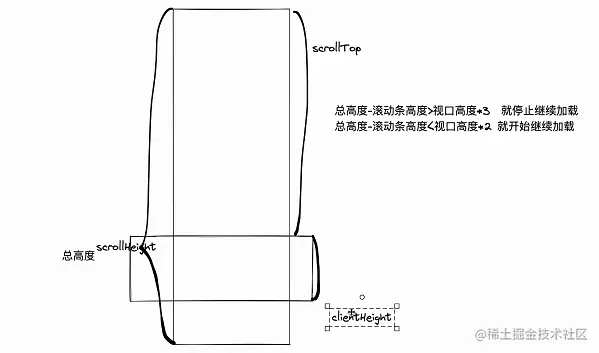
if(document.documentElement.scrollHeight-document.documentElement.scrollTop>=document.documentElement.clientHeight*4){
return
}
continueLoad()
}
function continueLoad(){
num++
if(num>79){
num=2
}
img.src="./img/load/"+num+"-.jpg"
}
function scrollHandler(e){
if(document.documentElement.scrollHeight-document.documentElement.scrollTop<document.documentElement.clientHeight*2){
continueLoad()
}
}
function randomColor(){
return Array(6).fill(1).reduce(v=>v+Math.floor(Math.random()*16).toString(16),"#")
}