封装一个dialog组件,每个功能页都会用到
<button open-type="getPhoneNumber" bindgetphonenumber="getPhoneNumber" class="confirm m" style="{{ 'background-color:' + iconColor + ';'}}">立即开启</button>
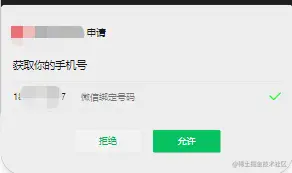
- 开始slot配置
 options: {
    multipleSlots: true // 在组件定义时的选项中启用多slot支持
 },
- 配置属性列表 此处定义组件的样式属性
 /**
   * 组件的属性列表
   */
  properties: {
    iconColor: {
      type: String,
      value: '#000000'
    },
    ifShowConfirm: {
      type: Boolean,
      value: true
    },
  },
- 唤起用户授权手机号 - bindgetphonenumber="getPhoneNumber"
- 当用户拒绝授权的时候会返回 e.detail.errMsg == 'getPhoneNumber:fail user deny'
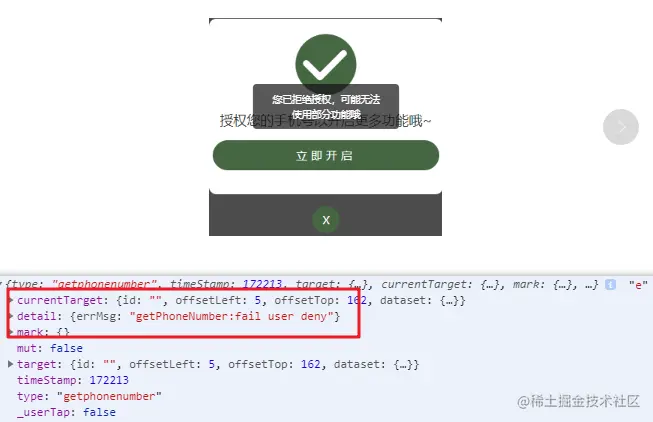
getPhoneNumber(e) {
console.log(e, 'e');
if (e.detail.errMsg == 'getPhoneNumber:fail user deny') {
wx.showToast({
title: '您已拒绝授权,可能无法使用部分功能哦',
icon: 'none'
});
- 当该appid没有权限(个人小程序)的时候,返回 e.detail.errMsg == 'getPhoneNumber:fail no permission'
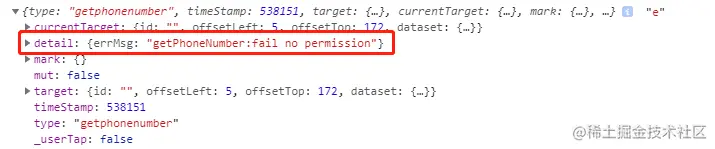
} else if (e.detail.errMsg == 'getPhoneNumber:fail no permission') {
this.setData({
ifShowConfirm: false
})
this.triggerEvent('phoneFlag', {
phoneFlag: true
})
wx.showToast({
title: '全部功能已开启拉~',
icon: 'none'
});
let phone = 18850328667;
wx.setStorageSync('phone', phone);
}
- 当该appid是企业号并且成功授权的时候,返回 e.detail.errMsg: "getPhoneNumber:ok"

else {
this.setData({
ifShowConfirm: false
})
- 当用户确认授权之后,调用写好的云函数getphone获取手机号
wx.cloud.callFunction({
name: 'getphone',
data: {
cloudID: e.detail.cloudID
}
}).then(res => {
this.triggerEvent('phoneFlag', {
phoneFlag: true
})
wx.showToast({
title: '全部功能已开启~',
icon: 'none'
})
let phone = res.result.list[0].data.phoneNumber
wx.setStorageSync('phone', phone)
}).catch(error => {
console.log(error);
wx.showToast({
title: '错了错了',
icon: 'none'
});
})
}
},
父组件code
<view class="btn_box">
<view wx:if="{{!phoneFlag}}" class="btn df m" bindtap="toGrant">点击查询.</view>
<view wx:else class="btn df m" bindtap="" bindtap="toSearch">点击查询</view>
</view>
<dialog wx:if="{{ifShowConfirm}}" bindphoneFlag="phoneFlag" bindresFlag="resFlag" iconColor="{{iconColor}}" />
- js
- 接收子组件传递过来的值 bindphoneFlag="phoneFlag"
phoneFlag(res) {
this.setData({
phoneFlag: res.detail.phoneFlag
})
},
- 接收子组件传递过来的值 bindresFlag="resFlag"
- 子组件返回来判断是否已经授权过 已经授权就false不显示这个弹框
resFlag(res) {
this.setData({
ifShowConfirm: res.detail.ifShowConfirm
})
},
子组件code
<view id="dialog" class="dialog_box" wx:if="{{ifShowConfirm}}">
<view class="dialog">
<icon class="iconfont icon-yes" style="{{ 'color:' + iconColor + ';'}}"></icon>
<view class="tips">
授权您的手机号以开启更多功能哦~
</view>
<button open-type="getPhoneNumber" bindgetphonenumber="getPhoneNumber" class="confirm m" style="{{ 'background-color:' + iconColor + ';'}}">立即开启</button>
<view class="cancel" bindtap="cancel" style="{{ 'background-color:' + iconColor + ';'}}">X</view>
</view>
</view>
Component({
options: {
multipleSlots: true // 在组件定义时的选项中启用多slot支持
},
properties: {
iconColor: {
type: String,
value: '#000000'
},
ifShowConfirm: {
type: Boolean,
value: true
},
},
data: {},
methods: {
   // 获取用户手机号-确认授权
    getPhoneNumber(e) {
      console.log(e, 'e');
      if (e.detail.errMsg == 'getPhoneNumber:fail user deny') {
        wx.showToast({
          title: '您已拒绝授权,可能无法使用部分功能哦',
          icon: 'none'
        });
} else if (e.detail.errMsg == 'getPhoneNumber:fail no permission') {
this.setData({
ifShowConfirm: false
})
this.triggerEvent('phoneFlag', {
phoneFlag: true
})
wx.showToast({
title: '全部功能已开启拉~',
icon: 'none'
});
let phone = 18850328667;
wx.setStorageSync('phone', phone);
} else {
this.setData({
ifShowConfirm: false
})
wx.cloud.callFunction({
    name: 'getphone',
    data: {
    cloudID: e.detail.cloudID
    }
}).then(res => {
this.triggerEvent('phoneFlag', {
    phoneFlag: true
})
wx.showToast({
    title: '全部功能已开启~',
    icon: 'none'
});
let phone = res.result.list[0].data.phoneNumber;
wx.setStorageSync('phone', phone);
}).catch(error => {
    console.log(error);
    wx.showToast({
    title: '错了错了',
    icon: 'none'
    });
   })
  }
},
cancel() {
this.triggerEvent('resFlag', {
ifShowConfirm: false
})
console.log('ss')
this.setData({
ifShowConfirm: false
})
},
}
})
@import "../../iconfont.wxss";
button.confirm {
line-height: 50rpx !important;
background: #9a1f1a;
text-align: center;
color: #fff;
padding: 15rpx;
font-size: 30rpx;
letter-spacing: 10rpx;
border-radius: 40rpx;
}
.cancel {
width: 70rpx;
height: 70rpx;
border-radius: 50%;
background: #9a1f1a;
background-size: 100% 100%;
position: absolute;
left: 50%;
transform: translateX(-50%);
bottom: -100rpx;
display: flex;
justify-content: center;
align-items: center;
text-align: center;
font-size: 30rpx;
color: #fff;
}
.dialog_box {
position: fixed;
left: 0;
top: 0;
width: 100%;
height: 100vh;
background: rgba(0, 0, 0, 0.7);
display: flex;
justify-content: center;
align-items: center;
z-index: 100;
}
.dialog {
width: 600rpx;
height: 450rpx;
background: #fff;
border-radius: 20rpx;
padding: 30rpx 10rpx;
box-sizing: border-box;
position: relative;
text-align: center;
}
.dialog_img {
width: 150rpx;
height: 150rpx;
}
.tips {
text-align: center;
font-size: 36rpx;
color: #333;
margin: 30rpx auto;
}



