

JavaScript定时事件简介
在指定的时间间隔内执行脚本的过程,也被称为周期性执行,在JavaScript中得到了促进,被称为JavaScript定时事件。它由两个方法组成,即setInterval()方法和setTimeout()方法,其中setInterval()方法是用来设置每个函数执行之间的延迟。当我们多次执行一个函数时,也就是说,每个代码执行之间的固定时间间隔后执行,而clearInterval()方法用于退出setInterval()方法的执行,setTimeout()方法则指定函数在开始执行前等待的时间段。
有两个JavaScript定时事件。它们是
1.setInterval()方法
- setInterval()方法用于在我们多次执行一个函数时设置每个函数的执行时间间隔;也就是说,每个代码的执行时间间隔为固定的时间。
- 在JavaScript中,setInterval()方法的语法是这样的。
setInterval(function_name, delay[, arg1, arg2..])
其中function_name是被反复执行的函数,每次执行之间的时间延迟由延迟参数指定,单位为毫秒。
- 假设setInterval()方法被包含在JavaScript中。在这种情况下,直到setInterval()方法中指定的时间过后,脚本才会被执行,这个方法在需要反复执行脚本的JavaScript中很有用。
JavaScript 定时事件的例子
下面提到了不同的例子。
例子#1
演示setInterval()方法的JavaScript程序,显示时钟以显示当前时间,并随着时间的推移更新时间。
代码。
<!DOCTYPE html>
<html>
<body>
<p>The clock is the result of executing the code:</p>
<p id="clocktimer"></p>
<script>
//setInterval() method is used to execute the fucntion clock every second
var var1 = setInterval(clock, 1000);
//date() method is used to obtain today's date and then toLocaleTimeString is used to convert the date to time and setInterval() method runs the function clock for every second to display and update the current time
function clock()
{
var dat = new Date();
document.getElementById("clocktimer").innerHTML=dat.toLocaleTimeString();
}
</script>
</body>
</html>
输出。
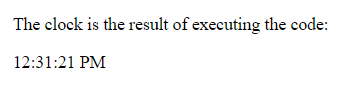
在上面的程序中,
标签被用来在显示时钟之前显示标题。然后用一个id来识别时钟。然后用setInterval()方法来执行每秒一次的时钟功能。然后使用date()方法获得今天的日期,然后使用toLocaleTimeString将日期转换为时间,setInterval()方法每秒钟运行一次函数clock以显示和更新当前时间。
例子 #2
演示setInterval()方法和clearInterval()方法的JavaScript程序,显示时钟以显示当前时间,并随着时间的推移更新时间,在点击按钮时停止时间。
代码。
<!DOCTYPE html>
<html>
<body>
<p>The clock is the result of executing the code:</p>
<p id="clocktimer"></p>
<button onclick="clearInterval(var1)">Stop the clock</button>
<script>
//setInterval() method is used to execute the function clock every second
var var1 = setInterval(clock, 1000);
//date() method is used to obtain today's date and then toLocaleTimeString is used to convert the date to time and setInterval() method runs the function clock for every second to display and update the current time
function clock()
{
var dat = new Date();
document.getElementById("clocktimer").innerHTML=dat.toLocaleTimeString();
}
</script>
</body>
</html>
输出。
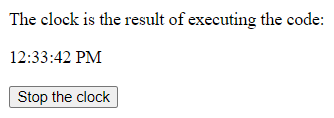
在上面的程序中,
标签用于在显示时钟之前显示标题。然后用一个ID来识别时钟。然后用clearInterval()方法来停止每个函数执行的时间间隔并停止时钟。然后setInterval()方法被用来每秒执行一次函数时钟。然后用date()方法获得今天的日期,然后用toLocaleTimeString方法将日期转换为时间,然后用setInterval()方法每秒钟运行一次函数时钟以显示和更新当前时间。
1.setTimeOut()方法
- setTimeOut()方法用于指定在开始执行一个函数之前必须经过的时间,单位是毫秒。
- 在JavaScript中setTimeOut()方法的语法如下。
2. setTimeOut(function_name, delay[, arg1, arg2...] )
其中function_name是一个被反复执行的函数,每次执行之间的时间延迟由延迟参数指定,单位为毫秒。
- 假设setTimeOut()方法被包含在JavaScript中。在这种情况下,直到setTimeOut()方法中指定的时间过后,脚本才会被执行,这个方法在JavaScript中很有用,它要求在指定的时间后执行脚本。
例子#3
演示setTimeOut()方法的JavaScript程序,在点击按钮时,等待setTimeout()方法中指定的时间间隔后,由网页显示信息。
代码。
<!DOCTYPE html>
<html>
<body>
<p>Please click on Click Me button and the page displays the welcome message after one second</p>
<button onclick="setTimeout(Welcomemsg, 1000);">Click Me</button>
<script>
//Welcomemsg function displays the message on the page when the button is clicked
function Welcomemsg()
{
alert('Welcome to JavaScript');
}
</script>
</body>
</html>
输出。

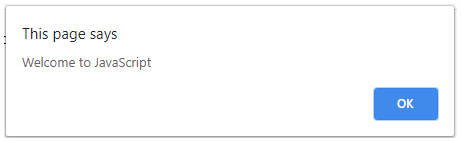
在上面的程序中,在显示Click Me按钮之前,使用了
标签来显示标题。然后在按钮上使用setTimeOut()方法,在显示欢迎信息前等待一秒。然后,当按钮被点击时,Welcomemsg函数在页面上显示该信息。
总结
在本教程中,我们通过编程实例及其输出,了解了JavaScript中定时事件的定义、语法和工作原理。
