持续创作,加速成长!这是我参与「掘金日新计划 · 6 月更文挑战」的第27天,点击查看活动详情
引言
- 封装富文本API,采用block实现链式编程
- 超链接属性
- HTML字符串与富文本互转
- 创建带有图片的富文本
I、基础知识&工具
1.1 封装富文本API,采用block实现链式编程
iOS开发效率工具:完整SDK源码【封装富文本API,采用block实现链式编程】(block 的妙用:结合block和方法的优点实现iOS的链式编程)
1、文章:blog.csdn.net/z929118967/… 2、从CSDN资源下载完整SDK代码:https://download.csdn.net/download/u011018979/14038715
- 部分API
- 用法例子
    NSMutableAttributedString *xx  = [[NSMutableAttributedString alloc]init];


    xx.kn_addString(@"封装富文本API").kn_fontColor(UIColor.redColor).kn_addString(@"采用block实现链式编程").kn_fontColor(UIColor.blueColor).kn_addString(@"!");
1.2 属性
| 属性 | 用途 | 类型 |
|---|---|---|
| NSFontAttributeName | 字号 | UIFont 默认12 |
| NSParagraphStyleAttributeName | 段落样式 | NSParagraphStyle |
| NSForegroundColorAttributeName | 前景色 | UIColor |
| NSBackgroundColorAttributeName | 背景色 | UIColor |
| NSObliquenessAttributeName | 字体倾斜 | NSNumber |
| NSExpansionAttributeName | 字体加粗 | NSNumber 比例 0就是不变 1增加一倍 |
| NSKernAttributeName | 字间距 | CGFloat |
| NSUnderlineStyleAttributeName | 下划线 | 1或0 |
| NSUnderlineColorAttributeName | 下划线颜色 | UIColor |
| NSStrikethroughStyleAttributeName | 删除线 | 1或0 |
| NSStrikethroughColorAttributeName | 删除线颜色 | UIColor |
| NSStrokeColorAttributeName | same as ForegroundColor | UIColor |
| NSStrokeWidthAttributeName | 字体描边 | CGFloat |
| NSLigatureAttributeName | 连笔字 | 1或0 |
| NSShadowAttributeName | 阴影 | NSShawdow |
| NSTextEffectAttributeName | 设置文本特殊效果,目前只有图版印刷效果可用 | NSString |
| NSAttachmentAttributeName | 设置文本附件,常用插入图片 | NSTextAttachment |
| NSLinkAttributeName | 链接 | NSURL (preferred) or NSString |
| NSBaselineOffsetAttributeName | 基准线偏移 | NSNumber,可用于布局 |
| NSWritingDirectionAttributeName | 文字方向 | 分别代表不同的文字出现方向@[@(1),@(2)] |
| NSVerticalGlyphFormAttributeName | 水平或者竖直文本 | 1竖直 0水平 |
II、超链接属性的应用案例
1、文章:blog.csdn.net/z929118967/… 2、从csdn资源下载demo源码:https://download.csdn.net/download/u011018979/14026773 3、效果
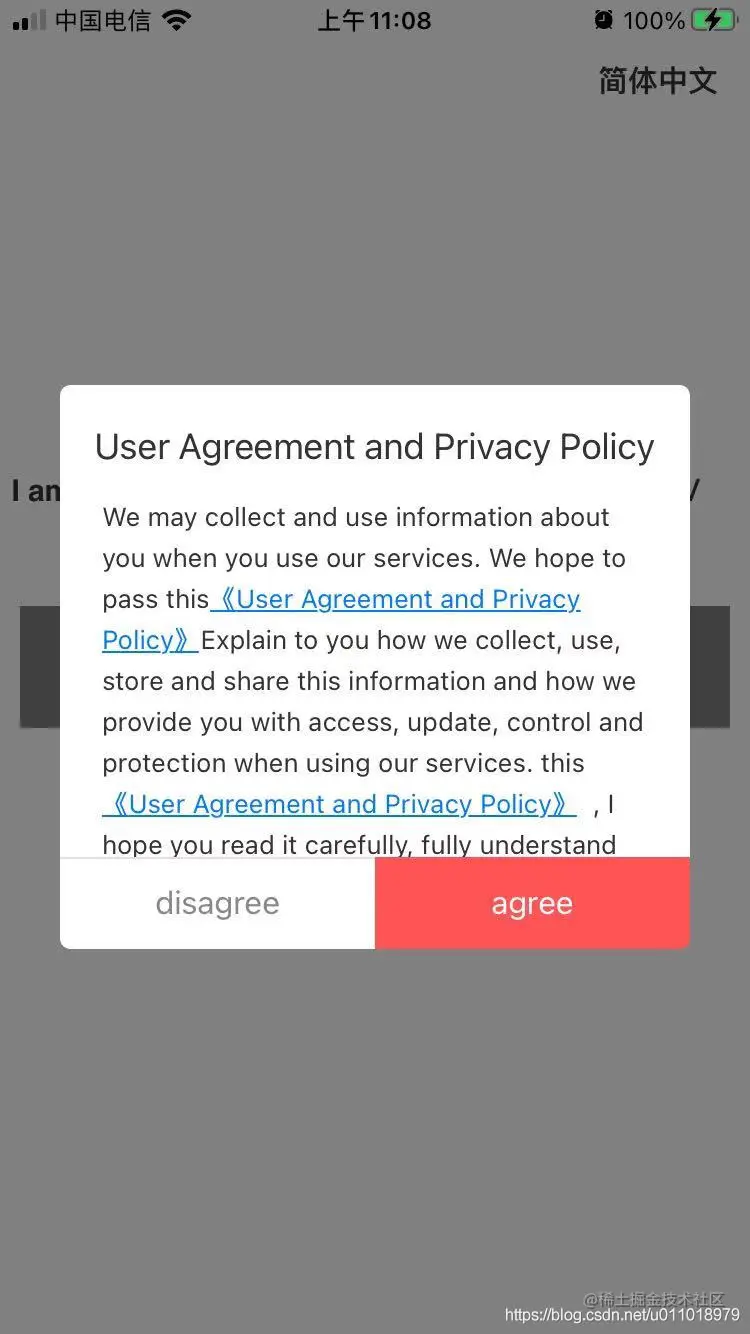
4《用户协议及隐私政策》 弹框的实现步骤: 4.1、自定义TextView,采用富文本属性进行内容设置attributedText(包括下划线NSUnderlineStyleSingle、超链接NSLinkAttributeName 、颜色NSForegroundColorAttributeName 等信息) 4.2、实现代理方法textView:shouldInteractWithURL:inRange,处理点击超链接的回调(打开对应URL Webview)
III、HTML字符串与富文本互转
- html->NSAttributedString
    NSString *html = @"<p style='color:green'>博客<span style='color:#e83c36;'><a>https://kunnan.blog.csdn.net/<a/></span><br/>微信公众号:<span style='color:red'>iOS逆向</span><br/>“订阅”一次 ,享受终身服务的快乐。</br><span style='color:red'>专注《iOS应用逆向与安全》</span>(包括iOS基础)</p>";
    NSAttributedString *attStr = [[NSAttributedString alloc] initWithData:[html dataUsingEncoding:NSUnicodeStringEncoding] options:@{NSDocumentTypeDocumentAttribute: NSHTMLTextDocumentType} documentAttributes:nil error:nil];
IV、创建带有图片的富文本
iOS图文混排之【 NSAttachmentAttributeName 创建带有图片的富文本】(案例:展示信用卡标签)
1、文章:kunnan.blog.csdn.net/article/det… 2、原理:使用NSAttachmentAttributeName属性设置文本附件功能来插入图片使用NSTextAttachment对象 3、应用场景:展示信用卡标签
V、富文本在适配系统API的应用例子
5.1 适配iOS13UI控件UITextField的_placeholderLabel 私有API
- 问题:iOS13无法直接访问_placeholderLabel.textColor
- 解决方案:
使用 NSMutableAttributedString 富文本attributedPlaceholder来替代KVC访问 UITextField 的 _placeholderLabel。
+ (void)setupUITextField4attributedPlaceholder:(UITextField*)textField{

    textField.attributedPlaceholder = [[NSAttributedString alloc] initWithString:@"placeholder" attributes:@{NSForegroundColorAttributeName:kTextPlaceholderColor, NSFontAttributeName:kTextFont(13) }];
}