


jQuery get简介
在JQuery中,get()被定义为jquery中的一个方法,它被用来发送http GET请求到服务器的帮助下的异步格式,不仅用于发送,也用于从数据库服务器检索数据,当用户请求被发送到服务器时,数据是查询字符串格式,数据是加密的,该方法被调用后的回调函数,如果用户请求成功,get()方法将传递URL。数据和回调类型,XMLHttpRequest对象将从get()方法中返回。
语法
在javascript中,jquery库使用一组不同的内置方法来与web应用程序中的用户进行交互。jquery get()方法与html元素进行交互,用于定制网页。它有自己的语法,一组参数将被传递并返回XMLHttpRequest格式的请求。
<html>
<head>
<script type=”text/JavaScript” src=https://ajax.googleapis.com/ajax/libs/jquery/2.1.3/jquery.min.js>
</script>
<script type=”text/javascript”>
$(document).ready(function() {
$(“#variablename”).click(function(event)
{
$.get( “ backend programfile with extension”, some datas,[callback function],[type]);
--some jquery codes---
});
});
</script>
<body>
--some html UI based tag elemenst ---
</body>
</html>
在jQuery中get方法是如何工作的?
jquery是一个javascript库,它可以用来与网页进行更复杂的交互。使用jquery,它有默认的方法和属性,将更需要网络应用的要求;在此基础上,get()方法被用来使用异步格式向服务器发送数据。在默认参数的帮助下,如URL、数据和回调函数类型,它将被传递给后端代码。
XMLHttpRequest对象是get()方法的返回类型。jquery的默认Ajax方法用于发送请求和接收服务器响应,像XMLHttpRequest对象一样返回值。jqueries或jqXHR的XHR对象将在其属性、方法和函数行为的帮助下返回一些接口。
jQuery.get(url, [data], [callback], [type]) 是一般的语法和参数,将用于发送异步数据到服务器,而url是由任何字符串表示的,其中包含特定的请求被发送到服务器的URL,数据是额外的,其可选的参数,代表结果由服务器响应的键/值对。
请求数据是任何数据类型,如整数、字符串等,如果该方法用于键/值数据对,它们将是唯一的标识符。对于结果,XMLHttpRequest对象是get()方法的返回类型,然后 "类型 "参数主要是使用数据类型,这些数据类型将在回调函数后返回,如用户定义的函数,这需要在get()方法的回调参数的帮助下,在事件中被调用。
jQuery get的例子
以下是jQuery get的例子。
例子#1
代码。
<html>
<head>
<title>The jQuery Example</title>
<script type = "text/javascript"
src = "https://ajax.googleapis.com/ajax/libs/jquery/2.1.3/jquery.min.js">
</script>
<script type = "text/javascript" language = "javascript">
$(document).ready(function() {
$("#example").click(function(event){
$.get(
"index.php",
{ name: 'Sivaraman',
city: "Tiruppur",
mobile: "8220244056"
},
function(data) {
$('#demo').html(data);
}
);
});
$("#example1").click(function(event){
$.get(
"index1.php",
{ name: 'Sivaraman',
city: "Tiruppur",
mobile: "8220244056"
},
function(datas) {
$('#demo1').html(datas);
}
);
});
});
</script>
</head>
<body>
<p>Welcome To My Domain </p>
<span id = "demo" style = "background-color:red;">
Please Click the button for getting your saved datas
</span>
<span id = "demo1" style = "background-color:blue;">
Your retrieved datas
</span>
<div><input type = "button" id = "example"
value = "Welcome Users" /></div>
<div><input type = "button" id = "example1"
value = "Retrieve" /></div>
</body>
</html>
<?php
$_REQUEST["name"] ="Sivaraman";
$_REQUEST["city"] ="Tup";
$_REQUEST["mobile"] ="8220244056";
echo "Thank you for storing the details Please Click the Retrieve button for to checking your stored datas";
?>
<?php
switch ($_REQUEST) {
case 1:$_REQUEST["name"] ="Sivaraman";
echo "name";
break;
case 2:$_REQUEST["city"] ="TUP";
echo "city";
break;
case 3:$_REQUEST["mobile"] ="822027689";
echo "mobile";
break;
default:
echo "no";
}
?>
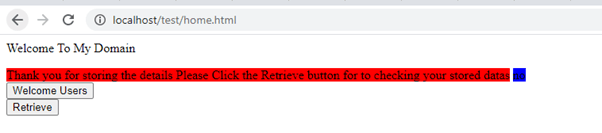
输出。

例子 #2
代码。
<html>
<head>
<script src="https://ajax.googleapis.com/ajax/libs/jquery/3.5.1/jquery.min.js"></script>
<script>
$(document).ready(function(){
$("button").click(function(){
$.get("index1.php",
{ name: 'Sivaraman',
city: "Tiruppur",
mobile: "8220244056",
},
function(name, city, mobile){
alert("Sivaraman: " + name + "\n Tiriuppur: " + city + "\n 86536768:" + mobile);
});
});
});
</script>
</head>
<body>
<button>Please click the button for to getting the response from our servers</button>
</body>
</html>
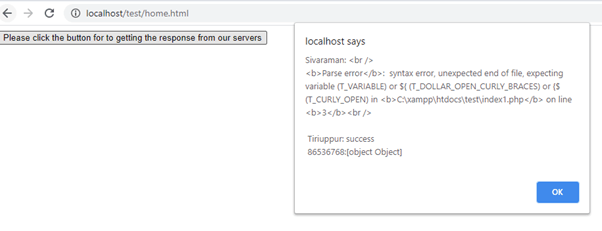
输出。
例子 #3
代码。
<!DOCTYPE html>
<html lang="en">
<head>
<meta charset="utf-8">
<title>Welcome User To Retrieve the Current Date and Time</title>
<script src="https://code.jquery.com/jquery-3.5.1.min.js"></script>
<script>
$(document).ready(function(){
$("#btn1").click(function(){
$.get("index1.php", function(data){
$("#demo").html(data);
});
});
$("#frm").submit(function(event){
event.preventDefault();
$.get("index1.php", function(data){
$("#demo1").html(data);
});
});
});
</script>
</head>
<body>
<div id="demo">
<h2>Welcome To My Domain</h2>
</div>
<button type="button" id="btn1">Click the Button to get the today's date with time</button><br/><br/>
<form action="index.php" ide="frm">
<label>Name: <input type="text" name="name"></label><br/><br/>
<label>City: <input type="text" name="city"></label><br/><br/>
<label>Address: <input type="text" name="address"></label><br/><br/>
<label>Mobile: <input type="text" name="mobile"></label><br/><br/>
<label>State: <input type="text" name="state"></label><br/><br/>
<label>Country: <input type="text" name="country"></label><br/><br/>
<label>Pincode: <input type="text" name="pincode"></label><br/><br/>
<label>Email: <input type="text" name="email"></label><br/><br/>
<label>Comment: <textarea cols="50" name="comment"></textarea></label>
<input type="submit" value="submit">
</form>
<div id="demo1"></div>
</body>
</html>
<?php
$name = htmlspecialchars($_GET["name"]);
$city = htmlspecialchars($_GET["city"]);
$mobile = htmlspecialchars($_GET["mobile"]);
$address = htmlspecialchars($_GET["address"]);
$state = htmlspecialchars($_GET["state"]);
$pincode = htmlspecialchars($_GET["pincode"]);
$country = htmlspecialchars($_GET["country"]);
$email = htmlspecialchars($_GET["email"]);
$comment = htmlspecialchars($_GET["comment"]);
echo "Hi, $name. Your comment has been successfully Submittted thank you for your registeration" . "";
echo "Please see your latest comments: $comment";
?>
输出。


在上面的例子中,我们在不同的地方使用了get()方法,因为它将通过一些技术如AJAX来获取UI数据。当我们使用ajax时,它将在不刷新页面或重新加载页面的情况下获取数据。但在这里,我们没有使用ajax;我们只是简单地存储了UI数据,并使用get()方法和正式参数来检索数据。
总结
在jQuery中,我们有很多预先定义好的方法和属性。当我们在基于网络的应用程序中使用这些方法时,同时,用户浏览器也要避免安全限制,如防火墙或其他一些内部网站的保护。有时jquery.get()会出现编译时和运行时的错误;在web控制台的帮助下,我们将对这些错误进行排除。
