

本文已参与「新人创作礼」活动,一起开启掘金创作之路。
1、springboot特点
1.1依赖管理
父项目做依赖管理,父项目中的集合了Spring框架进行web开发所需要的的几乎所有jar包。
依赖管理
<parent>
        <groupId>org.springframework.boot</groupId>
        <artifactId>spring-boot-starter-parent</artifactId>
        <version>2.3.4.RELEASE</version>
</parent>

spring-boot-starter-parent的父项目
 <parent>
    <groupId>org.springframework.boot</groupId>
    <artifactId>spring-boot-dependencies</artifactId>
    <version>2.3.4.RELEASE</version>
  </parent>

几乎声明了所有开发中常用的依赖的版本号,拥有自动版本仲裁机制
打开该父项目可以看到源码中密密麻麻遍布了所有的jar包依赖:
关于导入的starter场景启动器:
1、见到很多的spring-boot-starter-* (某种场景启动器): *的意思就是指某种场景
2、只要引入starter,这个场景的所有常规需要的依赖我们都自动引入
3、SpringBoot所有支持的场景都在下面的官方文档里有说明
https://docs.spring.io/spring-boot/docs/current/reference/html/using-spring-boot.html#using-boot-starter
4、我们以后见到的  *-spring-boot-starter:都是第三方为我们提供的简化开发的场景启动器。只有官方的场景启动器叫spring-boot-starter-*
5、所有场景启动器最底层的依赖
<dependency>
  <groupId>org.springframework.boot</groupId>
  <artifactId>spring-boot-starter</artifactId>
  <version>2.3.4.RELEASE</version>
  <scope>compile</scope>
</dependency>
在springboot的开发中,我们不需要关注版本号,因为springboot有版本仲裁机制,父项目中内部自动仲裁了所有jar包的版本号。
1、引入依赖是springboot默认的都可以不写版本号
2、但如果引入的是非springboot版本仲裁的jar包,则要写明版本号。
我们也可以自己修改要使用的jar包版本号:
1、查看spring-boot-dependencies里面规定当前依赖的版本用的key,然后用key.的方式来进行版本号的修改。
2、如mysql的版本在当前项目里面重写配置
    <properties>
        <mysql.version>5.1.43</mysql.version>
    </properties>
1.2 自动配置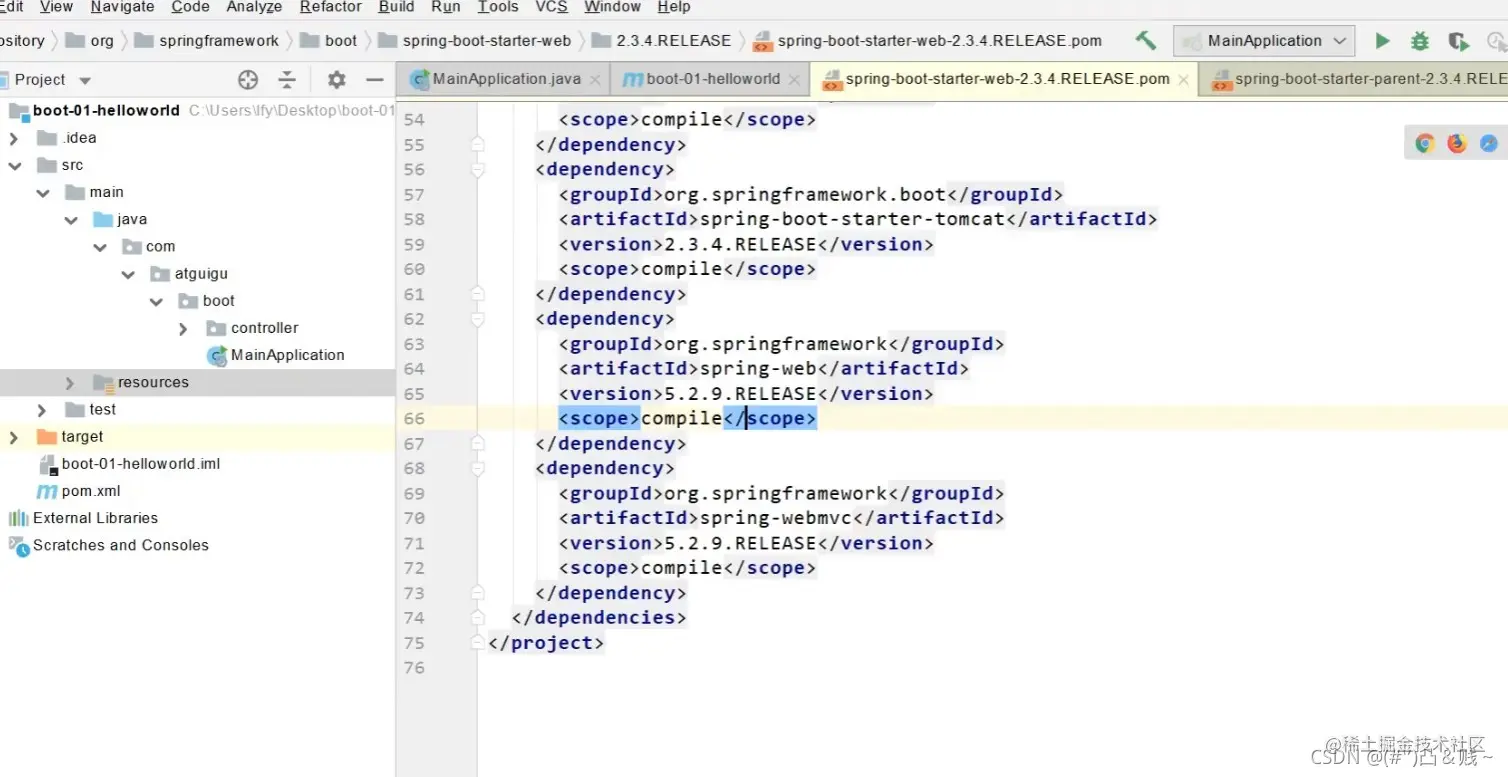
由上图在父项目中的源码,我们可以明显看到: 1、springboot自动配好了Tomcat,父项目中引入了Tomcat依赖。
配置Tomcat
<dependency>
      <groupId>org.springframework.boot</groupId>
      <artifactId>spring-boot-starter-tomcat</artifactId>
      <version>2.3.4.RELEASE</version>
      <scope>compile</scope>
    </dependency>
2、springboot自动配好了SpringMVC
springboot引入了SpringMVC全套组件 自动配好了SpringMVC常用组件(功能)
3、自动配好Web常见功能,如:字符编码问题
SpringBoot帮我们配置好了所有web开发的常见场景
4、默认的包结构
springboot默认主程序(MainApplication)所在包及其下面的所有子包里面的组件都会被默认扫描进来 所以我们无需进行以前的包扫描配置操作 如果我们想要改变扫描路径的话,可以使用如下两种方式@SpringBootApplication(scanBasePackages="com.atguigu") 或者@ComponentScan 指定扫描路径
@SpringBootApplication这一个注解
等同于下面这三个注解的组合体
@SpringBootConfiguration
@EnableAutoConfiguration
@ComponentScan("com.atguigu.boot")
5、各种配置拥有默认值
默认配置最终都是映射到某个类上,如:MultipartProperties 配置文件的值最终会绑定每个类上,这个类会在容器中创建对象
6、按需加载所有自动配置项
非常多的starter并不会全部都开启 只有被引入的场景启动器那么这个场景的自动配置才会开启 SpringBoot所有的自动配置功能都在 spring-boot-autoconfigure 包里
2、容器功能
2.1 组件添加
为了便于理解springboot的自动配置原理,我们先来看一下springboot的一些底层注解它们是如何来完成相关的功能的。 首先来看一下,怎么给容器里面增加组件。 我们准备了两个组件,一个Pet类,一个User类。
package com.atguigu.boot.bean;

public class User {
    private String name;
    private int age;

    public String getName() {
        return name;
    }

    public void setName(String name) {
        this.name = name;
    }

    public int getAge() {
        return age;
    }

    public void setAge(int age) {
        this.age = age;
    }

    @Override
    public String toString() {
        return "User{" +
                "name='" + name + '\'' +
                ", age=" + age +
                '}';
    }
}
package com.atguigu.boot.bean;

public class Pet {
    private String name;

    public String getName() {
        return name;
    }

    public void setName(String name) {
        this.name = name;
    }

    @Override
    public String toString() {
        return "Pet{" +
                "name='" + name + '\'' +
                '}';
    }
}
如果我们要使用原生的Spring来实现组件往容器中的添加的话,我们会在resources根目录文件夹下创建一个Spring的配置文件,比如就叫beans.xml
此时我们的Spring容器中就会有两个组件,一个user一个pet。但是现在我们springboot已经不写xml了,那要怎么进行组件的放入呢?boot给出了几种解决办法。
第一种:使用@Configuration注解声明配置类
我们创建一个config包,在这个包中存放我们的所有配置类。然后创建第一个配置类MyConfig:
package com.atguigu.boot.config;

import com.atguigu.boot.bean.User;
import org.springframework.context.annotation.Bean;
import org.springframework.context.annotation.Configuration;

/**
 * 1、配置类里面使用@Bean标注在方法上给容器注册组件,默认是单实例
 * 2、配置类本身也是个组件
 * 3、proxyBeanMethods:代理bean的方法,默认是true
 *      Full(proxyBeanMethods == true)
 *      Lite(proxyBeanMethods == false)
 *      组件依赖问题
 */
@Configuration(proxyBeanMethods = true) //告诉springboot,这是一个配置类,它等同于之前在SSM中写的配置文件
public class MyConfig {

    /**
     * 外部无论对配置类中的这个组件注册方法调用多少次获取的都是之前注册在容器中
     * 的单实例对象
     * @return
     */

//    组件声明,使用@Bean,就等同于之前在配置文件中写的bean标签
//    给容器中添加组件,以方法名作为组件的id。返回值类型就是组件类型
//    返回的值,就是组件在容器中的实例
    @Bean
    public User user(){
//        等同于之前写的
//          <property name="name" value="zhangsan"></property>
//        <property name="age" value="15"></property>
        return new User("zhangsan",25);
    }
}
上面是我写的笔记,但是还可以看一下老师的笔记,查缺补漏:
#############################Configuration使用示例######################################################
/**
 * 1、配置类里面使用@Bean标注在方法上给容器注册组件,默认也是单实例的
 * 2、配置类本身也是组件
 * 3、proxyBeanMethods:代理bean的方法
 *      Full(proxyBeanMethods = true)、【保证每个@Bean方法被调用多少次返回的组件都是单实例的】
 *      Lite(proxyBeanMethods = false)【每个@Bean方法被调用多少次返回的组件都是新创建的】
 *      组件依赖必须使用Full模式默认。其他默认是否Lite模式
 *
 *
 *
 */
@Configuration(proxyBeanMethods = false) //告诉SpringBoot这是一个配置类 == 配置文件
public class MyConfig {

    /**
     * Full:外部无论对配置类中的这个组件注册方法调用多少次获取的都是之前注册容器中的单实例对象
     * @return
     */
    @Bean //给容器中添加组件。以方法名作为组件的id。返回类型就是组件类型。返回的值,就是组件在容器中的实例
    public User user01(){
        User zhangsan = new User("zhangsan", 18);
        //user组件依赖了Pet组件
        zhangsan.setPet(tomcatPet());
        return zhangsan;
    }

    @Bean("tom")
    public Pet tomcatPet(){
        return new Pet("tomcat");
    }
}


################################@Configuration测试代码如下########################################
@SpringBootConfiguration
@EnableAutoConfiguration
@ComponentScan("com.atguigu.boot")
public class MainApplication {

    public static void main(String[] args) {
        //1、返回我们IOC容器
        ConfigurableApplicationContext run = SpringApplication.run(MainApplication.class, args);

        //2、查看容器里面的组件
        String[] names = run.getBeanDefinitionNames();
        for (String name : names) {
            System.out.println(name);
        }

        //3、从容器中获取组件

        Pet tom01 = run.getBean("tom", Pet.class);

        Pet tom02 = run.getBean("tom", Pet.class);

        System.out.println("组件:"+(tom01 == tom02));


        //4、com.atguigu.boot.config.MyConfig$$EnhancerBySpringCGLIB$$51f1e1ca@1654a892
        MyConfig bean = run.getBean(MyConfig.class);
        System.out.println(bean);

        //如果@Configuration(proxyBeanMethods = true)代理对象调用方法。SpringBoot总会检查这个组件是否在容器中有。
        //保持组件单实例
        User user = bean.user01();
        User user1 = bean.user01();
        System.out.println(user == user1);


        User user01 = run.getBean("user01", User.class);
        Pet tom = run.getBean("tom", Pet.class);

        System.out.println("用户的宠物:"+(user01.getPet() == tom));


    }
}
总结一下: @Configuration的基本使用 Full模式与Lite模式的最佳实战
配置 类组件之间无依赖关系用Lite模式加速容器启动过程,减少判断 配置类组件之间有依赖关系,方法会被调用得到之前单实例组件,用Full模式
2、@Bean、@Component、@Controller、@Service、@Repository、@ComponentScan 这些是之前学的老知识了,springboot也是可以用的,不过多叙述。 @Import可以唠一下:
 * 4、@Import({User.class, DBHelper.class})
 *      给容器中自动创建出这两个类型的组件、默认组件的名字就是全类名
 *
 *
 *
 */

@Import({User.class, DBHelper.class})
@Configuration(proxyBeanMethods = false) //告诉SpringBoot这是一个配置类 == 配置文件
public class MyConfig {
}
3、@Conditional
条件装配,满足Conditional指定的条件,则进行组件注入。
以ConditionalOnBean为例:当我们在某个bean组件上写上@ConditionalOnBean(name = "tom")时,意思就是如果容器中存在名为"tom"的组件,那么该bean组件才会被注入到容器中,否则不注入。
=====================测试条件装配==========================
@Configuration(proxyBeanMethods = false) //告诉SpringBoot这是一个配置类 == 配置文件
//@ConditionalOnBean(name = "tom")
@ConditionalOnMissingBean(name = "tom")
public class MyConfig {


    /**
     * Full:外部无论对配置类中的这个组件注册方法调用多少次获取的都是之前注册容器中的单实例对象
     * @return
     */

    @Bean //给容器中添加组件。以方法名作为组件的id。返回类型就是组件类型。返回的值,就是组件在容器中的实例
    public User user01(){
        User zhangsan = new User("zhangsan", 18);
        //user组件依赖了Pet组件
        zhangsan.setPet(tomcatPet());
        return zhangsan;
    }

    @Bean("tom22")
    public Pet tomcatPet(){
        return new Pet("tomcat");
    }
}

public static void main(String[] args) {
        //1、返回我们IOC容器
        ConfigurableApplicationContext run = SpringApplication.run(MainApplication.class, args);

        //2、查看容器里面的组件
        String[] names = run.getBeanDefinitionNames();
        for (String name : names) {
            System.out.println(name);
        }

        boolean tom = run.containsBean("tom");
        System.out.println("容器中Tom组件:"+tom);

        boolean user01 = run.containsBean("user01");
        System.out.println("容器中user01组件:"+user01);

        boolean tom22 = run.containsBean("tom22");
        System.out.println("容器中tom22组件:"+tom22);


    }
2.2原生配置文件引入
@ImportResource
使用场景:首先我们要知道的一个事实是,现在我们在spring的配置文件中写上的bean组件对于springboot而言是不知道的,无法被springboot解析为bean组件。但是有些时候我们在公司开发,需要将古老的项目(这个项目是用SSM写的)迁移到springboot上来,但是呢又因为工程过于庞大无法完全迁移,依然部分要写配置文件,此时@ImportResource就可以将spring的配置文件引入springboot当中。
======================beans.xml=========================
<?xml version="1.0" encoding="UTF-8"?>
<beans xmlns="http://www.springframework.org/schema/beans"
       xmlns:xsi="http://www.w3.org/2001/XMLSchema-instance"
       xmlns:context="http://www.springframework.org/schema/context"
       xsi:schemaLocation="http://www.springframework.org/schema/beans http://www.springframework.org/schema/beans/spring-beans.xsd http://www.springframework.org/schema/context https://www.springframework.org/schema/context/spring-context.xsd">

    <bean id="haha" class="com.atguigu.boot.bean.User">
        <property name="name" value="zhangsan"></property>
        <property name="age" value="18"></property>
    </bean>

    <bean id="hehe" class="com.atguigu.boot.bean.Pet">
        <property name="name" value="tomcat"></property>
    </bean>
</beans>
@ImportResource("classpath:beans.xml")
public class MyConfig {}

======================测试=================
        boolean haha = run.containsBean("haha");
        boolean hehe = run.containsBean("hehe");
        System.out.println("haha:"+haha);//true
        System.out.println("hehe:"+hehe);//true
2.3 配置绑定
曾经在SSM框架当中也有很多配置文件需要绑定,所以springboot中也一样。 如何使用Java读取到properties文件中的内容,并且把它封装到JavaBean中,以供随时使用;原生方式如下,非常繁琐:
public class getProperties {
     public static void main(String[] args) throws FileNotFoundException, IOException {
         Properties pps = new Properties();
         pps.load(new FileInputStream("a.properties"));
         Enumeration enum1 = pps.propertyNames();//得到配置文件的名字
         while(enum1.hasMoreElements()) {
             String strKey = (String) enum1.nextElement();
             String strValue = pps.getProperty(strKey);
             System.out.println(strKey + "=" + strValue);
             //封装到JavaBean。
         }
     }
 }
而在springboot中,这一过程被简化了许多。
我现在在bean包下有一个Car类,并在application.properties中写上了两个属性:
现在我们要做的就是引入这个配置文件:
1、@Component+@ConfigurationProperties
这是第一种绑定的方式
/**
 * 只有在容器中的组件,才会拥有SpringBoot提供的强大功能
 */
@Component
@ConfigurationProperties(prefix = "mycar")
//prefix指的就是properties配置文件中的属性前缀
//不指定的话配置文件中那么多的属性springboot不会知道要引入的是谁
public class Car {

    private String brand;
    private Integer price;

    public String getBrand() {
        return brand;
    }

    public void setBrand(String brand) {
        this.brand = brand;
    }

    public Integer getPrice() {
        return price;
    }

    public void setPrice(Integer price) {
        this.price = price;
    }

    @Override
    public String toString() {
        return "Car{" +
                "brand='" + brand + '\'' +
                ", price=" + price +
                '}';
    }
}
2、@EnableConfigurationProperties + @ConfigurationProperties
@EnableConfigurationProperties(Car.class)
//1、开启Car配置绑定功能
//2、把这个Car这个组件自动注册到容器中
public class MyConfig {
}
3、最佳实践
引入场景依赖(下面的官方链接提供了boot的所有场景启动器)
查看boot自动配置了哪些文件(选做)
自己分析,引入场景对应的自动配置一般都生效了 配置文件中debug=true开启自动配置报告。Negative(不生效)\Positive(生效)
是否需要修改boot的默认设置
1、参照文档修改配置项 docs.spring.io/spring-boot… 自己分析。xxxxProperties绑定了配置文件的哪些。 2、自定义加入或者替换组件 @Bean、@Component。。。 自定义器 XXXXXCustomizer; ......
4、开发小技巧
4.1、Lombok
简化了JavaBean的开发(就是省略了get、set方法,以及常见的一些方法啥toString啊有参无参构造器等)
        <dependency>
            <groupId>org.projectlombok</groupId>
            <artifactId>lombok</artifactId>
        </dependency>


idea中记得搜索安装lombok插件,如果搜不到,那就有可能idea已经内置了该插件
===============================简化JavaBean开发===================================
@NoArgsConstructor //生成无参构造器
//@AllArgsConstructor //生成拥有所有参数的构造器
@Data //生成所有属性的set以及get方法
@ToString //生成toString方法
@EqualsAndHashCode //生成equals方法和hash方法
public class User {

    private String name;
    private Integer age;

    private Pet pet;

    public User(String name,Integer age){
        this.name = name;
        this.age = age;
    }


}


================================简化日志开发===================================
@Slf4j //生成日志方法
@RestController
public class HelloController {
    @RequestMapping("/hello")
    public String handle01(@RequestParam("name") String name){

        log.info("请求进来了....");

        return "Hello, Spring Boot 2!"+"你好:"+name;
    }
}
4.2、dev-tools
其实和重启项目差不多的感觉,没太大必要使用。
        <dependency>
            <groupId>org.springframework.boot</groupId>
            <artifactId>spring-boot-devtools</artifactId>
            <optional>true</optional>
        </dependency>
项目或者页面修改以后:Ctrl+F9;
4.3、Spring Initailizr(快速构建SpringBoot项目场景)
1、选择我们需要的开发场景
2、自动依赖引入
3、自动创建了我们的项目结构
4、自动编写好了我们项目的主配置类

