

C++空向量简介
在C++中,向量有一个empty()函数,帮助检查向量容器是否有元素。矢量几乎与动态数组相似,当一个项目被删除或插入时,它有自动调整自身大小的功能,其存储能够由容器自动处理。向量的元素被保存在连续的存储中,可以在迭代器的帮助下进行访问和遍历。此外,项目是在最后插入的,这需要不同的时间,因为偶尔需要进行数组扩展。让我们详细了解一下空向量。
语法
以下是空向量的语法。
v.empty()
这里,v是向量的名称。
参数。不需要传递任何参数。
返回值。如果该向量是空的,将返回true。否则,将返回false。
空向量函数在C++中如何工作?
假设有一个向量v,包含元素56、73、58、89、10。如果调用v.empty()方法,可以看出,输出将显示为false。
同样的代码将如下所示。
v={56,73,58,89,10} v.empty() ;
**输出。**假的
同时,如果另一个向量vtr存在并且不包含任何元素。如果这次调用v.empty()方法,可以看到输出将显示为true。
同样的代码将如下所示。
v={} v.empty() ;
**输出。**真
异常情况。
下面是向量类的 empty() 方法的异常情况。
当一个参数被传递时,将显示一个错误。
C++空向量的例子
以下是空向量的示例程序。
示例#1
检查向量是否为空的C++程序。
代码。
// C++ program to implement empty() function #include <iostream> #include <vector> using namespace std ; int main() { //create a vector v with different integer elements vector<int> v{ 39, 52, 62, 31, 91, 24} ; //print the size of the vector cout <<"The size of vector v: \n"<< v.size() <<endl ; //checks whether the vector is empty or not cout << "Checks whether the vector v is empty or not? : \n" << v.empty() <<endl ; //create a vector vtr with no elements vector<int> vtr{ } ; //print the size of the vector cout <<"The size of vector vtr: \n" << vtr.size() <<endl ; //checks whether the vector is empty or not cout << "Checks whether the vector vtr is empty or not? : \n" << vtr.empty() <<endl ; return 0; }
输出。
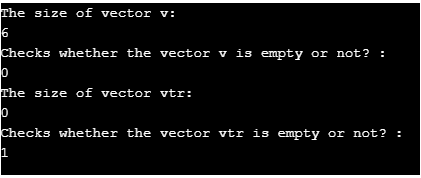
首先,创建一个具有不同整数元素39, 52, 62, 31, 91, 24的向量v。创建完毕后,打印该向量的大小。然后,使用empty()方法检查该向量是否为空。一旦完成,创建一个没有元素的向量vtr,并打印向量的大小。再次,使用 empty() 方法检查该向量是否为空。在执行代码时,可以看到向量v的大小是6,并且向量不是空的,因为打印的是0。同时,向量vtr的大小为0,向量是空的,因为1被打印出来。这里,0是假的布尔值,1是真的布尔值。
例子#2
C++程序向向量添加元素,并在添加这些元素之前检查向量是否是空的
代码。
#include <iostream> #include <vector> using namespace std ; int main() { vector<int> v; //print the size of vector v cout << "Size of vector: " << v.size() << endl ; //checks whether vector v is empty or not //if it is empty if (v.empty()) cout << "The input vector is empty." << endl ; //if it is not empty else cout << "The input vector is not empty." << endl ; //push elements to the vector v.push_back(45) ; v.push_back(23); v.push_back(56); v.push_back(25); v.push_back(57); //print the size of the vector cout << "Size of vector: " << v.size() << endl; //checks whether the vector is empty or not //if it is empty if (v.empty()) cout << "The input vector is empty." << endl; //if it is not empty else cout << "The input vector is not empty." << endl; return 0; }
输出。
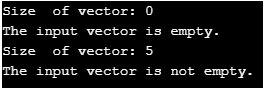
在这个程序中,创建一个向量v并打印向量大小。然后,使用 empty() 方法检查该向量是否为空。检查后,使用push_back()方法向其中添加元素。再一次,打印大小并使用empty()方法检查向量是否为空。在执行这些代码时,会显示相应的信息。
例子#3
查找向量中元素之和的C++程序。
代码。
// C++ program to find sum of elements in a vector #include <iostream> #include <vector> using namespace std; int main() { //declare a variable s which is equal to zero int s = 0; //create a vector v with different integer elements vector<int> v{ 39, 52, 62, 31, 91, 24}; //check whether the vector is empty while (!v.empty()) { //find the sum of the elements s = s + v.back(); v.pop_back(); } //print sum of the elements cout << s; return 0; }
输出。

首先,声明一个变量s,它被初始化为零。然后,创建一个有不同整数元素39, 52, 62, 31, 91, 24的向量v。创建后,使用 empty()方法检查该向量是否为空。如果该向量不是空的,则进入循环。元素的总和将通过该循环来确定。在执行该代码时,可以看到元素之和被打印出来。
优点
以下是向量的优点。
- 矢量的大小可以被改变
- 可以存储多个对象
- 可以从一个向量中删除元素
结论--C++空向量
在C++中,向量有一个empty()函数,用来检查向量是否有元素。本文详细解释了向量中empty()函数的语法、工作原理、优点和例子等不同方面。
推荐文章
这是一个关于C++空向量的指南。在这里,我们讨论了C++中的空向量函数是如何工作的,并附有代码和输出的例子。你也可以看看下面的文章,以了解更多 --
